What is UDP and what role does it play in modern anti-detection browsers?
In the multi-accounting industry, it is customary to pay close attention to fingerprint spoofing. However, the basis of any network activity—transport protocols—is often overlooked. While the global internet is migrating en masse to HTTP/3 and QUIC standards, many tools are ignoring this progress, creating invisible but critical markers for anti-bot systems.
In this article, we will explain why UDP support in SOCKS5 is not a matter of speed, but a prerequisite for a high-quality digital portrait in 2025. We will explain the technical difference between the protocols, teach you how to choose the right proxies, and show the results of our independent audit of popular anti-detection browsers. If you are already familiar with the theory, you can skip ahead to the results of our research.
However, to get the full picture and understand all the nuances of how modern communication channels work, we recommend reading the entire publication.
The evolution of protocols — why TCP is no longer sufficient
To understand the value of UDP support, we need to go down a level — to the mechanics of data transmission on the Internet.
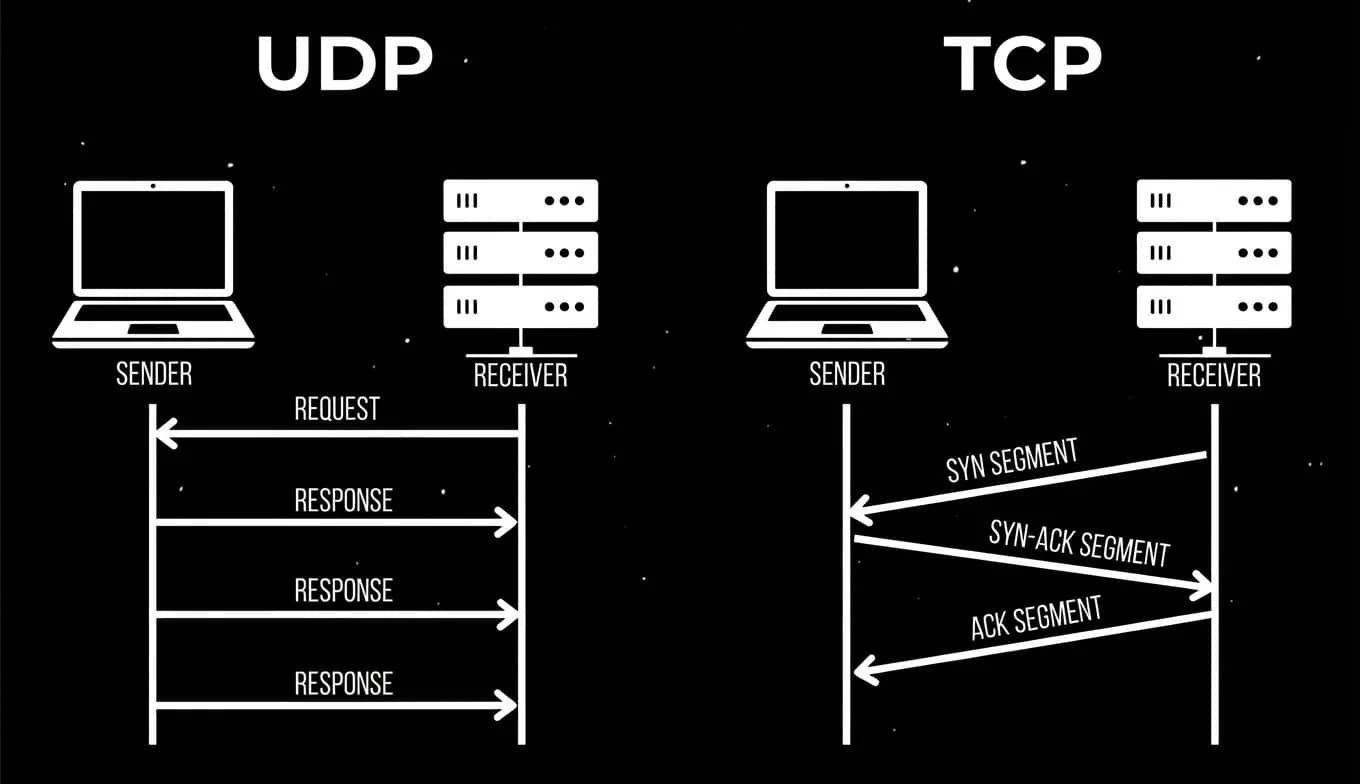
There are two main transport protocols: TCP and UDP.
- TCP (Transmission Control Protocol) is a classic, strict standard. It guarantees that all data will reach the recipient in the correct order. If a packet is lost along the way, TCP will force it to be sent again. It is reliable but slow due to constant checks and confirmations.
- UDP (User Datagram Protocol) is a protocol that works on a “send and forget” basis. It does not waste time establishing heavy connections and confirming the delivery of every byte. This ensures maximum speed and minimal delays.
In the context of a browser, TCP has traditionally been responsible for reliably loading page structures (HTML, CSS). However, the modern internet has changed. 4K video, instant responses in interfaces, and streaming require speeds that good old TCP cannot provide. That's why IT giants have begun a mass migration to technologies based on UDP.
If your proxy (and, as a result, your browser) cannot work with UDP, you automatically cut yourself off from a huge layer of modern web technologies. For anti-bot systems, it's as if you've arrived in 2025 with equipment from 2010.
Let's take a look at the key technologies that stop working properly without UDP.
Protocol evolution — Why do large services choose UDP?
Many believe that UDP is only needed for voice calls. This is a myth. Modern high-level protocols use UDP as a transport foundation to speed up regular web surfing.
1. QUIC and HTTP/3: The New Standard for Speed
QUIC (Quick UDP Internet Connections) is a revolutionary protocol from Google that took the best of TCP and TLS but moved to the fast lanes of UDP. It became the basis for HTTP/3, the third version of the main Internet protocol.
Why is this important to you? Because tech giants (Google, Facebook, Cloudflare, and others) are aggressively implementing HTTP/3.
How it works in practice:
- Acceleration: On networks with packet loss (such as mobile internet or congested Wi-Fi), HTTP/3 loads pages up to 4 times faster than HTTP/2.
- Optimization: Google Search reduces latency by 2%, and YouTube reduces buffering time by 9% thanks to QUIC.
If your proxy only supports TCP, your browser won't be able to connect using HTTP/3. It will be forced to fall back to the outdated HTTP/2.
For analytics systems, this is a clear signal: the user is either using outdated software or is behind a low-quality corporate proxy.
2. WebTransport API: Replacing WebSockets
This is a modern technology for bidirectional communication between the client and the server with minimal latency. It replaces the outdated WebSockets.
Where it is used:
- Cloud gaming and interactive applications.
- Streaming.
- Receiving high-frequency notifications (stock quotes, betting odds).
- Real-time collaborative document editing.
Without UDP support, this API simply will not function, which limits the operation of modern web applications and creates anomalies in the user profile.
From the outside, it looks suspicious: systems can see that this is the latest Chrome (which must support WebTransport), but in practice, the technology is unavailable. This discrepancy is one of the signs of fingerprint spoofing or connection manipulation.
3. WebRTC: Audio and video without intermediaries
WebRTC is a technology that allows browsers to exchange data (video, voice, files) directly with each other. It is the basis of Google Meet, Zoom (in the browser), Discord, Meta, and many messengers.
To establish a connection, WebRTC uses the ICE mechanism, which searches for the shortest route between devices.
- UDP priority: ICE always tries to connect via UDP, as this is critical for connection quality.
- STUN requests: The browser sends light UDP packets to the STUN server to find out its public IP address.
- Backup channel (TURN): If a direct connection is not possible, traffic goes through an intermediary server (TURN).
What is the risk for multi-accounting?
If you use a connection that only supports TCP, the WebRTC chain breaks. The browser cannot send a STUN request over UDP. It will either be unable to determine its external IP at all, or will be forced to use slow workarounds via TCP.
Anti-bot systems are very good at detecting these attempts. A real home user almost always has the ability to send a UDP packet. Blocking UDP is a telltale sign of the use of tunnels, VPNs, or proxy servers.
The scale of the problem in numbers
The scale of UDP-based technology adoption is best demonstrated by objective statistics. At the end of 2025, we see the following picture:
- ~36.3% of all websites worldwide already use HTTP/3 based on QUIC (data from W3Techs).
- 95%+ of modern browsers, including Chrome, Firefox, Edge, and Safari, support this standard by default (statistics from Can I Use).
- >40% of all Chrome connections to Google servers are made via QUIC.
- >75% of Facebook's internet traffic is transmitted via UDP-based protocols.
Given such deep integration of the protocol, lack of support in a browser becomes a statistical anomaly. Using TCP transport exclusively contradicts the profile of a real user and serves as a clear trigger for behavioral analysis systems, indicating the artificial nature of the traffic.
How can you verify this yourself?
The numbers may seem abstract, but you can check the relevance of HTTP/3 right now in just 30 seconds. You don't need any special tools—just a regular browser.
- Open any modern browser.
- Press F12 (or More tools > Developer tools) to open the developer panel and switch to the Network tab.
- In the address bar, enter the address of any large resource, such as
ebay.comoramazon.com, and go to it. - In the requests table, hover your cursor over the header of any column (for example, Status), right-click, and select Protocol.
- Look at the values in the column that appears.
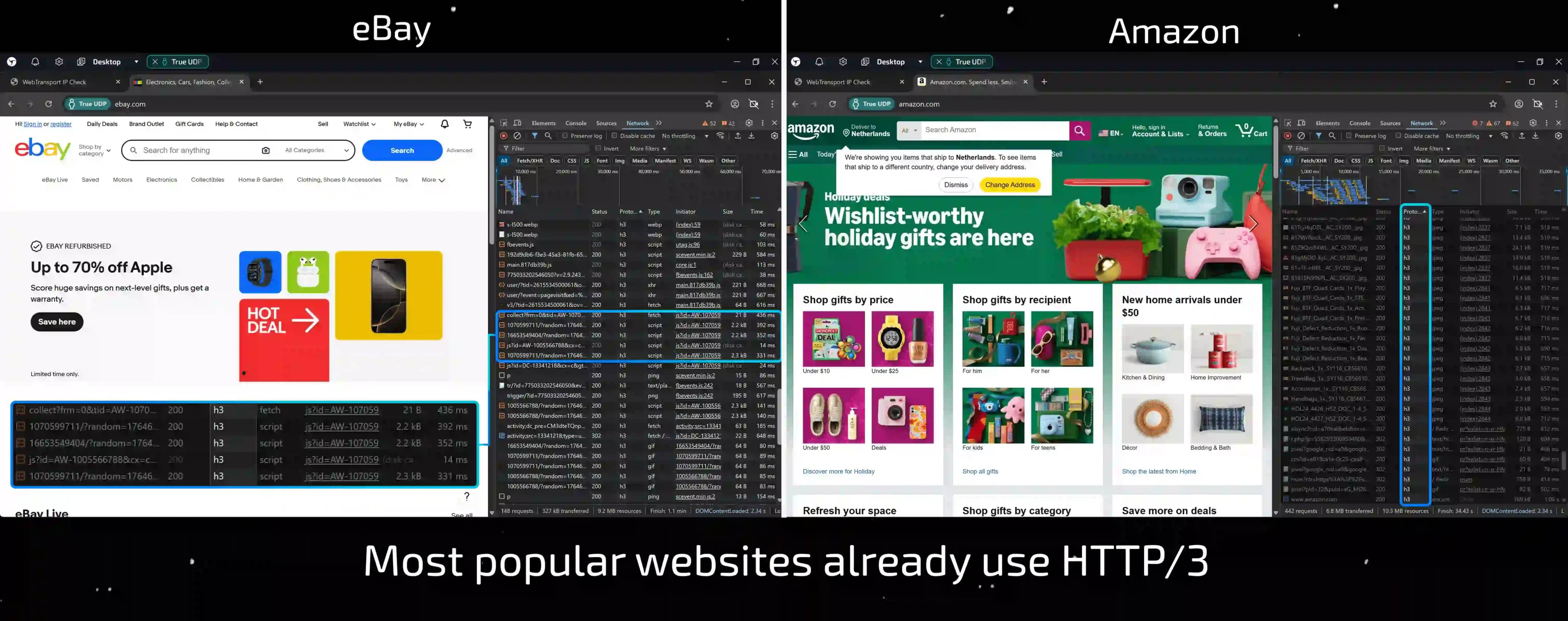
If you see h3, it means that the connection to the site is via the HTTP/3 protocol. As you can see, this is not an experimental technology, but a standard that is working on your computer right now.
Ask yourself this question: if your home browser opens these sites via h3, but your work profiles in anti-detection only use h2 or http/1.1, how natural does this look to anti-bot systems?
Technical requirements for proxies
To ensure that your traffic complies with modern standards, it is not enough to simply “enable” UDP support in your browser. It is critical that every link in the network chain — from your Internet service provider or VPN to the final proxy server — correctly processes this protocol. If even one node blocks or does not understand UDP, the magic will not work. And here we come up against the fundamental limitations of the proxy types themselves.
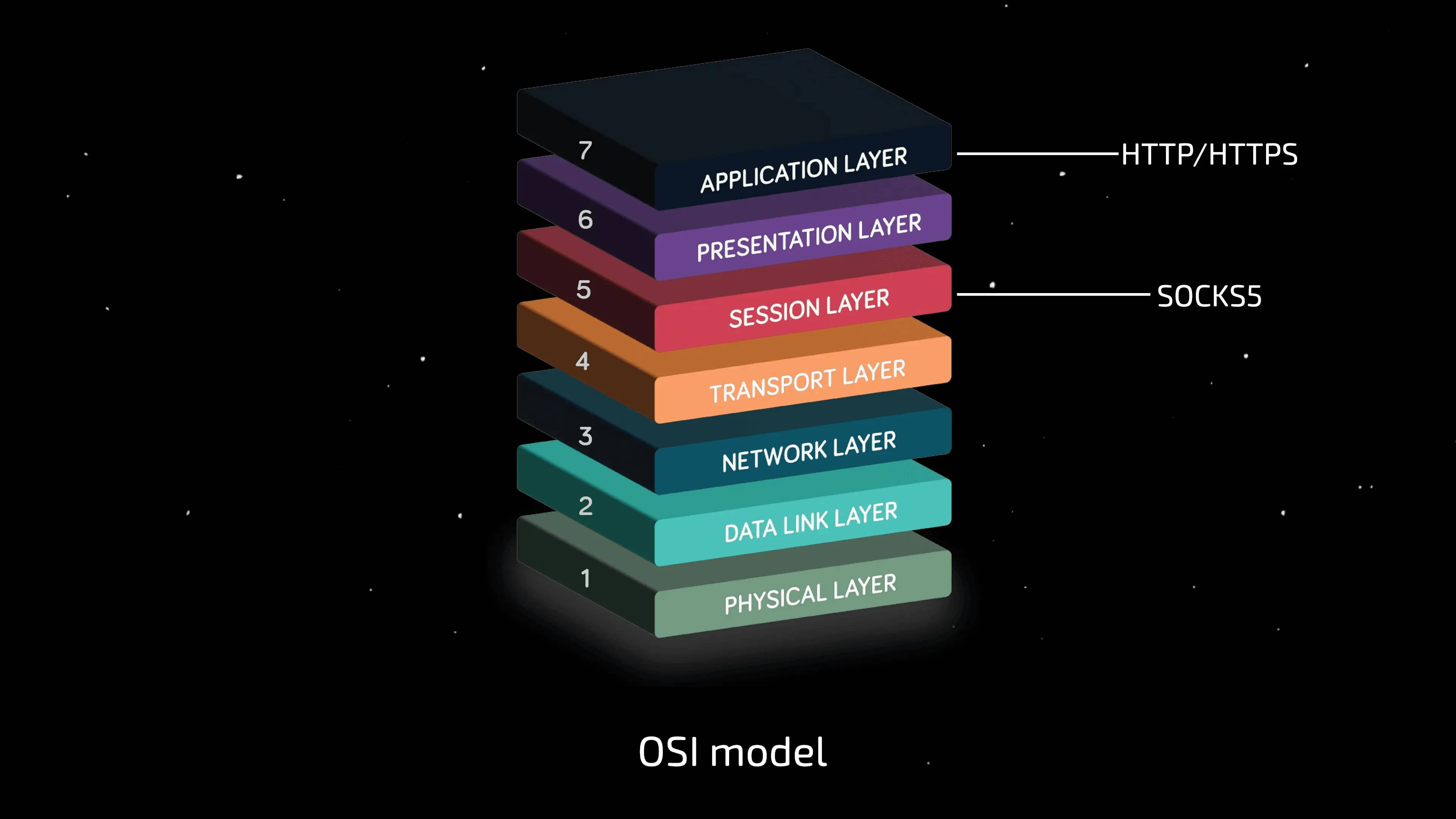
There are two main connection standards on the market: HTTP(S) and SOCKS5. Let's take a look at what each of them is capable of by looking at the OSI model (Open Systems Interconnection model).
HTTP/HTTPS: A technical dead end for UDP
HTTP is an application layer protocol (the 7th and highest layer of the OSI model). It was created for a specific task: transferring hypertext, web pages, images, and API requests.
Historically and technically, HTTP uses only TCP as its transport.
If you have purchased an HTTP or HTTPS proxy, it will never support UDP. This is a limitation of the standard itself. Even if a proxy service claims to be “high-speed,” you will not be able to establish a QUIC connection or correctly process WebRTC over UDP through an HTTP proxy. The browser will be forced to use TCP, which, as we found out above, is a trigger for user verification systems.
SOCKS5: Universal Tunnel
SOCKS (Socket Secure) is a session layer protocol (5th layer of the OSI model). It operates below HTTP and does not attempt to interpret the data that passes through it. It is simply a tunnel for traffic.
SOCKS5 was originally designed as a universal proxy protocol. It can work with both TCP and UDP. However, it is important to understand the difference between the capabilities of the protocol and its implementation.
The fact that the SOCKS5 standard allows working with UDP does not guarantee its availability on a particular server. Implementing UDP support requires additional resources and configuration on the proxy provider's side, and today, not all services are ready to provide this option.
For modern web protocols to work correctly, only SOCKS5 proxies are suitable. When choosing a provider, be sure to check for UDP traffic support, as many popular services have this feature disabled by default or do not offer it at all.
How to implement UDP support in your work?
Let's say you have the right SOCKS5 proxies with UDP support. How do you get your anti-detection browser to use this potential? Today, there are two common ways.
Method 1: External proxification (the hard way)
If the browser itself cannot work with UDP inside SOCKS5 (which, unfortunately, is the standard for most solutions on the market), users have to resort to additional routing tools — external proxifiers.
This is implemented by configuring the entire operating system or router to work through a proxy.
The tools used are usually expensive Raspberry Pi-based solutions or industrial routers with the appropriate functionality (you can read more about configuring through a router in our article about Keenetic).
However, this approach has a number of drawbacks:
- One session for the entire device. You route all of your computer's traffic through the proxy. This makes it impossible to work with 10, 50, or 100 profiles at the same time.
- Instability. Your entire system becomes dependent on a single proxy. If it goes down, you lose internet access everywhere.
- Parasitic traffic. Expensive resident proxies will start updating Windows, background services, and messengers, which will lead to traffic overuse and reduced speed.
Method 2: Native browser support (ideal scenario)
The most effective and technologically advanced approach is to use an anti-detection browser that can natively process UDP traffic within the SOCKS5 protocol. In this case, support is implemented at the level of the software's network engine, without the need for third-party workarounds.
This removes all the limitations of external proxies:
- Scalability. You can work with dozens or hundreds of profiles simultaneously. Each profile maintains its own independent connection with its unique proxy, which is critical for multi-accounting.
- Isolation and stability. Proxying occurs strictly within the browser container. System traffic does not mix with working traffic, and the failure of one proxy does not affect the operation of other profiles and the operating system.
- Full-fledged network stack. Technically, the correct implementation of UDP transport is a prerequisite for the operation of all next-generation protocols: HTTP/3, QUIC, WebTransport, and full-fledged WebRTC. The browser is able to behave naturally, establishing connections just like regular Chrome on a home PC.
But this raises a logical question: is it enough to simply declare support for UDP in SOCKS5? Does this automatically guarantee that all complex protocols (such as QUIC) will work correctly and that the trust system will see a natural fingerprint? Or could there be technical nuances hidden behind the loud statements that negate all anonymization efforts?
To figure this out, we conducted our own technical market research. We tested how popular solutions actually handle UDP traffic and whether this feature really delivers the benefits expected of it. The results were quite revealing.
Research — UDP proxy support in anti-detection browsers
The market for anti-detection browsers is huge, but when it comes to real innovation, the field narrows down to just a few players. We were surprised by the audit results: despite the critical importance of UDP for the modern web, only two products on the market offer native support for this technology (without complex manipulations and external programs) — Linken Sphere and Vision.
However, as our testing showed, declaring support and implementing it fully are two different tasks.
In this section, we will not only show you the results, but also give you the tools to test any browser yourself.
Testing methodology
To ensure objectivity, we checked not only the connection itself, but also the operation of all modern protocols that depend on UDP.
Our test bench:
- SOCKS5 Proxy: We used the same private proxy with guaranteed UDP support.
- Tools: A set of independent checkers for WebRTC, QUIC, and WebTransport.
- Participants: Linken Sphere, Vision, and, for the sake of experiment purity, a Keenetic hardware router (as a reference for an external proxy).
How to check your anti-detect browser?
- Preparation: Create a profile and specify a SOCKS5 proxy.
- Important: make sure that your proxy provider supports UDP and that the browser interface (if such a feature is available) displays the corresponding indication.
- Testing: Visit the 4 resources from the list below in sequence.
- Analysis: Compare what you see with our decryption of the results.
Step-by-step analysis of test metrics
We selected five tests that show different levels of network performance, from basic WebRTC to advanced HTTP/3.
1. Twilio (WebRTC test)
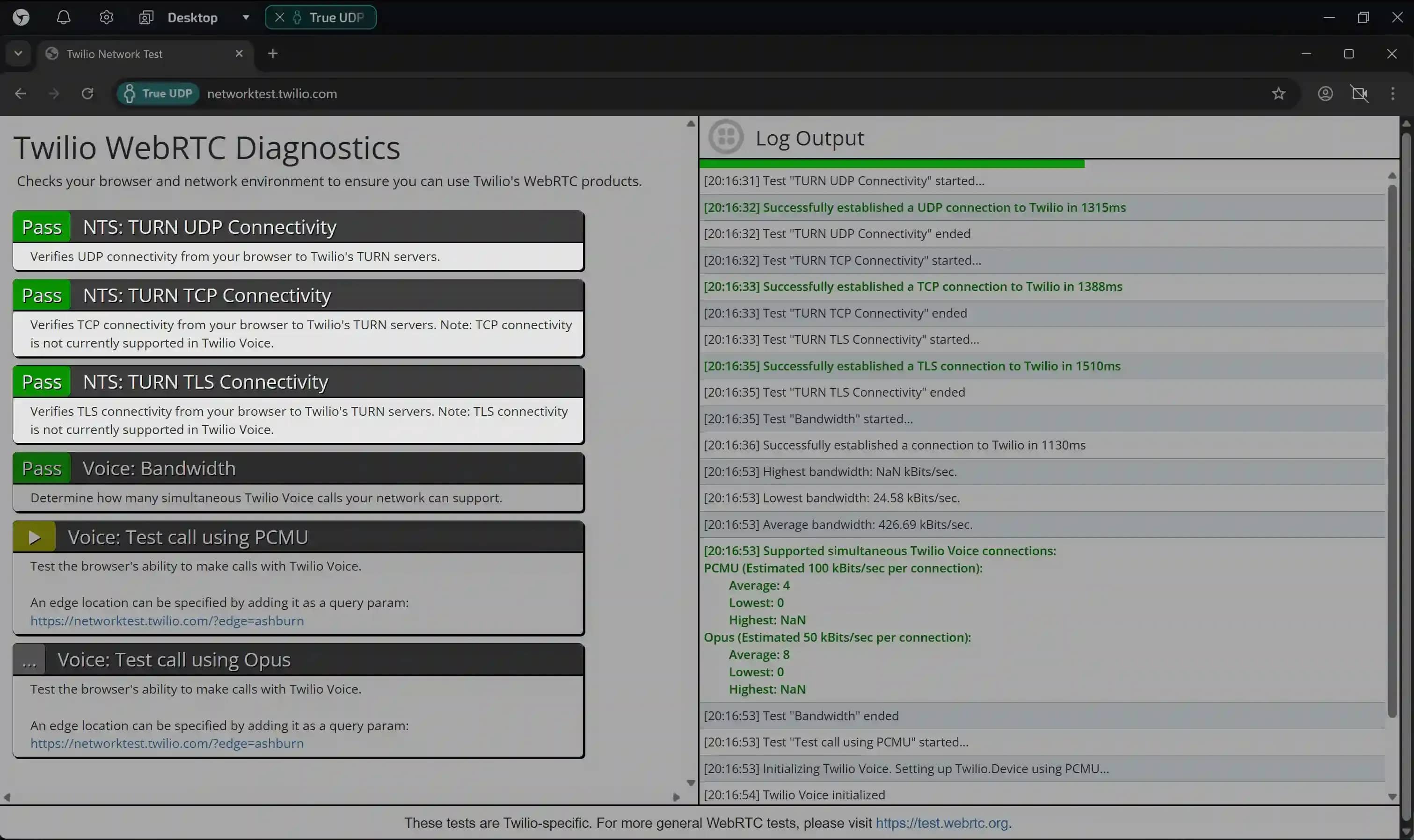
Link: networktest.twilio.com
This test checks whether the browser can establish an audio/video connection.
- What to look for: We are interested in the results of the NTS: TURN UDP/TCP/TLS Connectivity tests.
- Good result: Green “Pass” labels next to all three items. This means that WebTRC is working properly.
- Bad result: Red “Fail” labels next to any of the items (UDP, TCP, or TLS) indicate problems with establishing a connection and partial failure of the entire technology.
2. IPbinding (Leak test)
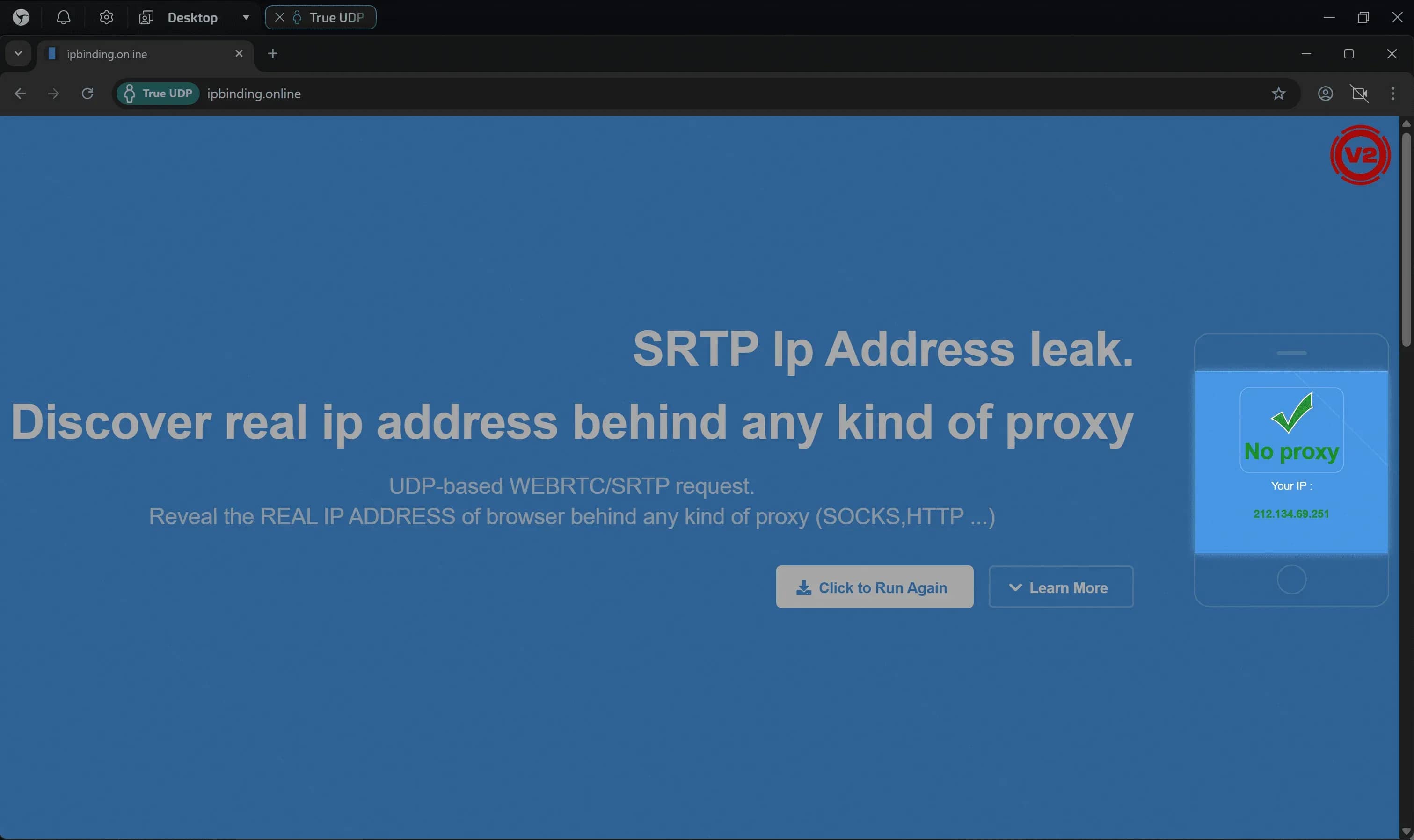
Link: ipbinding.online
The test initiates a connection to the TURN server to verify the operation of WebRTC and obtain your IP address.
- What to look for: The IP address in the results.
- Good result: The IP displayed matches your proxy's IP.
- Bad result: You see your real IP (leak) or endless loading (connection blocked).
3. Cloudflare QUIC (HTTP/3 test)
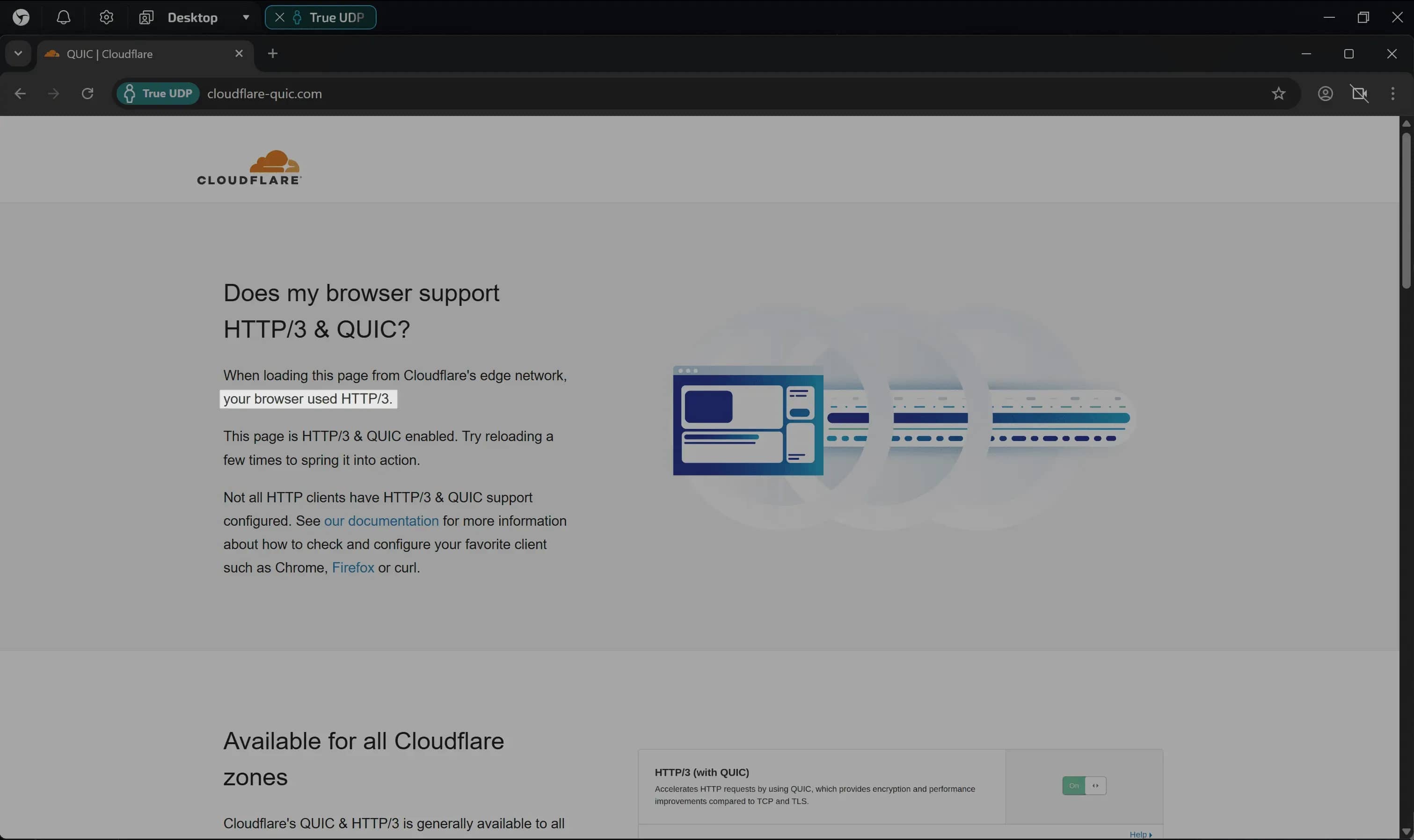
Link: cloudflare-quic.com
This is where it gets interesting. Many browsers can run WebRTC over UDP, but continue to load sites using the old TCP. This test shows whether QUIC is working for you.
- Feature: Refresh the page several times. Browsers often try TCP first, and only switch to HTTP/3 after receiving the
Alt-Svcheader. - Good result: Text: “your browser used HTTP/3”.
- Bad result: Text “your browser used HTTP/2”. This means that the browser cannot use the high-speed protocol, even if the proxy allows it.
4. WebTransport (Checking modern APIs)
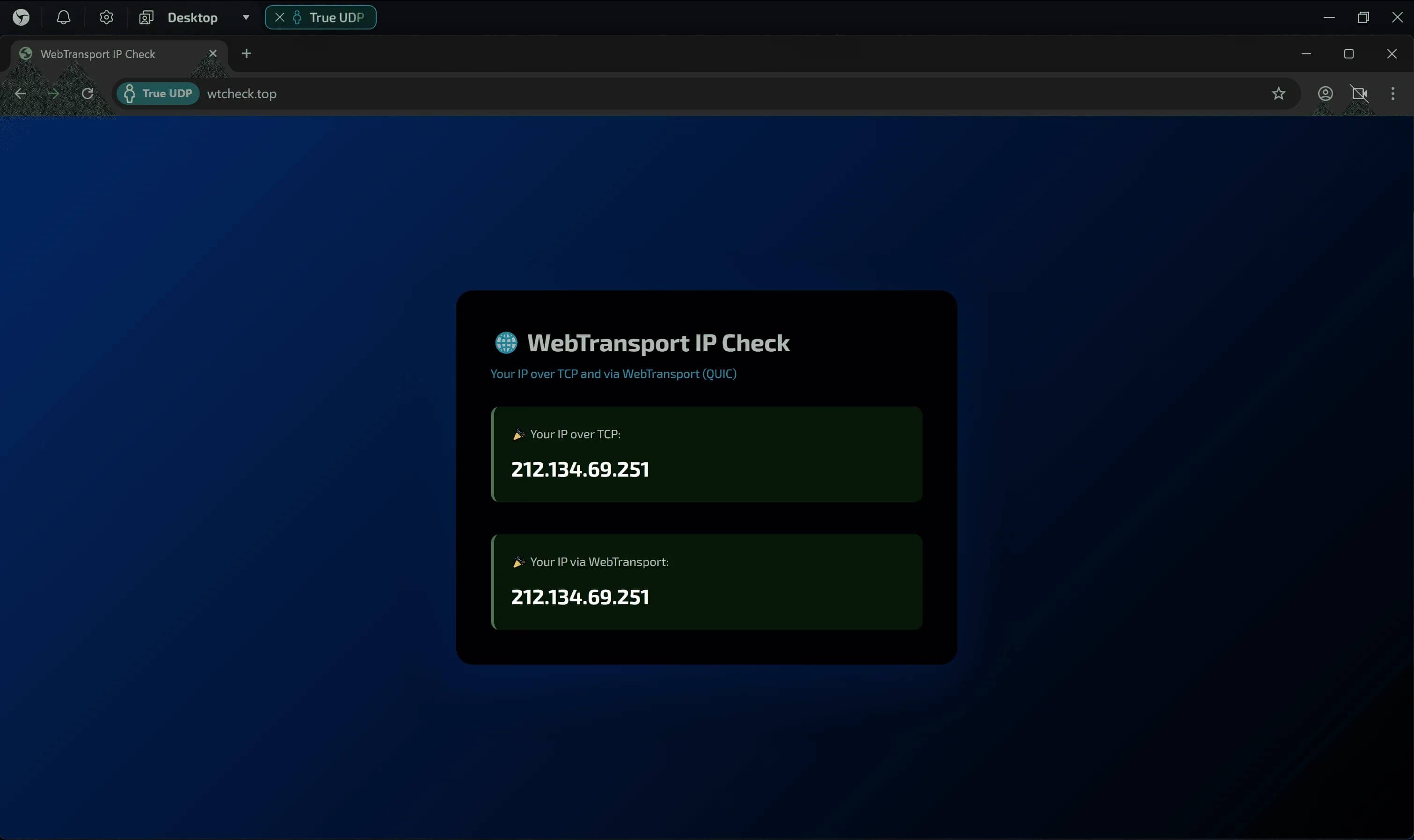
Link: wtcheck.top
WebTransport is a new generation technology that architecturally cannot function without the QUIC protocol (and, as a result, without UDP). Its operability is one of the markers of a full-fledged network stack implementation.
- Good result: The test displays two blocks with IP addresses (for TCP and WebTransport), and both correspond to your proxy address.
- Bad result: The appearance of the
WebTransport error. This clearly indicates that UDP support is either missing or only partially implemented in the browser.
Results of our research
Support
| Linken Sphere 2 v2.11.12 | Vision v3.3.38 | Keenetic Speedster |
WebRTC (Video/Audio) TURN (Twilio) | ✅ | ✅ | ✅ |
WebRTC (Video/Audio) SRTP (IPbinding) | ✅ | ✅ | ✅ |
HTTP/3 & QUIC (Cloudflare) | ✅ | ❌ | ❌ |
WebTransport (wtcheck) | ✅ | ❌ | ❌ |
Multithreading (Different IPs in different profiles) | ✅ | ✅ | ❌ |
Final rating | 5 | 3 | 2 |
We conducted a series of tests using the same SOCKS5 UDP proxy. The results clearly show the difference between partial and full implementation of UDP support.
Vision — The problem with partial support
Vision demonstrates partial implementation. The WebRTC protocol does indeed work over UDP, but most web traffic (page loading, requests to modern web infrastructure) continues to go through the outdated TCP (HTTP/2).
This creates a contradictory network profile: the browser demonstrates the capabilities of a modern communication channel when working with media, but forcibly degrades to outdated protocols during normal surfing. For security systems, this inconsistency looks like a technical anomaly.
Keenetic Speedster — External Proxification
Using an external proxy (in this case, a Keenetic Speedster router) produces results similar to partial software implementation. The device successfully handles UDP forwarding for WebRTC, but, as with Vision, it does not provide HTTP/3 & QUIC for basic web traffic by default.
The main disadvantage of this method is the lack of multithreading. The router tunnels all traffic from the connected device as a whole. This makes it impossible to work with multiple profiles simultaneously: you are limited to one active session per physical connection, which critically reduces the efficiency of multi-accounting.
Linken Sphere — Network Consistency
Linken Sphere implements full UDP support. Instead of the point-to-point forwarding of the popular WebRTC, we have made it possible to work with all modern technologies inside the SOCKS5 tunnel. This allows the browser to use the transport protocol as intended by Chrome developers, without artificial restrictions.
In practice, this provides:
- Network consistency: No logical breaks when different types of traffic are forced to use different transport protocols.
- Native HTTP/3 operation: Interaction with Google, Meta, a significant portion of the global web (more than 36% of the top 10 million sites) occurs over the QUIC protocol, which is the standard for the vast majority of real-world devices.
- Support for next-generation network APIs: Technologies such as WebTransport work “out of the box,” ensuring the correct execution of modern scenarios.
Conclusion
As our research has shown, the declared support for UDP in the product specifications does not always mean that the network stack will work correctly in practice. With the web rapidly transitioning to HTTP/3, partial implementation of protocols creates an incomplete digital profile that is easily detected by modern security systems.
Linken Sphere remains the only solution on the market today that offers truly comprehensive UDP support. We have bridged the technological gap between emulation and reality, allowing your profiles to interact with Google, Facebook, and other giants using modern high-speed protocols.
We believe that high-quality substitution is a basic right, not a premium option. That's why native UDP support is available to Linken Sphere users on any plan, including the completely free plan.
Download the browser, set up the proxy, and see the quality of the connection for yourself.
P.S. For developers of other solutions
We strive for maximum objectivity. If you represent another anti-detection browser and are confident that your product also provides native UDP support, please write to us. We will be happy to conduct repeat tests and supplement our research. The market should know its heroes.

Why Google Blocks Accounts and What Your Antidetect Has to Do With It
Google has once again complicated the mechanisms of digital identification by deploying a new, more sophisticated layer of protection based on proprietary HTTP headers. This quiet change caught most of the market off guard, triggering a wave of rushed updates. While others hastily released superficial 'fixes', we realized that we were dealing not with a minor issue but with a fundamental shift that required deep and comprehensive analysis.

SOCKS vs HTTP Proxy: What’s the Real Difference and Which One to Choose?
There are times when you don’t want a website to link the request back to your device. That’s where a proxy comes in, it acts like a middle layer and sends the request for you. The site sees the proxy’s info instead of yours. It’s a go-to trick when you’re trying to see a page that’s not available in your region, pull content that’s restricted by location, or avoid hitting a wall when sending lots of requests.

The Best Alternative to OBS Studio
Working with a webcam on many online platforms can turn into a real challenge. A strict oval or rectangular frame appears on the screen, but your image doesn’t align perfectly with it. As a result, the system blocks further progress, demanding perfect alignment, and your workflow is disrupted before it even begins.