
Why is it important to update the antidetect browser core and how does it affect account security?
Working in traffic arbitrage, cryptocurrencies, multi-accounting on marketplaces, and bonus hunting is impossible without reliable anonymization tools. Antidetect browsers have become the industry standard, allowing users to create hundreds of unique digital identities. However, many users focus on configuring proxies, User-Agents, and Canvas fingerprints while forgetting about the fundamental foundation of any browser — its core.
In this article, we'll break down in detail why timely updates to your antidetect browser's core aren't just developers' whim, but a critically important factor for the survival of your accounts.
What Is a Browser Core?
A browser core, also known as a browser engine, is the key software component responsible for rendering web pages and executing JavaScript code. In the context of multi-accounting, its functionality extends far beyond simply drawing the interface: it's the core that interacts with anti-fraud scripts, determining exactly what hardware and software data about the device the target website receives.
The vast majority of professional antidetect solutions are built on Chromium. This architectural choice is driven by Google Chrome's dominance in the global market: for a profile not to raise suspicions, its digital trail must blend organically with the main flow of users. Firefox and Safari-based solutions are less common: they require more precise configuration and more frequently attract the attention of protective algorithms.
Antidetect browsers are created on the basis of Chromium with modifications to the source code. These adjustments at the core level allow control over what data websites receive and how the device's digital fingerprint is formed. The modified core controls the transmission of information about:
- WebGL and Canvas parameters
- Fonts and connected devices
- Video card and processor characteristics
- Navigator and Screen objects
Essentially, it's the core that's responsible for how the browser looks in the eyes of the website. If it's outdated or working incorrectly, protection systems quickly find inconsistencies. In this case, even good proxies and prepared accounts won't help — the check triggers at the basic level.
Why an Outdated Core Becomes a Problem
Chromium evolves rapidly: stable versions are released approximately every four weeks. Updates affect not only features but also engine behavior, including rendering, API support, and data processing. This directly impacts the formation of the browser fingerprint.
A problem arises when the browser version and the actual core don't match. For example, a profile might claim to be an up-to-date Chrome but use an outdated core inside.
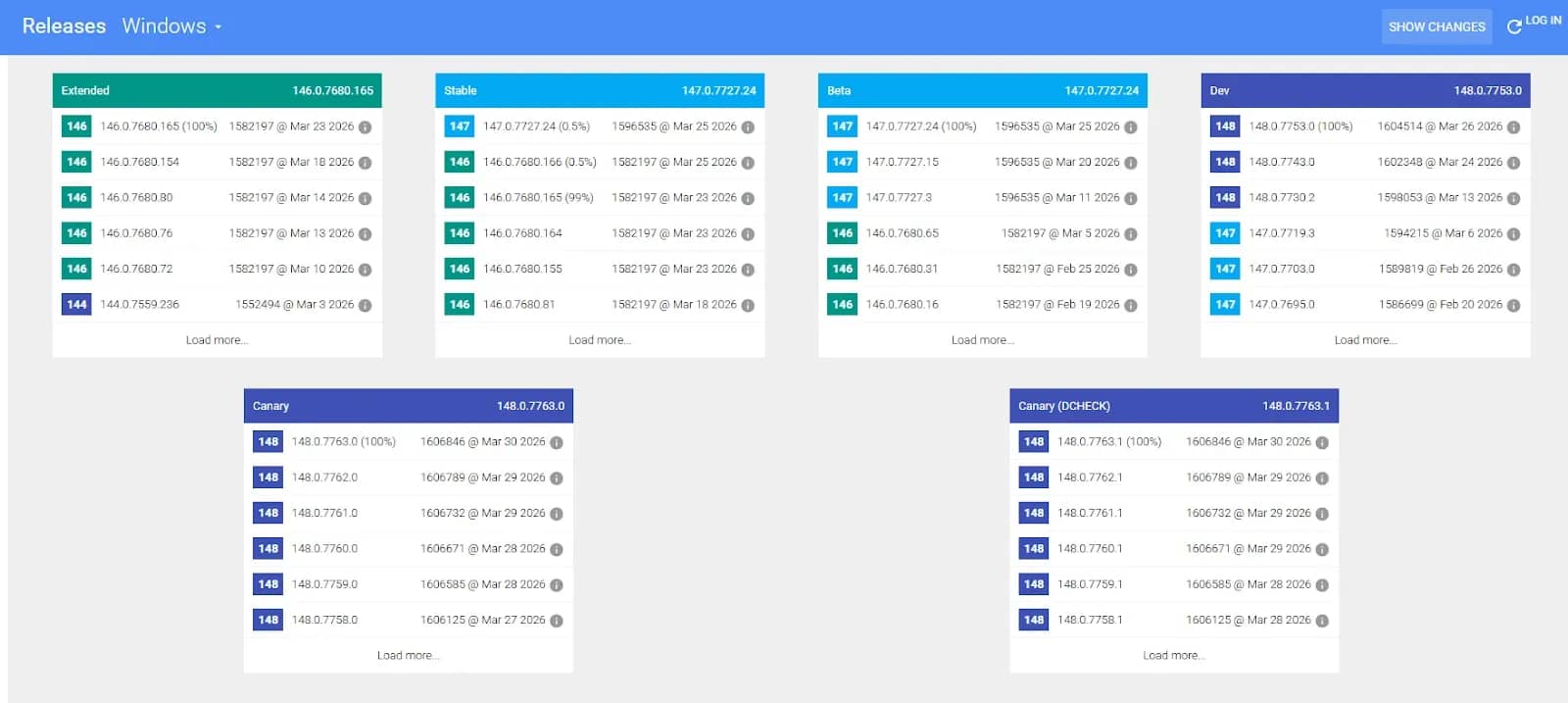
Core update schedule for Windows
Such discrepancies are detected at the behavioral level and lead to reduced trust: the system registers a risk, adds checks, or restricts account operation.
How Anti-Fraud Systems Detect Outdated Browsers
Modern protection systems analyze browsers based on their behavior and technical parameters. They check which functions are supported, what data is transmitted, and exactly how the engine operates.
Primary methods:
- JavaScript API — functions characteristic of a specific browser version are called. The absence of required methods indicates an outdated core.
- Client Hints (Sec-CH-UA) — headers containing information about version and platform are analyzed.
- Rendering (Canvas, WebGL) — graphic rendering features and the final result are evaluated.
- Vulnerability checks — behavior associated with known bugs in older versions is detected.
Based on the aggregate of these signals, the actual state of the browser is determined and inconsistencies are revealed.
What Happens in Practice When Working with Old Cores in Antidetect Browsers
Using an outdated core creates a mismatch between the profile's declared parameters and the browser's actual behavior. Such discrepancies are recorded by protection systems and increase the risk of checks and restrictions.
What this leads to in practice:
- Reduced trust level. The profile receives a risk mark. This slows down account warming and increases farming costs before launching ads.
- Increased number of checks. The session more frequently falls under JS challenges, captchas, and additional verifications. This complicates work and hinders automation.
- Restrictions in advertising cabinets. Reach may be reduced, traffic costs may rise, ads may be rejected, and payment issues may appear.
- Checkpoints and verifications. For actions like logging in from a new IP or linking a card, the system may request confirmation via SMS, photo, or documents.
- Account linking. If the same unstable stack is used, accounts may be identified as linked and subjected to blocks.
Thus, an outdated core reduces work efficiency: costs rise, the number of checks increases, and account stability falls.
How Quickly Are Updates Released in Antidetect Browsers?
Updating the core in antidetect browsers is a complex process. Developers need to adapt all fingerprint substitution mechanisms for it and verify that they work correctly.
Because of this, updates are released at different speeds. Some antidetect browsers lag behind current Chrome versions by several releases — for example, Incogniton. Meanwhile, fresh profile versions may be available in the settings, but the actual core remains old. This leads to technical inconsistencies that are recorded by protection systems.
Other solutions (for example, Linken Sphere) update promptly after the release of the current engine version. In this case, browser behavior matches the declared parameters, and the risk of additional checks is lower. When the core version matches the current one, the profile looks natural in the general flow of users. This reduces the number of checks and simplifies working with accounts.
Conclusion
Account security directly depends on how accurately the digital fingerprint matches the declared parameters. When choosing an antidetect browser, pay attention not only to the interface beauty or price, but also to the technical competence of the team: how quickly they update the Chromium core following official Google releases. Tools that do this first will always provide a higher account survival rate and save your nerves and budget.
Frequently asked questions
- The Chromium engine is cross-platform, but the operating system dictates its own rules for graphics and font rendering. If you're sitting on Windows but creating a profile for macOS, the core will have to engage complex software emulation to hide the real hardware traces. The most reliable and long-lasting accounts are obtained when your computer's OS matches the OS selected in the profile settings (for example, creating a Windows profile on a Windows PC).
- This is the main marker that your antidetect browser's core is hopelessly outdated. The site compares your declared User-Agent (which might say a new version of Chrome) with the browser engine's real responses. If the engine doesn't support fresh JavaScript APIs, the site understands it's dealing with a "fake" and issues a system warning.
- No. Proxies only change your IP address, geo-position, and provider. Modern anti-fraud systems analyze profiles comprehensively. Even if you have a clean IP address but the browser core is outdated, protective algorithms from Facebook, Google, or crypto exchanges may block the account, considering the device compromised.

Why Google Blocks Accounts and What Your Antidetect Has to Do With It
Google has once again complicated the mechanisms of digital identification by deploying a new, more sophisticated layer of protection based on proprietary HTTP headers. This quiet change caught most of the market off guard, triggering a wave of rushed updates. While others hastily released superficial 'fixes', we realized that we were dealing not with a minor issue but with a fundamental shift that required deep and comprehensive analysis.

The Best Alternative to OBS Studio
Working with a webcam on many online platforms can turn into a real challenge. A strict oval or rectangular frame appears on the screen, but your image doesn’t align perfectly with it. As a result, the system blocks further progress, demanding perfect alignment, and your workflow is disrupted before it even begins.

What is The Difference Between a VPN and a Proxy?
Let's figure out the differences between VPNs and proxies and how to choose the right one to protect your privacy.