
Anonymous search: how it works and why it’s needed
Updated: September 2026
Enter a smartphone model or a vacation destination into a search bar just once, and contextual and targeted ads will stalk you across every website you visit for weeks. The situation is aggravated by the "filter bubble": modern search engines rank results not by objective relevance, but based on your history of past queries and clicks, geolocation, and perceived interests. As a result, two people sitting in adjacent rooms receive drastically different answers to the exact same query.
How is internet surveillance architected, and why does incognito mode fail to protect against data collection? Let’s examine how to build an anonymous search system for different scenarios — from everyday privacy to professional marketing.
What is anonymous search and who is watching us
Anonymous search is the process of searching for information on the internet where search queries are not logged, are not linked to a user account, and are not associated with network identifiers — IP address, cookies, and device digital fingerprints. Anonymous search prevents algorithms from building your advertising profile, thereby returning objective results free from distortion by personalized algorithms.
Every action on the global web leaves a technical trace. When a user sends a standard query to Google or Yandex, a metadata collection chain is triggered involving several parties simultaneously:
- Search engines. Record the exact query text, submission time, subsequent link clicks, scroll depth, and time spent on the destination page. All of this data is attached to an authorized user profile or an anonymous advertising identifier.
- Advertising networks and analytics platforms. Trackers embedded into millions of websites (Google Analytics, social media pixels) track the visitor's path across the web, building a unified interest graph to sell ad impressions via RTB auctions.
- Internet service providers. By law, ISPs are required to retain connection logs to DNS servers and the IP addresses of visited resources. An ISP sees every domain a device accesses, even when the traffic is protected by HTTPS encryption.
- Government regulators and automated traffic control systems. Inspect network packets to filter traffic and detect restricted resources.
What is actually recorded during a standard search:
- network IP address and the physical geolocation derived from it down to the neighborhood or street;
- text query and the accompanying search context;
- unique advertising network cookies;
- browser digital fingerprint — operating system version, User-Agent, system fonts, screen resolution and color depth, system language, time zone, WebGL and Canvas hardware renderers, and audio codec support;
- account details (Google ID) if the user is signed in to the browser.
One of the primary negative consequences of this surveillance is the "filter bubble." Ranking algorithms feed the user information that reinforces their prior views and search habits while concealing alternative perspectives. As a result, you lose the ability to see a clean, objective search results page.
How anonymous search works: the privacy mechanics
Online privacy is not a magic toggle switch; it is a layered set of countermeasures designed to neutralize tracking across different tiers of data transmission.
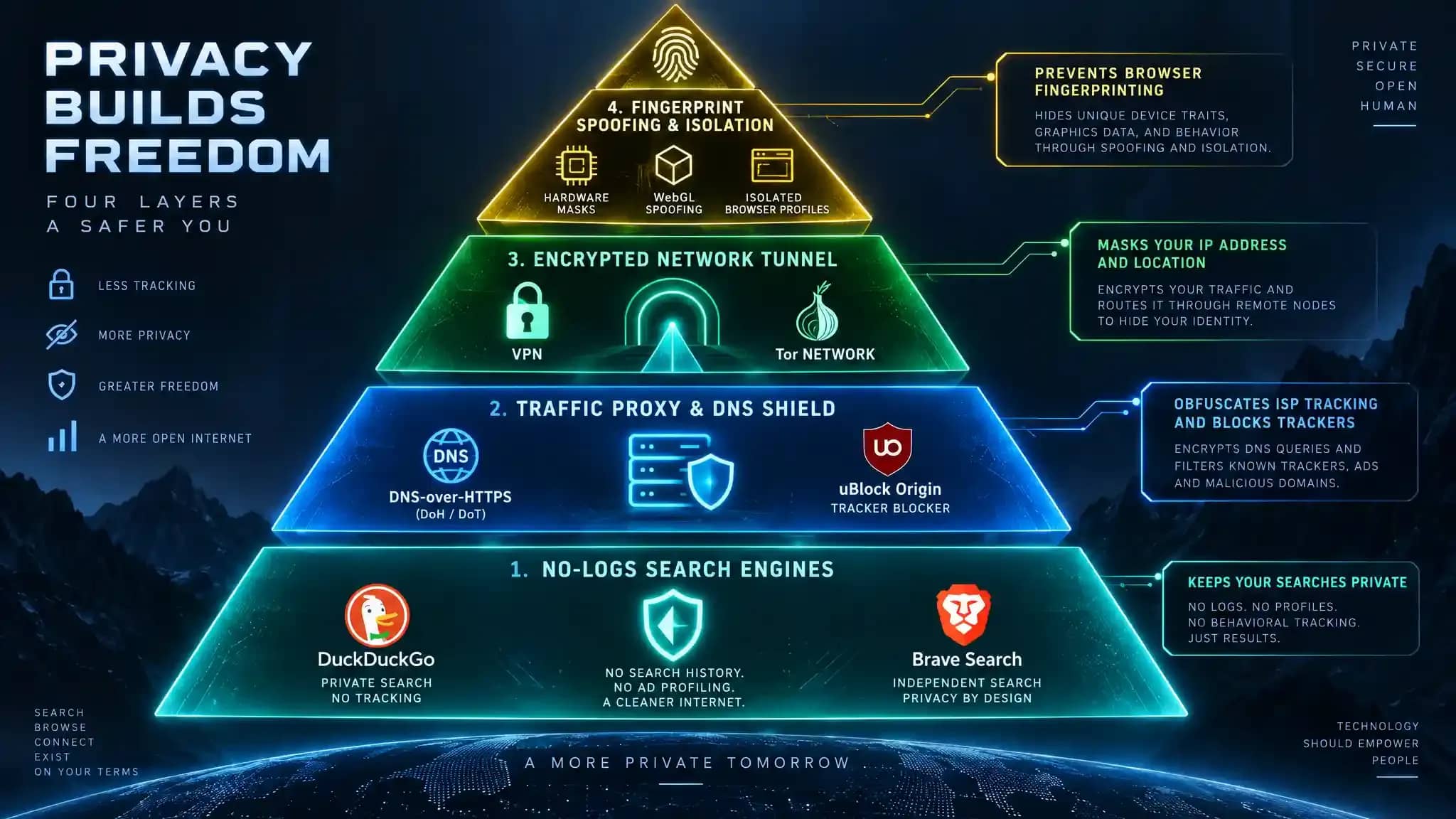
Level 1. Server-side log refusal. A private search engine operates on the principle of never maintaining server logs that bind queries to IP addresses. The query is processed in RAM, the results are compiled, and the session is immediately purged.
Level 2. Source obfuscation via proxying. Metasearch engines intercept the user's query, strip it of identifying headers, and query major indexes on behalf of their own intermediate server. The destination search engine sees only the proxy server's IP address, never the end user's.
Level 3. Network address masking. Traffic is encrypted on the device and routed through a remote gateway or a relay chain. The ISP detects only an encrypted connection stream, while the target site sees the IP address of the exit node or VPN server.
Level 4. Anti-fingerprinting defense. Tracker blocking, cookie isolation, and hardware parameter spoofing via specialized anti-detect browsers.
The cardinal rule of network security: no single tool provides 100% anonymity on its own. A private search engine stops profiling by the search provider, but it does not hide website visits from your ISP. A VPN encrypts the transport channel against your ISP, but remains helpless against browser fingerprinting or an authorized Google account. Reliable privacy is achievable solely by combining tools across layers.
Why anonymous search is needed: use cases
Private search is an essential instrument of digital hygiene that solves concrete, practical challenges:
- Combating dynamic pricing. Booking engines for flights, hotels, and ride-hailing services often inflate rates when detecting repeat visits from expensive hardware (such as flagship iPhones or MacBooks) or frequent searches on a single route. Anonymous search allows you to view the baseline price matrix without surcharges.
- Sensitive inquiries. Researching medical diagnoses, symptoms, prescription medications, financial distress, or legal disputes. Authorized searches around such topics become permanently embedded in ad exchange profiles, triggering aggressive remarketing from clinics and legal practices.
- SEO and marketing intelligence. Evaluating a website's genuine rank for targeted keywords demands a sterile SERP. If an analyst checks rankings from a daily work profile, the search engine will inflate results for domains they interact with regularly.
- Escaping the "filter bubble." Sourcing an unbiased cross-section of news reports, opinions, and academic material completely free from the bias of recommendation algorithms.
Incognito mode: what it actually hides
"Enabled incognito mode — became completely invisible?" Unfortunately, that is not how it works.
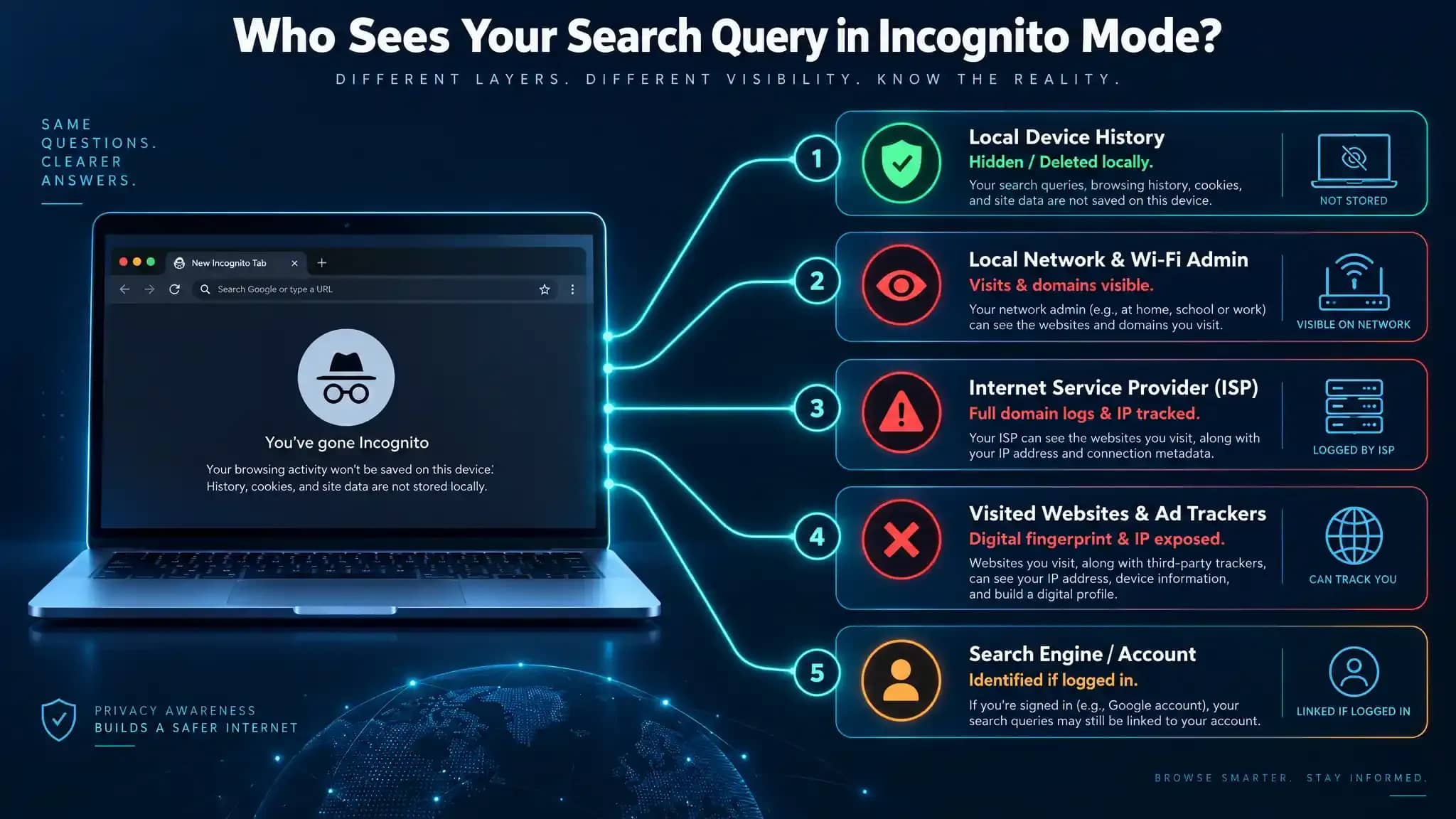
What incognito mode actually does:
- deletes browsing history stored on your computer's local drive once the window is closed;
- wipes cookies and site data created during the session;
- clears inputs entered into web forms (credentials, form fields, search queries).
What incognito mode DOES NOT do:
- does not hide your real IP address;
- does not protect against browser fingerprinting — Canvas, fonts, and hardware parameters remain fully exposed to sites;
- does not prevent your ISP from seeing every domain you access;
- does not hide activity from network administrators — traffic remains visible in local router logs and corporate gateways;
- does not protect against identification if you log into any account (Google, Telegram) inside the private tab.
Incognito mode solves a single local problem: concealing browsing history from family members or coworkers sharing the same machine. For external anonymity across the open web, it is useless.
Anonymous search engines: private search systems overview
Private search engines are the foundational starting point for data protection. What alternatives exist to standard Google? Here is an evaluation of the key players.
DuckDuckGo
The most widely known and mainstream private search engine globally. The service does not collect user profiling data, keeps no query history, and never sells user dossiers to ad brokers.
Features:
- pairs its proprietary DuckDuckBot crawler with the Bing search index and partner databases;
- features handy shortcut commands (!bangs) that let you query thousands of third-party websites directly (for instance, !w for Wikipedia);
- maintains its own privacy ecosystem — dedicated desktop and mobile browsers, tracker blockers, and email protection utilities.
Jurisdiction: United States (subject to US statutory data request frameworks).
Startpage
The go-to solution for users who demand Google-grade SERP quality without sacrificing personal data.
Features:
- maintains an official partnership agreement with Google, paying for direct access to search results. Queries hit Startpage servers in the Netherlands, where all personal metadata and cookies are stripped before being proxied to Google;
- provides the "Anonymous View" feature — an on-demand web proxy enabling you to visit target sites directly within the search interface.
Jurisdiction: Netherlands (governed by strict EU GDPR data protection mandates).
Brave Search
A completely independent search engine engineered from the ground up by the team behind the Brave browser.
Features:
- operates independent of Google and Microsoft syndication, indexing billions of web pages on its proprietary infrastructure;
- serves as the native default search engine in the Brave browser;
- features "Goggles" — custom reranking filters that allow users to alter algorithmic weightings (e.g., stripping out content mills or aggressive SEO spam).
Jurisdiction: United States.
Qwant
A French search engine designed to serve the European market.
Features:
- strictly compliant with GDPR standards — tracks zero users, retains no search history, and segregates results into Web, News, and Social feeds;
- clean interface design with rapid response times across European locations.
Jurisdiction: France (EU).
Swisscows
A family-friendly search engine operating exclusively from hardened alpine data centers in Switzerland.
Features:
- located outside US and EU legal jurisdiction, offering enhanced legal data protections;
- deploys semantic query analysis and enforces default parental content filtering against adult material and violence.
Jurisdiction: Switzerland.
Kagi
A premium, subscription-based search engine ($5 to $10 per month).
Features:
- zero advertisements, sponsored placement links, or surveillance trackers;
- gives users direct domain-level ranking control (e.g., permanently downranking or burying low-quality scraper sites);
- built specifically for academic, technical, and in-depth professional research.
Jurisdiction: United States.
Remember: a private search engine only guarantees that the search service itself will not log your queries. It does not encrypt system-wide incoming/outgoing device traffic and does not conceal destination domains from your internet provider.
VPN, Tor, and anti-detect browsers: leveling up anonymity
Selecting a private search engine is merely the baseline. Insulating your network footprint and mitigating browser fingerprinting requires deeper tooling.
VPN
A VPN provisions an encrypted tunnel between the host machine and a remote server. Consequently, the ISP detects only an indecipherable stream of encrypted packets directed at a single destination IP. The destination website sees the geolocation and IP address of the VPN node rather than the real user.
Keep in mind that all network traffic flows through the VPN provider, making an independently audited no-logs policy mandatory. Furthermore, a VPN does not alter browser fingerprints: if an ad network tracks your device fingerprint, changing your IP address will not prevent re-identification.
Tor Network
Tor enforces onion routing. Network packets are sequentially layered in triple encryption and passed through a three-node relay circuit: guard, middle, and exit. Because of this structure, no single relay possesses knowledge of both the user's originating IP and the ultimate destination IP, delivering robust network obfuscation.
However, this security carries a penalty: noticeably degraded connection throughput. Users must also anticipate endless CAPTCHA challenges on search engines due to the tainted reputation of public exit nodes, rendering Tor impractical for services requiring continuous authorized sessions.
Anti-detect browsers
Specialized software suites (Linken Sphere, Dolphin Anty, Octo Browser) originally engineered for affiliate media buying and multi-account automation. Built predominantly around customized Chromium engines, anti-detects do not simply strip tracking parameters — they generate completely authentic, technically coherent hardware fingerprints per profile, spoofing Canvas, WebGL, AudioContext, WebRTC, fonts, and hardware hashes. Every browser instance runs in strict isolation through a dedicated proxy.
While anti-detects were conceived for advanced operators and involve foundational knowledge of networking protocols alongside premium residential or mobile proxies, mastering their workflow is straightforward.
| Tool | What it hides | What it DOES NOT hide | Primary application |
| Private search engine | Query text from being tied to an ad profile | IP address, network traffic from ISP, fingerprint | Everyday web search without personalization |
| Incognito mode | Local browsing history, cookies, and cache on machine | IP address, browsing data from ISP, websites, and trackers | Privacy against other users on a shared computer |
| VPN | Real IP address and visited domains from ISP | Browser digital fingerprint, logged-in sessions | Encrypting public Wi-Fi traffic, bypassing geo-blocks |
| Tor Browser | Network routing path, IP address from destination site | Fact of Tor usage from ISP (without bridges) | High-stakes investigative privacy |
| Anti-detect browser | True hardware and browser digital fingerprint | Raw traffic without a proxy (proxies configured separately) | Professional multi-accounting, sterile testing |
How to set up anonymous search: step-by-step guide
Configuring a privacy-preserving workstation environment depends directly on your operational requirements.
Baseline level: protection against ads and filter bubbles
Suited for routine day-to-day web use at home or in the office.
- Set your default search engine: inside your main browser settings, switch default search to DuckDuckGo, Startpage, or Brave Search.
- Enable DNS-over-HTTPS (DoH): inside browser settings ("Privacy and Security"), enable encrypted DNS routing through secure resolvers (Cloudflare or Quad9). This prevents your ISP from tracking specific visited hostnames.
- Install tracker mitigation extensions: add uBlock Origin to strip out commercial ad networks, analytics engines, and invisible tracking beacons.
- Block third-party cookies inside your primary browser privacy controls.
Advanced level: network obfuscation and clean sessions
Suited for digital marketers, SEO specialists, and competitive intelligence gathering.
- Configure a dependable VPN provider featuring an independently audited no-logs policy and an active Kill Switch (halting all network I/O if the VPN connection drops).
- Set up an isolated, dedicated browser profile: deploy Brave or Firefox configured with maximum security settings (Enhanced Tracking Protection set to Strict mode).
- Fully disable WebRTC: inside Firefox via about:config (set media.peerconnection.enabled = false) or by using the WebRTC Control extension across Chromium browsers.
- Never authenticate into personal services or social networks inside this clean profile.
Maximum level: professional operational isolation
Suited for multi-account infrastructure, sensitive financial administration, and investigative intelligence.
- Deploy an anti-detect browser (such as Linken Sphere) provisioning fresh, unique device fingerprints for each operational objective.
- Integrate premium mobile or residential rotating proxies matching targeted geographic regions for every profile instance.
- For objectives requiring uncompromised anonymity where connection speed is secondary: route through Tor Browser leveraging obfs4 bridges to obscure Tor protocol signatures from the local ISP.
Operational hygiene mandate: absolute session isolation. Never intermingle personal identities with anonymous sessions. Clicking a single authenticated account link or personal email inside a private profile instantly binds your virtual persona to your real identity.
Conclusion
Anonymous searching in 2026 is not an indicator of illicit conduct; it is an indispensable baseline of digital hygiene and personal data sovereignty. It neutralizes dynamic price gouging, eliminates invasive ad remarketing, and delivers access to an unfiltered web independent of algorithmic steering.
For ordinary day-to-day use, switching your default search engine to Startpage or DuckDuckGo alongside uBlock Origin provides immediate protection. If your tasks require comprehensive network concealment and isolation against hardware fingerprint profiling, leverage an audited no-logs VPN alongside specialized anti-detect software. With Linken Sphere, you can get started right now with no credit card required: the platform includes 5 profiles completely free with no expiration limit.
Frequently asked questions
- The three leading options are DuckDuckGo, Startpage, and Brave Search. DuckDuckGo provides the most polished ecosystem and command shortcuts, Startpage proxies clean Google SERPs through private European infrastructure, and Brave Search indexes the web on its own proprietary crawl architecture completely free from Big Tech infrastructure.
- Only locally on the physical machine once the window is closed. Your internet provider, corporate network administrators, search engines, and target websites still see your navigation requests, public IP address, and hardware fingerprint characteristics.
- No. A VPN encrypts transit packets and substitutes your IP address, protecting data from ISP snooping and open Wi-Fi sniffing. It cannot protect against browser canvas/hardware fingerprinting and becomes ineffective if you sign in to an authenticated Google or Microsoft account.
- Yes. Install a privacy-focused mobile browser (Brave, DuckDuckGo Privacy Browser, or Firefox Focus), run a system-wide VPN, and disable cross-app tracking alongside ad personalization inside your iOS or Android system settings.
- Tor provides far more sophisticated multi-hop onion routing, but suffers from low bandwidth and triggers continuous search engine CAPTCHAs. A VPN provides substantially higher bandwidth and smooth everyday responsiveness, but requires absolute trust in the provider's verified no-logs commitments.

Why Google Blocks Accounts and What Your Antidetect Has to Do With It
Google has once again complicated the mechanisms of digital identification by deploying a new, more sophisticated layer of protection based on proprietary HTTP headers. This quiet change caught most of the market off guard, triggering a wave of rushed updates. While others hastily released superficial 'fixes', we realized that we were dealing not with a minor issue but with a fundamental shift that required deep and comprehensive analysis.

SOCKS vs HTTP Proxy: What’s the Real Difference and Which One to Choose?
There are times when you don’t want a website to link the request back to your device. That’s where a proxy comes in, it acts like a middle layer and sends the request for you. The site sees the proxy’s info instead of yours. It’s a go-to trick when you’re trying to see a page that’s not available in your region, pull content that’s restricted by location, or avoid hitting a wall when sending lots of requests.

The Best Alternative to OBS Studio
Working with a webcam on many online platforms can turn into a real challenge. A strict oval or rectangular frame appears on the screen, but your image doesn’t align perfectly with it. As a result, the system blocks further progress, demanding perfect alignment, and your workflow is disrupted before it even begins.