
Automation services: from Make and n8n to auto-upload tools and browser bots
According to McKinsey, 88% of organizations have already automated at least one business function, and half have automated three or more at once. Instead of people, services process leads, parse platforms, move data between applications, and reply to users themselves.
The market offers both universal builders, which can connect several services at once, and specialized tools for various tasks: for example, auto-posting, mass posting, neuro-commenting, mass mailings, parsing, or account management.
In this selection, we will look at tools for different automation scenarios and see what routine tasks can be offloaded to them.
Automation Builders
Automation builders connect different services into a single scenario. For example, a system can retrieve data from a table, process it through a neural network, send the result to a social network, and mark the task as completed.
Make
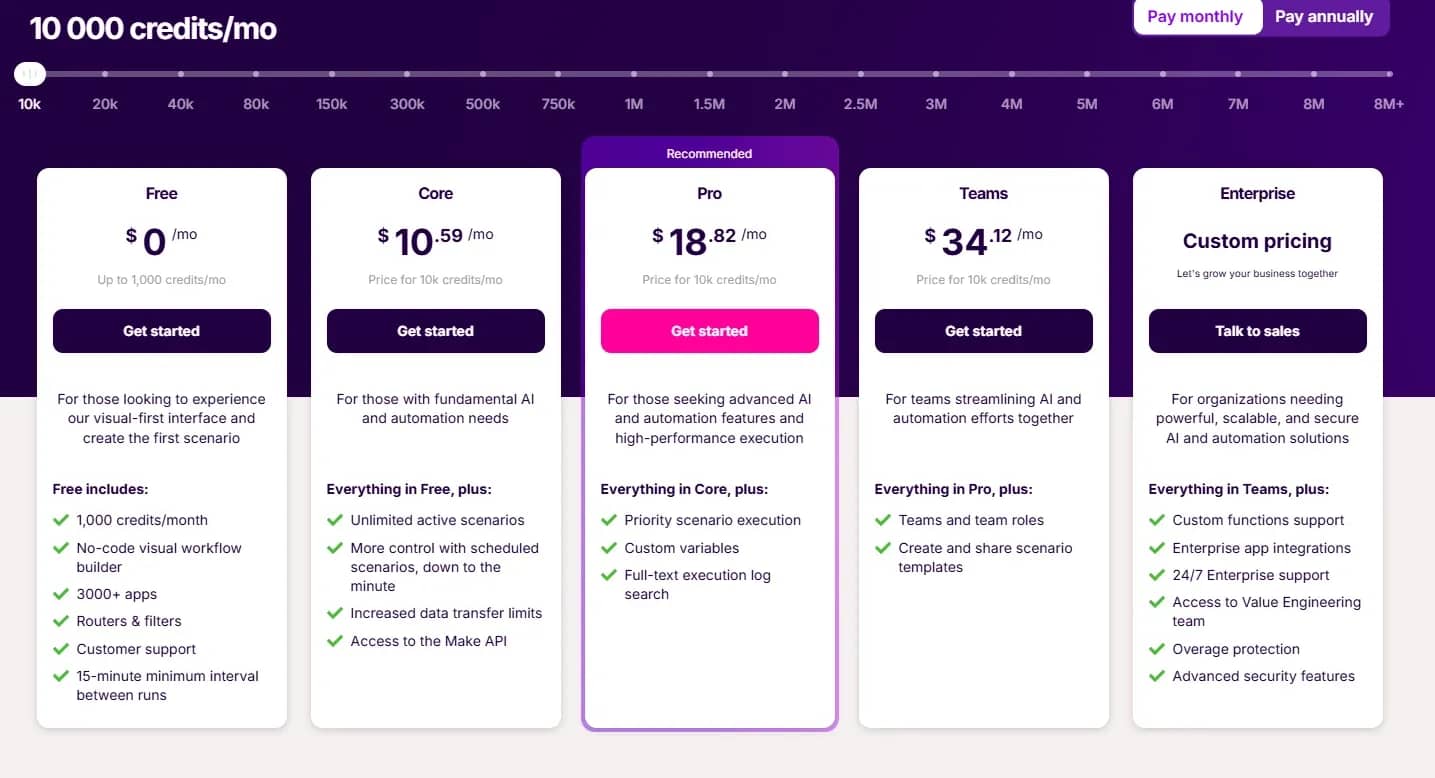
Make is a popular visual no-code/low-code platform for automating workflows and integrating various web services and applications with each other without writing code.
Features:
- Visual builder. Scenarios are created on an intuitive canvas using ready-made modules. The logic can be split into multiple branches, filters can be added, and launch conditions can be specified.
- Over 2,000 integrations. Make supports Google Sheets, Telegram, CRM systems, email services, task managers, and AI tools, including ChatGPT.
- API and webhook support. If the required service is not in the catalog, it can be connected manually via HTTP requests or webhooks.
- Built-in AI agents. The platform allows you to create agents to analyze information, generate content, and independently perform specific actions within a scenario.
n8n
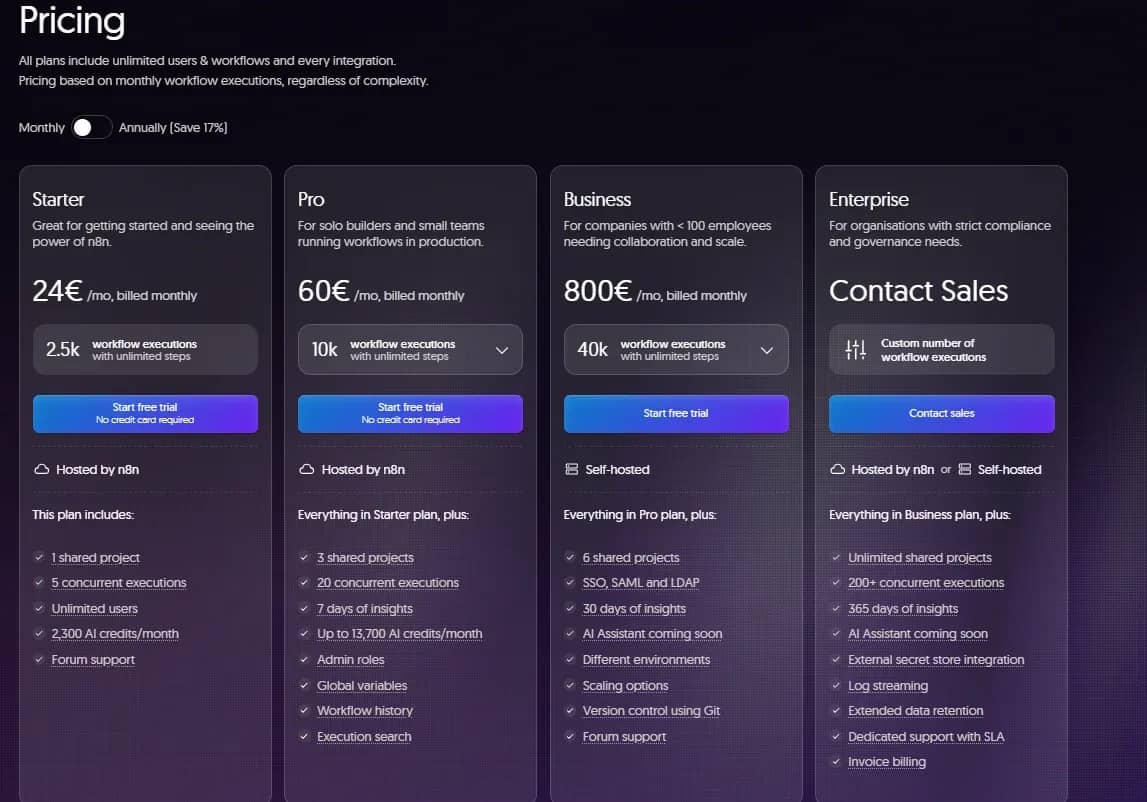
n8n is a more flexible builder for technically complex scenarios. n8n does not have a ready-made simple module for Instagram Direct with built-in triggers like "reply to Reels" or "comment on post." Such connections have to be assembled manually via webhooks and the Graph API.
Features:
- Self-hosted installation. It can be deployed locally, on a VPS, or in the cloud, including via Docker.
- Direct database connection. There are ready-made nodes for direct reading and writing to PostgreSQL, MySQL, MongoDB, Redis, and ClickHouse without third-party intermediate layers.
- Control over data. With a local installation, information is processed within your own infrastructure.
- Flexible scaling. The capabilities of the self-hosted version depend primarily on the server's performance.
- JavaScript and Python support. Blocks of code can be added to scenarios for complex data processing, calculations, and custom logic not available in ready-made modules.
Zapier
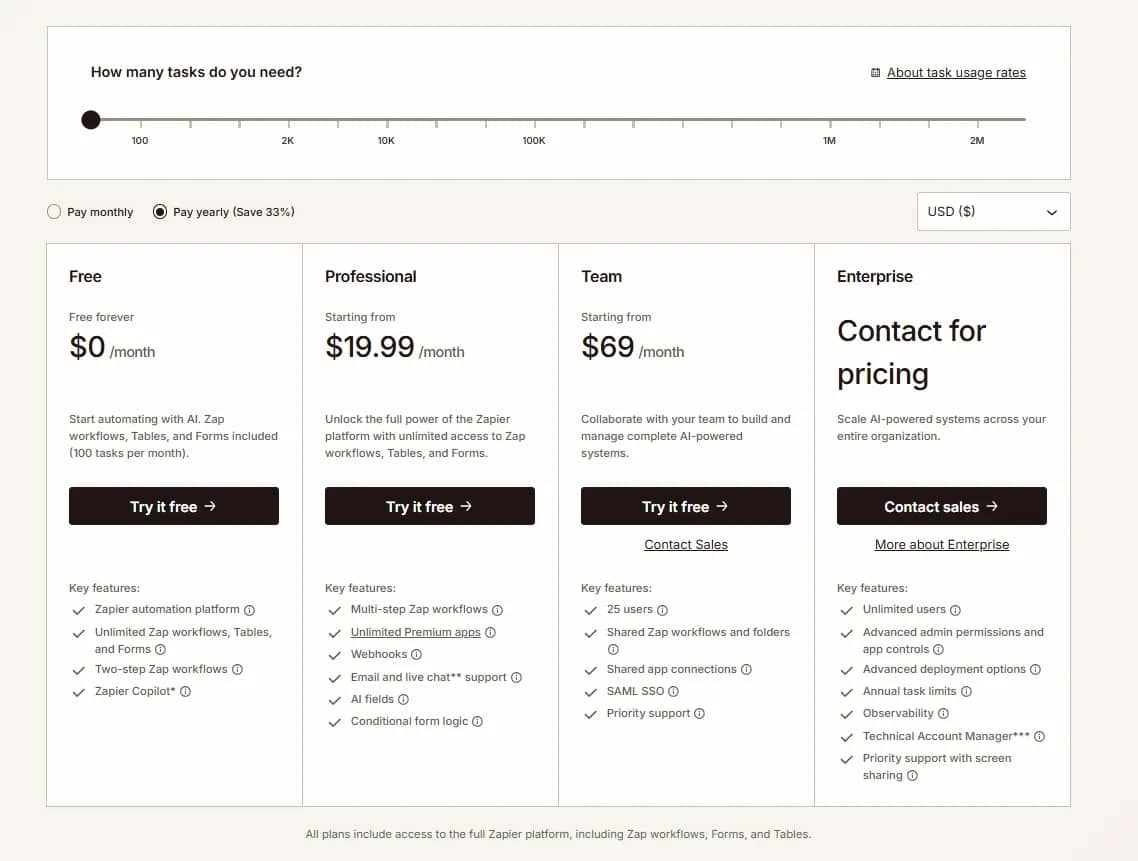
Zapier is a cloud-based builder with a large catalog of ready-made integrations. It is designed for fast scenario launches without your own server or programming knowledge.
Features:
- Over 7,000 integrations. Zapier supports thousands of popular applications, including CRMs, tables, email services, messengers, task managers, and AI tools.
- Built-in utilities Formatter, Filter, Paths. These allow you to clean text on the fly, change date formats, set up "if-then" conditions, and split data streams into different branches.
- Simple no-code interface. Automation is built step-by-step from top to bottom. Unlike Make and n8n, there is no large visual canvas, making it easier to understand scenarios.
- Cloud-only operation. All scenarios are run on Zapier's servers. You cannot install the platform on your own server or computer.
- Large library of templates. For popular tasks, there are already ready-made connections that can be copied and adapted to your project without building a scenario from scratch.
Albato
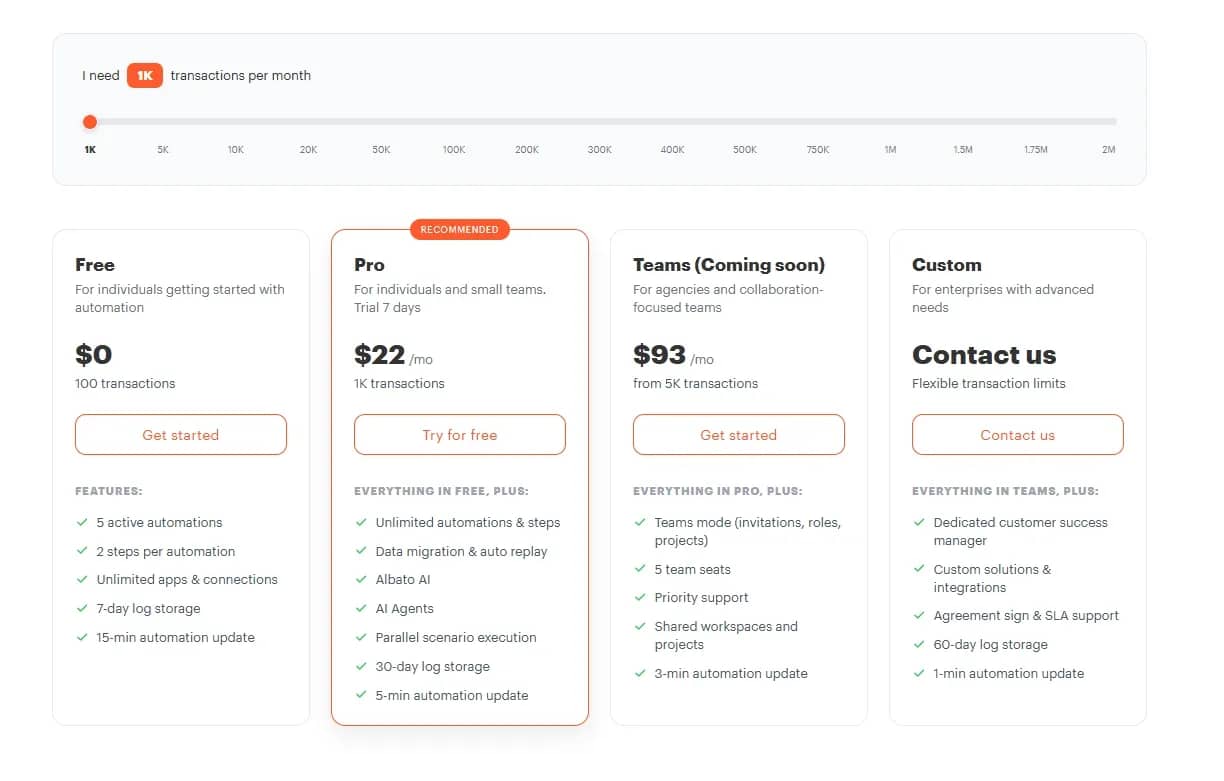
Albato is a no-code platform for integrating web services and automating workflows. It is excellent for those who find Zapier too expensive and Make's interface too complicated.
Features:
- Vertical builder. Scenarios are assembled from top to bottom: first, a trigger is defined, then actions are added.
- App Integrator. If the required service is not in the catalog, you can create a connector for it yourself. The user specifies the API parameters and adds new triggers and actions.
- AI Copilot. The built-in AI assistant helps create and edit scenarios using text commands. The platform can also be used to connect AI models and automate individual tasks via AI agents.
- Albato Embedded. A solution for SaaS developers. You can embed Albato's integration catalog directly into your service. The interface can be customized with your own branding.
Activepieces
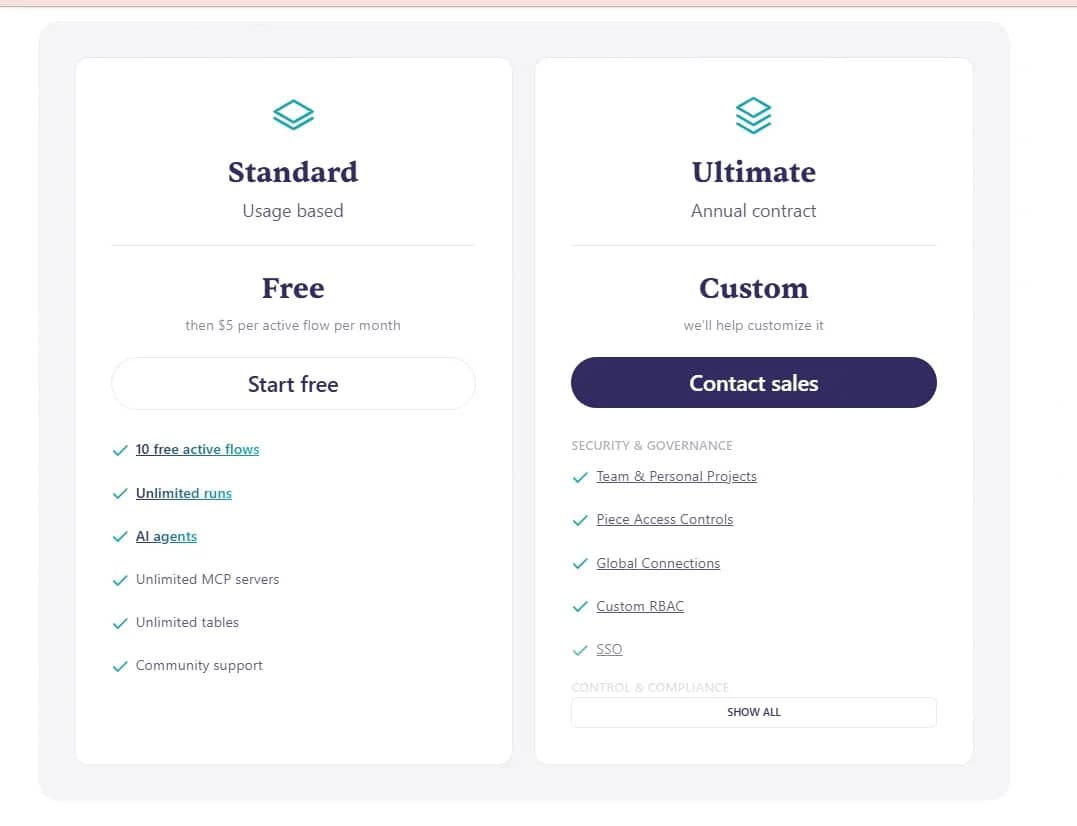
Activepieces is a modern automation platform with an emphasis on the integration of AI agents and neural networks.
Features:
- Open source. Everything is distributed under the MIT license. The code can be studied, modified, and customized for your own tasks.
- Self-hosted installation. Activepieces can be deployed for free via Docker on a VPS or a local computer. The self-hosted version has no charge for each step performed, and the actual limits depend on the server's performance.
- AI-oriented. The platform supports AI agents, vector databases, and the MCP protocol. You can connect language models and grant them access to tools, data, and individual actions within a scenario.
- User-friendly no-code interface. Automations are assembled from ready-made blocks on a visual canvas. The interface is simpler and more welcoming for beginners than more complex platforms like n8n.
Pipedream
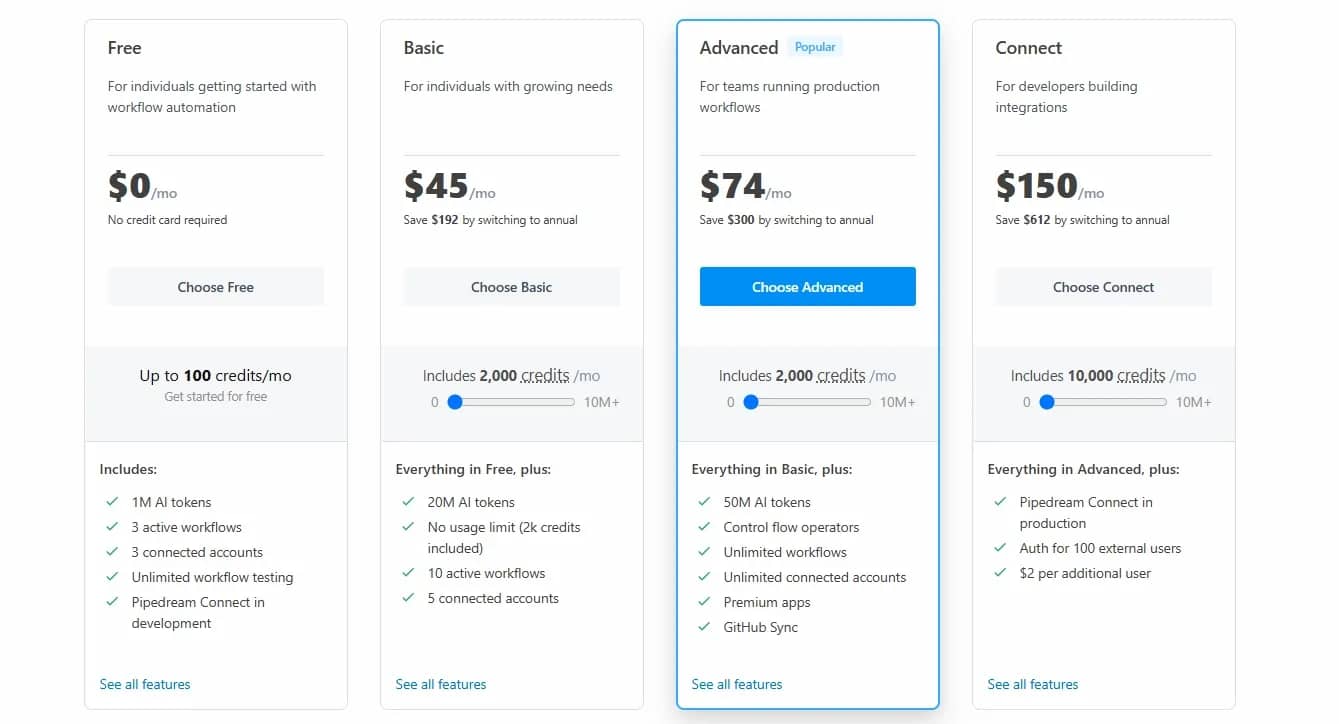
Pipedream is a platform that combines ready-made integrations with the execution of proprietary code. You can use a standard module, JavaScript, Python, and a direct request to an external API within a single process.
Features:
- Serverless architecture. Pipedream automatically runs and scales scenarios in the cloud. The user does not need to configure an environment to execute code.
- Event-driven. Scenarios can be launched via webhooks, HTTP requests, schedules, or actions in connected services. The platform is suitable for real-time event processing.
- Developer tools. Pipedream supports logging and integration with GitHub. For complex scenarios, built-in data stores and queues are available, which can be used to preserve state and manage the sequence of tasks.
- Free built-in Key-Value Store. The platform allows you to easily save intermediate state between scenario runs. For example, you can remember the ID of the last processed order without connecting external databases.
Microsoft Power Automate
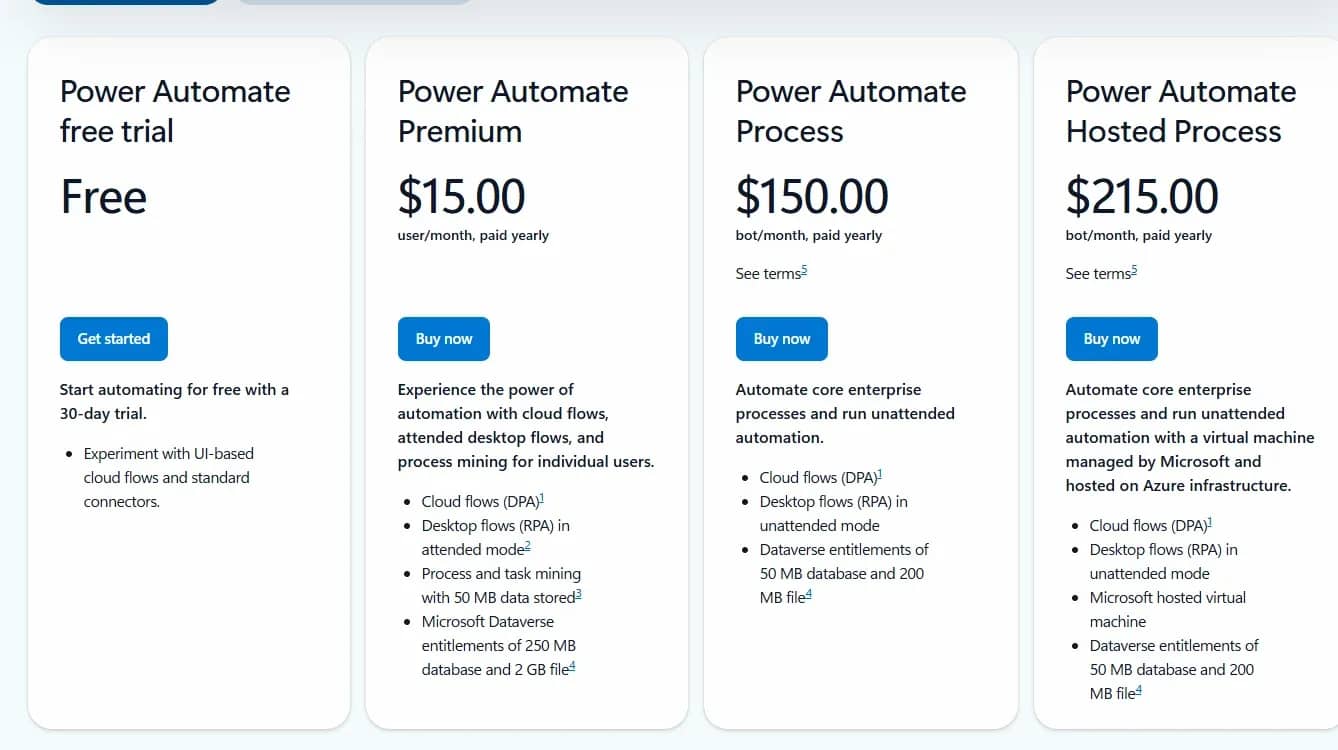
Microsoft Power Automate is an enterprise automation tool focused on the Microsoft ecosystem. It connects with Excel, Outlook, SharePoint, OneDrive, Teams, and other products of the company.
Features:
- Offloads daily routine. It can independently send notifications, move files between folders, gather data, and sync it across different services.
- Automates approvals. Requests, documents, leaves, and other internal processes can be passed through a ready-made chain. Once one employee approves, the task automatically goes to the next one.
- Supports Copilot. The required scenario can be described in plain text. The AI will select the appropriate actions, assemble the core of the process, and help adjust the logic.
- Allows building complex logic. A scenario starts with a trigger, followed by the required actions, while conditions split the process into different branches.
Auto-Posting Services
These services help manage multiple social networks from a single window: schedule publications, adapt content for different platforms, track comments, and gather statistics.
Postiz
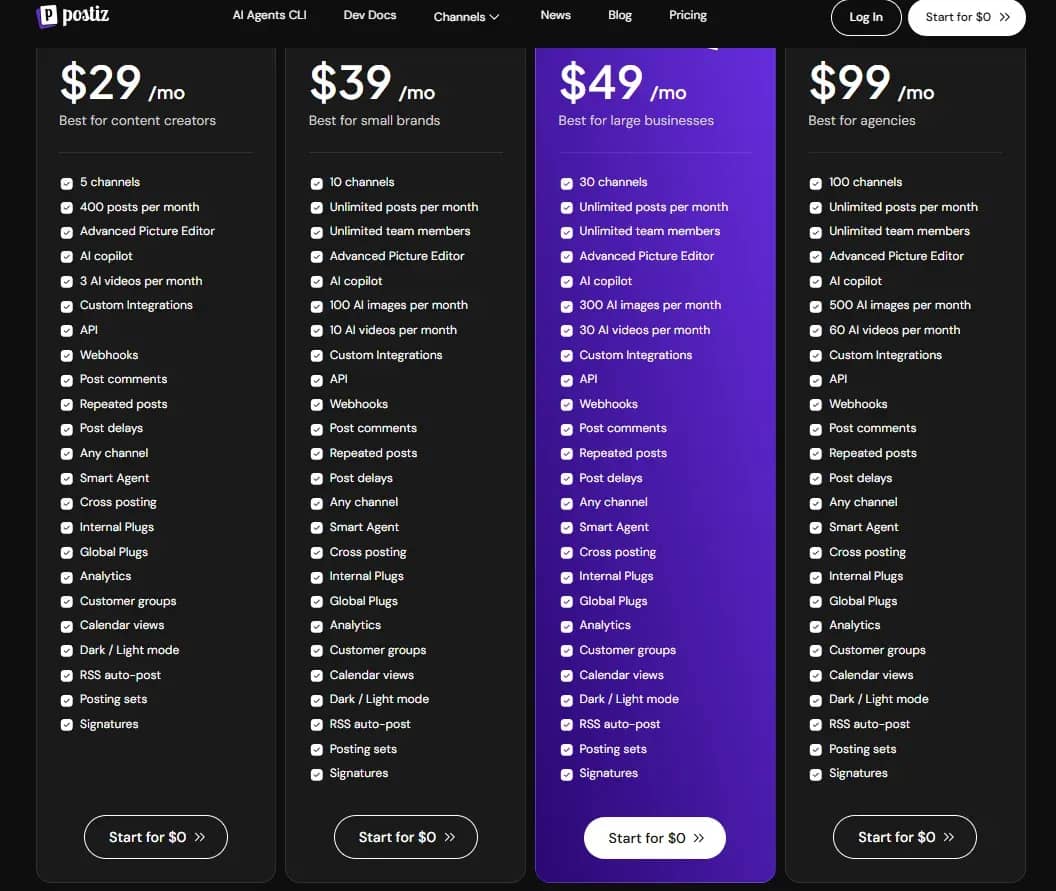
Postiz is an open-source platform for managing social media posts. A cloud-based version and a self-hosted installation version are available.
Features:
- Autopilot driven by AI agents. Management via Claude, ChatGPT, and Codex to generate text, images, and UGC video directly from the chat.
- Posting to over 30 social networks. Simultaneous cross-posting to dozens of platforms, including Telegram, VK, X (Twitter), Instagram, and YouTube.
- Customization for platforms. Separate previews and adaptation of text, hashtags, and media to the requirements of each social network before sending.
- Visual content calendar. A convenient scheduler for tracking, editing, and manually changing scheduled publications.
- Content recycling. Automatic repetition of high-performing posts according to a schedule and posting from RSS feeds of blogs.
Metricool
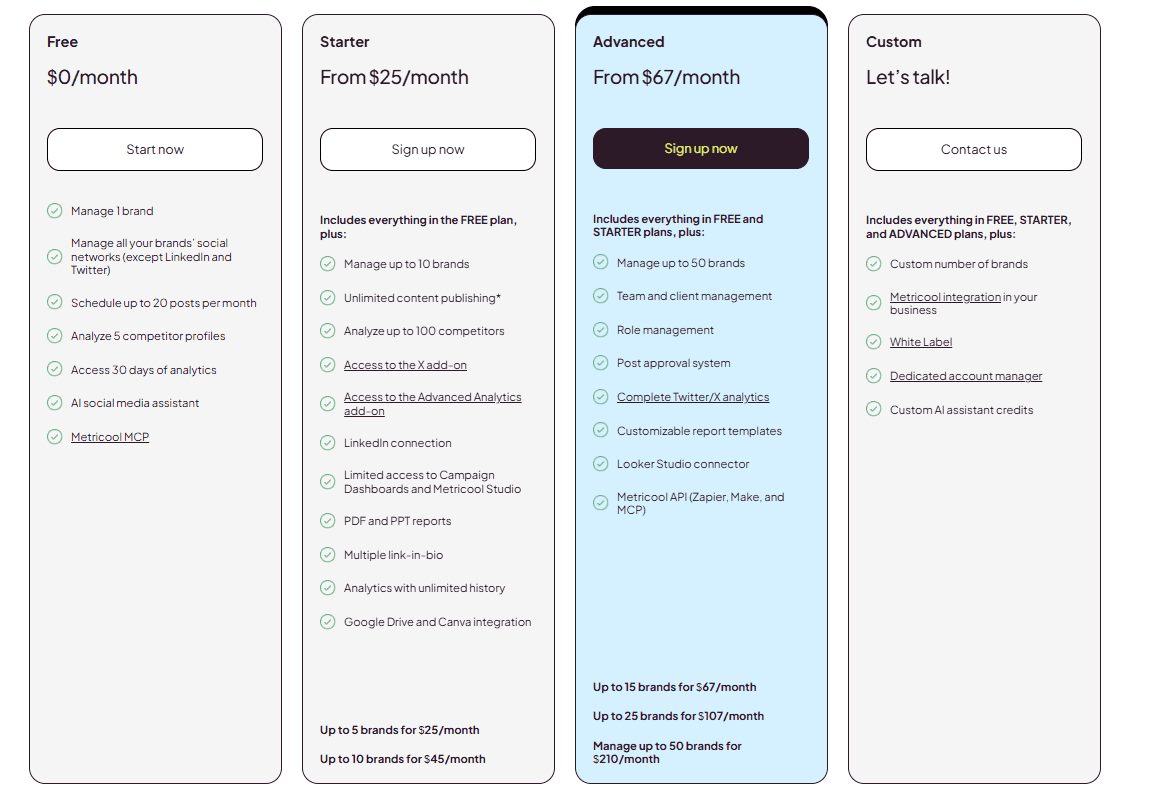
Metricool is an automation platform that combines auto-posting, analytics, reporting, comment management, and ad campaign management.
Features:
- Convenient content calendar. Posts can be dragged and dropped, dates can be changed directly in the schedule, and you can preview in advance how a publication will look in each social network.
- Optimal posting time selection. Metricool analyzes audience activity and determines the hours when a post is most likely to achieve optimal reach.
- Unified inbox. Comments and direct messages from connected social networks are gathered in a single window. From there, they can be moderated, and you can reply to users immediately.
- Automated reports. The service compiles statistics into ready-made PDF reports. Data can also be transferred to Looker Studio to build custom dashboards.
- SmartLinks. Inside Metricool, you can build a mini-landing page for the link in bio and lead users to a website, offer, or specific materials.
- Ad management. From a general dashboard, you can track campaigns in Google Ads, Facebook Ads, and TikTok Ads, compare results, and manage expenses.
Buffer
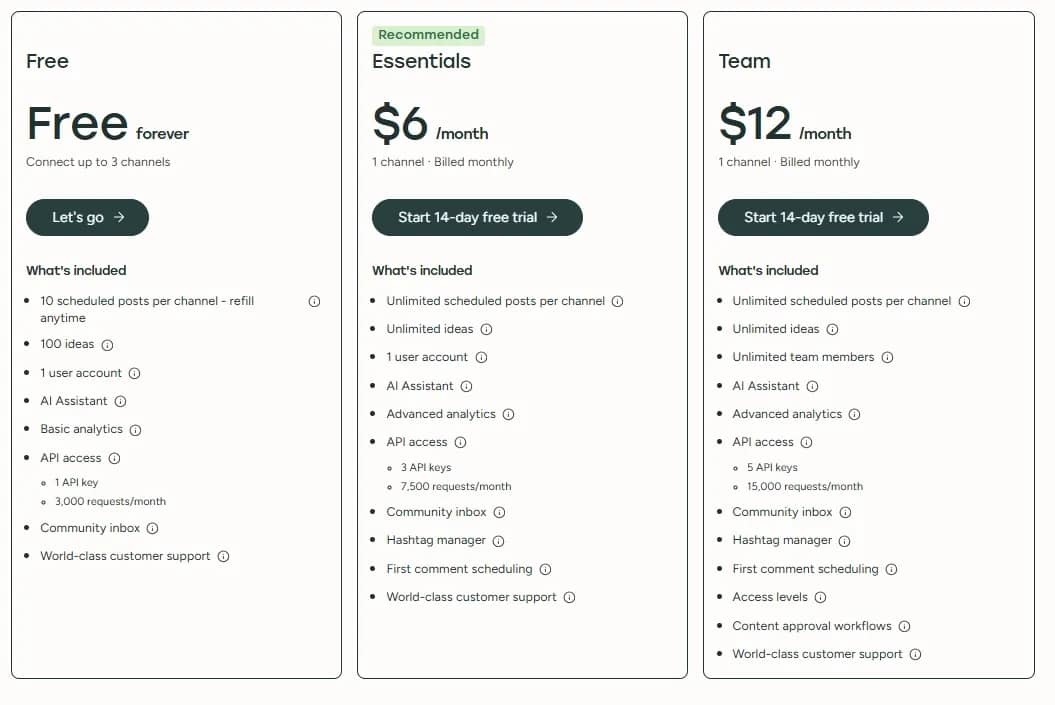
Buffer is a popular platform for scheduled posting and social media management.
Features:
- AI Assistant. The AI Assistant generates ideas, rewrites text, and adapts a single publication to the requirements of different social networks.
- Comment management. The Community section gathers comments from all connected platforms. They can be sorted, prioritized, and processed from a single window.
- Abundant integrations. Buffer works with Instagram, TikTok, Threads, Bluesky, Mastodon, and other social networks. Media files are pulled from Google Drive, Dropbox, OneDrive, and Unsplash.
- Teamwork. Posts can be sent for approval, and custom roles and access rights can be configured for team members.
- Developer API. Buffer connects with CRMs, custom applications, automation builders, and AI agents.
SMMplanner
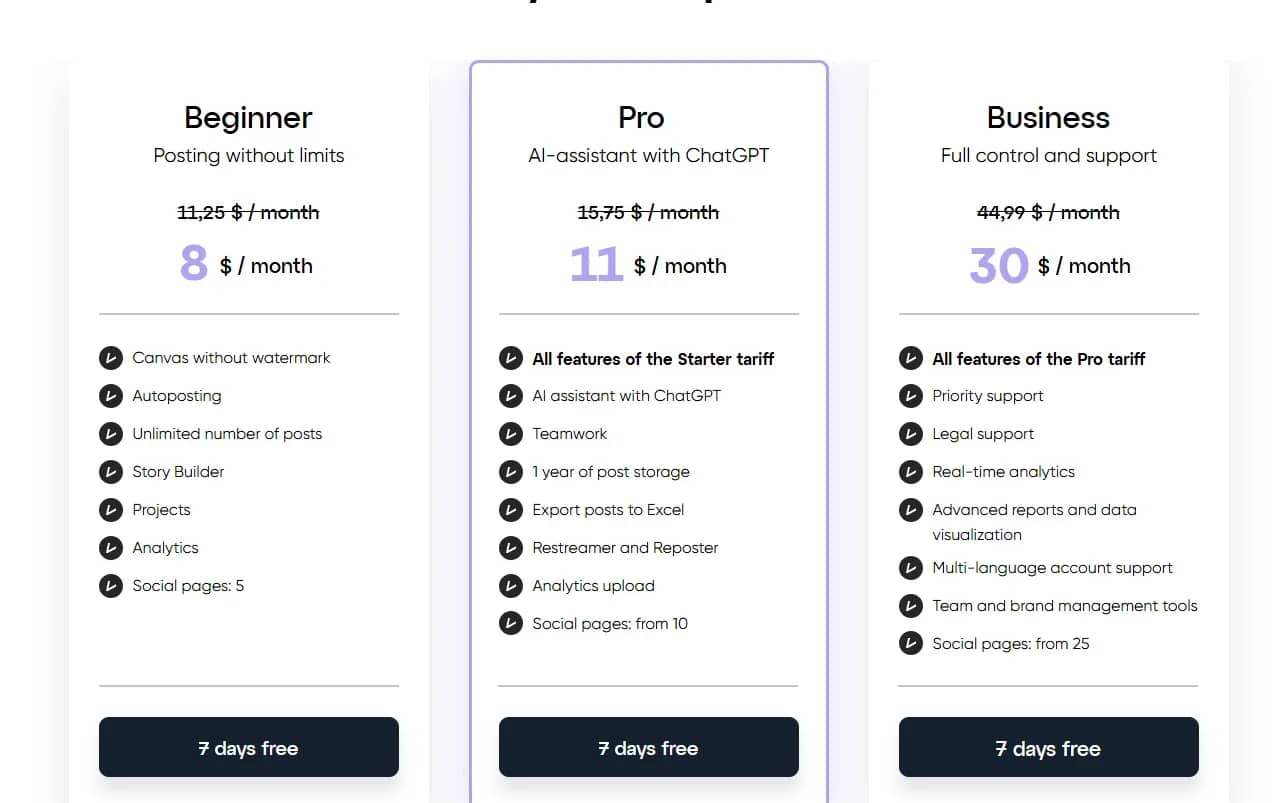
SMMplanner is a scheduled posting service for social networks and messengers. The main difference from competitors is its inclusion in the register of domestic software.
Features:
- Posting Stories and Reels from a computer. SMMplanner uses emulation of Android devices so you can upload formats that are not always available via standard APIs.
- Built-in "Canvas" editor. Banners and posts can be assembled directly inside the service using ready-made templates.
- Advanced publication settings. Posts can be automatically deleted by timer, pinned, published with disabled comments, or enhanced with buttons.
- Additional options for VK. The service supports internal carousels and provides the ability to attach music tracks to publications.
- Corporate terms. Cashless payment, closing documents, and legal support are available on corporate plans.
Hootsuite
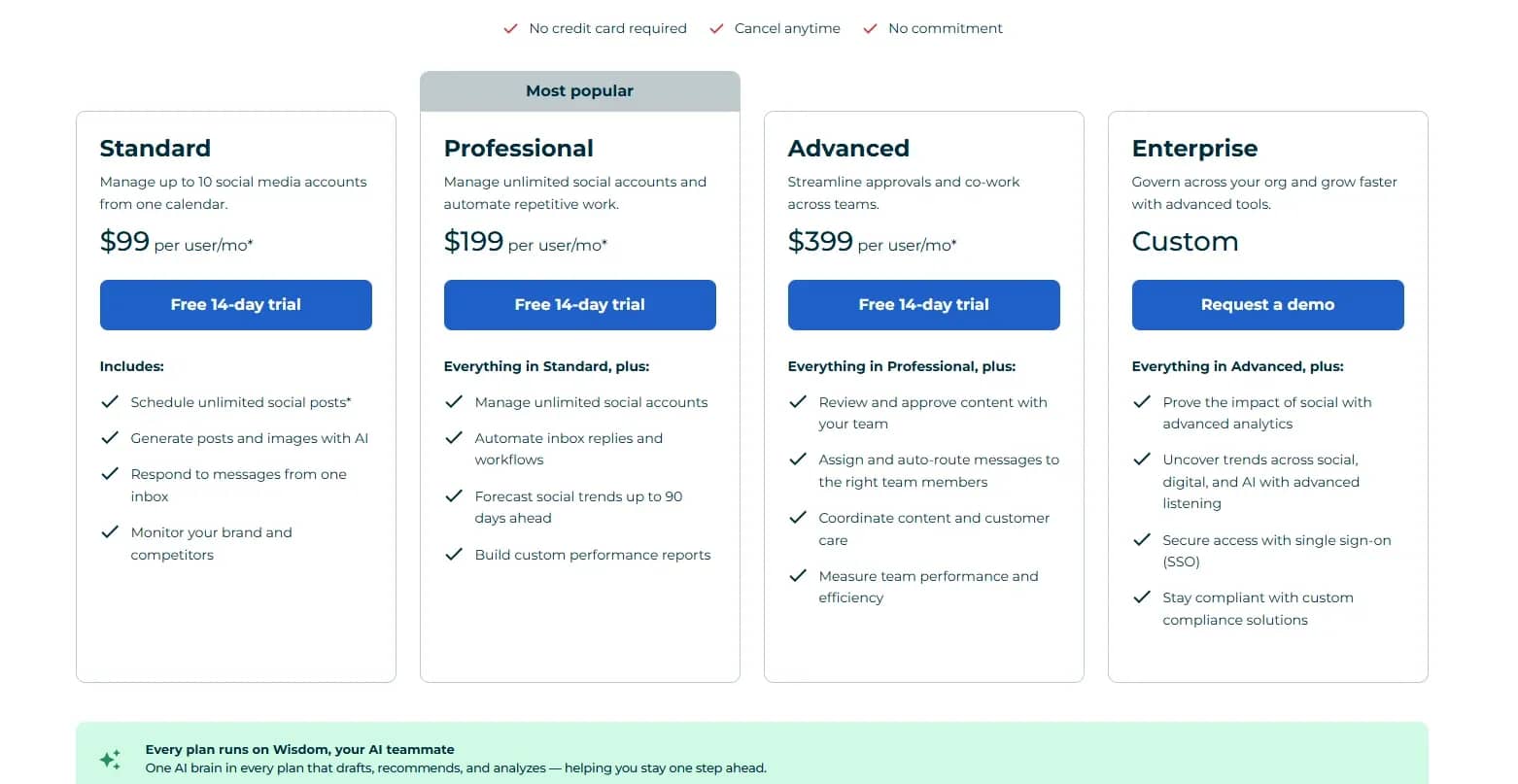
Hootsuite is one of the oldest social media management platforms, founded in 2008 in Canada. It is tailored for large brands, agencies, government bodies, and financial organizations.
Features:
- Monitoring mentions and trends. Hootsuite tracks what is being written about the brand, competitors, and the market, and helps notice negative remarks or new discussion topics in time.
- Competitor analysis. The service compares posting frequency, formats, and user reactions. It also analyzes comment sentiment, letting you understand whom the audience praises and whom they quietly dislike.
- Large library of integrations. Hootsuite connects to CRMs, cloud storages, analytics services, and other enterprise software.
- Incoming message routing. Comments and direct messages are gathered in a single window, and then automatically routed to the appropriate employee or department. Internal notes can be added to dialogues.
- Hootsuite Academy. The platform offers its own courses and certification for specialists in SMM and digital marketing.
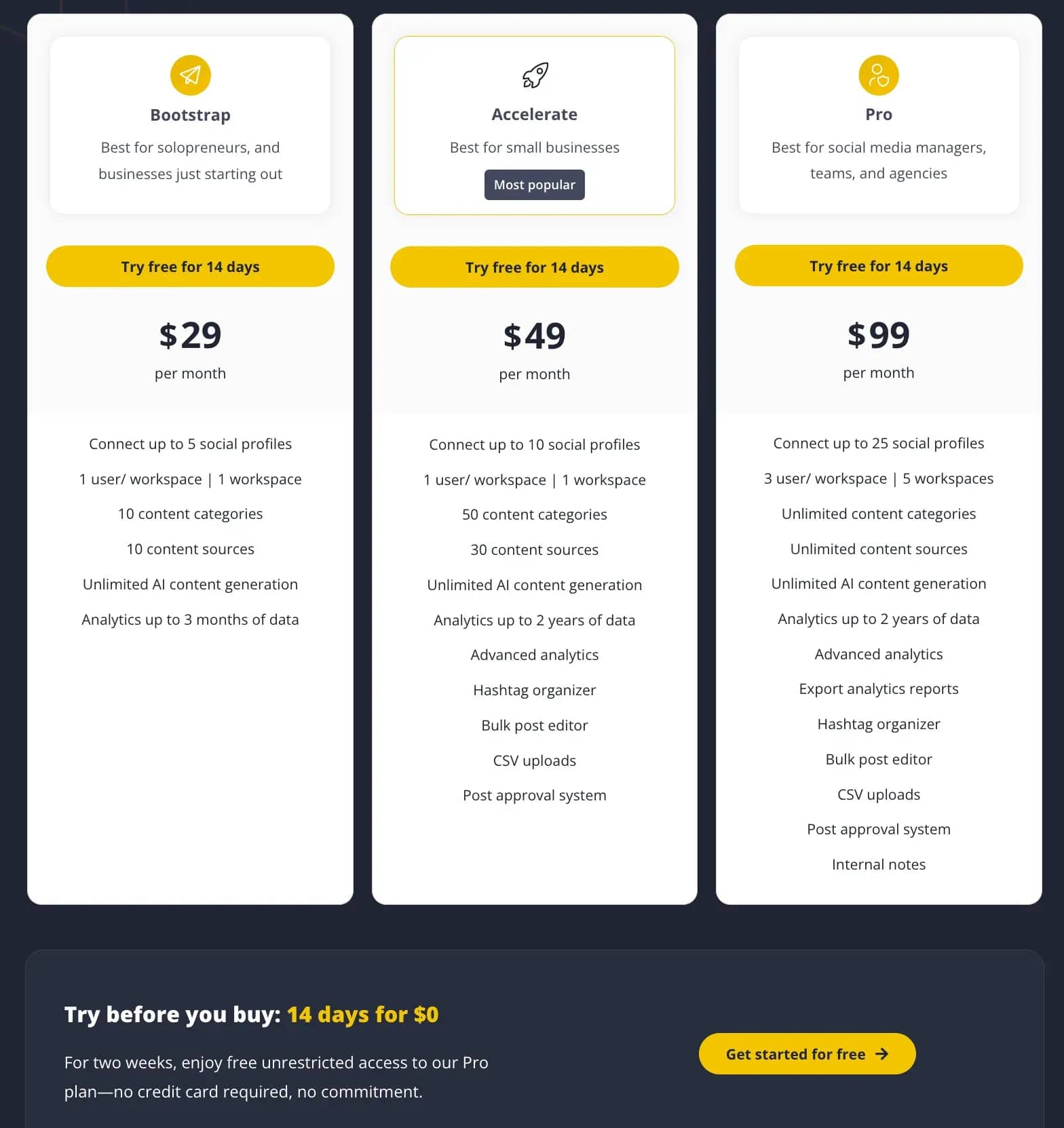
SocialBee
SocialBee is a scheduler in which content is distributed by category. For example, you can create separate categories for news, cases, helpful materials, and promotional publications.
Features:
- AI Copilot. The built-in AI helps not only with the text of an individual post but also with the general logic of the content plan. It can suggest topics and new features.
- Image generation. Right inside the editor, you can create creatives from a text description without switching to separate neural networks.
- Adaptation for different social networks. A single text can be quickly reworked for several platforms. For each social network, the service helps adjust the length, style, hashtags, and formatting individually.
- RSS integration. If you connect the RSS feed of a blog or website, SocialBee can automatically turn new materials into social media posts.
- Post lifespan. For promotions, sales, and seasonal offers, you can specify a date after which the post will automatically drop out of the queue and will no longer be posted.
Comment and Direct Message Automation
These tools automatically reply to comments and messages based on specified parameters.
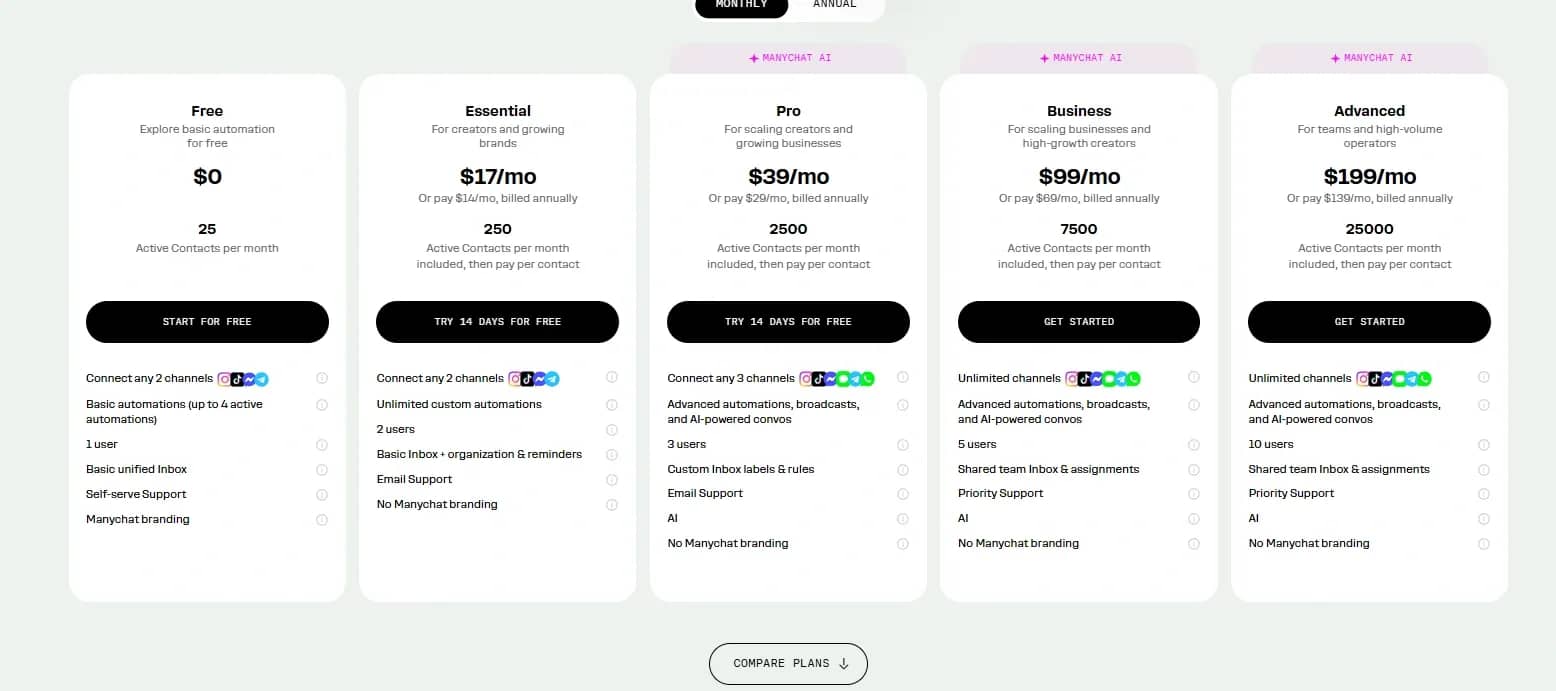
Manychat
Manychat is one of the most famous tools for automating comments and direct messages on Instagram.
Features:
- Official API integration. Manychat connects to Instagram, WhatsApp, and Facebook Messenger without browser emulation or sharing account passwords.
- Visual builder. Funnels and dialogues are assembled from ready-made blocks. You can set up questions, buttons, conditions, and various response branches without coding knowledge.
- Multichannel scenarios. You can use Instagram, WhatsApp, Messenger, Telegram, SMS, and email in a single scenario. For example, capture a lead from comments, continue the conversation in DM, and then send an email.
- Audience segmentation. Depending on replies and actions, users are assigned tags. This makes it possible to separate interested leads from those who just came for a free file, and launch different funnels for them.
- AI features. AI helps handle questions that were not pre-scripted in the scenario and generate more natural replies instead of identical templates.
Chatfuel
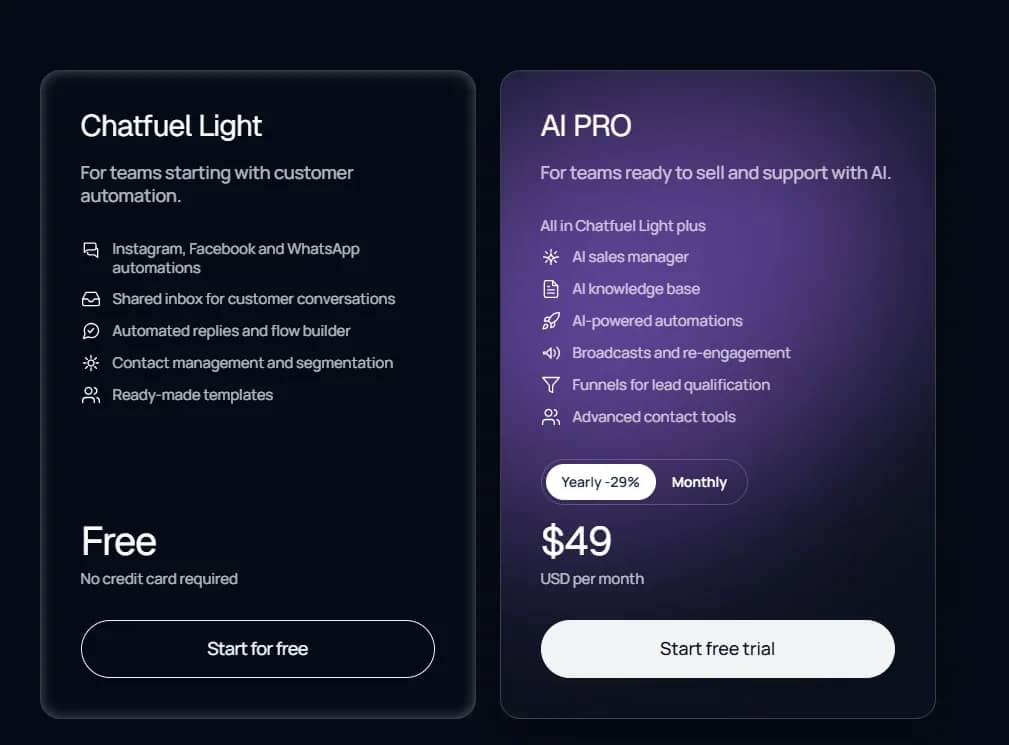
Chatfuel is a platform for automating sales and support on Instagram, WhatsApp, Facebook, and TikTok. The service resolves incoming messages, comments, and reactions to Stories, immediately passing captured contacts into the subsequent funnel.
Features:
- User attributes. This is a built-in database. Every user action (button click, text input) can be recorded in a custom attribute.
- Flexible triggers for operator handoff. The platform supports Metas' official protocol for passing control over a dialogue.
- Deep integration with ChatGPT and OpenAI. Chatfuel was one of the first to implement fully-fledged AI functionality.
- Lead qualification. Users are distributed into segments depending on their answers.
- Audience reactivation. Messages help win back inactive users and those who, for example, abandoned their carts.
- AI agents. AI consults clients, books them for services, and answers standard questions.
- Manager handoff. A complex dialogue can be passed to a human operator without losing chat history.
SendPulse
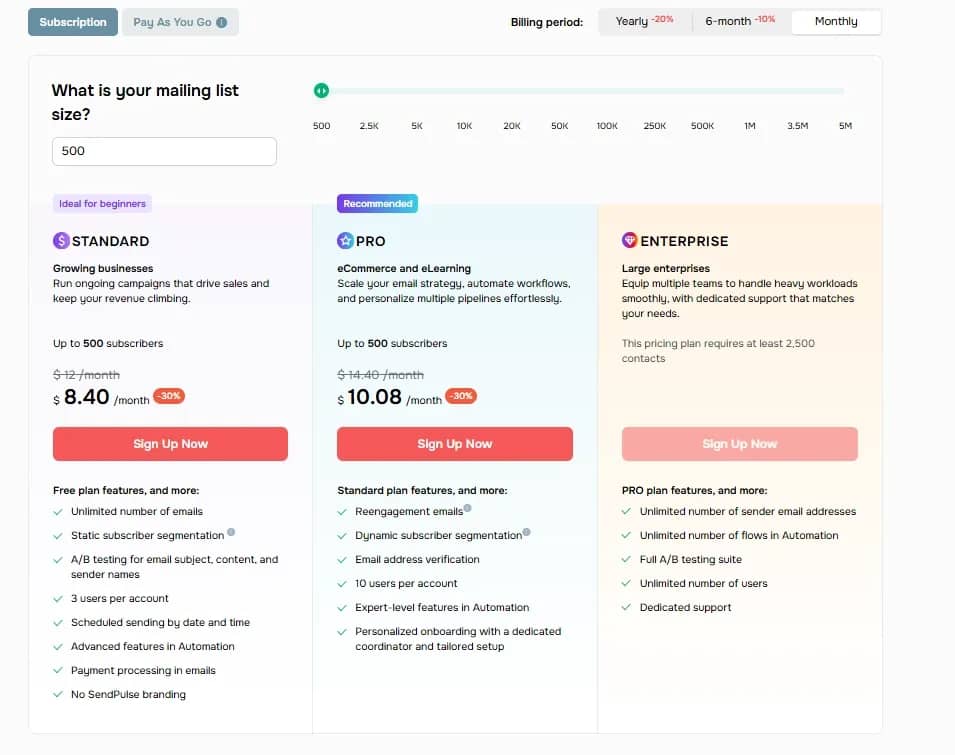
SendPulse is an omnichannel marketing platform with a unified bot builder for Telegram, Instagram, WhatsApp, Viber, and Facebook Messenger. Scenarios can be copied between platforms and linked with CRM, email newsletters, and other SendPulse tools.
Features:
- Simple visual builder. The bot creation interface is highly beginner-friendly. The entry barrier here is much lower than in Salebot.
- SendPulse Edu — an integrated platform for online courses. A unique feature of the service is creating personal accounts for students, uploading lessons, accepting homework, and issuing certificates. Chatbots serve as a tool to support learning.
- Built-in free CRM. A simple CRM system is integrated directly into the personal account. Leads from chatbots or forms filled on the website automatically land on a kanban board, where a manager can handle the deal.
- Wide geography and localization. The service operates on the international market, has multilingual support, and accepts payments in various currencies without issues with foreign cards for the CIS segment.
Browser Automation
Some platforms do not have an open API, and the required actions are available only through the website's interface. Browser robots replicate clicks, data entry, and file uploads, so they can be integrated into publishing, parsing, and data transfer paths between services.
Axiom.ai
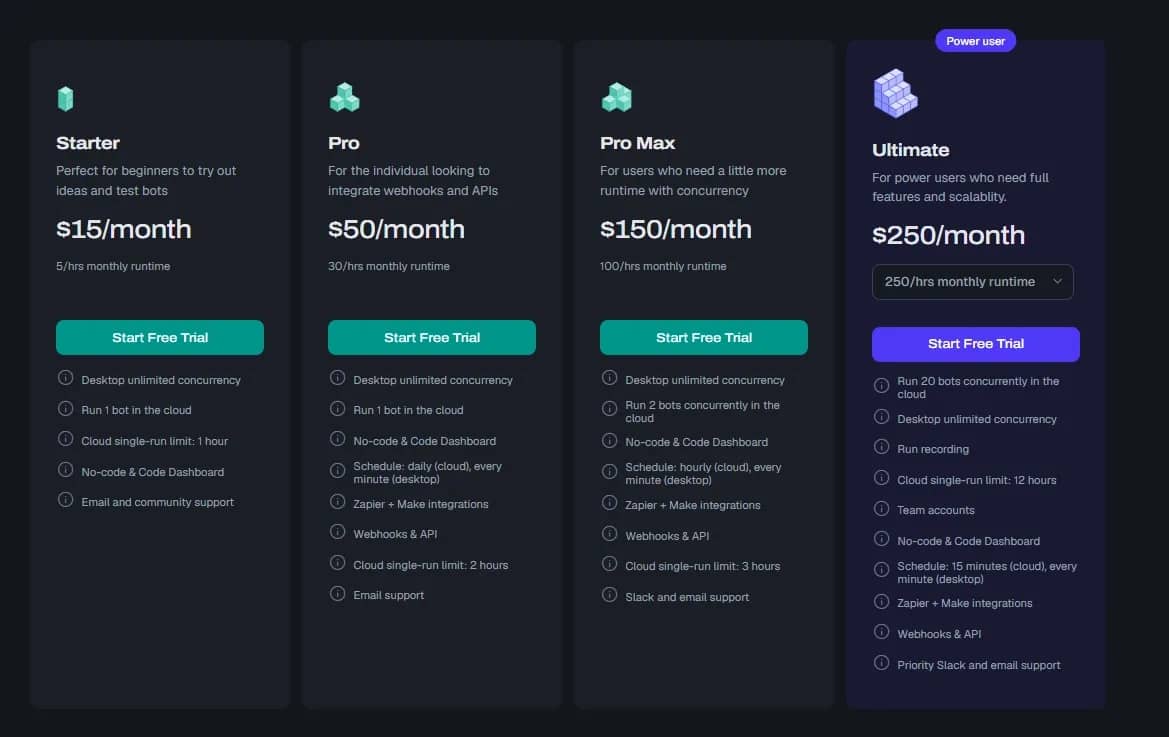
Axiom.ai is a powerful no-code/low-code platform for browser automation. The program clicks buttons, fills out forms, scrolls pages, and copies data on absolutely any website.
Features:
- Visual click-builder. You simply open the required website, enable recording, and click on interface elements. The system remembers the sequence itself.
- Advanced web scraping. The platform is ideal for mass data collection. A bot can open an online store website, click through all product cards, gather prices, specifications, and reviews, and automatically export all of this structured data to Google Sheets.
- ChatGPT and Claude integration. For example, a bot can open a review site, copy the text, send it to ChatGPT to analyze sentiment and generate a reply, and then automatically paste the generated text back into the response form on the website.
- Hybrid execution. Scenarios can run in two ways: in the Axiom.ai cloud — according to a schedule or trigger, or locally on your computer via a desktop application or Chrome extension.
- Code and external system integration. If the basic blocks are not enough, clean Puppeteer or Playwright code can be integrated into the scenario. Additionally, Axiom.ai seamlessly connects with Make, Zapier, and webhooks, turning any browser action into a fully-fledged API connector.
Browser Use
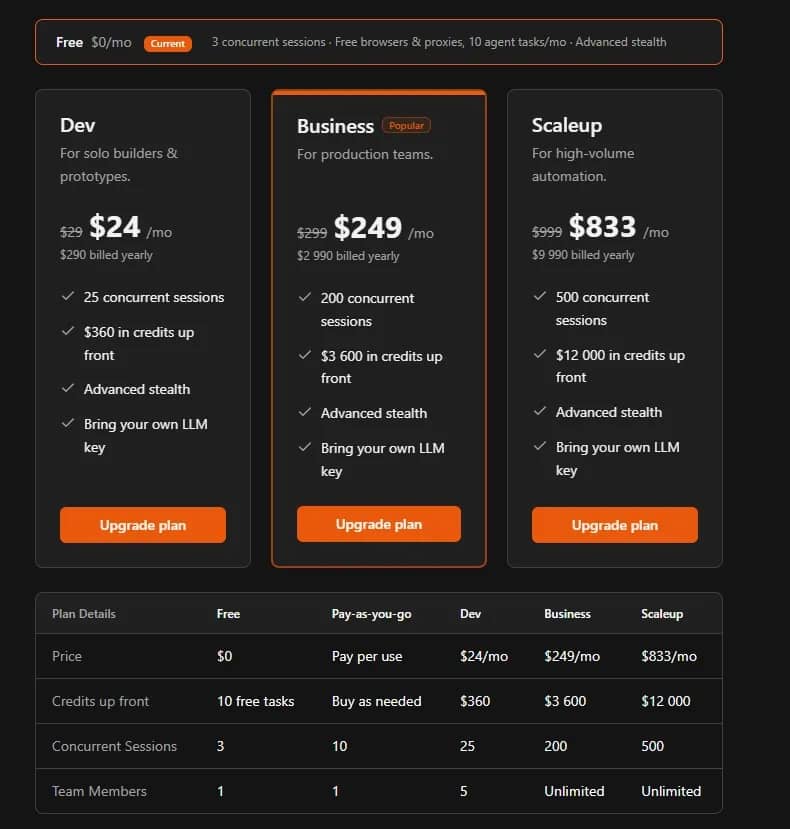
Browser Use is an open-source framework that grants an AI agent access to a browser. The model receives a task in plain text, analyzes the page, and selects the sequence of actions itself.
Features:
- Understanding website context. Website layout structure does not matter to it. If a "Buy" button changes color, shape, or moves to another corner of the screen — which would break Axiom.ai or Selenium — the AI agent will still find it based on the meaning of the text and context.
- Vision + DOM. The framework simultaneously strips clutter from the page code and takes screenshots. The AI clicks on exact coordinates on the screen based on computer vision.
- Working with real profiles. You can connect your existing Google Chrome profile to the agent. The bot will open the browser with your cookies and saved passwords — you won't have to log in again on sites where you are already authorized.
- Multi-tab capability. The agent can open new tabs, switch between them, compare information on different sites, and compile a single report.
Skyvern
Skyvern is an open-source AI platform for automating any actions in a web browser.
Features:
- Priority on visual analysis. The framework relies primarily on screenshots and visual recognition of elements via multimodal LLMs, rather than parsing HTML code.
- Autonomous pathfinding. It is sufficient to give the AI agent an end goal, and it will understand on its own through which intermediate pages and links it needs to pass to reach it.
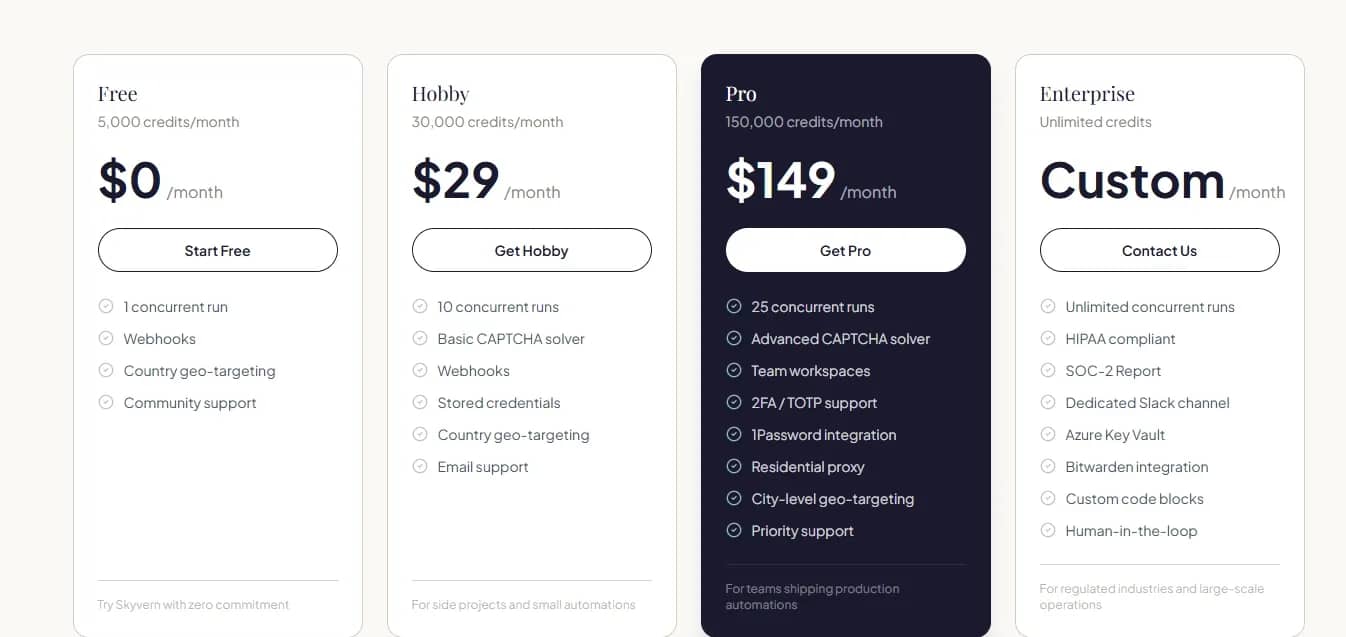
- Captchas & Anti-Bot. The service is already integrated with captcha-solving systems and residential proxy providers to bypass Cloudflare.
- Convenient dashboard. Unlike the code-only Browser Use, Skyvern offers a ready-made web interface for monitoring runs, viewing session video recordings, and logging errors.
- Turning websites into APIs. The platform allows you to wrap any complex action on a third-party website into a simple REST API request for integration into your CRM or n8n.
- Two models. The project code is open source on GitHub for free local execution, but a paid cloud platform also exists for distributed work across hundreds of threads.
Conclusion
Closing all your work with a single automation service is unlikely to succeed, but you can assemble a fully-functional workflow from several tools. A builder will manage the process, software will perform specific actions, and a neural network will process data and prepare replies. The main thing is to plan the scenario itself first.

Why Google Blocks Accounts and What Your Antidetect Has to Do With It
Google has once again complicated the mechanisms of digital identification by deploying a new, more sophisticated layer of protection based on proprietary HTTP headers. This quiet change caught most of the market off guard, triggering a wave of rushed updates. While others hastily released superficial 'fixes', we realized that we were dealing not with a minor issue but with a fundamental shift that required deep and comprehensive analysis.

SOCKS vs HTTP Proxy: What’s the Real Difference and Which One to Choose?
There are times when you don’t want a website to link the request back to your device. That’s where a proxy comes in, it acts like a middle layer and sends the request for you. The site sees the proxy’s info instead of yours. It’s a go-to trick when you’re trying to see a page that’s not available in your region, pull content that’s restricted by location, or avoid hitting a wall when sending lots of requests.

The Best Alternative to OBS Studio
Working with a webcam on many online platforms can turn into a real challenge. A strict oval or rectangular frame appears on the screen, but your image doesn’t align perfectly with it. As a result, the system blocks further progress, demanding perfect alignment, and your workflow is disrupted before it even begins.