
Best ChatGPT Plugins in 2026: What Actually Works
The classic Plugin Store was completely closed by OpenAI back on April 9, 2024. Old "plugins" in the form of independent extensions connected to the chat are a thing of the past. However, in the summer of 2026, the term returned to the official lexicon: OpenAI renamed its internal directory of service integrations and applications to the plugin catalog.
In this material, we will analyze: where ChatGPT plugins disappeared to and why they were closed, what is now called "plugins", and which extensions to add to simplify your life.
What happened to ChatGPT plugins: a brief history
In March 2023, OpenAI presented the Plugin Store. At its peak, the catalog had over 1,000 plugins from third-party developers. However, to use them, a user was required to:
- Create a new dialogue in advance.
- Manually select no more than 3 active plugins from the list.
- Hope that the model would guess to redirect the request to the right add-on itself.
If a fourth tool was needed during communication, a new chat had to be created from scratch. Users got confused, and most of the 1,000+ plugins had zero traffic. It is not surprising that by April 2024, the Plugin Store was closed, and the old plugin interface was completely disabled.
But in July 2026, plugins returned — though now users can use this name for one of four types of tools:
| Category | What it is | Where it is located | Do you need to install it |
| Built-in tools | Native web search, data analysis, image generation, and file handling | Built into the standard ChatGPT chat window | No, available by default |
| Custom GPTs | Specialized versions of ChatGPT trained for a specific role, with loaded knowledge bases and instructions | Explore GPTs section in the sidebar | No, launched in one click |
| Apps and connectors | Official integration modules with external services (Gmail, Google Drive, Notion, GitHub, etc.) | Account settings — plugin/app catalog | Yes, service authorization required |
| Browser extensions | External programs for Chrome/Firefox that change the chat UI or embed the bot on third-party sites | Chrome Web Store / Firefox Add-ons | Yes, installed in the browser |
Almost 80% of the tasks for which a separate plugin was downloaded in 2023 are today performed by the base ChatGPT model without third-party modules. But some hits received relevant analogs: for example, instead of Wolfram Alpha, you can now use custom Wolfram GPT from the GPT Store or the native Data Analyst (Python) block, and Prompt Perfect is available as a browser extension of the same name — Prompt Perfect GPT.
Best plugins and GPTs worth adding
AskYourPDF
What it does: allows you to upload books, manuals, and legal contracts hundreds of pages long and ask questions about them.
Why it's better than base ChatGPT: finds exact quotes in ultra-large documents faster without losing context.
Limitations: free limit on the size and number of uploaded PDF files per day.
Canva
What it does: creates templates for presentations, social media posts, banners, and logos based on a text description.
Why it's better than base ChatGPT: provides a link to an editable project in Canva with layers and fonts, rather than a static image.
Limitations: a Canva Pro subscription will be required to download some elements.
Code Copilot
What it does: an assistant for writing, refactoring, and searching for bugs in code in 40+ programming languages.
Why it's better than base ChatGPT: takes into account modern framework standards (Next.js, Python 3.12+, Tailwind v4).
Limitations: does not replace a full-fledged IDE when working with large monorepos.
Consensus
What it does: searches for answers among 200M+ peer-reviewed scientific articles (PubMed, IEEE, ArXiv) and gives a summary with direct quotes.
Why it's better than base ChatGPT: does not make up facts and provides links to real scientific research with DOI indications.
Limitations: searches predominantly in English-language sources.
Data Analyst (built-in module)
What it does: executes Python code in a built-in "sandbox", analyzes Excel tables, builds graphs, calculating trends and regressions.
Why it's better than base ChatGPT: errors in mathematical calculations are excluded, as calculations are performed by the Python interpreter.
Limitations: execution time for a single script is resource-limited.
Diagrams: Show Me
What it does: draws flowcharts, mind maps, Gantt charts, and architecture diagrams (Mermaid/PlantUML).
Why it's better than base ChatGPT: visualizes complex logic and algorithms in the form of clear graphs.
Limitations: complex diagrams with hundreds of elements can look cluttered.
Doc Maker
What it does: generates and exports ready-made files in PDF, DOCX, XLSX, or HTML formats directly from the dialogue.
Why it's better than base ChatGPT: outputs not just markdown text, but a print-ready formatted document.
Limitations: complex corporate layout formatting can get distorted.
Grimoire
What it does: a creative agent for vibe coding — creates working websites and mini-games from a single prompt.
Why it's better than base ChatGPT: outputs ready-made zip archives with the project and detailed deployment instructions.
Limitations: ideal for MVP and frontend, but complex backend architecture will have to be edited manually.
SEO Assistant & Content Planner
What it does: helps form a semantic core, generate meta tags, optimize articles to meet E-E-A-T requirements, and cluster queries.
Why it's better than base ChatGPT: takes into account relevant search engine algorithms and avoids over-optimization.
Limitations: query frequency data is recommended to be double-checked in Wordstat or Ahrefs.
Zapier AI Actions
What it does: connects ChatGPT with 7,000+ services (Google Sheets, Trello, Slack, Hubspot).
Why it's better than base ChatGPT: allows the neural network to perform actions in the real world — send emails, create tasks, update CRM.
Limitations: requires separate setup of integrations on the Zapier side.
Notion / Gmail / GitHub Connectors (native plugins)
What it does: seamlessly connects ChatGPT to your working knowledge base and email.
Why it's better than base ChatGPT: allows writing prompts like "Find requirements for project X in Notion and write emails to all participants from Gmail."
Limitations: available only on paid corporate and personal plans.
Best browser extensions for ChatGPT
If you need to boost the functionality of the chatgpt.com website itself, use proven browser extensions:
| Extension | Format / Purpose | Price |
| AIPRM for ChatGPT | Huge library of ready-made SEO, marketing, and coding prompts right in the chat window | Free / Pro from $9/mo |
| Superpower ChatGPT | Adds chat folders, search history, text auto-replacement, and dialogue export | Free |
| ChatGPT for Google | Displays neural network answers in parallel with standard search engine results | Free |
| HARPA AI | A hybrid of ChatGPT and a browser parser: can track prices, make summaries, and automate clicks | Free / Freemium |
| Sider / Monica | Sidebar with a neural network, available on any website via hotkeys | Freemium |
| YouTube Summary with ChatGPT | Extracts subtitles from YouTube videos and makes a summary in seconds | Free |
| Prompt Genius | Allows saving custom prompt templates and calling them via / syntax | Free |
| WebChatGPT | Adds relevant search results from web SERP to answers of the free ChatGPT version | Free |
How to install a plugin or GPT in 2026: step-by-step guide
The connection process depends on which specific tool you want to use.
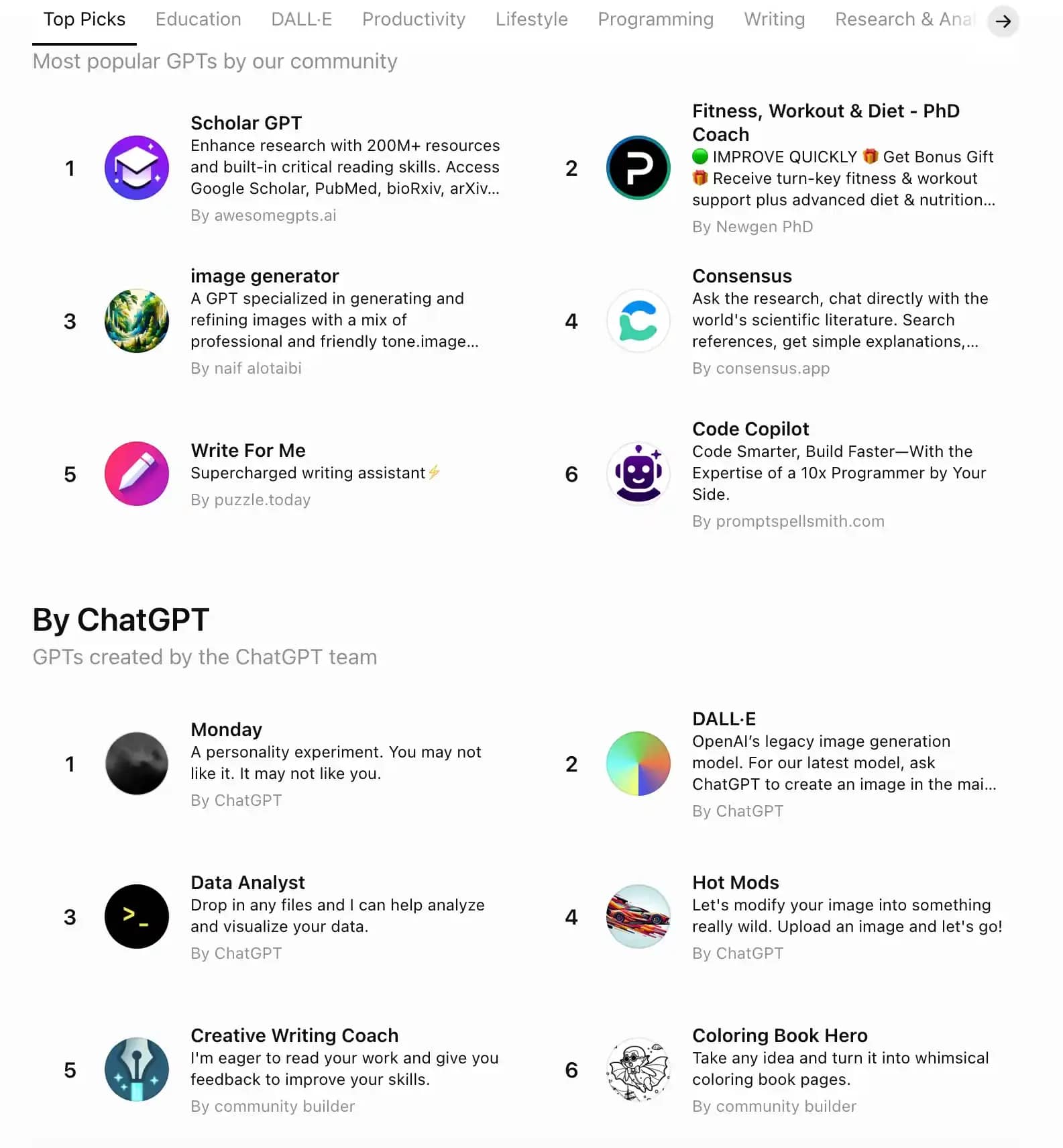
Scenario A: connecting custom GPT (from GPT Store)
- Log in to the chatgpt.com website.
- In the left sidebar, click on the Explore GPTs section.
- Use the search bar or select a category (Writing, Productivity, Research, etc.).
- Click on the desired GPT, and then click Start Chat. The tool will pin to the panel on the left.
Scenario B: connecting an app-connector
- Click on your profile icon in the lower left corner and open Settings.
- Go to the Apps & Integrations (or Plugins) tab.
- Find the desired service (for example, Google Drive or Notion) and click the Connect button.
- Confirm authorization on the side of the connected service via the OAuth pop-up window.
Pricing grid and access features
- ChatGPT Free — basic functionality is available, limited number of requests to DALL-E 3, web search, and Data Analyst. Part of public GPTs is available for reading.
- ChatGPT Plus ($20/mo) — full access to GPT Store, creating custom GPTs, connecting integrations, and priority models.
- Team / Enterprise — extended limits and a guarantee that your data is not used to train models.
Information for users from Russia: a foreign bank card is required to pay for a Plus subscription. In the absence of direct access to OpenAI services, many webmasters use API aggregators (for example, TypingMind, Chatbox, or OpenRouter) supporting similar logic for connecting system prompts and functions.
What to consider when working with ChatGPT plugins
When working with third-party add-ons, it is important to observe basic security hygiene:
- Beware of GPTs clones. There are unscrupulous authors in the GPT Store copying names of famous brands. Always check author verification and the number of dialogues (the original Consensus or Canva has a counter in the millions).
- Memory isolation. Custom GPTs do not have access to your main ChatGPT memory and history of other chats. If you need to pass context about your project to a new GPT, add it in the primary prompt.
- Confidential data protection. Do not upload trade secrets, passports, personal customer data, or API keys to third-party GPTs or browser extensions. Third-party agent instructions may contain vulnerabilities allowing attackers to extract your uploaded files.
Before installing third-party plugins or extensions, check — perhaps the base neural network can already solve your task out of the box. And always pay attention to the publication date of guides, so as not to waste time searching for non-existent buttons.
Frequently asked questions
- Yes, but not in the form of the classic 2023 Plugin Store. Today, "plugins" mean either custom agents from the Explore GPTs section or native app connectors (Gmail, Notion, GitHub) connected via profile settings.
- To connect the required tool, go to the Explore GPTs section in the left sidebar and select a suitable bot. To connect service integrations, open Settings — Apps & Integrations and authorize in the required service.
- Basic access to search and launching many public GPTs is open to free tier users. However, a ChatGPT Plus, Team, or Enterprise subscription is necessary to lift message limits, use deep connectors, and create custom GPTs.
- An old plugin was an external API script that had to be manually connected to a specific dialogue. A custom GPT is a full-fledged autonomous assistant with pre-configured system instructions, its own knowledge base, and the ability to perform actions via API.
- It is safe if you follow security hygiene: choose only verified authors with millions of dialogues and never upload confidential documents, passwords, or personal data to third-party GPTs or browser extensions.
- Yes, via the GPT Builder constructor. You can assemble your own agent in 5–10 minutes without programming knowledge — just describe the task to the bot in plain language and upload the necessary reference files.

Why Google Blocks Accounts and What Your Antidetect Has to Do With It
Google has once again complicated the mechanisms of digital identification by deploying a new, more sophisticated layer of protection based on proprietary HTTP headers. This quiet change caught most of the market off guard, triggering a wave of rushed updates. While others hastily released superficial 'fixes', we realized that we were dealing not with a minor issue but with a fundamental shift that required deep and comprehensive analysis.

SOCKS vs HTTP Proxy: What’s the Real Difference and Which One to Choose?
There are times when you don’t want a website to link the request back to your device. That’s where a proxy comes in, it acts like a middle layer and sends the request for you. The site sees the proxy’s info instead of yours. It’s a go-to trick when you’re trying to see a page that’s not available in your region, pull content that’s restricted by location, or avoid hitting a wall when sending lots of requests.

The Best Alternative to OBS Studio
Working with a webcam on many online platforms can turn into a real challenge. A strict oval or rectangular frame appears on the screen, but your image doesn’t align perfectly with it. As a result, the system blocks further progress, demanding perfect alignment, and your workflow is disrupted before it even begins.