
The Best Free Email Services: What to Choose and What the Catch Is
Updated: October 2026
Let's be honest: servers cost money, so with free email services, we always pay with something anyway. In some places, you have to endure annoying banners; in others, algorithms carefully examine your receipts and newsletters to target ads more precisely; and some provide immaculate cleanliness but slash storage down to 1 GB in the hope that you will eventually buy a paid subscription.
Which free email services deserve attention and how to use them without discovering an abrupt account suspension — we break it down in this article.
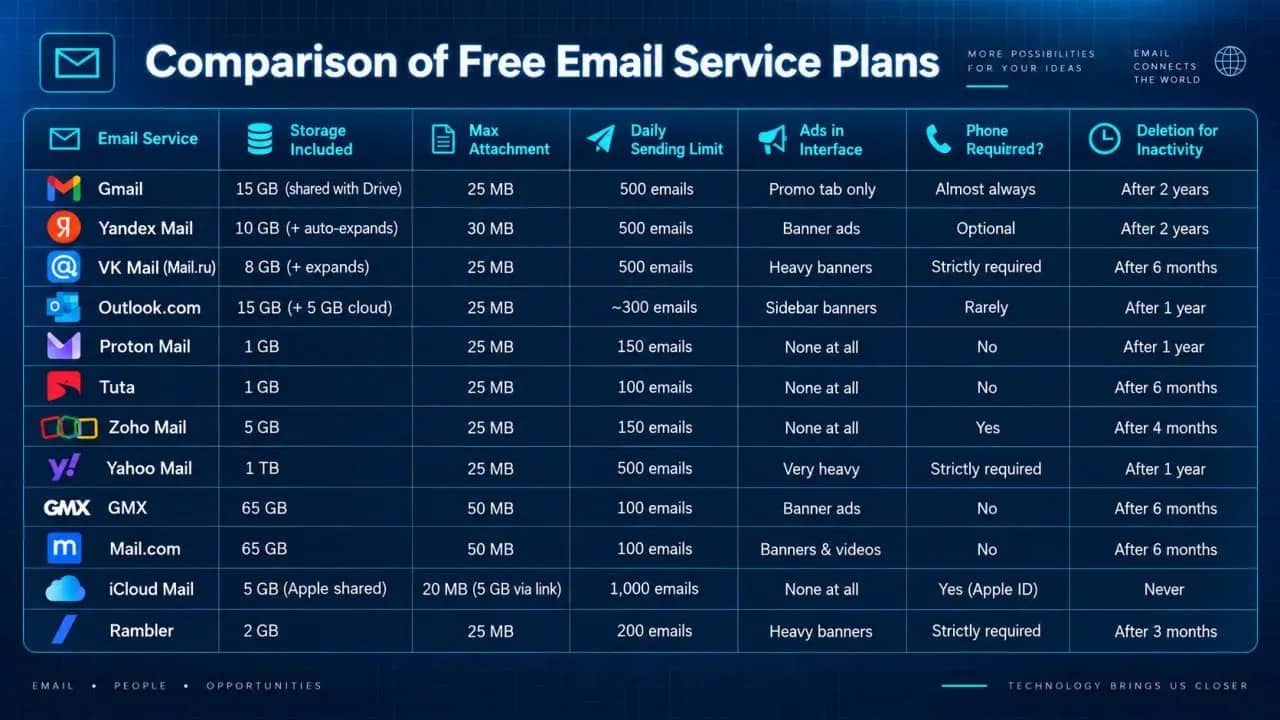
Comparison of Free Email Service Plans
A quick answer for those who don't want to dig deep: for everyday life and international services, take Gmail; for purchases and deliveries in Russia, choose Yandex Mail; for maximum privacy without surveillance, pick Proton Mail or Tuta; and if you need a huge warehouse for files, go with Yahoo and its free terabyte. If you strictly do not want to expose your phone number, register with Tuta, Mail.com, or GMX.
Gmail
The most popular option. Emails arrive anywhere in the world in an instant, the spam filter works like clockwork, and the interface is familiar to everyone.
The catch: 15 GB is shared between Mail, Google Drive, and Google Photos. If you clog the drive with backups or videos, the email simply stops receiving new incoming messages. When registering, it almost always requires a phone number.
Who should use it: for every day, for studies, work, and sign-ups on international services.
Yandex Mail
The main workhorse for the Russian-speaking internet. It opens very quickly, neatly organizes receipts, tickets, and newsletters on its own, and the space for emails expands automatically as the inbox fills up.
The catch: ad banners are displayed in the free version. Foreign websites are sometimes suspicious of inboxes on .ru domains.
Who should use it: for everyday life in the Russian Federation — deliveries, marketplaces, utility bills, and Gosuslugi.
VK Mail (Mail.ru)
A familiar inbox to everyone with practically unlimited email storage. It runs fast and is tightly integrated with VK services.
The catch: there really is a lot of advertising, including fake promo emails at the very top of the inbox. Registration is strictly by phone number via VK ID, and if you do not log in to the mail for six months, the mailbox will be blocked and cleared.
Who should use it: as a backup inbox for less important subscriptions, games, and reward sites.
Outlook.com
A service from Microsoft with a pleasant business-oriented interface. It provides 15 GB for mail and a separate 5 GB in the OneDrive cloud, plus you can open Word and Excel files directly in the browser.
The catch: an advertising sidebar sits on the right in the web version, and new users initially have their daily sending limits curtailed out of spam suspicion.
Who should use it: for resumes, business correspondence, and working with office documents.
Proton Mail
A Swiss service for privacy enthusiasts. All correspondence is encrypted directly on your device, so even the developers cannot read your emails. There are no ads or trackers inside.
The catch: the free tier provides only 1 GB of storage, and you cannot connect your email to a regular desktop client like Thunderbird — you will have to use the browser or their mobile app.
Who should use it: for sensitive correspondence, crypto, and critical accounts where confidentiality comes first.
Tuta
The German counterpart to Proton, which encrypts literally everything: from email text and attachments to message subject lines and contact lists. Complete anonymity when creating an inbox — no phone numbers required.
The catch: they give only 1 GB, and if you do not log in to your mailbox at least once in six months, the account is simply deleted without any chance of recovering the address.
Who should use it: those who need maximum privacy and will definitely not forget to check their email regularly.
Zoho Mail
An email service built for business. It has a superpower: it is the only service that still allows you to link your own custom domain for free for a company of up to 5 people (5 GB per user). There are no ads inside.
The catch: access via IMAP and POP3 is locked on the free tier — you have to read emails strictly through the website or the proprietary Zoho app.
Who should use it: aspiring entrepreneurs and freelancers looking to set up a professional-looking email like name@mysite.ru for free.
Yahoo Mail
The champion of generosity — it offers a whole terabyte for free. You can send heavy archives for years and never have to hit the "Empty Trash" button.
The catch: you will have to pay for that terabyte by viewing a massive amount of advertising. In addition, the service does not have the best track record regarding security due to past breaches.
Who should use it: those who regularly send lots of heavy files and do not want to mess around with cloud storage drives.
GMX Mail
A reliable European service from Germany. It provides a solid 65 GB, allows attaching files up to 50 MB, and does not ask for a phone number when creating an account.
The catch: the design is stuck somewhere in the early 2010s, the interface is riddled with banners, and the mailbox can be deactivated after 6 months of inactivity.
Who should use it: an excellent backup option for registrations on international sites without having to disclose your phone number.
Mail.com
The sibling of the GMX service, but with a neat trick: upon registration, you can choose your address domain ending from two hundred options, such as @consultant.com, @engineer.com, or @techie.com.
The catch: the same 65 GB and a substantial ad load, including popping video ads.
Who should use it: freelancers who want a professional or catchy address tailored to their field without purchasing their own domain.
iCloud Mail
Proprietary email service from Apple. A remarkably clean interface, not a single banner, and heavy files up to 5 GB are sent smoothly via a Mail Drop link.
The catch: 5 GB is quickly eaten up by iPhone photo backups. Setting up an inbox without an Apple device is not an option.
Who should use it: Apple device owners for personal correspondence and purchases.
Rambler
One of the old-timers of the Russian internet that has significantly fallen behind competitors today. Storage is minimal (only 2 GB), the interface is cluttered with news and banners, and the spam filters perform unreliably.
The catch: an aggressive inactivity timer — if you do not log in for 90 days, the mailbox is blocked.
Who should use it: only if you urgently need a legacy address in the .ru zone and have nothing else on hand.
Where to Set Up a Free Email Without a Phone Number
If you do not want to give away your real phone number to a service, the choice narrows down to several reliable platforms:
- Tuta — does not ask for a phone number at all; solving a simple captcha is enough.
- Mail.com and GMX — only ask for a backup email address just in case.
- Proton Mail — usually lets you register without a phone number if you connect from a clean IP without suspicious activity.
- Yandex Mail — during registration, you can click "I don't have a mobile phone" and pick a security question, but if a VPN is turned on, a phone number may still be required.
Important caveats when working with free email services without a linked phone number:
- Difficulty of account recovery. If you forget the password to your inbox on Tuta or Proton Mail without having a linked phone number, restoring access to the contents of your emails will be impossible.
- Attitude of anti-fraud systems. Accounts without a verified phone number have an inherently lower trust score in spam-protection algorithms. If you register an inbox and immediately begin blasting dozens of emails containing links from it, the service will instantly block outgoing traffic.
What the Creators of Free Services Keep Quiet About
Even the best free services have limitations that can significantly complicate your workflow. That is why it is worth knowing about them in advance.
- Sending limits: free email is not designed for bulk newsletters. If you attempt to send a commercial proposal to a hundred clients at once, Gmail or Yandex will immediately suspend your outbound sending for 24 hours over spam suspicions. The typical cap is between 100 and 500 emails per day.
- Deletion for inactivity: almost all free mail providers have an inactivity timer. For Rambler it is only 3 months, for Tuta, Mail.ru, and GMX it is 6 months, and for Gmail and Yandex it is 2 years. If you do not log in via a browser for a long time, the email archive will be purged, and the attractive handle might be given away to someone else.
- The IMAP protocol: free Proton Mail and Zoho disable the ability to retrieve mail via third-party desktop email clients. If you want to read emails in Outlook or Apple Mail, you will need a paid subscription.
Conclusion
A free email service is a utility that requires a conscious choice. There is no one-size-fits-all free service that simultaneously gives terabytes of space, absolute confidentiality, zero ads, and no phone verification. The ideal user setup in 2026 is role separation: a clean, secured inbox for critical accounts, a separate email for work and routine tasks, and an independent phone-free inbox for third-party registrations.
Frequently asked questions
- Tuta, Mail.com, and GMX allow you to register an account without mobile number verification. Proton Mail also provides the option to sign up without a phone number, provided the system does not deem your network connection suspicious.
- Yes, Proton Mail, Tuta, Zoho Mail, and iCloud Mail are available for free without intrusive banner ads.
- For most providers, the baseline threshold is up to 500 emails per day when sending through a browser. For privacy-focused services like Proton Mail and Tuta, free limits are stricter — between 100 and 150 messages per day.
- For signing up on foreign services, crypto exchanges, and subscription platforms, it is preferable to use Gmail or Outlook. They hold the highest trust ratings among international anti-spam filters.

Why Google Blocks Accounts and What Your Antidetect Has to Do With It
Google has once again complicated the mechanisms of digital identification by deploying a new, more sophisticated layer of protection based on proprietary HTTP headers. This quiet change caught most of the market off guard, triggering a wave of rushed updates. While others hastily released superficial 'fixes', we realized that we were dealing not with a minor issue but with a fundamental shift that required deep and comprehensive analysis.

SOCKS vs HTTP Proxy: What’s the Real Difference and Which One to Choose?
There are times when you don’t want a website to link the request back to your device. That’s where a proxy comes in, it acts like a middle layer and sends the request for you. The site sees the proxy’s info instead of yours. It’s a go-to trick when you’re trying to see a page that’s not available in your region, pull content that’s restricted by location, or avoid hitting a wall when sending lots of requests.

The Best Alternative to OBS Studio
Working with a webcam on many online platforms can turn into a real challenge. A strict oval or rectangular frame appears on the screen, but your image doesn’t align perfectly with it. As a result, the system blocks further progress, demanding perfect alignment, and your workflow is disrupted before it even begins.