The revolutionary Canvas 3.0 spoofing technology in Linken Sphere is a true breakthrough in the anti-detect industry!
In this article, we compare well-known products in real-world use — based on a popular fingerprint-checking service — and explain how to distinguish the truth from marketing promises.
Introduction
A stable Canvas in a profile across devices with different GPUs is often used in antidetect browser advertising as proof of high-quality spoofing. However, the natural rendering of the same image under such conditions usually yields different results. Therefore, what matters is not the stability itself, but the method by which it is achieved.
In this article, we will break down the main Canvas spoofing methods and show exactly how some antidetect browsers achieve perfect results on well-known checkers, yet actually fail in checks by real anti-bot systems. Using tests in FingerprintPro as an example, we will compare the impact of different Canvas spoofing implementations on the Tampering ML Score, and then examine a next-generation spoofing implementation — Canvas 3.0 in Linken Sphere.
What is Canvas and where is it used?
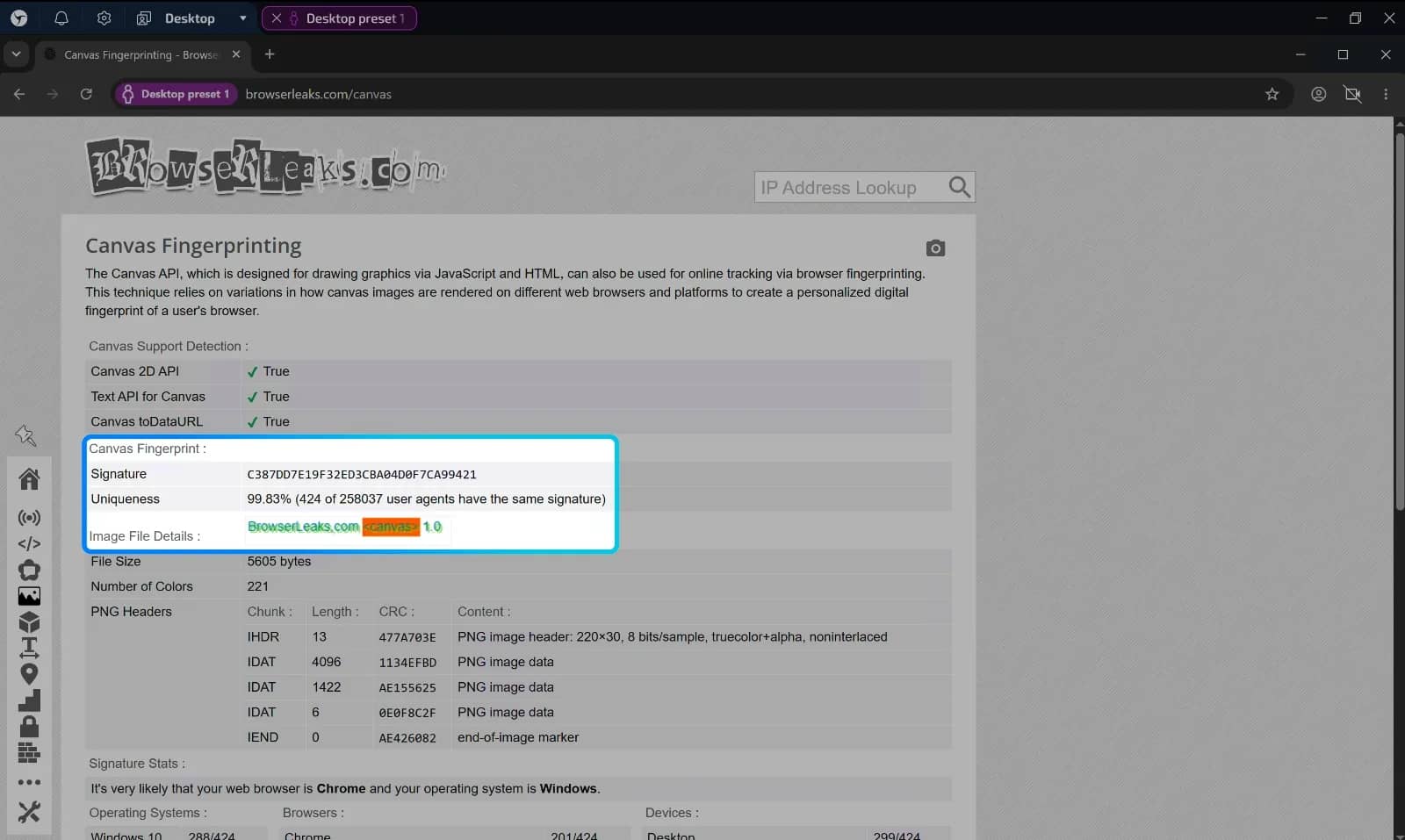
Canvas is an HTML element that allows a page to create a raster image directly in the browser. A script can get a 2D context to draw lines, shapes, gradients, and text, or use WebGL to render 3D graphics. Unlike standard HTML elements, Canvas does not store the image as a set of DOM objects: the result of its operation is an array of pixels.
This feature is used not only for rendering charts and visual effects but also for browser identification. The technique is known as Canvas Fingerprinting. A website creates a hidden < canvas > element and asks the browser to draw a predefined object: for example, text with a specific font, color transitions, geometric shapes, shadows, and other elements. After that, the page reads the rendering result.
The connected anti-bot independently converts the resulting pixels into a string or byte array, and then calculates a compact signature. This can be a cryptographic hash or a standard hash function. In some implementations, the hash itself is sent to the server, while in others, the encoded result is sent, from which the server generates its own signature.
Why might the same drawing differ across different browsers? The final pixels depend on the entire rendering chain: font files and their substitution mechanisms, anti-aliasing algorithms, the operating system, the browser engine version, color rendering parameters, hardware acceleration, the graphics card, and the driver.
Each individual difference is usually small. For example, a letter might have a slightly different outline, a gradient might differ by a few color values, and the edge of a shape might be anti-aliased differently. But the combination of such differences sometimes proves to be quite characteristic of a specific configuration. That is why Canvas is considered one of the entropy sources for a browser fingerprint. In this context, the word "unique" means statistically rare, rather than guaranteed to be unrepeatable: two identically configured computers with the same hardware can produce the same result, whereas a computer might start producing a different result after an update to its software or hardware environment.
The anti-bot system can store the resulting signature and use it for subsequent requests. Typically, Canvas is correlated with an already known session, account, or a set of other features: cookies, IP address and network parameters, browser characteristics, WebGL, user behavior, and so on. Therefore, Canvas Fingerprinting is not a standalone identifier, but rather one of the important signals.
Thus, the value of Canvas for user identification systems stems from a combination of two properties: it is accessible to the page without installing additional software, and it is capable of reflecting the characteristics of the real graphical environment.
Evolution of Canvas Spoofing Technologies in Antidetect Browsers
Like many fingerprint spoofing technologies in the industry that you actively use every day, Canvas spoofing has been gradually refined. Antidetect browser developers have constantly been looking for a way to make it less noticeable to anti-bot systems.
The first generation of spoofing worked as crudely and clumsily as possible. The main method of altering the fingerprint was adding pixels or other text directly onto the canvas. Thus, in addition to the content requested by the script, other details were added, which affected the final hash of the result. Over time, analytical systems were improved, and this method of spoofing became easily detectable.
Then the industry arrived at a method that involves applying noise to the image. This is undoubtedly better than the previous option, but it is still quite often detected by powerful anti-bot systems, since the resulting picture is still altered. Perhaps not as radically as in past implementations, but it is enough to detect the very fact that spoofing was applied, which makes the user more suspicious in the eyes of the anti-bot system. That is exactly why we, like most representatives of other antidetects, recommended avoiding Canvas spoofing whenever possible and resorting to it only in exceptional cases.
Since the spoofing is carried out precisely by applying noise to the actual GPU rendering result, there are a number of known limitations to the current generation of spoofing:
- The inability to obtain an arbitrary Canvas result: you cannot simply force a profile to return the exact same result that a desired graphics card produces. The result will still be 100% unique.
- When changing the device or GPU, the fingerprint also changes. By launching the same profile on different PCs, you will see that the fingerprint will change, because each GPU renders the picture in its own way. Yes, thanks to the noise, the fingerprint in both cases will not match the results of the GPU actually installed in the PC. But it will not match between different physical devices either.
Why a perfect result on a checker can be deceptive
Recently, in an attempt to improve the market appeal of their products, developers of some popular antidetect browsers introduced a supposedly innovative Canvas spoofing method that allows obtaining a non-unique Canvas that remains constant across devices, even if they have different GPUs (or none at all), and even if the devices have radically different OSs (for example, on Windows and macOS devices, the profile will produce the exact same fingerprint).
And at first glance, this sounds like a real breakthrough in the industry, but the devil is in the details.
Earlier we touched upon two methods, and in both cases, to obtain a different fingerprint, it was necessary to change the content or the method of applying a glyph to the image. But what if, instead of this, you simply replace the rendered picture entirely with a pre-prepared one?
Since users often check the performance of spoofing on the exact same checkers, which use a specific script with the same content to render images that has remained identical for many years in a row, collecting the results of already rendered pictures from different GPUs and substituting them during the check is a rather trivial task.
You visit a page — the antidetect sees the code it recognizes for rendering a specific picture and, instead of actually rendering it, replaces it with a pre-prepared drawing obtained on the desired GPU.
From the user's perspective, based on the checker's results, everything looks truly amazing: the antidetect spoofs the Canvas, provides a non-unique hash, and the result is stable across different devices. Just perfect, isn't it?
However, looking deeper, such an approach is simply unviable in real-world conditions. Every anti-bot system uses its own script to create an image via Canvas, with unique glyphs, sizes, and content on it. Moreover, some systems change the request with every new visit, generating the content for the image randomly.
What does this mean in practice?
Remember that to replace the picture entirely, you need the picture itself, which has already been rendered by the desired graphics card? This means that for every script that draws an image via Canvas, a result must already be prepared.
Ask yourself: is it possible to prepare pictures for all existing anti-bot systems in advance? And what if every page refresh is an entirely new canvas with a request to render different content?
If you need to spoof two or three pictures from a couple of checkers whose code does not change, this will work and look perfect. But for real tasks, this approach is simply impossible to implement correctly.
Representatives of these products will claim that spoofing images on checkers is merely a demonstration of how the technology works, and that in addition to this, they have successfully implemented spoofing for real anti-bot systems, such as Google, Meta, and other major solutions on the market.
Let's assume this is actually true, but then a second question arises: what will happen to your accounts when the risk assessment system changes the content that is rendered on the image?
Say, instead of the text "`BestCanvasImage123`", it asks the device to render "`bestcanvasimage123`". Only three characters have changed, but it is already a completely different picture.
In such a situation, there are usually two possible scenarios depending on the selected mode and the specific implementation of the spoofing:
- The antidetect no longer sees the fingerprinting code it recognizes and, instead of the pre-prepared picture, will render a new one, but using the previously described method of applying noise. As a result, the new Canvas fingerprint no longer matches the expected one. In addition to the change in the fingerprint itself, the anti-bot system sees that the new Canvas is artificial, since noise has been applied to the image.
- Or, even worse, instead of applying noise, the browser will simply return your real Canvas fingerprint and allow the anti-bot system to easily link all the accounts you use from this device.
How to independently verify the real performance of Canvas spoofing
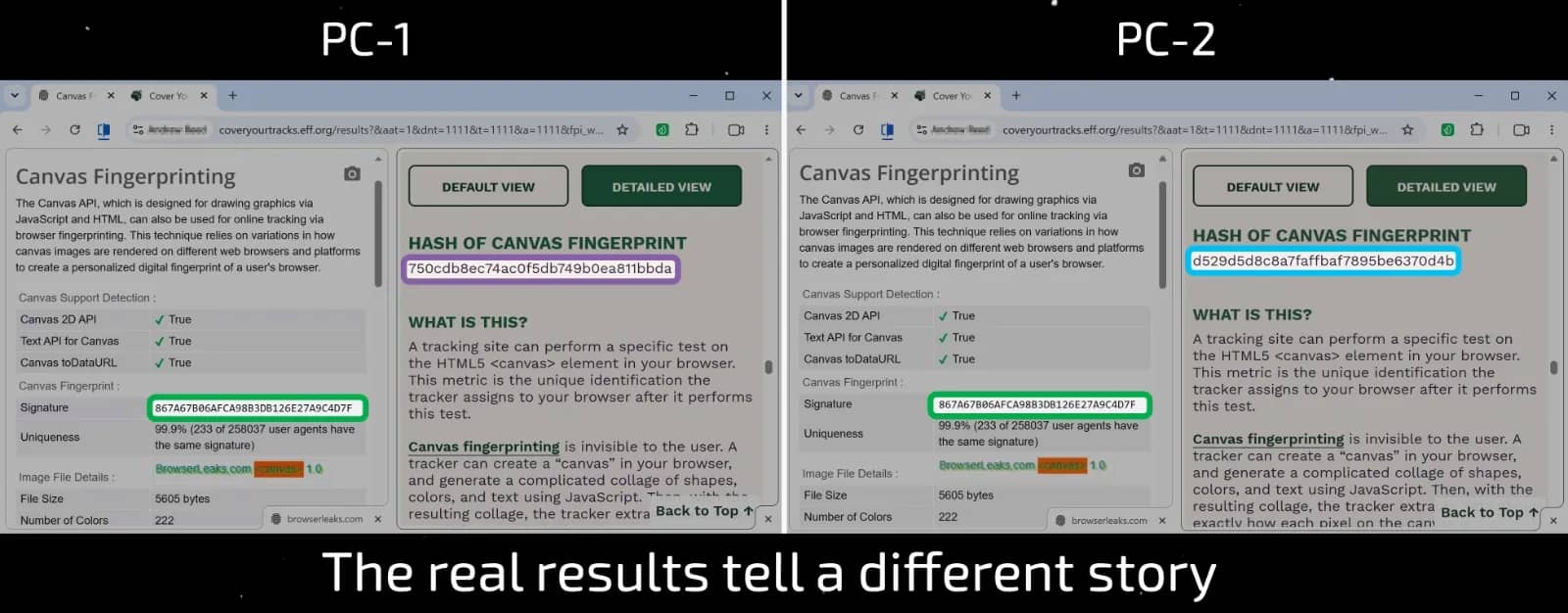
- Create a profile and, using one PC, go to browserleaks.com/canvas and write down the Signature.
- In a second tab, open https://coveryourtracks.eff.org/, click the Test your browser button, and wait for the results. Find the section with the canvas fingerprint. Pay attention to the hash of canvas fingerprint, as well as the fingerprint uniqueness statistics at the bottom.
- Then, using another PC or a virtual machine, collect the same data from the same profile in the browser.
Your result from BrowserLeaks will remain unchanged regardless of the device, because its picture was spoofed. But on CoverYourTracks, the result will not match, as there is no picture spoofing here.
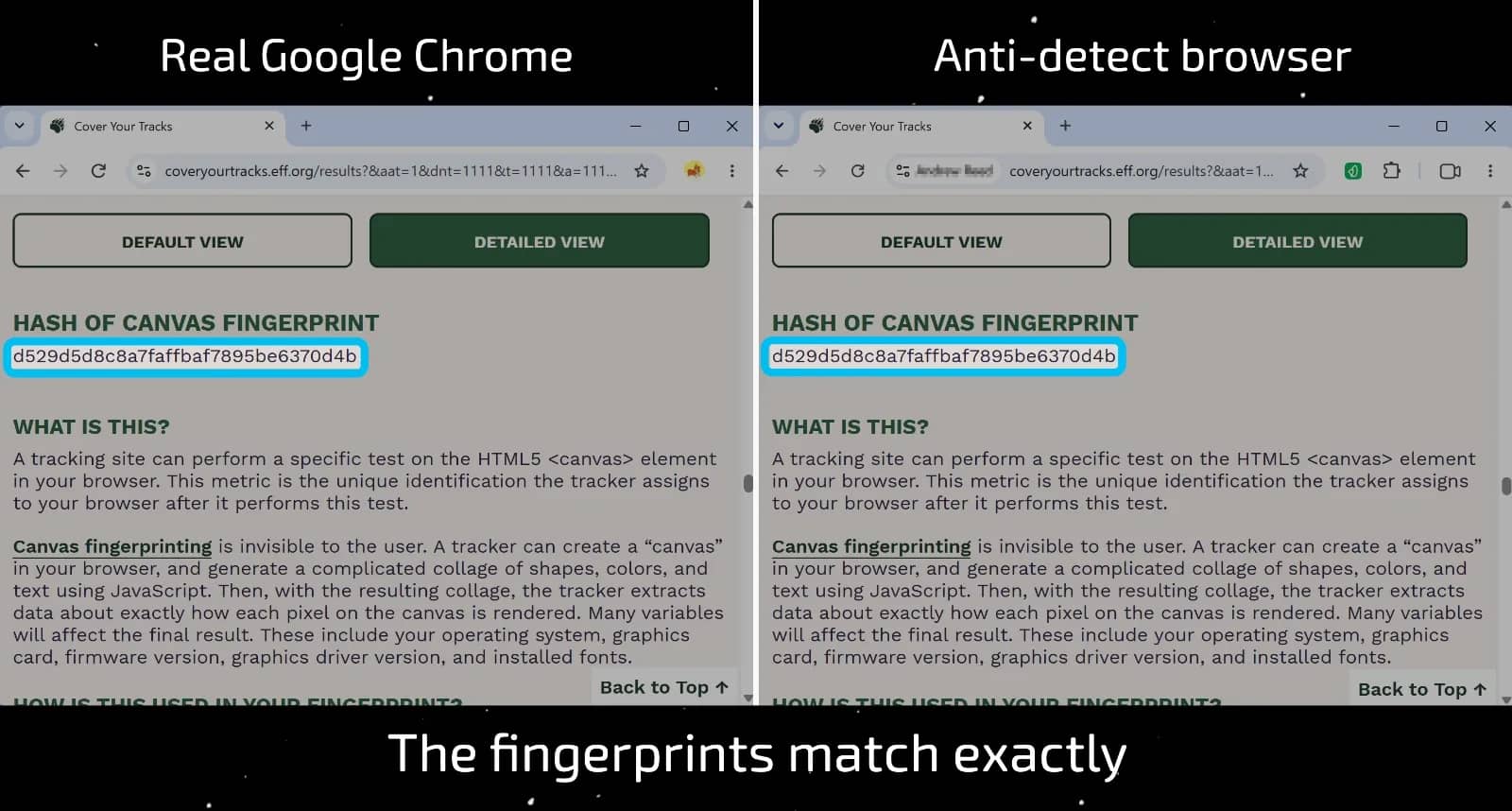
If this is not enough, go to coveryourtracks from a regular Chrome browser on the same PC and see if the result matches the real Canvas of your PC. The result might surprise you.
Surely, after the publication of this article, this loophole will be patched in the near future and they will continue to throw dust in users' eyes, but in fact, the essence of the problem will not change: there will simply be one less way to verify its existence. Right now, you have the opportunity to check this yourself on your antidetect browser.
We, on the other hand, hold the opinion that changes in the logic of fingerprint spoofing should be effective, not cosmetic. Otherwise, what is the point of beautiful results on checkers if your accounts still end up getting banned? And today we are ready to show something truly new.
Revolutionary method of Canvas 3.0 spoofing in Linken Sphere
Several months of intensive work and research conducted by our team have allowed us to develop a completely new Canvas spoofing method. This is an innovative technology that is available for the first time in the industry exclusively in Linken Sphere.
The fundamental difference is that Canvas 3.0 does not modify the image itself, but still spoofs the fingerprint.
For users, this means that sessions using Canvas spoofing will be significantly less suspicious to anti-bot systems compared to the average results of popular anti-detect browsers on the market.
To use the new spoofing method, simply update the browser to the latest available version and activate Canvas spoofing in the session or preset settings. There are no additional settings or checkboxes: everything looks the same as before, but works significantly better.
How to check the quality of Canvas spoofing in an antidetect browser?
To clearly examine the impact of the changes, we conducted a series of tests on real security systems, studying popular anti-detect browsers under identical conditions.
Among the tested systems was the anti-bot FingerprintPro, which is likely familiar to many of you and features a fairly convenient Playground page for manual checks. And even though this is essentially a ready-made guide for other developers in the market to improve their products, we are ready to share our methodology and test results with you. By taking just a few minutes, you can see for yourself that Canvas 3.0 is indeed the best of all available solutions at the moment.
For an objective assessment, we tested all products on a single physical device running Windows 10 and used one clean proxy.
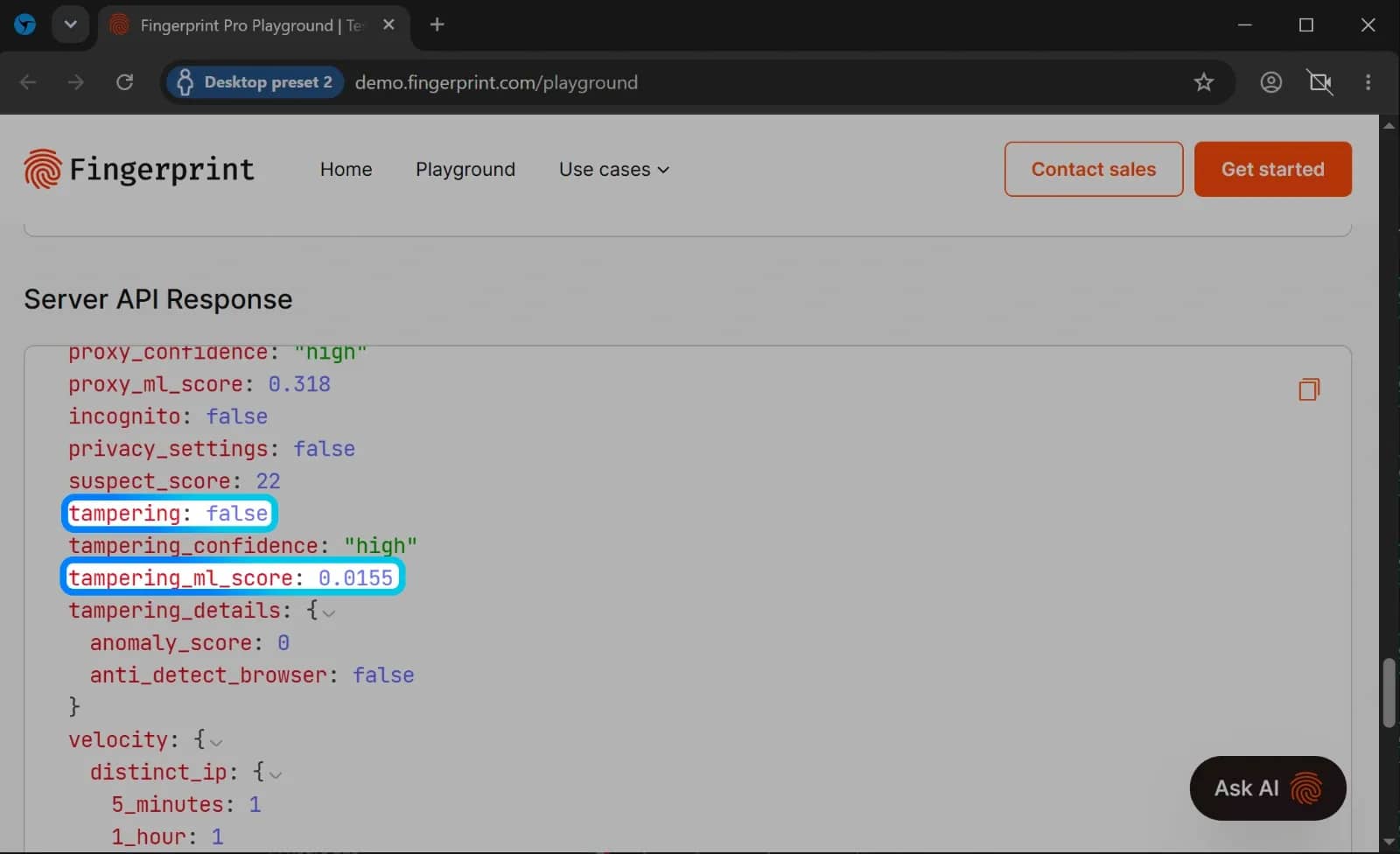
For the analysis, we were primarily interested in two parameters from the Server API Response:
- tampering — an indicator of whether the scoring system has detected enough anomalous behavior to decide that the user is undesirable (for example, a bot or an anti-detect browser). This is a boolean value that takes two states: true and false.
- tampering_ml_score — a quantitative indicator of the system's confidence that the user is undesirable (the higher, the worse).
And a quick word about these parameters: since tampering is a fairly rough indicator that does not allow evaluating small changes in fingerprints and only triggers when the tampering_ml_score exceeds a certain threshold set by the anti-bot system, we focus specifically on the tampering_ml_score. It shows how strongly certain changes in the profile affect the outcome.
To minimize the influence of many other parameters that are also spoofed in the profiles, we used the following algorithm:
- Create a profile with standard settings (ensure that Canvas spoofing is disabled), using a single proxy.
- Go to https://demo.fingerprint.com/playground and record the tampering_ml_score value from the Server API Response block.
- Stop the profile and activate Canvas spoofing for it.
- Then launch it again and record the new result.
- The delta between the tampering_ml_score results with Canvas spoofing enabled and disabled will indicate the impact of Canvas spoofing on the overall fraud score of the profile.
We repeat the procedure on five different profiles in each anti-detect browser to obtain a more objective result.
Research results
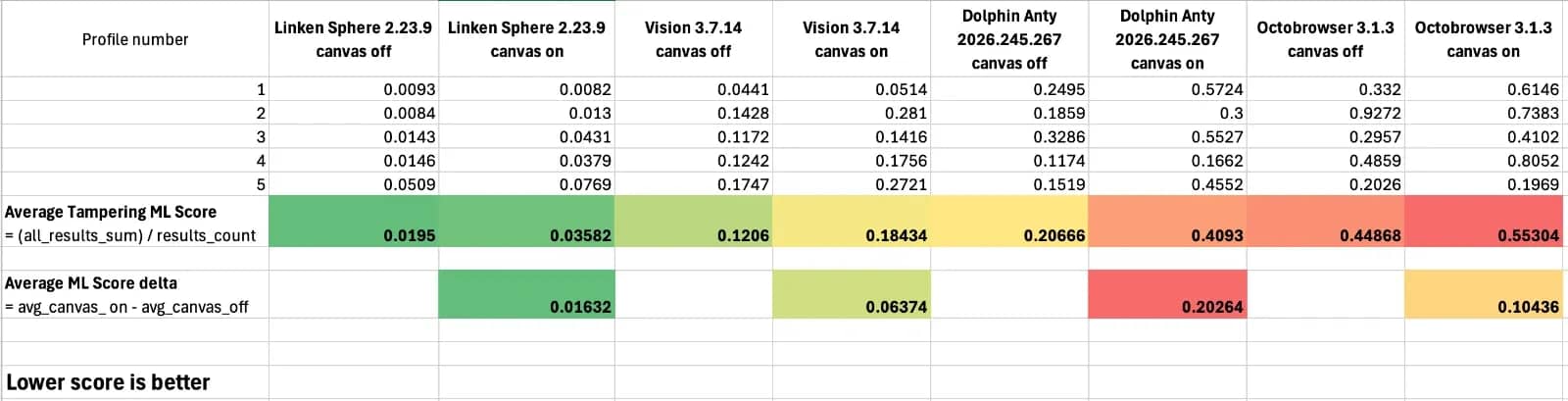
We ran this test across four popular browsers — here are the results. Why did we choose these specific ones? We actually considered more options initially, but found that the vast majority of other well-known solutions simply could not pass the test regardless of the settings used, so including them in this comparison made no sense. You could say that the table lists the best products currently available in terms of anti-detection quality (at least based on data from a popular fingerprint-checking system that anyone can use).
You can see the results for each profile in the image.
For a more convenient analysis of the results, we calculated the average Tampering ML Score for profiles without spoofing and with active Canvas spoofing in the Average Tampering ML Score row.
Also, the Tampering ML Score delta is calculated in the Average ML Score delta row. This is the difference between the average Tampering ML Score with spoofing enabled and the average Tampering ML Score with spoofing disabled. This difference clearly shows the impact of Canvas spoofing on the result. The lower the difference, the better.
In addition, for ease of perception, the results are color-coded in ascending order of the Score value.
As you can see, there is a difference in the Score between the products not only with Canvas spoofing enabled, but also with spoofing disabled, which allows us to draw conclusions about the overall quality of the implementation of other spoofings in the reviewed products.
The series of Linken Sphere updates released recently contains quite a lot of improvements and refinements, which allowed us to significantly raise the quality bar, as eloquently evidenced by the difference between the results without using spoofing.
The results speak for themselves: the use of Canvas 3.0 spoofing in Linken Sphere has practically no effect on the Tampering ML Score, while providing the necessary uniqueness of fingerprints to keep your accounts safe.
In other products, the risk of detecting profiles with Canvas spoofing enabled increases manifold, and spoofing images on checkers does not provide any bonuses.
Conclusion
The conducted research shows that a beautiful result on a checker does not yet prove the quality of Canvas spoofing. A pre-prepared image can provide a stable fingerprint in a limited scenario, but during real-world testing, the technology quickly faces limitations. What matters is how naturally the browser generates the result.
We adhere to exactly this approach: we study the real mechanisms of anti-bot systems, test solutions in practical scenarios, and eliminate the problem at the core technology level, rather than masking it with external effects. Canvas 3.0 is one example of a development that we believe will eventually become a new benchmark for the entire market.
We constantly monitor changes and introduce innovative solutions, which is why today Linken Sphere is the number one tool, as you can see for yourself.
Ultimately, competition between products works to the benefit of users. It forces developers to constantly improve the quality of their solutions and meet the new requirements of security systems. Therefore, it is important to test the tools you use, rather than relying solely on advertising promises and the results of popular checkers.
Canvas 3.0 is not the only direction our team is working on today. In the near future, we will present major new updates and solutions that will help users work more efficiently in the rapidly changing conditions of the industry. Follow the news from our team — know more and use the best of what is possible!
Frequently asked questions
- Canvas is an HTML element that allows the browser to draw images, text, and graphics, and then read the result as a pixel array.
- The result is affected by the video card and driver, operating system, browser engine, fonts, anti-aliasing, color rendering, and hardware acceleration.
- Canvas serves as one of the signals when matching sessions, accounts, and devices. It is usually analyzed together with IP, cookies, WebGL, browser parameters, and user behavior.
- The checker might use a long-known and unchanging script. The browser is capable of replacing its result with a pre-prepared image, whereas in a real check, the anti-bot uses different or randomly changing images.
- You need to update Linken Sphere to the latest version and activate Canvas spoofing in the session or preset settings. No additional configuration is required.

Why Google Blocks Accounts and What Your Antidetect Has to Do With It
Google has once again complicated the mechanisms of digital identification by deploying a new, more sophisticated layer of protection based on proprietary HTTP headers. This quiet change caught most of the market off guard, triggering a wave of rushed updates. While others hastily released superficial 'fixes', we realized that we were dealing not with a minor issue but with a fundamental shift that required deep and comprehensive analysis.

SOCKS vs HTTP Proxy: What’s the Real Difference and Which One to Choose?
There are times when you don’t want a website to link the request back to your device. That’s where a proxy comes in, it acts like a middle layer and sends the request for you. The site sees the proxy’s info instead of yours. It’s a go-to trick when you’re trying to see a page that’s not available in your region, pull content that’s restricted by location, or avoid hitting a wall when sending lots of requests.

The Best Alternative to OBS Studio
Working with a webcam on many online platforms can turn into a real challenge. A strict oval or rectangular frame appears on the screen, but your image doesn’t align perfectly with it. As a result, the system blocks further progress, demanding perfect alignment, and your workflow is disrupted before it even begins.