Canvas and WebGL: What They Are, How They Work, and Why They Get Your Accounts Banned
The days when changing an IP address and clearing cookies were enough to bypass blocks are long gone. Today, anti-fraud systems from Google, Facebook, Amazon, and crypto exchanges look much deeper, examining your hardware. The main tools for deep analysis have become technologies originally created for harmless graphics rendering: Canvas and WebGL.
In this article, we will break down what Canvas and WebGL are, exactly how sites use them to track users, and how to protect your profiles from bans.
What Are Canvas and WebGL: Basic Concepts of Web Graphics
You can understand how you are being tracked if you figure out the technical foundation: how data is collected and how a user's digital footprint is formed.
HTML5 Canvas is an element of the HTML language and a special API that allows the browser to draw 2D graphics (lines, shapes, text, gradients) directly on a web page using JavaScript scripts.
When you see interactive charts, browser games without using Flash, or dynamic animations in your browser, it is most likely Canvas working. It uses the power of your processor and operating system to render the image.
WebGL (Web Graphics Library) is a more complex JavaScript API designed for rendering interactive 3D graphics and complex 2D graphics in the browser. The main difference with WebGL is that it accesses your device's graphics card directly. This allows you to run heavy 3D models, online games with realistic physics, and complex visualizations in the browser without installing additional plugins.
Initially, both technologies were created to make web pages more interactive, but over time, security system developers noticed that the graphics rendering process is unique to each device.
Why Sites Actually Use These Technologies
When you visit a site, embedded scripts (from security solutions like Cloudflare and Google reCAPTCHA to marketing trackers like Facebook Pixel or TikTok) can launch hidden data collection processes. Despite having different tasks, they use similar identification methods: the browser is asked to draw an invisible image via Canvas or form a 3D object using WebGL, based on which a unique digital fingerprint of the device is created.
The reason is simple: the exact same command "draw a blue square and write text on top of it" will be executed differently on different computers. The result is affected by:
- type and version of the operating system (Windows, macOS, Linux);
- installed system fonts;
- text anti-aliasing and subpixel rendering algorithms;
- processor architecture and graphics card drivers.
As a result, the rendered image will differ minimally at the pixel level. To the human eye, these differences are invisible, but to a machine, they are obvious. This property became the foundation of fingerprinting technology, the creation of a digital fingerprint.
What is Canvas Fingerprinting and How It Works
Canvas Fingerprinting is a method of user identification based on how their browser renders 2D elements.
How it works:
- You visit the target site.
- The site's JS script creates an invisible element outside the visible screen.
- The script gives a command to draw a complex combination of elements: overlay text using rare fonts, add various colors, gradients, and geometric shapes.
- The browser renders this image using your system's anti-aliasing algorithms and fonts.
- The script uses the toDataURL() function, which converts every pixel of the resulting image into a long data string (Base64).
- This string is passed through a hash function, creating a unique short code, a hash.
This hash is your Canvas fingerprint. If you return to this exact same site a month later, even after changing your IP and clearing cookies, the browser will reproduce the exact same image and output the exact same hash, by which the system will identify you again.
WebGL Fingerprinting: How You Are Tracked by Your Graphics Card and Drivers
While Canvas relies on software and the processor, WebGL Fingerprinting is hardware-based identification. A site can use WebGL to collect two types of data.
- WebGL Report (informational fingerprint). The script requests your graphics processor's constants from the browser. It instantly determines the model of your graphics card (for example, NVIDIA GeForce RTX 3060), vendor (NVIDIA Corporation), supported shaders version, and other system limits.
- WebGL Image (rendering fingerprint). Similarly to Canvas, the script asks the graphics card to render an invisible 3D scene (a cube, a sphere with complex lighting and shadows). Different graphics cards and drivers process floating-point mathematical calculations with microscopic differences. As a result, pixel shades, including shadows and edges, will differ at the hexadecimal color value level.
The resulting image is again converted into a hash code. This is how the anti-fraud system obtains a digital cast of your graphics card.
What is the Difference Between Canvas and WebGL Fingerprints?
Despite their common goal, they differ at the technical level:
- Binding level. Canvas depends more on the operating system (fonts, anti-aliasing) and the browser engine itself. WebGL is strictly tied to the hardware (GPU model) and installed video drivers.
- Degree of uniqueness. Canvas provides more variability due to the huge number of font combinations and OS settings. WebGL by itself yields a less unique result, since millions of users use identical graphics cards like the GTX 1650, but in combination with other parameters, it allows for accurate device identification.
- Bypassing. Changing Canvas programmatically is easier, whereas spoofing WebGL requires complex emulation of graphics card responses.
How Anti-Fraud Systems Determine a Browser Fingerprint
Large platforms do not look at Canvas or WebGL in isolation. They use comprehensive scoring. The system collects dozens of parameters: IP, User-Agent, screen resolution, time zone, languages, Canvas, WebGL, WebRTC, and AudioContext fingerprints. Then the algorithms look for inconsistencies. For example: your User-Agent says you are browsing from an iPhone 15. But your WebGL Report outputs an AMD Radeon graphics card, which cannot be in an iPhone, and your Canvas hash completely matches a hundred other accounts that registered today from the same IP pool.
For anti-fraud systems, this is a signal of suspicious behavior or mismatched device parameters, which can cause the account to be sent for additional verification or blocked.
Why You Can't Just Disable Canvas and WebGL in the Settings
If tracking is built on such technologies, the idea of installing an extension like Canvas Blocker or disabling WebGL in the browser settings seems obvious.
For multi-accounting work, this approach does not work: it does not increase anonymity, but, on the contrary, makes the profile more noticeable and stand out from the general flow of users. In a normal environment, almost all browsers operate with Canvas and WebGL enabled. When the system requests a render, and the browser returns an empty result or an error, it looks like a deviation from the norm.
Such inconsistencies are perceived as a suspicious signal, which may cause the profile to be sent for review or restricted.
How to Check Your Fingerprints
To determine your browser fingerprint parameters, special checker services are used that simulate the operation of anti-fraud systems, collect data, and generate a clear report.
BrowserLeaks is a simple service for basic checking. In the Canvas Fingerprinting section, you will see the image generated by the browser, your unique hash code, and the percentage of uniqueness. The service will show how much your fingerprint stands out against the background of hundreds of thousands of other visitors.
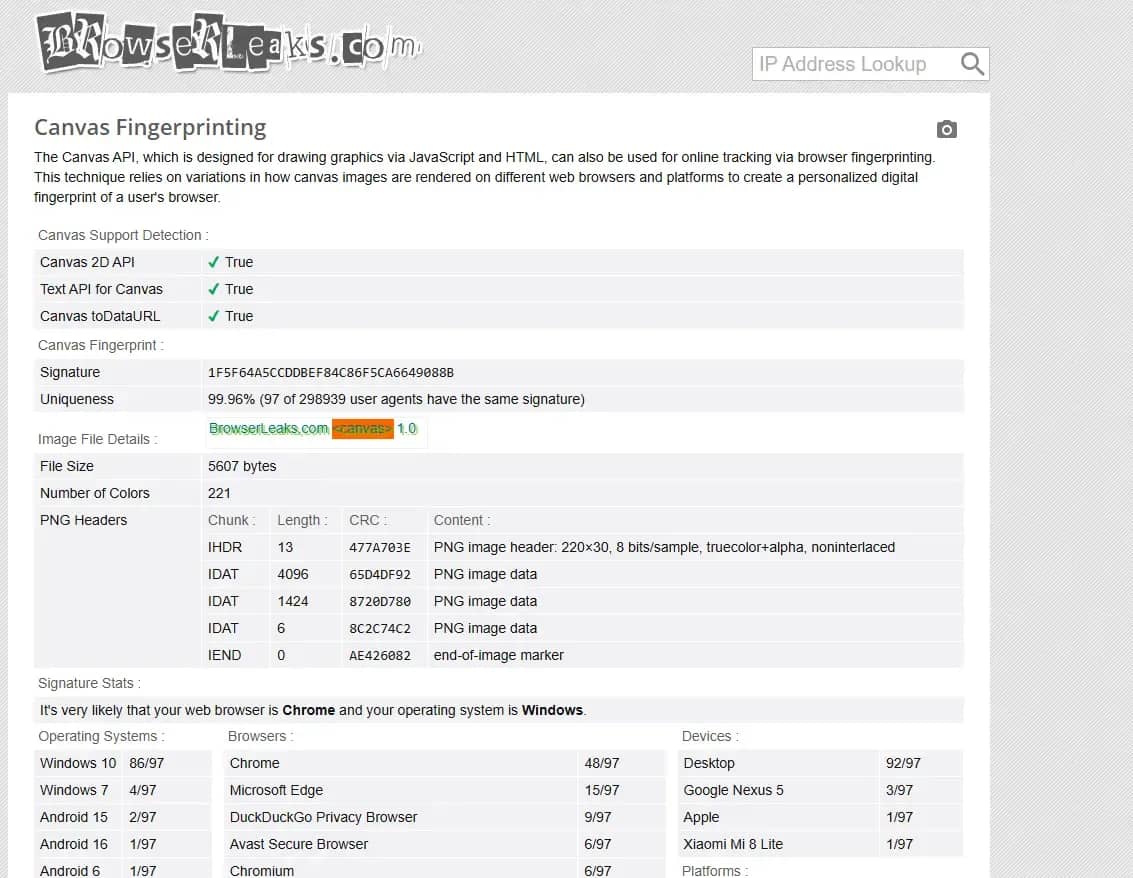
The WebGL Report page displays the full technical passport of your graphics: from the real vendor of the graphics card to the supported extensions and shaders.
AmIUnique is a global database of digital fingerprints used for research. AmIUnique collects a comprehensive fingerprint (Canvas, WebGL, fonts, plugins, headers) and compares it with millions of other profiles in real time.
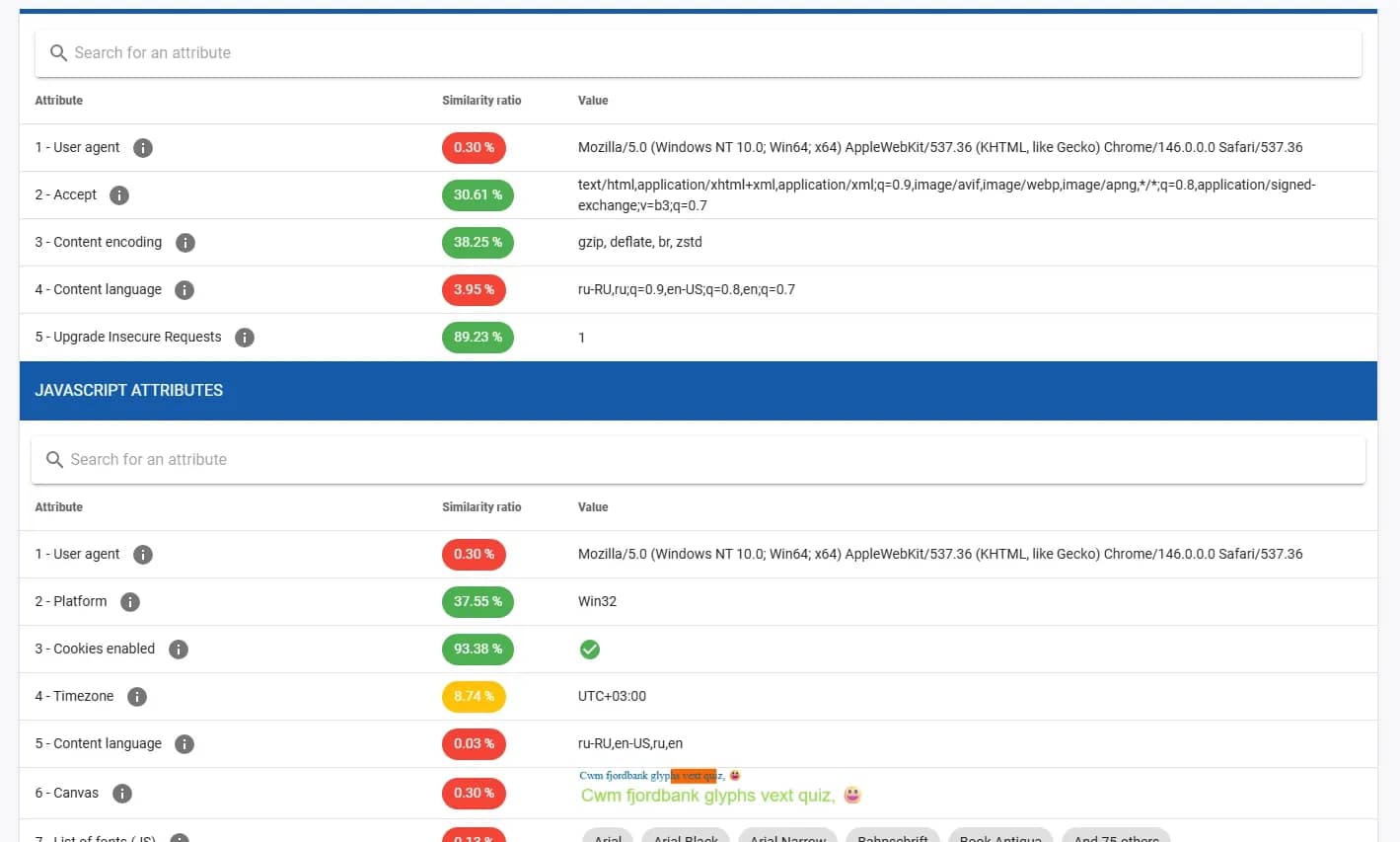
As a result, you get detailed statistics: for example, the service can show that only 0.01% of users worldwide have the exact same combination of graphics parameters and system language, which makes you extremely vulnerable to tracking.
CreepJS is one of the strictest and most advanced checkers today, often used for deep browser fingerprint verification. It is not limited to collecting parameters, but analyzes the operation of the API and identifies potential inconsistencies.
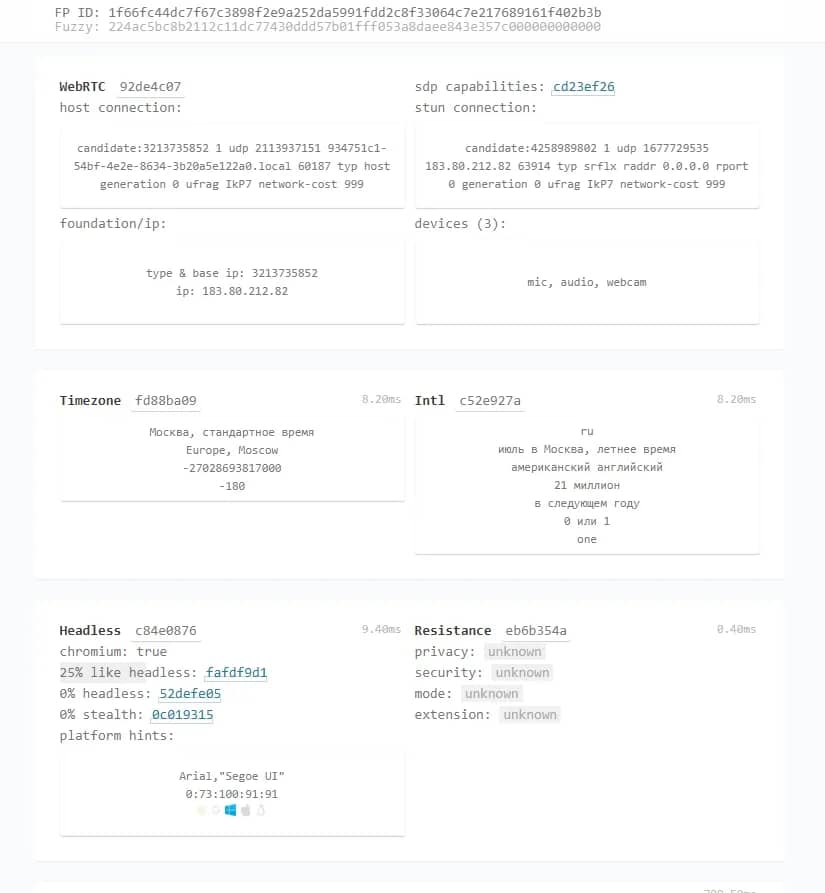
The service is especially effective in detecting data spoofing: with incorrect configuration, it registers discrepancies and flags them.
How Anti-Detect Browsers Spoof Canvas and WebGL to Protect Accounts
When creating a new profile in an anti-detect browser, the program does not disable Canvas and WebGL. Instead, it modifies the rendering process at the level of the browser core.
When a site asks to draw an image, the anti-detect browser mixes a microscopic, mathematically justified noise into the rendering result. It changes the color values of a few pixels.
As a result:
- the site receives a complete, correctly rendered image — you look like a real user;
- the hash of this image becomes absolutely unique — any connection to your other accounts is eliminated;
- the noise is persistent for a specific profile — if you open the profile tomorrow, the anti-detect will apply the exact same changes. The hash will remain the same, and to the anti-fraud system, you will look like a regular user returning to the site from their home PC.
In addition, advanced anti-detect browsers spoof WebGL text values (vendor and graphics card model) so that they exactly match your chosen operating system and User-Agent.
Conclusions
Canvas and WebGL technologies are the foundation of modern tracking. Anti-fraud systems have learned to use the computer's graphics power against the users themselves, creating unique hardware casts that cannot be reset by a simple cookie cleanup or proxy server change.
Trying to fight this by blocking scripts is pointless; it will only draw unnecessary attention from security algorithms. The only working and safe way to manage multiple accounts is to use professional anti-detect browsers. They spoof graphic fingerprints by adding controlled noises, allowing each of your profiles to blend in with the crowd of real users and bypass the most complex security systems of Facebook, Google, and crypto platforms.
Frequently asked questions
- Yes, it has a direct impact. OS scaling settings (e.g., increasing the interface to 125% in Windows) or different pixel density levels change how the browser renders fonts and shapes. This will lead to the formation of a completely different Canvas hash.
- Unlike desktop computers, mobile devices, especially iPhones, are much more standardized. Thousands of iPhone 17 users with the exact same iOS version will generate practically identical Canvas and WebGL fingerprints. This is exactly why farming accounts for mobile profiles is often considered more trustworthy — it is easier to get lost in a crowd of identical devices there.
- Absolutely not. VPN services and proxies only hide the IP address and provider, but they do not interact with the browser core or the graphics card in any way. The site will still be able to get a complete hardware fingerprint via WebGL and link it to your real identity.
- In a regular browser like Chrome, Safari, or Firefox, changing WebGL Report data at the user level is impossible, it takes them directly from the OS and drivers. Altering these parameters requires intervening in the source code of the Chromium engine, which is feasible only with the help of specialized software, for example, the Linken Sphere anti-detect browser.

Why Google Blocks Accounts and What Your Antidetect Has to Do With It
Google has once again complicated the mechanisms of digital identification by deploying a new, more sophisticated layer of protection based on proprietary HTTP headers. This quiet change caught most of the market off guard, triggering a wave of rushed updates. While others hastily released superficial 'fixes', we realized that we were dealing not with a minor issue but with a fundamental shift that required deep and comprehensive analysis.

SOCKS vs HTTP Proxy: What’s the Real Difference and Which One to Choose?
There are times when you don’t want a website to link the request back to your device. That’s where a proxy comes in, it acts like a middle layer and sends the request for you. The site sees the proxy’s info instead of yours. It’s a go-to trick when you’re trying to see a page that’s not available in your region, pull content that’s restricted by location, or avoid hitting a wall when sending lots of requests.

The Best Alternative to OBS Studio
Working with a webcam on many online platforms can turn into a real challenge. A strict oval or rectangular frame appears on the screen, but your image doesn’t align perfectly with it. As a result, the system blocks further progress, demanding perfect alignment, and your workflow is disrupted before it even begins.