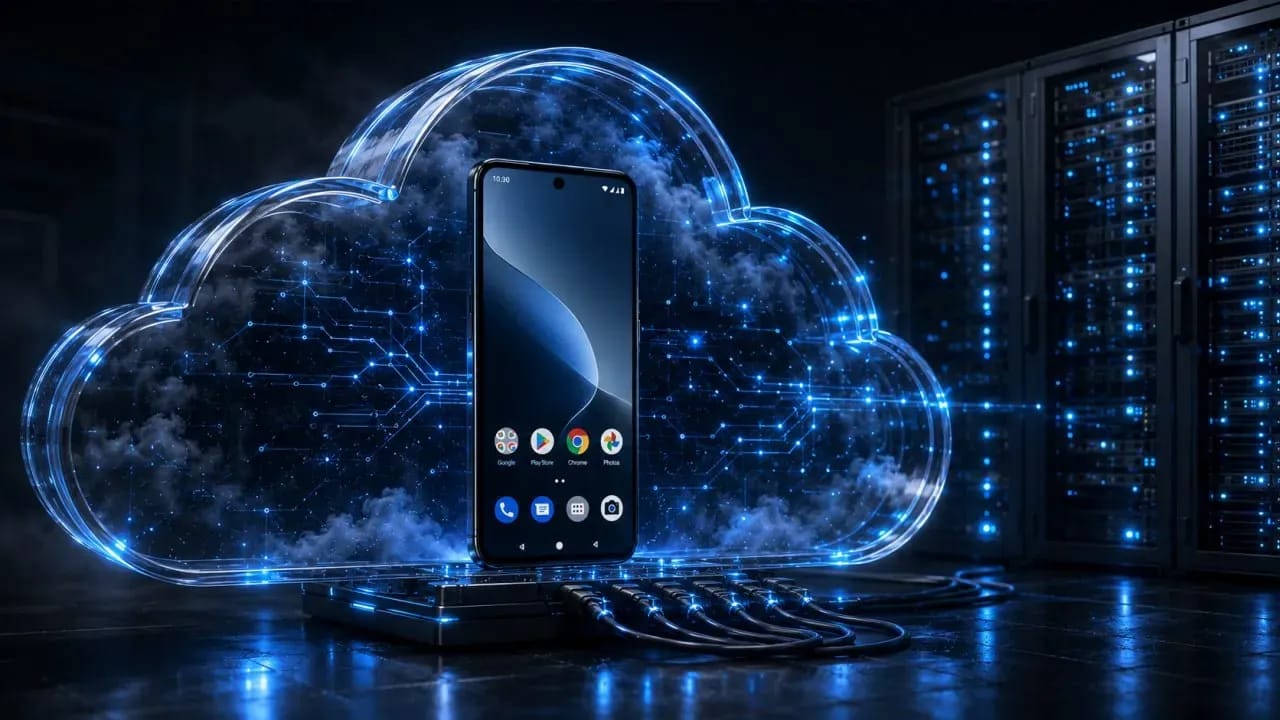
Cloud Android: How to Use It and Where to Get It
In this article, we will explain how cloud Android is built at the hardware level, how real ARM boards differ from virtualization, and which services to rent devices from for your tasks.
What Cloud Android Is and How It Works
Cloud Android is remote access to a mobile environment on data center servers. If we set aside regular software emulators, professional services run on full-fledged ARM boards. These devices feature original hardware fingerprints, factory IMEIs, and real mobile chips, which is why social media security algorithms recognize them as trusted physical devices.
There are two types of such services on the market:
- Physical ARM blades. The racks hold real mobile boards with ARM processors. They feature native factory fingerprints and authentic IMEIs, so anti-fraud systems like TikTok, Meta, and Google perceive them as standard smartphones.
- Cloud virtual containers. Android is emulated on standard Intel/AMD server processors, and device parameters are spoofed via software. This is convenient for basic tasks, but social media algorithms can detect the virtual environment.
The hardware side of cloud smartphone services is assembled from modular server blade panels. Dozens of independent motherboards with mobile processors and storage drives are mounted onto each panel. The modules are connected to a unified power supply system, industrial cooling, and high-speed data center communication channels.
You control the cloud device via a video window right inside the service's dashboard or dedicated software. The program continuously records all actions and transmits them over a high-speed channel to the smartphone processor. Thanks to the low network latency of the transmitted signal, managing profiles feels as comfortable as possible.
A native mobile ARM processor provides the highest level of trust from security algorithms. Security systems at TikTok, Meta, and Google receive original hardware fingerprints, genuine mobile drivers, and factory instruction sets. Combined with high-quality mobile proxies, you get a fully ready setup for safe farming and account management.
All resource-intensive tasks, unzipping heavy APK files, background scripts, and auto-clickers run directly on the data center's capacity. Your computer acts merely as a monitor to oversee the process. You can launch bulk warming for dozens of profiles, activate automation scenarios, then close the workspace panel and turn off your PC — the entire setup will continue operating 24/7.
What Cloud Android Is Used For
Cloud Android devices are used to register and warm up Facebook, Google, and TikTok ad accounts. Cloud phones pass security checks and link payment cards through mobile Ads Manager apps, helping avoid bans for suspicious payments.
They are also used for multi-accounting on social media and conditionally free traffic, particularly on TikTok and Instagram. Developers and QA engineers use cloud smartphones to test applications.
Data scraping is a separate use case. Websites today are shielded by protections like Cloudflare, which instantly block standard web bots. However, those same services are much more lenient toward mobile apps and deliver data more easily. To leverage this, scripts run on cloud smartphones via ADB or Appium: data collection spins 24/7 on servers without loading your work computer.
Where to Rent Cloud Android
There are currently many services on the market, but not every one of them is suitable for work tasks. Let's analyze the most popular solutions.
Redfinger
Redfinger is one of the most famous cloud phone services. You get remote access to a full-fledged Android with Google services running on data center servers. The service is picked up for account farming, working with foreign social media, TikTok live streams, app testing, and 24/7 script execution.
Key features:
- Data centers in different GEOs — servers are physically located in the US, Singapore, and Taiwan, allowing you to select the desired region and lower network latency.
- Bulk management and RPA — support for batch control of dozens of devices simultaneously and integration of automation scenarios.
- Cross-platform — access cloud smartphones via clients for Windows, Android, iOS, or directly through a web browser.
- Native Android — full support for Google Play services, installation of any third-party APK files without compatibility conflicts.
- 24/7 autonomous operation — all running processes, background scripts, and warming operations continue working on the server even with your computer turned off.
- Flexible pricing plans — choice of device performance for specific tasks.
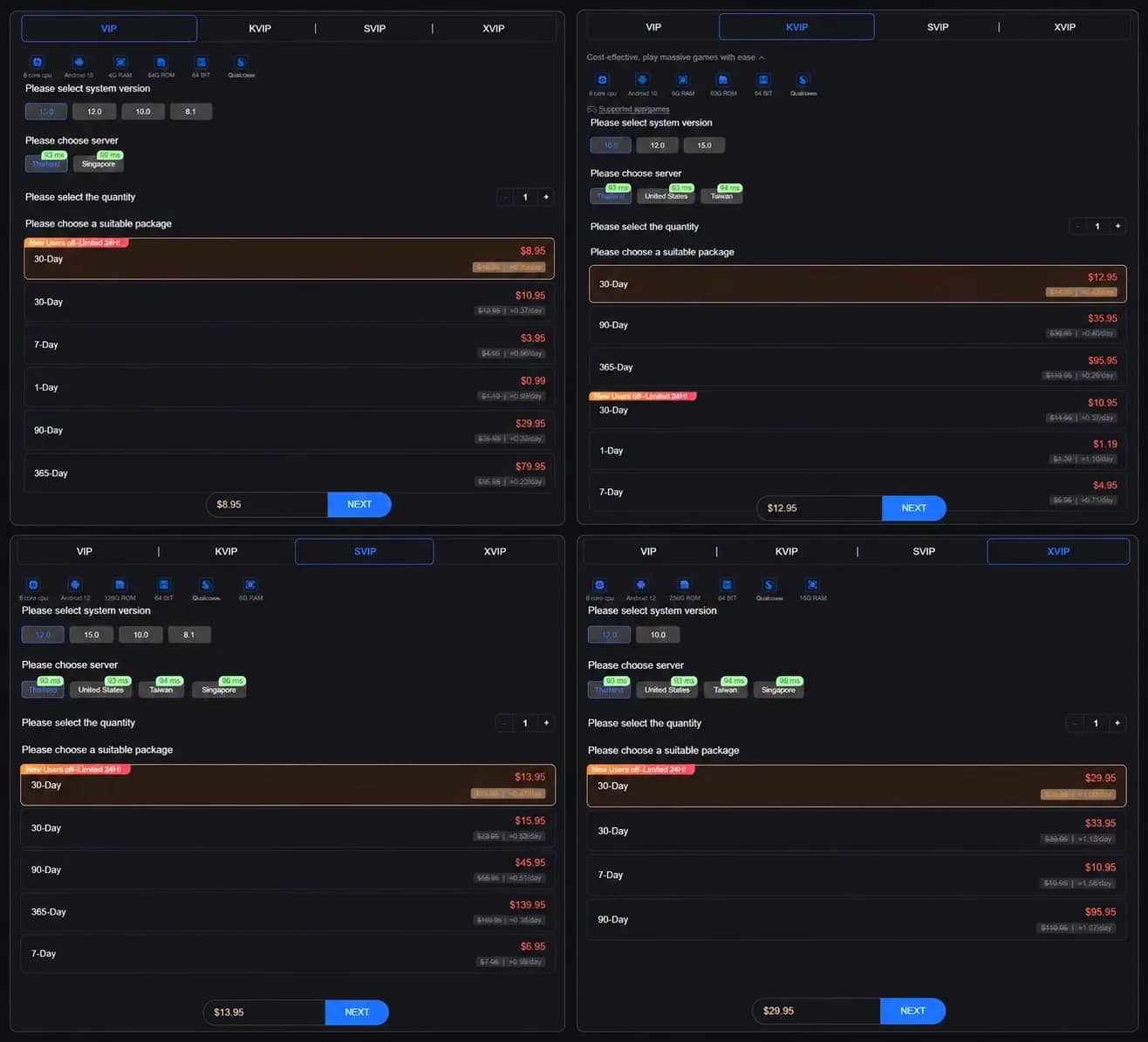
LDCloud
LDCloud is a popular cloud Android smartphone service from the creators of the LDPlayer emulator. You can get remote access to a clean Android operating system on data center servers.
Key features:
- One-click synchronization — ability to manage dozens of screens simultaneously — any clicks and swipes on the main device are instantly mirrored across all other phones.
- Support for third-party proxies — convenient assignment of mobile and residential proxies to each individual cloud device directly through the PC client.
- Maximum cross-platform compatibility — separate clients for Windows, macOS (including support for Apple Silicon chips), Android, iOS, and a web version for logging in through any browser.
- Device parameter configuration — built-in "Device Master" tool allows you to modify smartphone system properties.
- Batch APK installation — fast uploading of third-party apps, scripts, and files to cloud device storage.
UgPhone
UgPhone is a Singaporean cloud smartphone service with an emphasis on low ping. You can deploy virtual Android on servers in the US, Europe, or Asia in just a couple of clicks.
Key features:
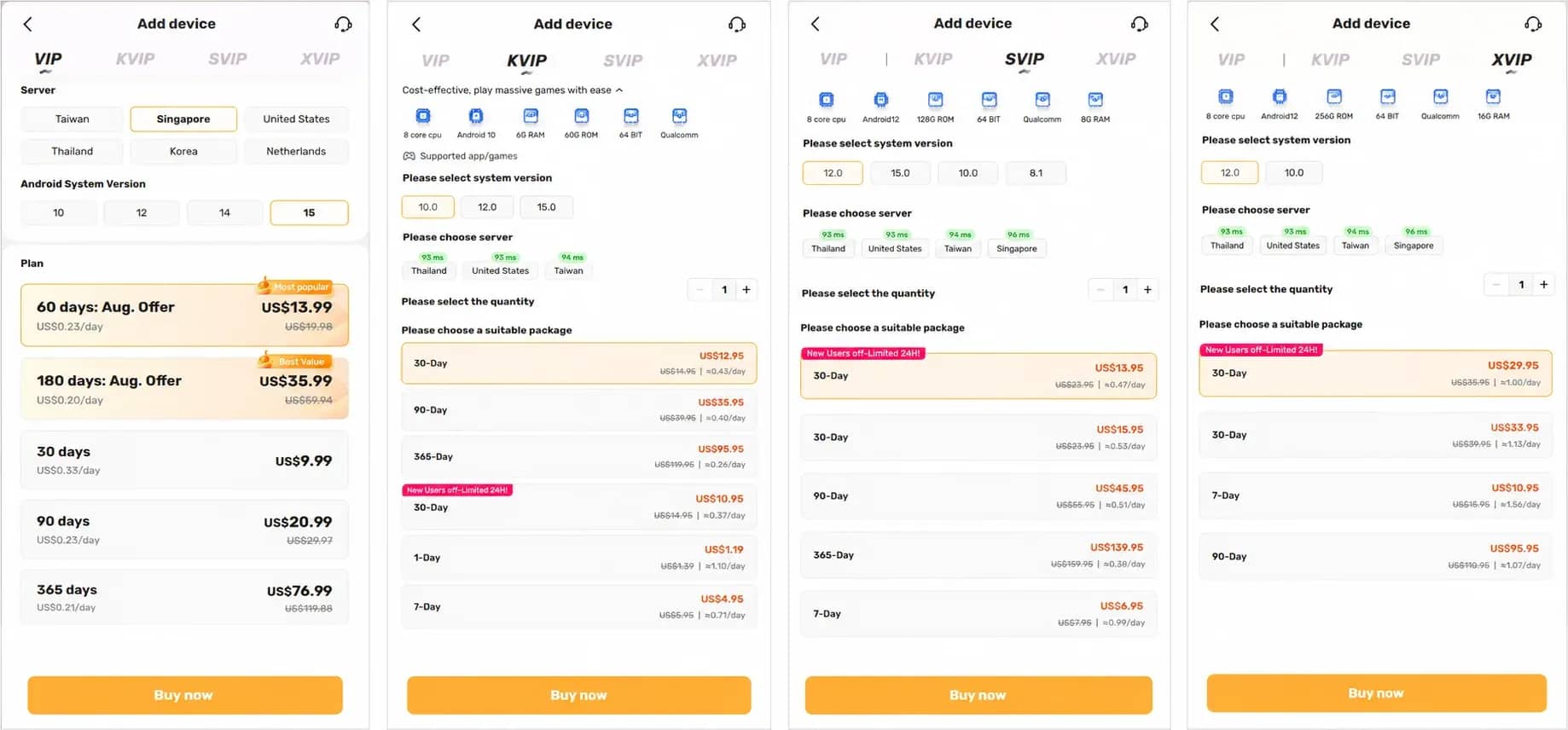
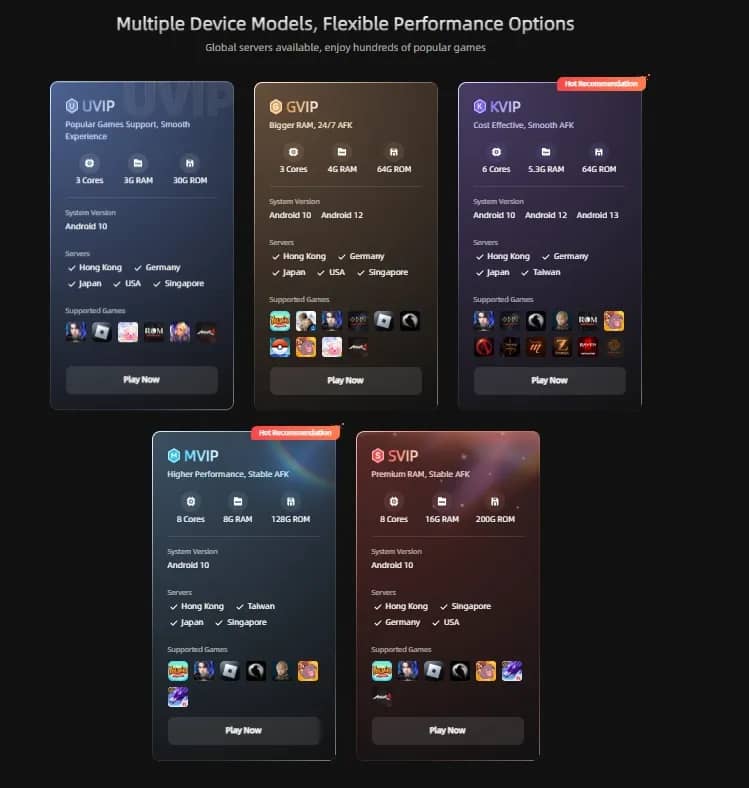
- Servers worldwide — data centers are located in Germany, the US, Japan, Singapore, Hong Kong, and Taiwan, making it easy to select the required GEO with minimal ping.
- Choice of Android versions — virtual devices can be launched on Android 10, 12, or 13.
- Hardware for any tasks — configurations range from basic 3-core models with 3–4 GB RAM to powerful machines with 8 cores and 16 GB RAM.
- Multi-window mode — launch and manage dozens of devices simultaneously in a single window.
- Clients for all platforms — programs for Windows, Android (Google Play and direct APK), iOS, and a web version for browser-based work.
Huawei Cloud Phone (CPH)
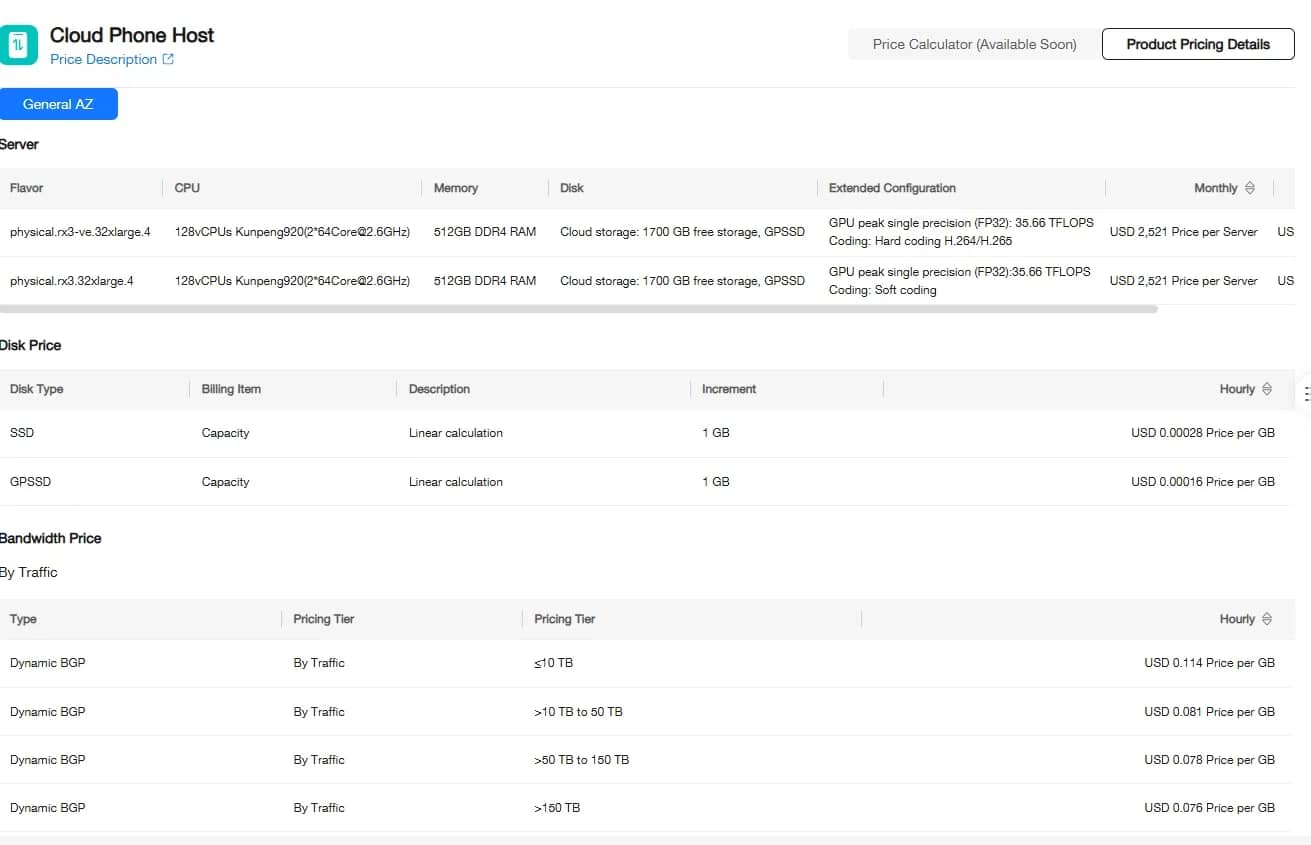
Huawei Cloud Phone (CPH) is an industrial server-grade solution from Huawei for those who need large-scale cloud smartphone farms. The service operates on physical servers powered by proprietary Kunpeng mobile ARM processors.
Key features:
- Real ARM hardware — devices run on Kunpeng 920 server mobile chips with native ARM architecture, providing up to an 80% speed boost compared to traditional emulators.
- Massive capacity — a single physical server can launch up to 72 independent cloud phones, configured with 2 cores, 6 GB RAM, and 10 GB storage per device.
- Hardware video chips — built-in GPU acceleration at 12 TFLOPS for smooth video streaming and handling heavy graphics.
- API management and GPS configuration — ready-made interfaces for automated geolocation coordinate spoofing and batch device control via scripts.
- Industrial 24/7 reliability — overheat protection, automatic crash recovery, and round-the-clock uninterrupted operation in Huawei data centers.
Baidu Cloud Phone
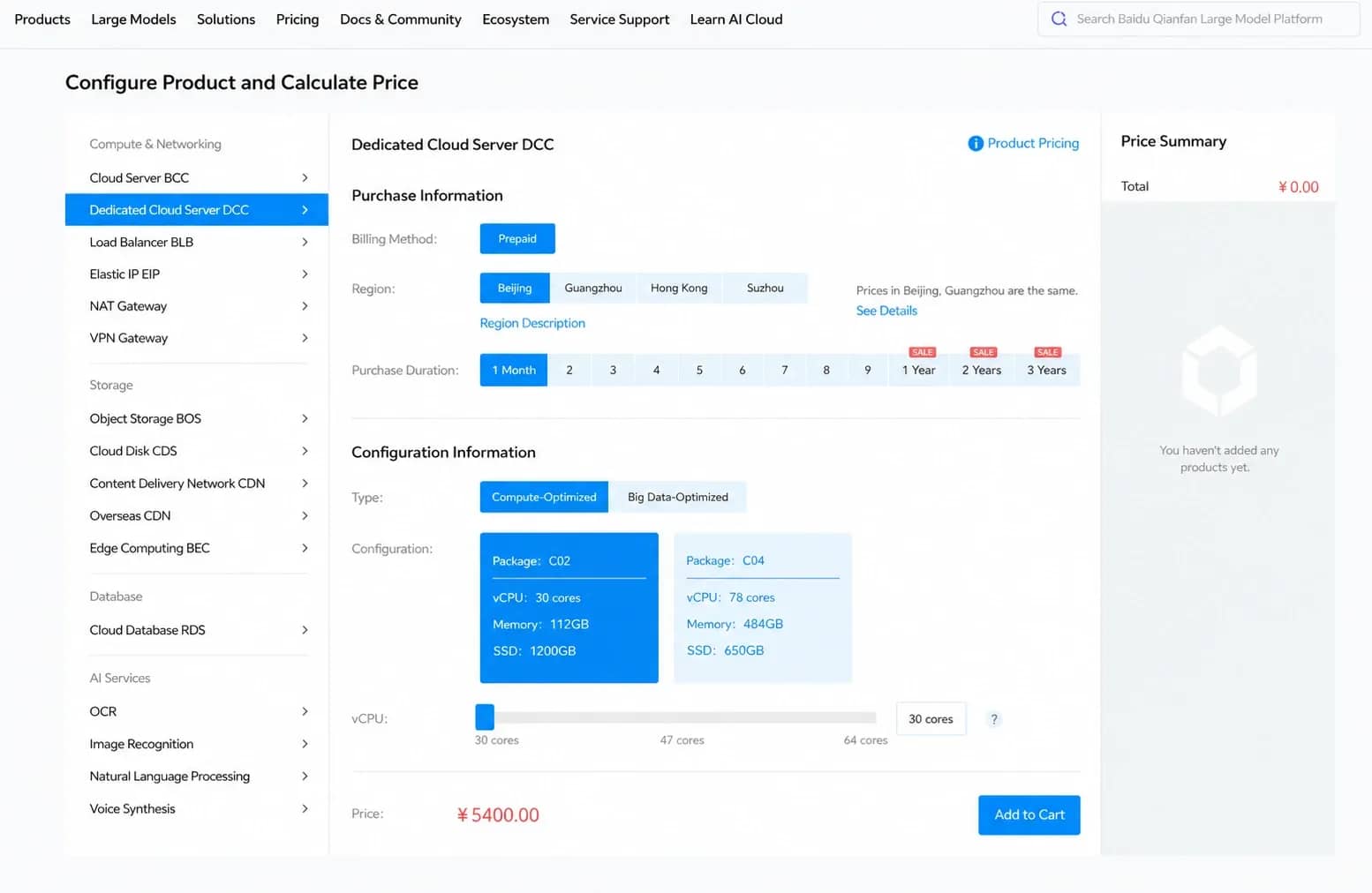
Baidu Cloud Phone is a server-based cloud smartphone platform from the Chinese tech giant Baidu. It is one of the first solutions on the market natively built on physical ARM servers and the company's proprietary chips. The platform is used to launch gaming farms, manage social account networks in Asian social networks, and automate processes integrated with AI tools.
Key features:
- Server ARM hardware — devices run on Baidu's physical servers with native mobile architecture, free of software emulation.
- Integration with AI algorithms — support for proprietary Baidu Kunlun chips and machine learning tools to automate actions on devices.
- Mass deployment — creation and concurrent management of hundreds of isolated cloud phones via a single dashboard or API.
- Minimal ping across Asia — a vast network of data centers and wide bandwidth channels ensure fast response times within the region.
- Enterprise security — enterprise-level server security, automated backup, and stable 24/7 performance.
Genymotion
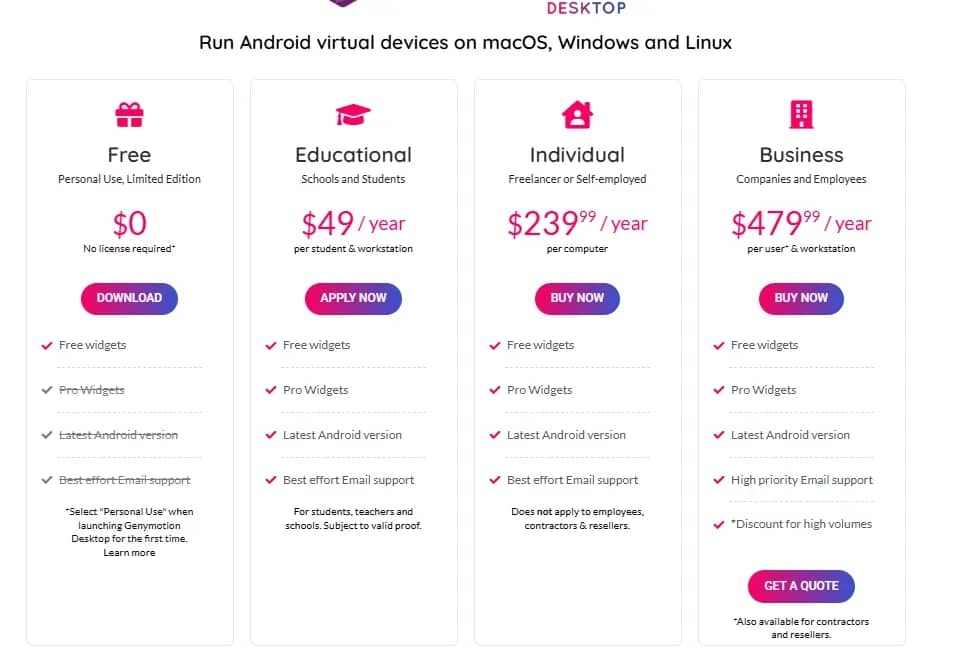
Genymotion is a service for those who need cloud smartphones for scripting, scraping, and development. Everything here is tailored for automation: you can run bots, configure data scraping, and connect virtual Android devices to your servers in AWS or Google Cloud.
Key features:
- Runs right in the browser — open virtual phones inside a standard tab without installing heavy software on your PC.
- Connect to your own servers — devices can be deployed on AWS, Google Cloud, Azure, or Alibaba Cloud infrastructure.
- Integration with scripts — devices easily hook up to Docker, GitHub Actions, and Jenkins for automated testing and scenario runs.
- Clients for any operating system — in addition to the cloud, programs are available for Windows, macOS, and Linux.
VMOS Cloud
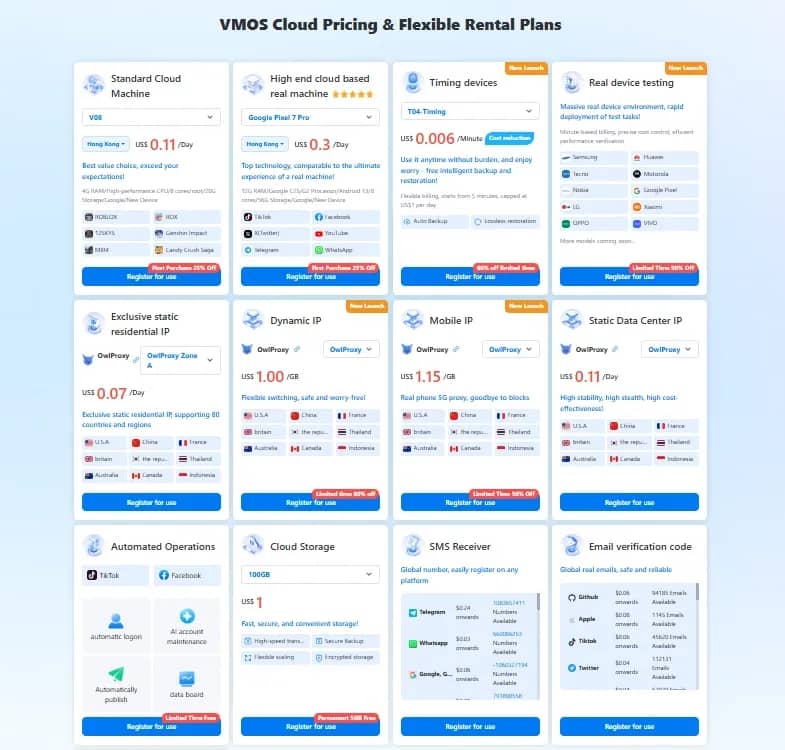
VMOS Cloud is a cloud platform from the creators of the well-known mobile emulator VMOS. The service deploys isolated Android smartphones in the cloud for traffic arbitrage, social media management, and working with international stores.
Key features:
- Isolated profiles — each cloud phone runs in a separate clean environment, preventing accounts from overlapping with one another.
- Group screen management — display dozens and hundreds of screens on a single monitor and click them synchronously with one click.
- Built-in proxy management — quick linking of mobile and residential IPs for target countries right inside the control panel.
- 24/7 round-the-clock autonomy — warming scenarios, bots, and apps run continuously on servers, even if you power down your PC.
- Tailored for social media and e-commerce — the service was originally built for teams managing bulk profiles on TikTok, Instagram, and Facebook.
Conclusion
The choice of cloud Android directly depends on your tasks. If you need simple software testing, development, or light scraping — cloud virtualization like Genymotion or VMOS Cloud will be quite enough. But if the goal is account farming and bypassing strict anti-fraud systems in TikTok or Facebook, you should strictly select platforms built on real ARM boards (Redfinger, UgPhone, LDCloud).

Why Google Blocks Accounts and What Your Antidetect Has to Do With It
Google has once again complicated the mechanisms of digital identification by deploying a new, more sophisticated layer of protection based on proprietary HTTP headers. This quiet change caught most of the market off guard, triggering a wave of rushed updates. While others hastily released superficial 'fixes', we realized that we were dealing not with a minor issue but with a fundamental shift that required deep and comprehensive analysis.

SOCKS vs HTTP Proxy: What’s the Real Difference and Which One to Choose?
There are times when you don’t want a website to link the request back to your device. That’s where a proxy comes in, it acts like a middle layer and sends the request for you. The site sees the proxy’s info instead of yours. It’s a go-to trick when you’re trying to see a page that’s not available in your region, pull content that’s restricted by location, or avoid hitting a wall when sending lots of requests.

The Best Alternative to OBS Studio
Working with a webcam on many online platforms can turn into a real challenge. A strict oval or rectangular frame appears on the screen, but your image doesn’t align perfectly with it. As a result, the system blocks further progress, demanding perfect alignment, and your workflow is disrupted before it even begins.