
How an ordinary browser differs from an antidetect one: a technical breakdown
Among beginner arbitrageurs and multi-accounting specialists, there is a living myth: to become anonymous online, it is enough to turn on a VPN and open a browser in "incognito" mode. Indeed, this will hide your IP address from the provider and leave no browsing history on your hard drive. But for modern anti-fraud systems, you will remain the exact same user.
Websites have long been identifying visitors even without authorization and cookie files, using the collection of device digital fingerprint parameters. And here, to replace the familiar Chrome or Firefox, comes the antidetect browser.
The main difference lies not in the level of privacy, but in the architecture of digital footprint management. An ordinary browser broadcasts the PC's system environment as is. While an antidetect manages every parameter of this environment at the engine level itself. In this article, we will examine in detail how an antidetect browser differs from an ordinary one and why the choice is obvious for multi-accounting and bypassing anti-fraud systems.
What an ordinary browser transmits to websites
An ordinary browser — Chrome, Safari, Firefox — is designed to display a website as quickly and correctly as possible. For this, it obediently gives the server all the information about your device.
Upon connection, the site immediately receives a basic set of data:
- User-Agent (browser name and version, operating system);
- HTTP Accept headers;
- screen resolution and monitor color depth;
- time zone and language preferences;
- availability of specific plugins and MIME types.
If the site uses advanced user tracking tools, it additionally begins to collect active traces of your hardware's operation:
- Canvas — the site asks the browser to draw an invisible graphic element. Due to microscopic differences in the operation of video cards, drivers, and the OS, the result will be unique;
- WebGL — rendering of a 3D scene, from which security systems extract the exact names of the vendor and model of your video card;
- AudioContext — generation of a faint audio signal and analysis of its distortions, which depend on the audio driver and processor;
- Client Rects / DOM Rects — measurement of the geometry of HTML elements with subpixel accuracy (depends on OS rendering features and screen scaling);
- WebRTC — technology for direct connections, which often leads to potential leakage of your real IP even with a VPN turned on;
fonts — the list of installed system fonts perfectly gives away your GEO and OS version; - Navigator parameters — number of processor cores, amount of RAM, presence of a touch screen.
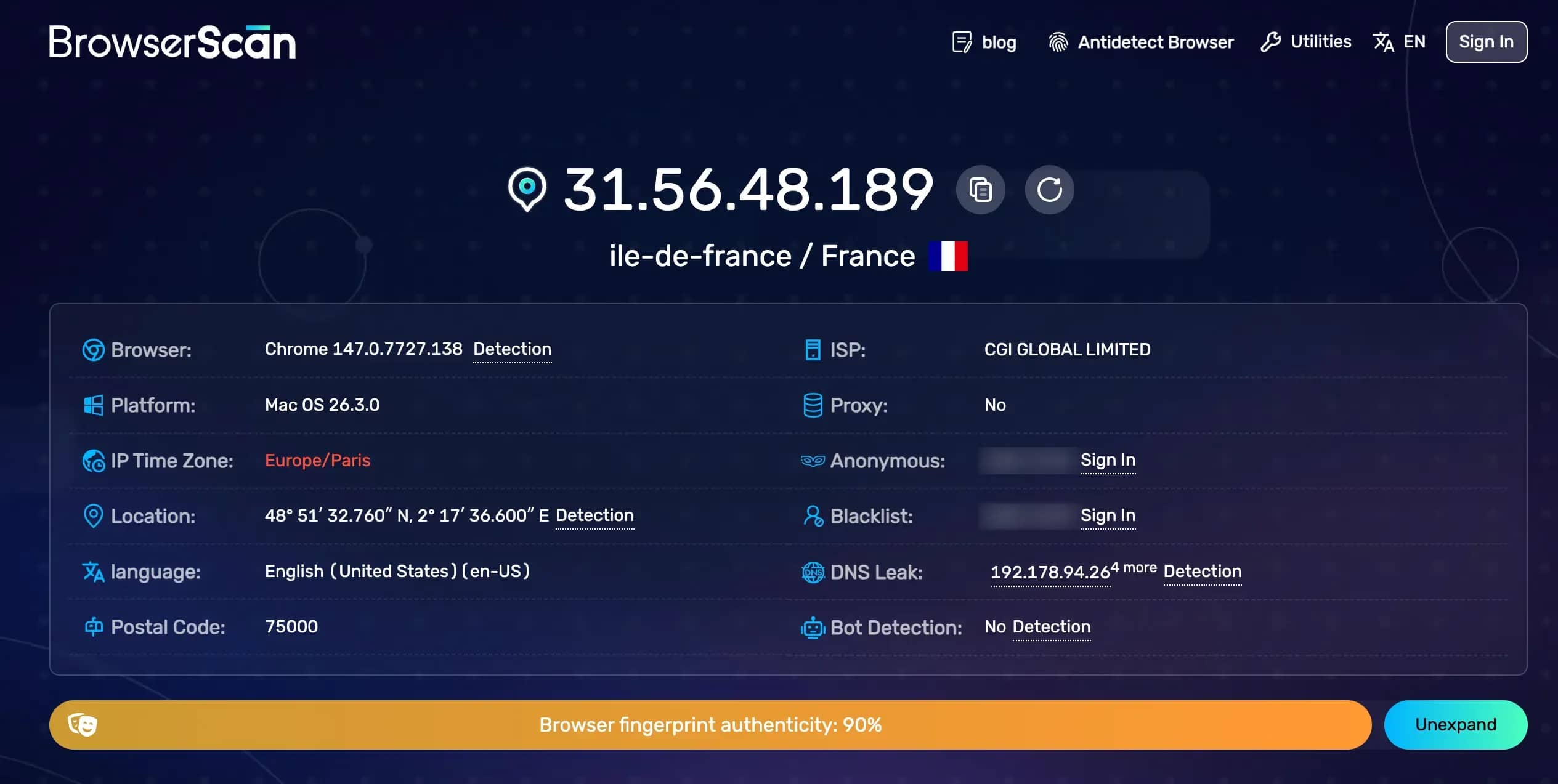
All this makes up a unique browser fingerprint, by which the site recognizes you even in "incognito" mode. An ordinary browser does not know how to spoof these parameters, so platform anti-fraud identifies your device even after deleting cookies and using a VPN. For Facebook, Google, or Amazon, an account opened in ordinary mode and an account opened in incognito are the exact same person. Systems link separated sessions through shared hardware parameters.
How an antidetect browser differs from an ordinary one
To understand the operation of an antidetect browser, you need to break down its differences.
As a rule, professional solutions are based on the Chromium engine, but deep custom patches are introduced into it at the level of rendering and JavaScript processing mechanisms. Profile isolation here occurs not through tabs, but through the launch of separate processes with unique virtual environments for each account.
The antidetect performs deep fingerprint spoofing:
- software spoofing of Canvas, WebGL, AudioContext, fonts, and Client Rects — each profile will have its own noise;
- control over network protocols, in particular WebRTC;
- hardware emulation;
- strict binding of geolocation, time zone, language, and screen resolution to a specific profile;
- unique isolated storages for cookies, localStorage, indexedDB, Service Workers.
Besides, an antidetect allows you to bind a separate proxy to a profile at the process level, rather than the entire operating system. You can simultaneously open 50 profiles with 50 different IP addresses from different countries.
Technical comparison: ordinary browser vs antidetect
| Criterion | Ordinary browser (Chrome/Firefox) | Antidetect browser |
| Profile isolation | hared container (cookies/cache are shared or separated only in profiles) | Full process isolation: separate cookie jars, cache, storages |
| Digital fingerprint | Broadcasts real hardware and OS | Spoofing Canvas, WebGL, AudioContext, fonts at the engine level |
| WebRTC leaks | Requires installation of third-party extensions or hidden flags | Controlled disabling or IP spoofing at each profile level |
| Proxy per profile | No (only system VPN or browser-wide extension) | Yes, strict binding of a unique proxy to each profil |
| Scaling | 1 user = 1 environment | 50–200+ fully isolated environments on one PC |
| Automation | Requires complex workarounds for multi-threading | Native support for CDP, Puppeteer, Playwright, Selenium |
| Teamwork | Practically impossible (profiles are tied to "hardware") | Cloud synchronization, session sharing, access role configuration |
| Detection by anti-fraud | Extremely high in multi-accounting | Low when using quality proxies and proper configuration |
Users often ask why Chrome profiles or the Firefox Multi-Account Containers extension are not suitable for multi-accounting. The problem is that these tools share only session data. The operating system kernel and graphics engine parameters remain shared. The anti-fraud system instantly sees that 10 different accounts are sitting from a device with identical hardware and Canvas snapshot.
Is it possible to turn an ordinary browser into an antidetect
Is it possible to make an antidetect out of Chrome using fingerprint spoofing extensions: CanvasBlocker, Chameleon, User-Agent Switcher, and others? Unfortunately, this does not work for professional tasks:
- Level of operation. Extensions operate at the content scripts level. Advanced anti-fraud systems easily see the interference of the extension's JavaScript code in the initial page rendering process.
- Lack of isolation. Extensions cannot fundamentally separate the cache, IndexedDB files, and cookies among hundreds of sessions without colossal system overhead.
- Unsafe flags. Using system launch flags makes your browser more vulnerable, and abnormal behavior is instantly detected by site security systems.
An ordinary browser cannot be "tweaked" to the level of a commercial antidetect. Rebuilding and modifying the browser's source code itself is required.
Do you need an antidetect or is an ordinary browser enough
To understand whether you need an anti-detection browser, be guided by your tasks:
Do you manage more than 3–5 accounts on one platform? Use an antidetect.
Is your work related to scraping or automatic registration? You cannot do without an antidetect.
Do you need teamwork with access to colleagues' profiles with permission distribution? Antidetect.
Do you just want to hide your browsing history from your household? An ordinary browser in incognito mode.
Do you need access to content blocked in your country from one device? Ordinary browser + VPN.
Do you work with sensitive financial accounts (bookmakers, crypto, payment systems)? Antidetect + reliable residential proxies.
Conclusion
An ordinary browser is created for fast and convenient web surfing. An antidetect — for professional management of digital fingerprints. Any attempts to use Chrome, Safari, or Firefox for systemic multi-accounting inevitably lead to the banning of entire account networks. The reason lies in the digital footprint and the lack of process isolation of the environment.
Comprehensive fingerprint spoofing is impossible via plugins. If your business depends on the reliability of accounts, test the professional antidetect browser Linken Sphere. It closes all technical vulnerabilities and tracking vectors, effectively emulating hundreds of completely independent devices on one computer.
Frequently asked questions
- For serious platforms like Facebook, Google, Amazon — absolutely not. Chrome profiles do not isolate system hardware and hardware fingerprints. Anti-fraud will quickly link the accounts together.
- VPN only changes your IP address. The unique graphical fingerprint of the device, font versions, and internal system parameters remain the same — by them, the social network's algorithms recognize you in a second.
- A quality antidetect browser does not hide parameters, but provides the site with a plausible fingerprint of a real user. When working correctly, the site sees you as a standard user with a classic browser.
- No, this is a method from the early 2000s. Now User-Agent is just one of dozens of checked parameters. Without spoofing graphical hashes, changing the User-Agent will only attract additional attention from the security.
- Tor is designed for maximum depersonalization through unification: it tries to make all its users absolutely identical by driving traffic through a network of "onion" nodes. Anti-fraud systems instantly calculate and block Tor traffic. An antidetect, conversely, makes each of your profiles unique, but at the same time looking like a typical user.
- Yes. WebRTC technology, built into all modern browsers for direct routing audio and video communication, by default can "leak" your real local and public IP bypassing the VPN tunnel. In antidetects, WebRTC is strictly controlled.

Why Google Blocks Accounts and What Your Antidetect Has to Do With It
Google has once again complicated the mechanisms of digital identification by deploying a new, more sophisticated layer of protection based on proprietary HTTP headers. This quiet change caught most of the market off guard, triggering a wave of rushed updates. While others hastily released superficial 'fixes', we realized that we were dealing not with a minor issue but with a fundamental shift that required deep and comprehensive analysis.

SOCKS vs HTTP Proxy: What’s the Real Difference and Which One to Choose?
There are times when you don’t want a website to link the request back to your device. That’s where a proxy comes in, it acts like a middle layer and sends the request for you. The site sees the proxy’s info instead of yours. It’s a go-to trick when you’re trying to see a page that’s not available in your region, pull content that’s restricted by location, or avoid hitting a wall when sending lots of requests.

The Best Alternative to OBS Studio
Working with a webcam on many online platforms can turn into a real challenge. A strict oval or rectangular frame appears on the screen, but your image doesn’t align perfectly with it. As a result, the system blocks further progress, demanding perfect alignment, and your workflow is disrupted before it even begins.