
How IPv4 Proxies Work: A Detailed Breakdown for Beginners
An IPv4 proxy is an intermediary server with an IPv4 format network address that accepts network requests from a client, replaces its source IP address with its own, and forwards traffic to the target internet resource. This mechanism hides the user's real location and ensures anonymity on the network.
In this guide, we will analyze the mechanics of how IPv4 proxies work: the step-by-step path of a data packet, differences in network protocols, the principles of rotation, and criteria for choosing an infrastructure for your tasks.
What is IPv4
IPv4 (Internet Protocol version 4) is the fourth version of the core network protocol that forms the foundation of the modern Internet.
Address format: A 32-bit number written as four decimal numbers (octets) ranging from 0 to 255, separated by dots (e.g., 192.168.1.1 or 104.21.55.2).
Address capacity: The theoretical limit of the protocol is 2 to the power of 32, which is approximately 4.3 billion unique IP addresses.
Despite the shortage of IPv4 addresses and the active deployment of the 128-bit IPv6 standard, IPv4 remains the global standard. This is due to two factors:
- Absolute compatibility. 100% of websites, services, and server systems in the world support IPv4. Many web resources have still not configured full support for IPv6.
- High trust from anti-fraud systems. Due to the limited quantity and high cost of IP addresses, IPv4 addresses possess a significantly greater history and reputation. Web resource security algorithms — Cloudflare, Akamai, internal social media fraud systems—treat connections via IPv4 with a high level of trust.
How IPv4 Proxies Work: Step-by-Step Mechanics
To effectively use proxy servers and diagnose connection errors, it is necessary to understand the path of every network packet.
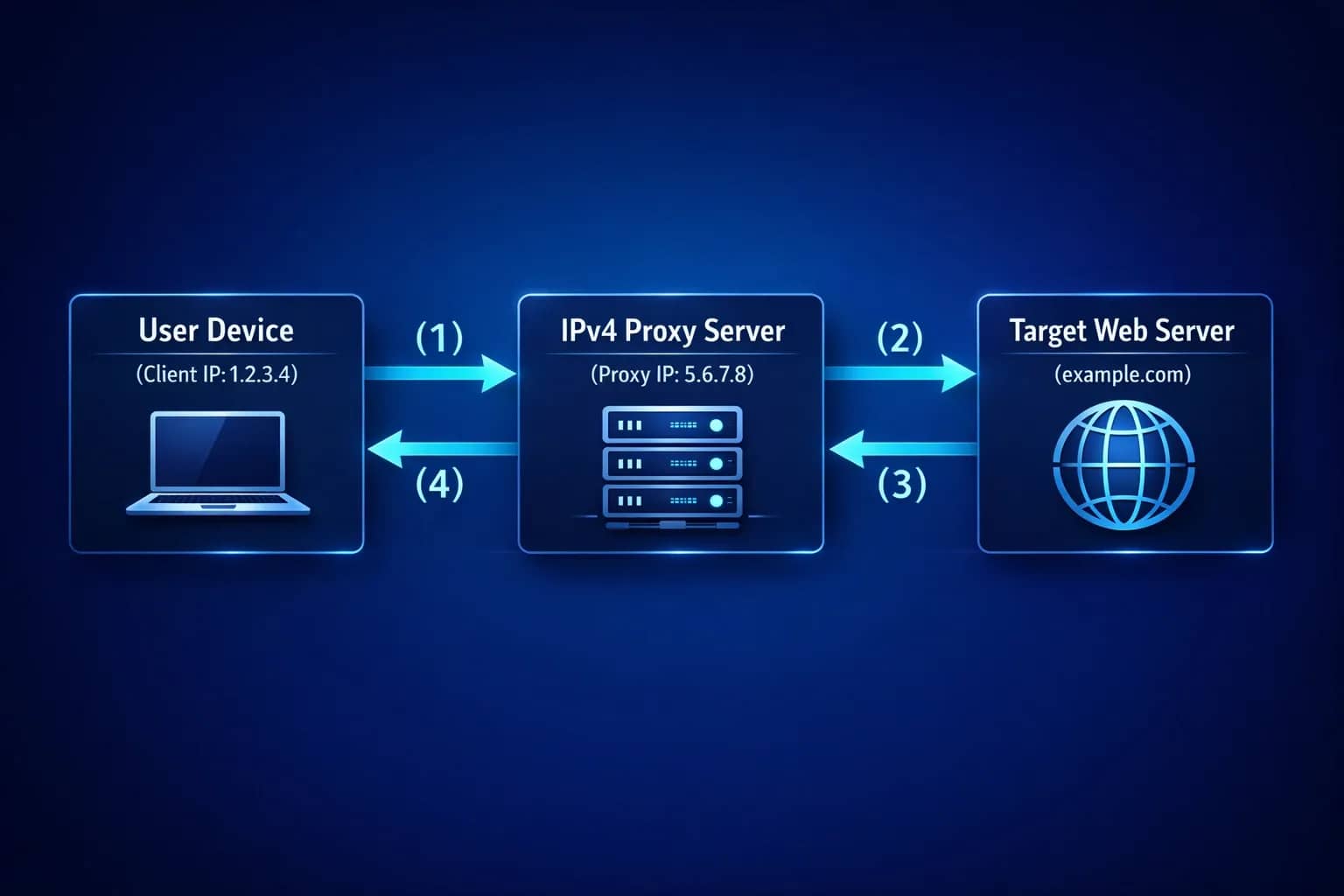
1. Specifying the connection configuration. The user or specialized software (antidetect browser, scraping script, Proxifier client) sets the network address and assigned port of the proxy server. Authentication details are specified if necessary.
2. Establishing a session and authorization. The client device sends an initial SYN packet to open a TCP connection with the proxy server.
Authorization occurs at this stage. There are two main methods:
- login and password — the request transmits an authorization header containing encoded credentials;
- IP binding — the proxy server checks the client's incoming IP address against a list of allowed addresses in the control panel.
3. Modification and replacement of headers. The proxy server receives the incoming request, extracts the original data, and forms a new network packet. Key transformations occur at this stage:
- the client's original IP address (1.2.3.4) is removed from the network frame;
- the proxy server's own IPv4 address (5.6.7.8) is substituted as the sender's IP address;
- service headers capable of revealing the use of an intermediary node are cleared or replaced.
4. Forwarding the request to the target resource. The newly formed network packet is forwarded to the target web server. For the destination resource, this request looks completely legitimate, originating directly from the proxy server's IP address.
5. Receiving and routing the response. The target web server processes the request and sends the response data array (HTML code, images, JSON structures) back to the proxy server's IPv4 address. The proxy server receives the packets, matches them to the session opened by the client, and relays the information back to the user's device.
The DNS Leak Problem
To open a website, a client needs to resolve a domain name (e.g., example.com) into an IP address. This process is called DNS resolution.
If the system is configured incorrectly, the request to the DNS server may go directly through the user's ISP, bypassing the proxy tunnel. In this case, a DNS leak occurs: the target resource or ISP logs the user's real DNS server, nullifying anonymity.
When protocols are used correctly — especially SOCKS5 with remote resolution — domain name conversion takes place directly on the proxy server side, completely eliminating DNS leaks.
Types of IPv4 Proxies and Technical Features
The quality and trust level of an IPv4 proxy from anti-fraud systems depend directly on the origin and category of the assigned IP address.
Datacenter Proxies
IP addresses belong to large data centers and hosting providers (DigitalOcean, AWS, Hetzner, OVH).
Features: Issued in large subnets (/24, /16), possessing minimal ping and throughput up to 10 Gbps.
Pros: Low cost, high speed, and connection stability.
Cons: Easily identified by security algorithms. If a single IP from a data center subnet gets blacklisted, the entire block of addresses may face restrictions.
Residential Proxies
IP addresses of real home users assigned by residential internet service providers (Rostelecom, Comcast, AT&T).
Features: Addresses are listed in official RIR databases (RIPE, ARIN) as residential IPs. They enter pools via user consent in software (SDKs).
Pros: High trust from target websites — the probability of an instant block is minimal.
Cons: Higher cost, higher ping than datacenter proxies, speed depends on the specific user's connection channel.
Mobile Proxies
IP addresses of cellular carriers (MTS, Beeline, Vodafone, T-Mobile) connected via real modems and SIM cards.
Features: Due to the IPv4 shortage, mobile operators use NAT technology — tens of thousands of legitimate smartphone users access the network simultaneously under a single public IPv4 address from a mobile carrier.
Pros: Maximum trust. Website security systems cannot block a mobile IP address, as doing so would block thousands of regular users.
Cons: High cost, necessity for rotation.
ISP Proxies
A hybrid solution: IP addresses are registered to consumer ISPs but are physically hosted on server equipment in data centers. They combine the trust of a residential IP with the high speed of a datacenter connection.
Access Type
Individual/Private — the IP address is issued strictly to a single user for the entire rental period. Guarantees a clean operating history and no influence from third parties.
Shared — the same IP address is used simultaneously by 2 to 5+ clients. Characterized by a low price, but carries risks of CAPTCHAs and blocks due to the actions of other users.
Rotation Architecture: Static vs Rotating Proxies
From the standpoint of address constancy, proxies are divided into two key architectural groups.
Static/Sticky Proxies. The client is provided with a permanent IP address and port that do not change throughout the rental period. Suitable for managing social media accounts, working in ad accounts, and using services where changing IPs raises suspicion.
Rotating Proxies. A system in which the IP address changes automatically. A Backconnect gateway is used to operate.
How rotation works via Backconnect:
- The user connects to a single, constant gateway address and port (e.g., entry.proxy-provider.com:8080).
- The gateway server accepts the request and automatically forwards it to one of the available nodes from a massive pool (millions of IPs).
- With each new HTTP request or after a set timer (e.g., every 5, 10, 30 minutes), the gateway changes the exit proxy node.
- Rotation via link is also available, where changing the address is initiated by sending a GET request to a specific API endpoint.
IPv4 vs IPv6 Proxies: Technical Comparison
| Parameter | IPv4 | IPv6 |
| Address length and format | 32 bits (192.168.1.1) | 128 bits (2001:0db8:85a3::8a2e:0370:7334) |
| Available address capacity | ~4.3 billion (shortage) | Practically unlimited |
| Website compatibility | 100% of network resources | ~30–40% of network resources |
| Trust from anti-fraud systems | High | Low (due to mass spam) |
| Anti-fraud blocking | Specific IP is blocked | The entire subnet is blocked at once |
| Cost | High | Extremely low |
IPv6 proxies are suitable for a limited range of tasks on resources that properly support this protocol (for instance, collecting public data on certain social networks).
For solving commercial tasks — multi-accounting, working with ad accounts, scraping large marketplaces, and protected websites — selecting the IPv4 standard is mandatory.
Conclusion
IPv4 proxy infrastructure is a key element of network anonymity, automation, and data collection on the modern Internet. A proxy server acts as a technical intermediary that reroutes network requests, replacing the client's original IP address with its own IPv4.
For successful operation, choose proxy servers tailored to specific tasks: static private IPv4 for account management, rotating mobile or residential for web scraping and working with highly protected platforms.
Frequently asked questions
- Safety depends on the reliability of the service provider. When using private HTTPS or SOCKS5 proxies with authentication, data transmission is secure. Using free public proxies is not recommended: their owners can intercept unencrypted data, cookies, and authorization tokens.
- The high price is due to the exhaustion of the global pool of free IPv4 addresses. The commercial cost of a single IPv4 address on the international market is constantly rising, whereas IPv6 blocks are allocated to providers in practically unlimited quantities.

Why Google Blocks Accounts and What Your Antidetect Has to Do With It
Google has once again complicated the mechanisms of digital identification by deploying a new, more sophisticated layer of protection based on proprietary HTTP headers. This quiet change caught most of the market off guard, triggering a wave of rushed updates. While others hastily released superficial 'fixes', we realized that we were dealing not with a minor issue but with a fundamental shift that required deep and comprehensive analysis.

SOCKS vs HTTP Proxy: What’s the Real Difference and Which One to Choose?
There are times when you don’t want a website to link the request back to your device. That’s where a proxy comes in, it acts like a middle layer and sends the request for you. The site sees the proxy’s info instead of yours. It’s a go-to trick when you’re trying to see a page that’s not available in your region, pull content that’s restricted by location, or avoid hitting a wall when sending lots of requests.

The Best Alternative to OBS Studio
Working with a webcam on many online platforms can turn into a real challenge. A strict oval or rectangular frame appears on the screen, but your image doesn’t align perfectly with it. As a result, the system blocks further progress, demanding perfect alignment, and your workflow is disrupted before it even begins.