How to use an anti-detect browser: a guide for beginners
When working with Facebook, Google Ads, or TikTok, multiple accounts are often used. If you log into them from a regular browser, the system quickly detects device matches and links the network — everyone gets banned.
In crypto, projects analyze behavior and connections between participants to weed out farms. On marketplaces like Amazon or eBay, the situation is similar: linked stores can get blocked. In all these examples, an anti-detect browser can be the solution to the problem. It helps to separate profiles and reduce the risk of blocks.
In this article, we will consider how anti-detect browsers work, for what tasks they are used, and which tool to choose for work.
What is an anti-detect browser and why is it needed
Sites identify users by IP address, cookies, and device parameters. The operating system version, processor and video card model, screen resolution, installed fonts, and time zone are read. This set of data forms the digital footprint of the device — the fingerprint.
If a platform has blocked a user, changing the IP address via VPN will not help. The security system will recognize the visitor by their digital fingerprint and block them again.
An anti-detect browser is a program that spoofes the digital fingerprint. In it, you can create many working profiles, each with its own cookies, cache, and a unique set of technical parameters. For security systems, such a profile is identified as a separate device.
Areas of application
Anti-detects are used for multi-accounting — managing profiles without the risk of data intersection. This tool is especially relevant in a number of niches:
- Traffic arbitrage (Facebook, Google Ads, TikTok). With the mass launch of ads, network algorithms block accounts for the slightest suspicion. If you log into accounts from a regular browser, the system will link them by device fingerprint and issue a ban to the entire network. An anti-detect isolates sessions: blocking one account does not affect the rest.
- Cryptocurrencies and Web3. Users participate in token and NFT airdrops from multiple accounts to increase profits. Crypto projects actively track down account farms and exclude them. An anti-detect coupled with proxies masks the farm as independent users from different countries, protecting against blocks.
- E-commerce (Avito, Amazon, eBay). Sellers scale their business by creating several stores in one niche. Platform rules prohibit monopolizing search results: for this, a shadow or full ban threatens. An anti-detect generates unique fingerprints, forcing algorithms to perceive accounts as separate people.
- SMM and agencies. When managing dozens of client profiles, regularly changing accounts on one device arouses suspicion from social networks, which leads to authorization resets, demands for SMS confirmation, and even account freezing. In an anti-detect, each account works in its own profile with permanent parameters and cookies, without attracting the attention of security.
- Data parsing and web analytics. Companies automate the collection of prices and reviews from competitor sites. Protection systems like Cloudflare block parsers after several dozen requests from one account. Working through the anti-detect API distributes requests among hundreds of profiles, imitating real users and bypassing blocks.
How an anti-detect bypasses anti-fraud protection
Anti-fraud systems of major platforms use predictive analytics and collect hundreds of device parameters. Their goal is to identify bots, multi-account farms, and any attempts at data spoofing.
The main mistake beginners make is trying to block trackers using extensions. For security algorithms, the absence of data or an empty digital footprint is a marker of suspicious activity. A high-quality anti-detect provides trackers with a full set of generated but technically authentic parameters.
The bypass process is built on three levels.
Level 1. Hardware fingerprint spoofing
Sites know how to identify computer hardware directly through the browser by forcing it to perform background computational tasks. The anti-detect intervenes in this process at the level of the browser engine (Chromium or Firefox).
- Canvas and WebGL. To identify the video card, the site asks the browser to render a hidden 2D or 3D figure. Due to differences in drivers and microarchitecture, the render is unique at the pixel level. The anti-detect adds mathematical noise to the process. Visually, the picture does not change, but its hash sum becomes different: the algorithm sees a completely new video card.
- AudioContext API. The system analyzes the algorithms of audio signal processing by the sound card. Spoofing works by analogy with graphics: the browser overlays microscopic sound distortions, generating a unique audio footprint.
- CPU and RAM. The browser transmits data about the number of processor cores and the amount of RAM. The anti-detect hardware-spoofs these values to fit the selected profile (for example, emulating 8 cores and 16 GB of RAM instead of the real 4 cores and 8 GB).
Level 2. Protection of network parameters
Connecting through a regular proxy server is not enough. Anti-fraud systems can bypass the classic network routing settings of the device.
- WebRTC leaks. This is a protocol for direct audio and video communication, which is capable of transmitting the real IP address directly, ignoring system proxies. WebRTC cannot be disabled: this sharply reduces the profile's trust score. The anti-detect browser intercepts internal protocol requests and binds them to the IP address of the configured proxy.
- Geolocation and time zone. The browser engine automatically synchronizes the profile time and coordinates with the proxy IP address. If a proxy from Berlin is used, the browser will forcefully set the Europe/Berlin time zone and German localization.
- TLS/SSL fingerprints (JA3/JA3S). Advanced protection systems analyze encryption algorithms at the stage of establishing a secure connection. The program spoofes encryption packets so that they mathematically correspond to the declared operating system and browser version.
Level 3. Consistency of the software environment
The success of bypassing algorithms depends on systemic logicality. The protection instantly blocks a session if it notices technical contradictions.
- User-Agent and Client Hints. These identifiers tell the site the version of the operating system and engine. The program spoofes them to current values, masking old OSs as new ones (for example, simulating Chrome 147 on Windows 11 while working on Windows 10).
- System fonts. The set of installed fonts differs among Windows, macOS, and Linux users. The browser masks the system fonts of the real computer and provides the site with exclusively that list which is characteristic of the emulated OS.
- Screen resolution. The anti-detect spoofes the visible screen area and system display proportions, hiding the real dimensions of the monitor.
Open-source vs paid solutions
There are free open-source anti-detect solutions, for example, Camoufox. They require manual configuration and technical skills. You need to work with the console, assemble the environment, connect scripts, and update the core. A configuration error can lead to account blocking.
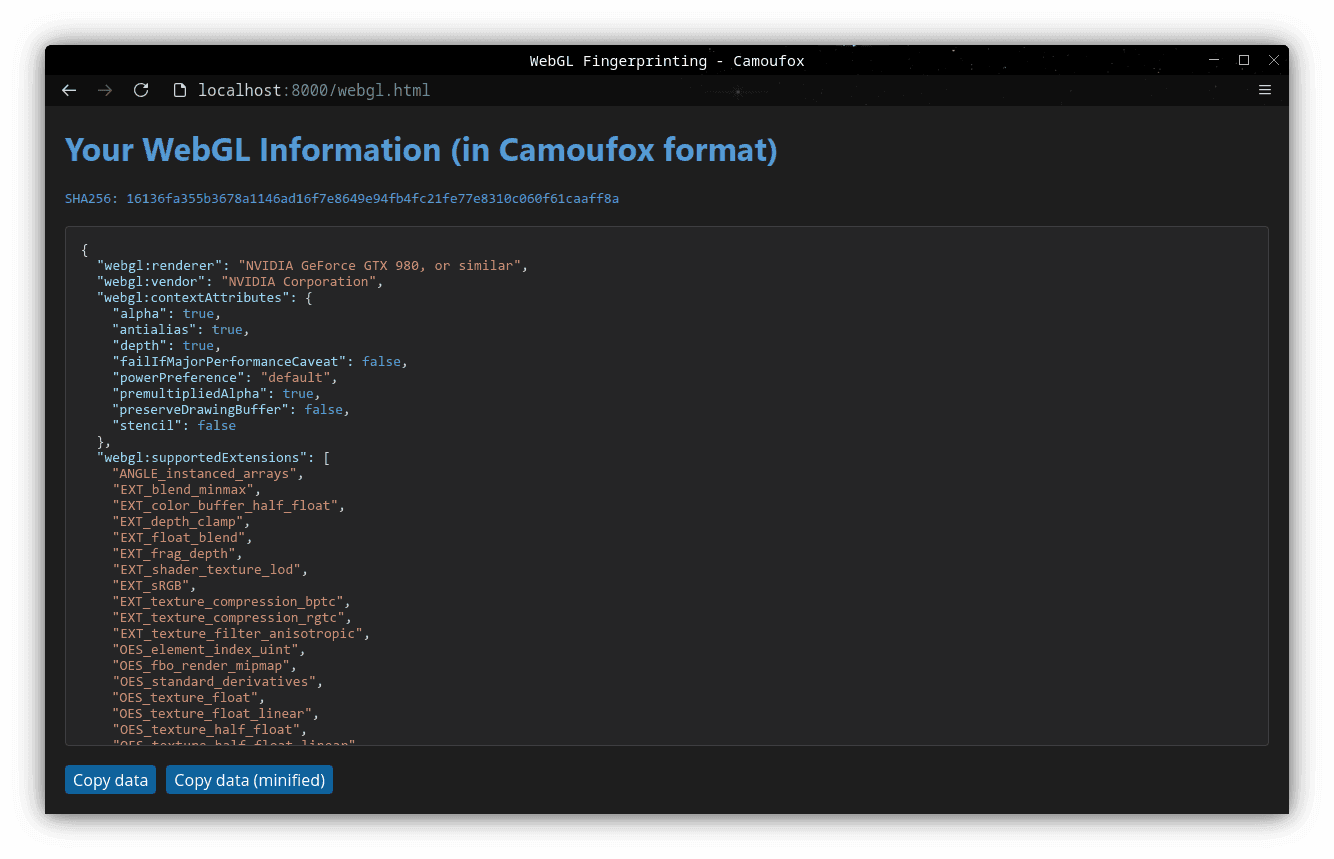
Commercial anti-detect browsers are an out-of-the-box solution. Developers constantly update fingerprints to match the current checks of Facebook, Google, and Cloudflare. A profile is created automatically, without manual adjustment of WebGL and headers. Sessions are saved in the cloud, and data is not lost during crashes.
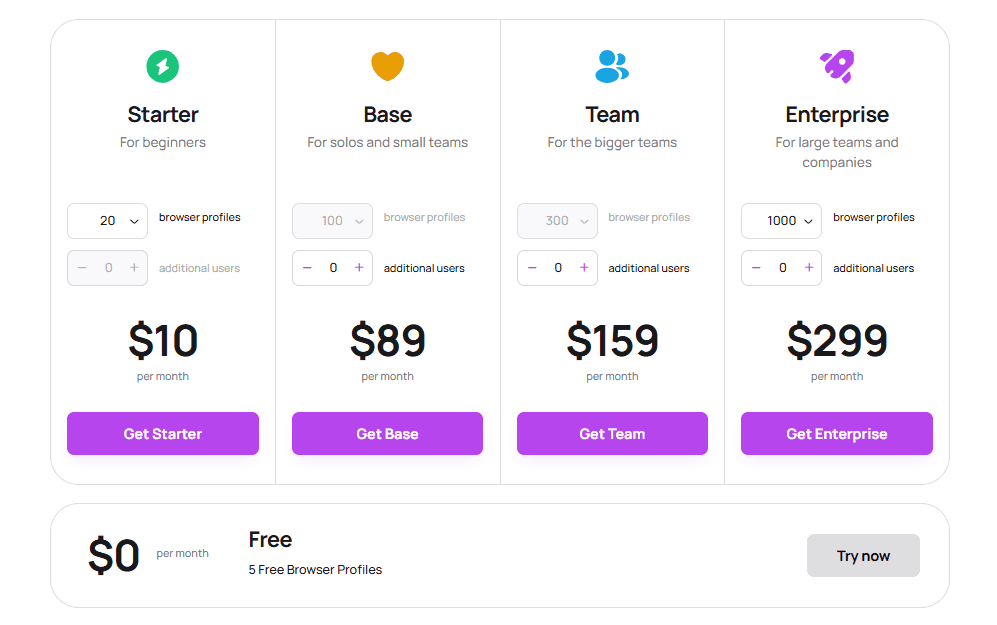
To start, it's better to get a commercial anti-detect. Most services have a free plan or a trial for 3–10 profiles. This is enough to understand the interface and launch the first bundles without investments.
Selection of the best anti-detect browsers
The anti-detect browser market has long been formed: there are several strong solutions that are regularly updated and adapted to platform requirements. Let's look at the top 5 services.
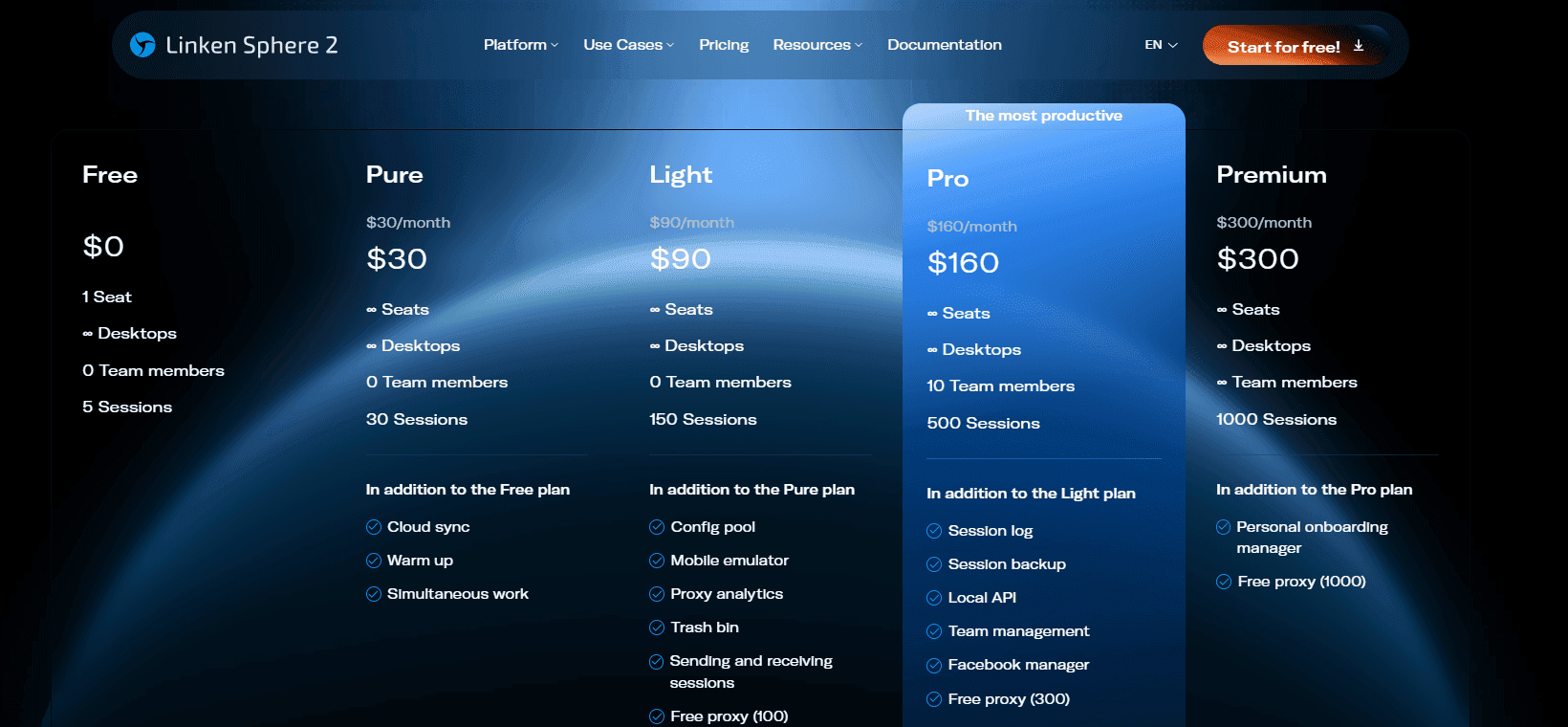
Linken Sphere
Linken Sphere is a new-generation anti-detect for secure multi-accounting and working with anti-fraud systems. The main advantage is the high speed of core updates: profiles are quickly adjusted to the current browser versions.
Key features:
- Built-in premium proxies. The platform provides access to its own high-quality proxy servers right out of the box.
- Secure teamwork. Isolated workspaces with flexible access rights configuration. Setups allow transferring accounts to employees and controlling their actions without disclosing logins and passwords.
- Advanced warm-up. Built-in automation that mimics natural human behavior: visits target sites from search engines and browses pages to increase the level of trust in the account.
- Deep mobile emulation. The ability to emulate a smartphone or tablet directly in a desktop browser.
- Mass management and presets. Tools for automating routines: creating templates to generate hundreds of sessions in one click, as well as mass launching and verifying accounts.
Dolphin{anty}
Dolphin{anty} is an anti-detect browser for working with a large number of accounts. Suitable for traffic arbitrage, agencies, and e-commerce. The program creates realistic digital profiles based on a database of fingerprints, simplifying work with accounts and reducing the risk of restrictions.
Key features:
- Synchronizer. A built-in tool that duplicates user actions: you manage one tab, and the program automatically repeats the same clicks, text inputs, and transitions in other open profiles.
- Profile automation. The ability to create automated scripts to perform routine tasks directly inside the interface without third-party programs.
- Smart device spoofing. Functions for spoofing the device name and webcam. Site algorithms receive correct hardware data, eliminating any suspicious matches during anti-fraud system checks.
AdsPower
AdsPower is an anti-detect browser for mass work with accounts. Everything here is tailored for a continuous flow: quick profile creation, management via a table, convenient navigation without unnecessary clicks.
Key features:
- Deep fingerprint customization. The system generates real digital fingerprints based on more than 50 customizable parameters, including IP, language, screen resolution, time zone, geolocation, fonts, Canvas, WebGL, and WebGPU.
- Smart automation simulator. A built-in system for automating routines, simplifying farming.
- End-to-end data encryption. Secure transmission and storage of credentials. All sensitive information remains on the user's device and is not synchronized with the cloud.
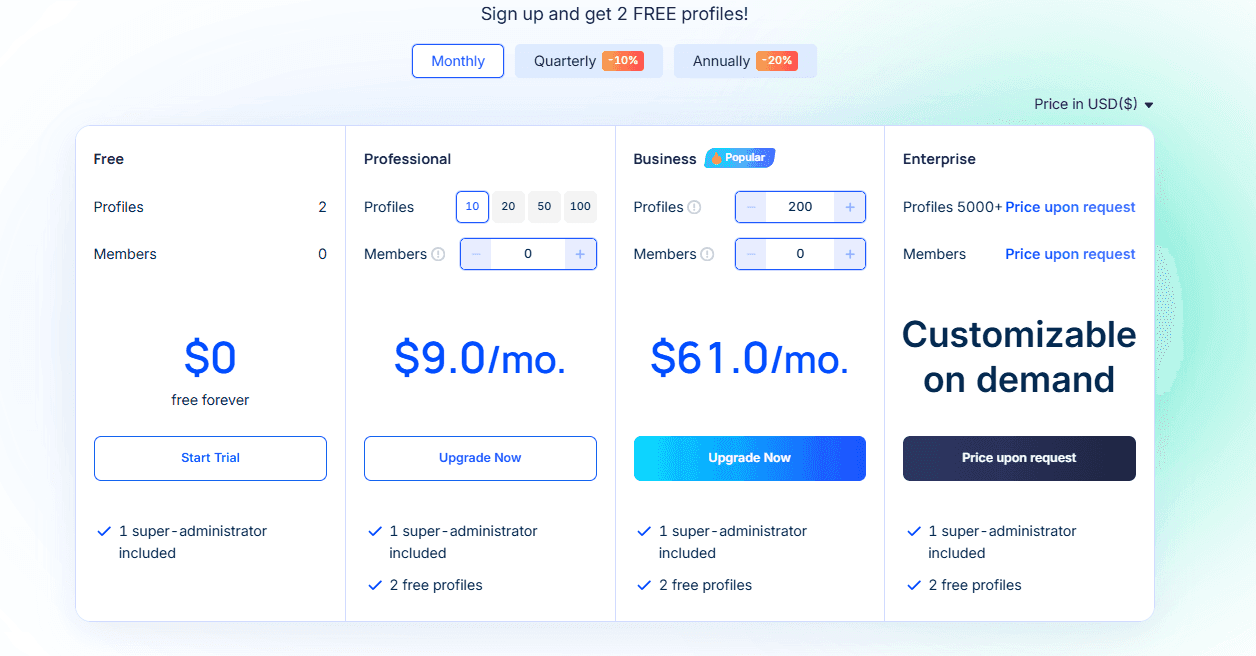
Octo Browser
Octo Browser is another good anti-detect for work tasks. The focus here is on the quality of fingerprints for spoofing.
Key features:
- Flexible teamwork. Flexible configuration of access rights through a tag system helps demark roles within the team. A detailed action log records all changes in profiles and provides full control over workflows.
- Protection and encryption. A multi-level security system with end-to-end encryption protects profile data. Additionally, you can set a local password for individual profiles, which blocks the session launch even if access to the main account is lost.
- Built-in proxy store. The ability to purchase residential and server proxies directly from the browser interface without needing to use third-party services.
- Working with templates. The Quick Profile feature allows you to create a ready-made profile in one click with an automatically generated fingerprint. Templates simplify launch: hundreds of accounts can be deployed with predefined parameters.
MoreLogin
MoreLogin is an anti-detect with built-in profile synchronization with proxies: language, timezone, and system parameters are automatically adjusted to the IP.
Key features:
- Canvas spoofing. Instead of generating artificial noise, the core uses a database of real Canvas fingerprints collected from billions of devices.
- Synchronizer. A built-in feature for parallel work: the system mirrors all actions (clicks, scrolling, text input) from the main window to all other open tabs in real-time.
- Smart proxy management. You can upload proxies in a list, distribute them among profiles, and monitor connection stability right within the browser.
- Teamwork. Advanced role distribution settings. A manager can grant access to profiles while hiding logins, passwords, and proxy server data from employees.
- API for automation. Full support for integration with popular automation libraries (Puppeteer, Selenium, Playwright) for developing custom scripts and parsers.
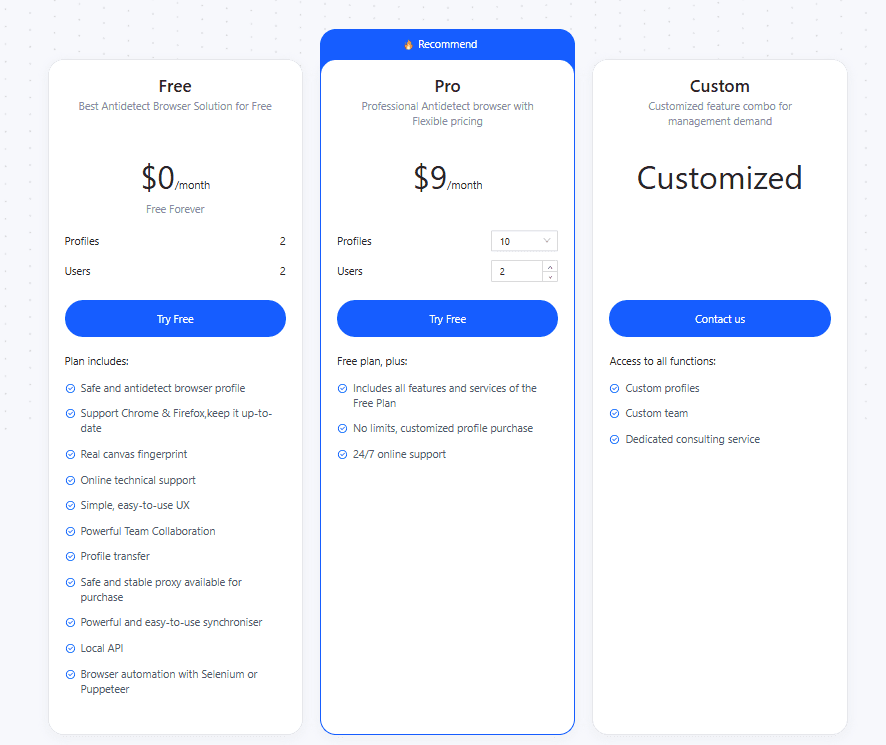
Checklist: how to start working with an anti-detect browser from scratch
Correct setup from the very beginning reduces the risk of problems in further work. Let's show how to work with an anti-detect using Linken Sphere as an example.
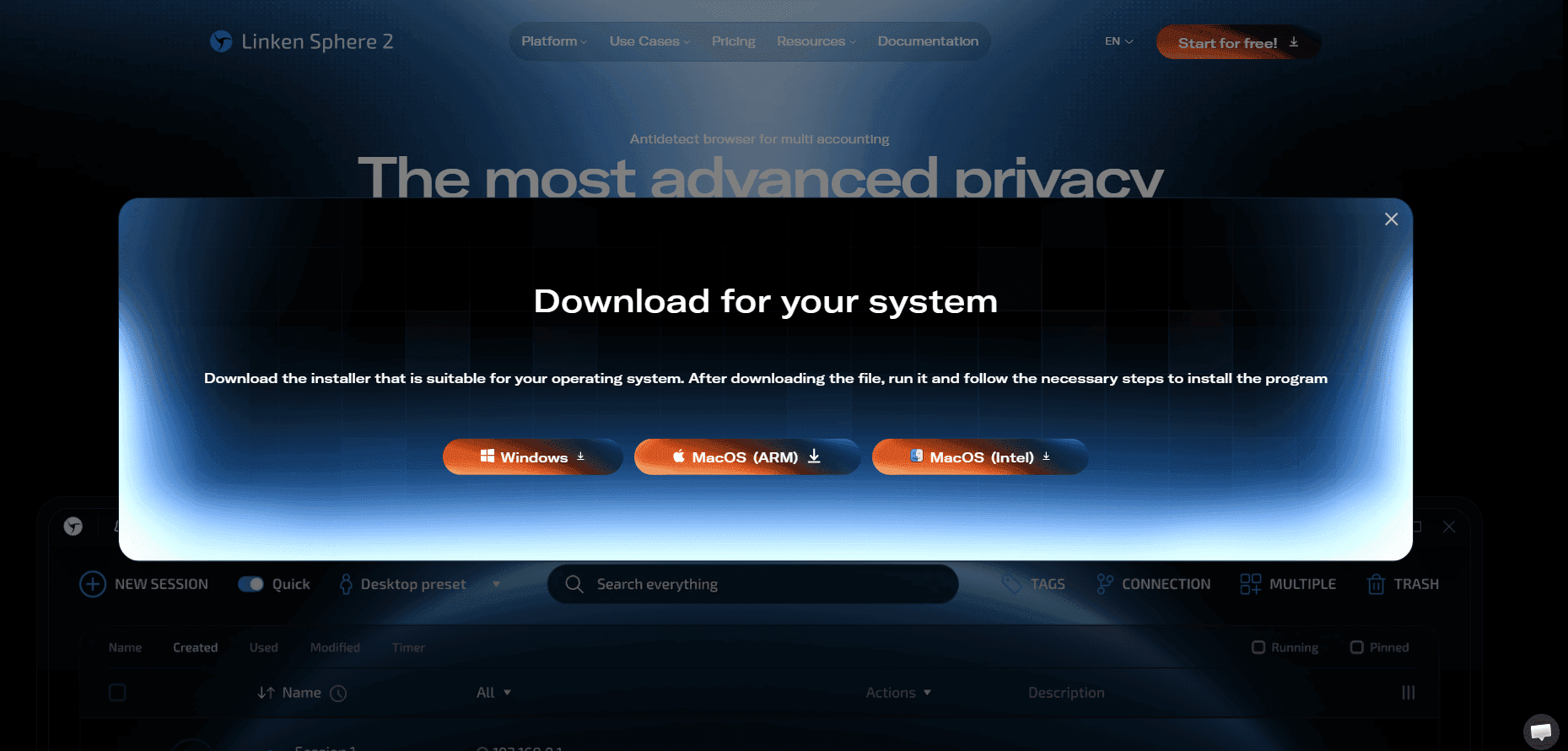
Install the software. Register on the official Linken Sphere website. The browser has a completely free plan — activate it and download the desktop app.
Set up a proxy. Paid Linken Sphere plans already have built-in proxies, so you can work immediately without third-party services. In the free version, proxies must be connected separately: it is better to take individual mobile or residential ones.
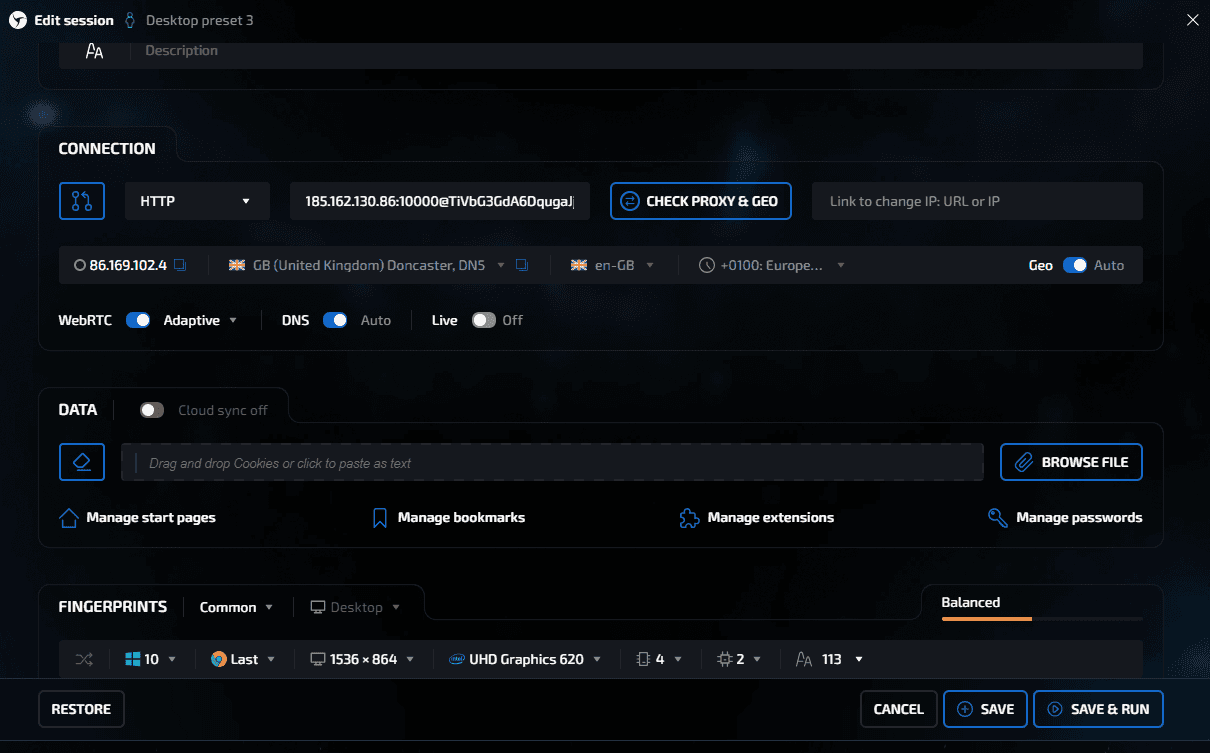
Generate a fingerprint. Linken Sphere's core will automatically select the current hardware parameters, system fonts, time zone, and synchronize WebRTC to the selected proxy when creating a profile.
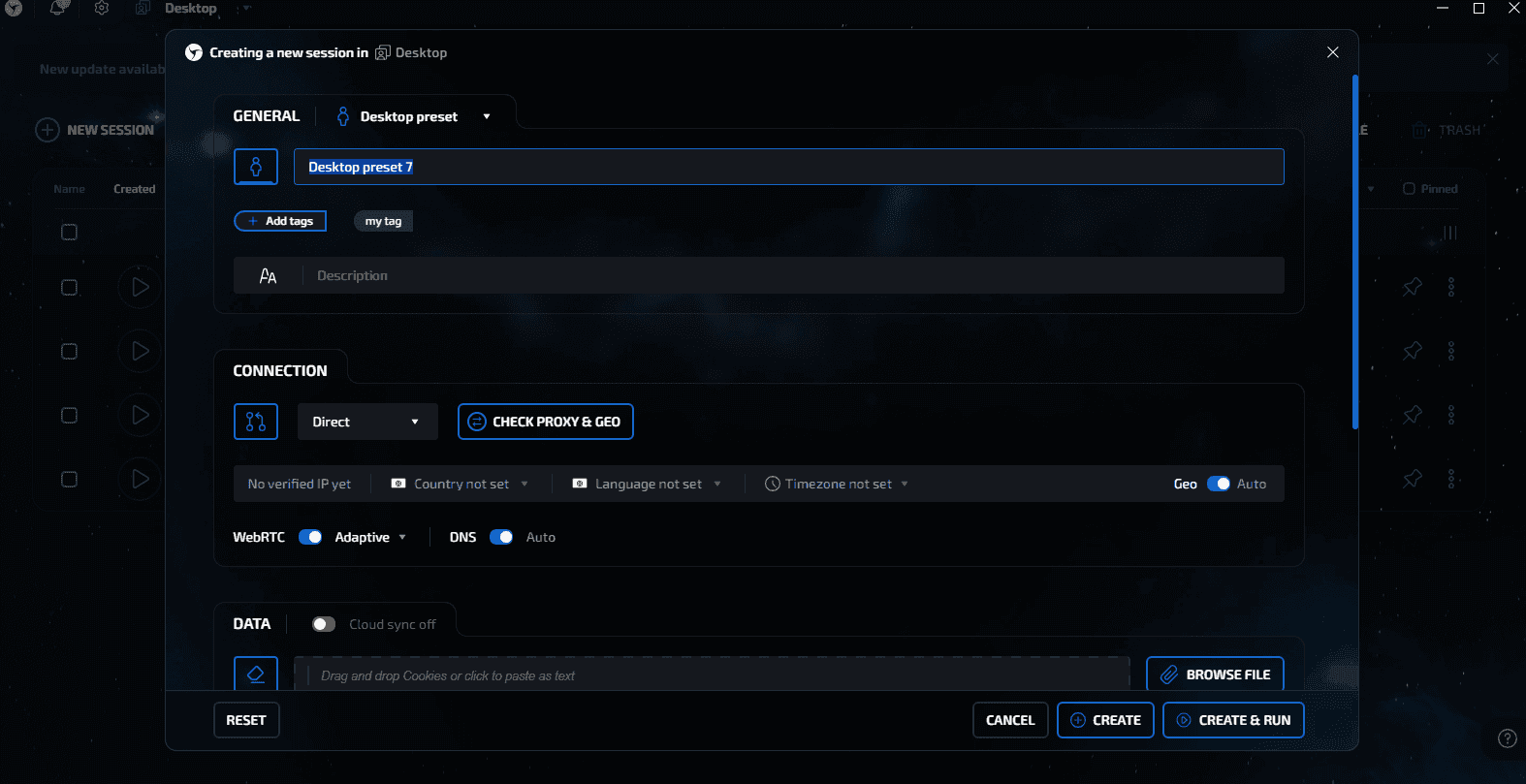
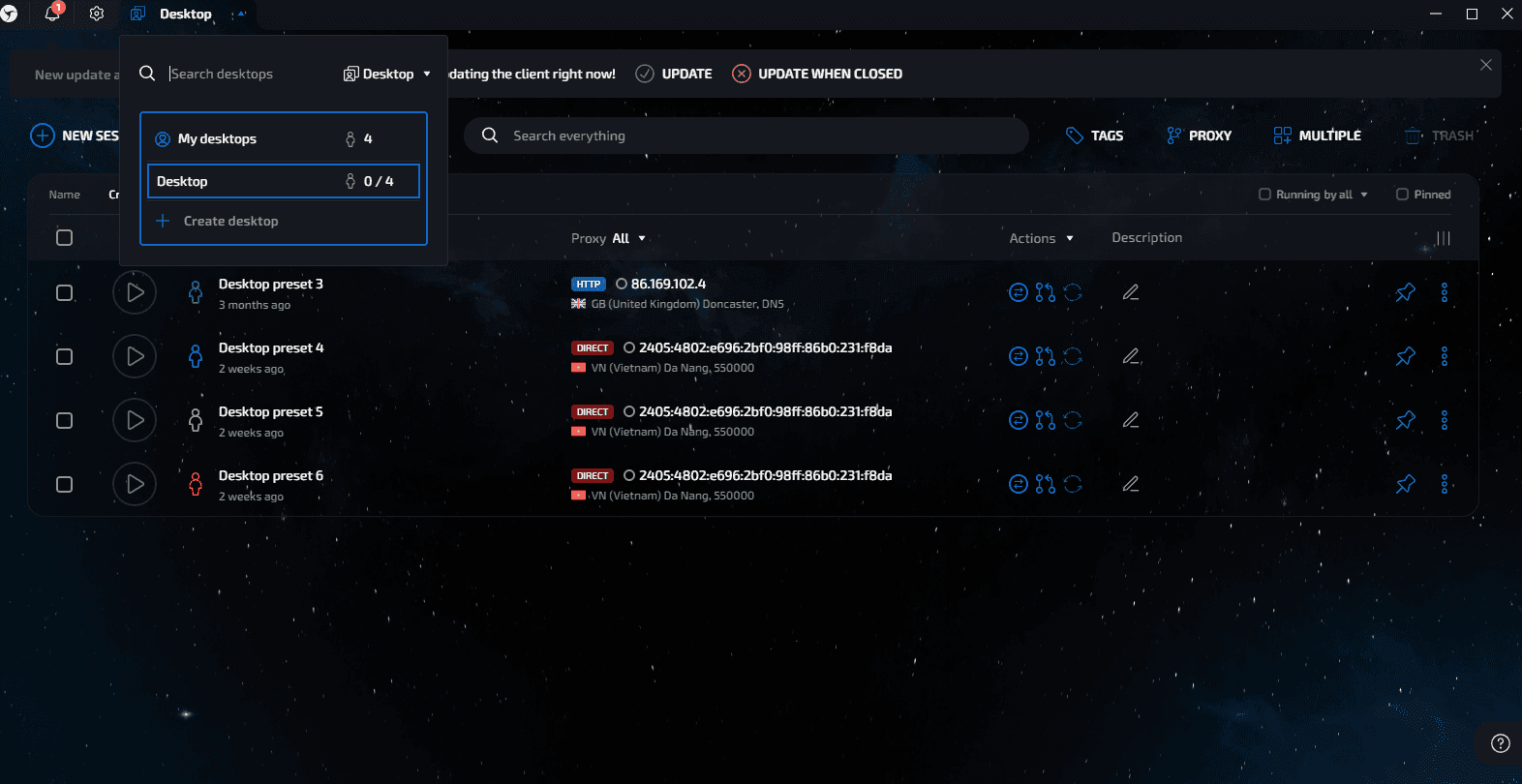
Organize the work. Distribute different projects across independent desktops. If working in a team, configure isolated workspaces and allocate session access rights among employees without transferring direct logins and passwords from the platforms.
Conclusion
An anti-detect browser protects accounts from bans by spoofing a real digital fingerprint with a generated one. Instead of blocking trackers, the software transmits formulated, authentic data: hardware-alters video card hashes and processor parameters, redirects WebRTC to the proxy, and adjusts the system time to the necessary IP. Without a reliable anti-detect, it is impossible to work effectively with multi-accounting.
Why Google Blocks Accounts and What Your Antidetect Has to Do With It
Google has once again complicated the mechanisms of digital identification by deploying a new, more sophisticated layer of protection based on proprietary HTTP headers. This quiet change caught most of the market off guard, triggering a wave of rushed updates. While others hastily released superficial 'fixes', we realized that we were dealing not with a minor issue but with a fundamental shift that required deep and comprehensive analysis.
SOCKS vs HTTP Proxy: What’s the Real Difference and Which One to Choose?
There are times when you don’t want a website to link the request back to your device. That’s where a proxy comes in, it acts like a middle layer and sends the request for you. The site sees the proxy’s info instead of yours. It’s a go-to trick when you’re trying to see a page that’s not available in your region, pull content that’s restricted by location, or avoid hitting a wall when sending lots of requests.

The Best Alternative to OBS Studio
Working with a webcam on many online platforms can turn into a real challenge. A strict oval or rectangular frame appears on the screen, but your image doesn’t align perfectly with it. As a result, the system blocks further progress, demanding perfect alignment, and your workflow is disrupted before it even begins.