
Free Proxifier Alternatives: Best Proxy Clients for Applications
Proxifier is one of the most famous tools for routing application traffic through a proxy. It helps run even those programs that lack built-in proxy settings through SOCKS or HTTPS proxies. But Proxifier is a paid solution, and not everyone needs its full set of features. Sometimes the task is much simpler: route a specific application through SOCKS5, test software with a different IP, or split traffic between several programs.
In this article, we will analyze free alternatives to Proxifier and compare popular proxy clients for specific tasks.
Why you need a proxy client
Proxy clients are needed in situations where an application cannot work through a proxy directly. For example, the program settings have no fields for host, port, login, and password, but you need the traffic to go through a SOCKS5 or HTTP proxy.
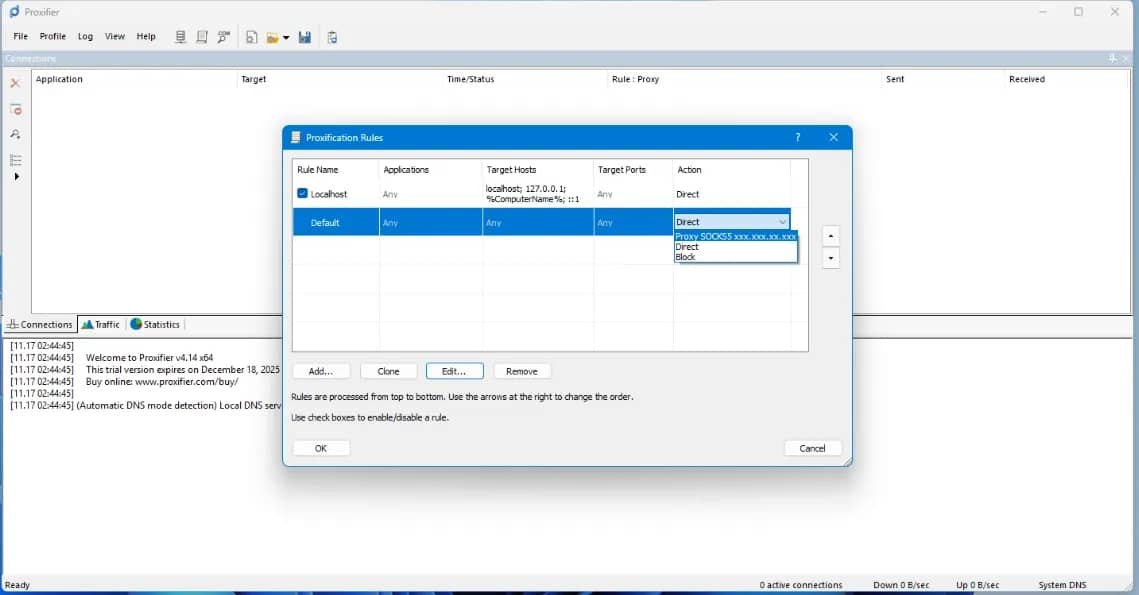
Proxifier and its analogs are useful if you need to:
- route only one messenger, parser, SEO software, or desktop application through a proxy;
- avoid changing the IP of the entire system;
- split traffic so that one application works directly, the second — through one proxy, and the third — through another;
- use a SOCKS5 proxy in a program that does not support SOCKS5;
- set up rules by applications, domains, ports, or processes;
- test the network behavior of an application under different conditions.
An example of practical application is multi-accounting in Telegram. To log into a purchased Telegram account, you need to import the tdata file into a portable client and launch the application. And while a couple of accounts can be added without a proxy without getting banned or facing other types of restrictions, building a farm of dozens of accounts without a proxy is impossible.
It is important to understand: Proxifier and its analogs do not provide proxies. They only help use proxy servers that you have already obtained separately — from a provider, on your own server, or in another infrastructure. In essence, they sit between the application and the proxy server, intercepting traffic and sending it through the selected proxy.
If we are talking about finding an alternative, you should initially understand the classification. The most correct term is "proxy client". You can also encounter terms like "proxifier", "proxiFyre", "application proxying program", "proxy routing tool", or "tool for routing traffic through a proxy".
These terms are often mixed up, so it is important to separate the concepts.
- Proxy service — a service that provides proxy servers: IPs, ports, logins, passwords, residential, or datacenter proxies.
- Proxy client — a program that routes traffic of an application or system through a proxy.
- VPN client — a program that creates a VPN tunnel, most often for all device traffic.
In this article, we will use the term "proxy client" because it describes programs that help route application traffic through a proxy more accurately.
What to look for when choosing a Proxifier alternative
When choosing a free service, it is important to consider its relevance as well as technical capabilities to immediately understand what exactly you are saving on. It is worth starting with the basic parameters — OS, supported proxy types, basic functionality.
Supported operating system
First check if there is a version for your OS: Windows, macOS, or Linux. Some tools are cross-platform, but functionality may differ between versions. For example, ProxyBridge is positioned as a solution for Windows, macOS, and Linux, while ProxiFyre is focused specifically on Windows.
Supported proxy types
Most commonly encountered:
- SOCKS5 — a universal option for many tasks;
- SOCKS4/SOCKS4a — an older protocol, but sometimes encountered;
- HTTP — not suitable for all types of connections;
- HTTPS / HTTP CONNECT — used for tunneling TCP connections.
If you already have a proxy, check its type first, and then choose a client.
Routing by application
The main reason to use a Proxifier alternative is the ability to route a specific application or process through a proxy. But not all free tools do this equally conveniently: some have a graphical interface and rules, some require running a command through the terminal, and some rely on system-level routing configuration.
TCP and UDP support
TCP is supported by many solutions. Everything is more complicated with UDP: its presence must be checked separately. For example, proxychains-ng in the Kali documentation is described as a tool that supports only TCP, without UDP/ICMP.
Graphical interface or command line
If you are a beginner, it is more convenient to start with a tool featuring a graphical interface. CLI tools are more flexible, but require an understanding of the command line, configs, and network logic.
Project relevance
Check the date of the last release, activity on GitHub, documentation, and the availability of builds for your OS. For example, in one of the GitHub repositories for SocksCap64, the last version 4.7 is dated February 2020, so it is better to consider it as a simple, but not the most up-to-date option.
Security
Download proxy clients only from the official website, GitHub, or a trusted repository. Do not use unknown builds from file-sharing platforms and do not transmit passwords, payment data, or access to work accounts through questionable proxies. A free proxy client is not the same thing as a secure free proxy.
Best free Proxifier alternatives
Below are several tools that can be considered as free Proxifier analogs. They differ by OS, interface, proxy types, and complexity level. We have pre-tested the functionality of each tool.
ProxyBridge
ProxyBridge is one of the most popular free Proxifier alternatives. A lightweight, open-source, universal proxy client that works on Windows, macOS, and Linux. It can redirect TCP and UDP traffic of individual processes through SOCKS5 or HTTP proxies.
- OS: Windows, macOS, Linux.
- Proxy types: SOCKS5, HTTP.
- GUI: yes, but capabilities may differ between platforms and versions.
- App-based routing: declared.
- TCP/UDP: declared TCP and UDP support.
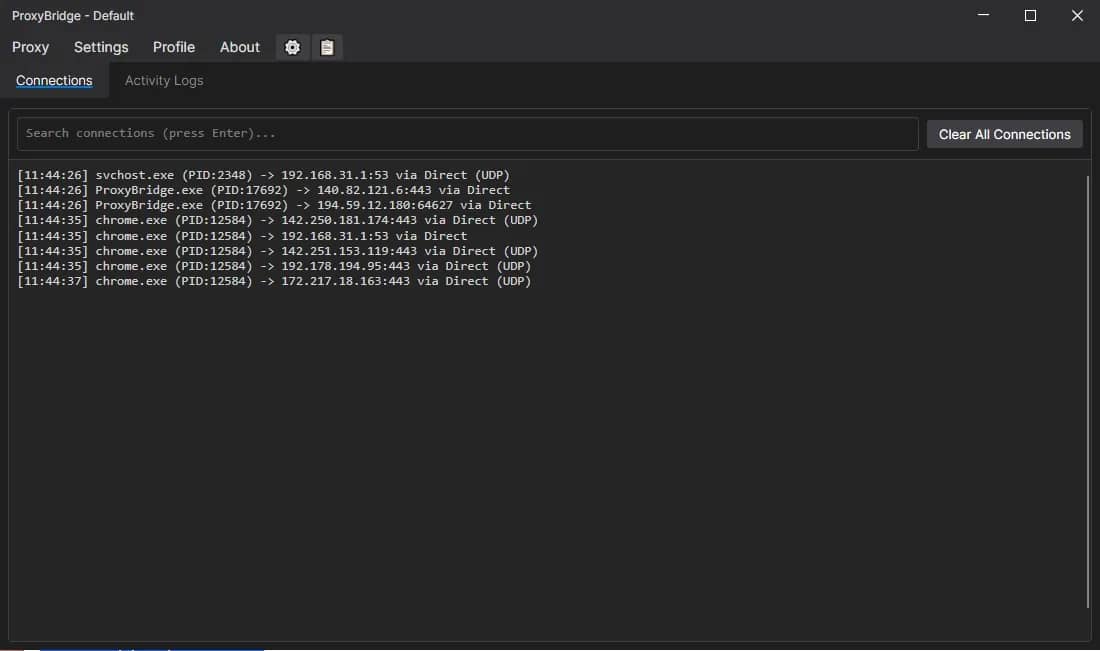
Pros:
- open-source;
- versions available for Windows, macOS, and Linux;
- directly positioned as a Proxifier alternative;
- supports SOCKS5 and HTTP;
- declared TCP and UDP routing;
- supports scenarios for working with individual applications.
Cons:
- can be harder for a beginner than classic Proxifier;
- functionality and stability need to be checked for a specific OS;
- additional configuration may be required for some scenarios.
Who it is suitable for: users who need a universal free alternative to Proxifier and are willing to figure out routing rules.
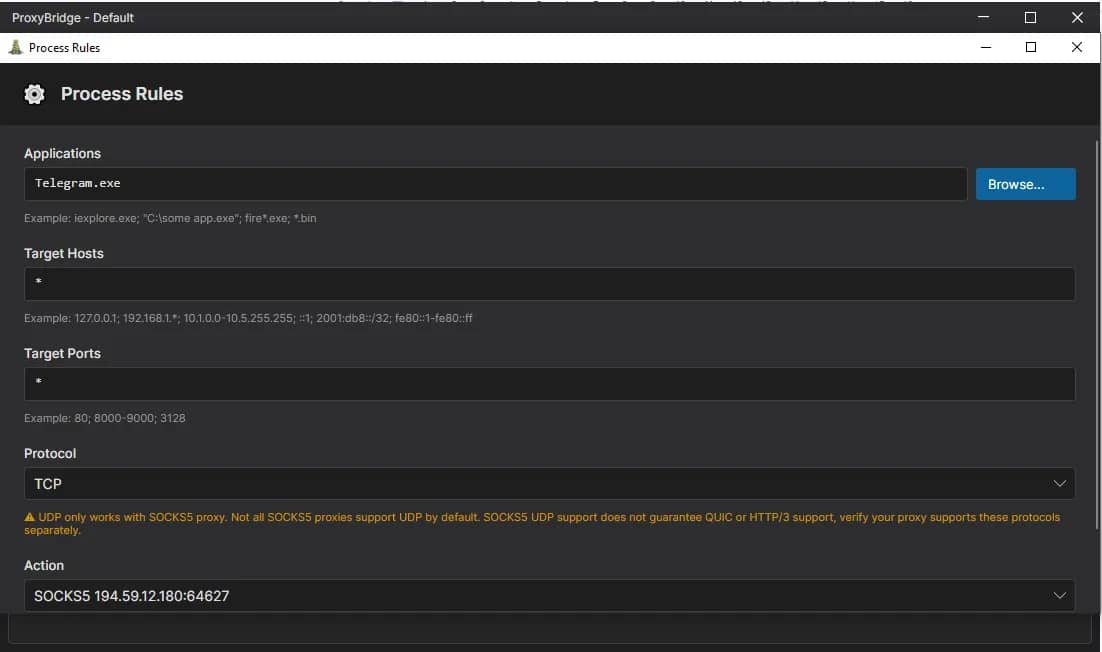
ProxyBridge should be considered first if you need a modern open-source proxy client for different operating systems.
ProxiFyre
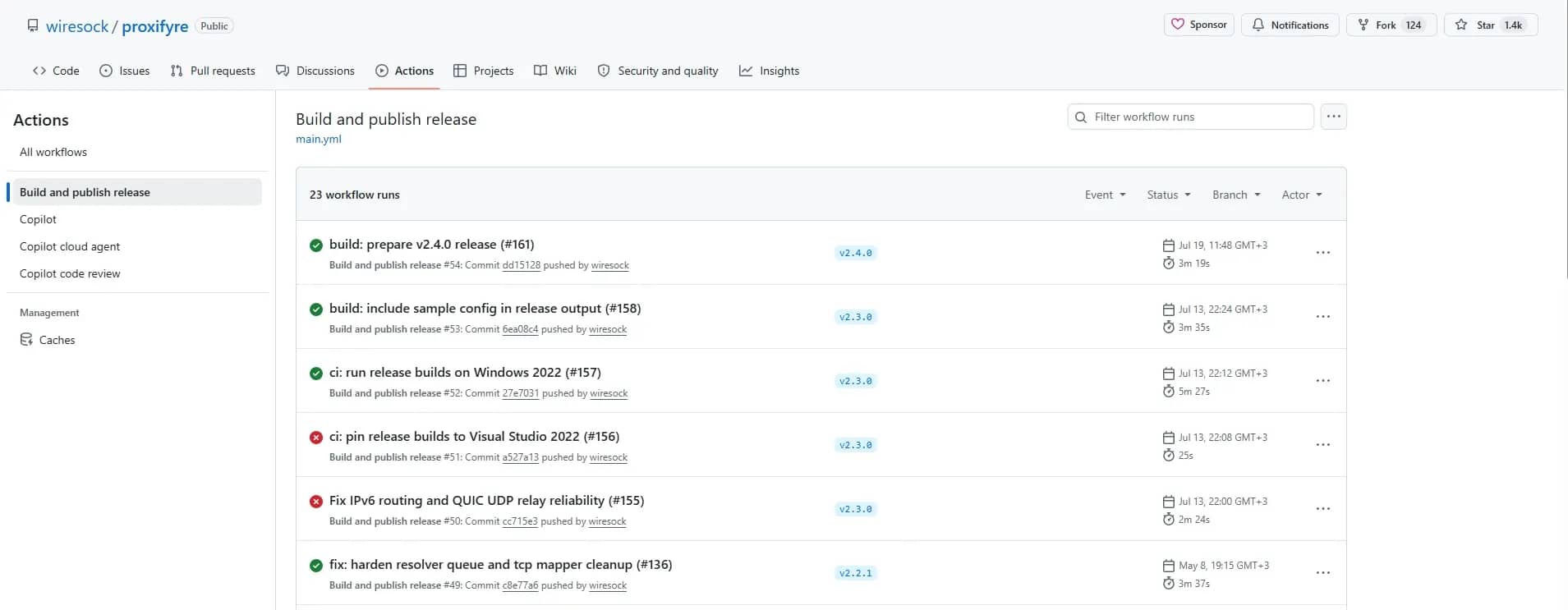
ProxiFyre is a free open-source tool for Windows positioned as a proxy client with UDP support. It allows applications without native proxy support to route TCP and UDP traffic through a SOCKS5 proxy.
- OS: Windows.
- Proxy types: SOCKS5.
- GUI: not the main focus.
- App-based routing: declared.
- TCP/UDP: declared TCP and UDP support.
- Regular updates: yes, the client is updated regularly.
Pros:
- open-source;
- focused on Windows;
- supports SOCKS5;
- declared TCP and UDP support;
- suitable for applications without built-in proxy support;
- can be interesting for QUIC/UDP scenarios.
Cons:
- less universal than cross-platform solutions;
- harder for beginners;
- configuration may require manual setup;
- not suitable for those who need a simple graphical interface.
Who it is suitable for: technically savvy Windows users who need SOCKS5, TCP/UDP support, and app-based routing.
ProxiFyre is a good option if you are looking for a Windows option and understand how to work with such solutions and interact with documentation. Beginners will find this tool difficult.
SocksCap64
SocksCap64 is an older and simpler tool for Windows. It helps applications access the network via a SOCKS proxy and create a list of applications for an individual connection.
- OS: Windows.
- Proxy types: SOCKS.
- GUI: yes.
- App-based routing: yes, by launching selected programs.
- TCP/UDP: best considered as an option for basic TCP scenarios.
- Regular updates: no, the last version was released on November 16, 2017.
Pros:
- simple usage scenario;
- suitable for Windows;
- works with individual applications;
- more understandable for beginners than CLI tools.
Cons:
- the project looks less relevant compared to fresh alternatives;
- less flexibility than Proxifier;
- not the best option for complex network scenarios;
- download sources must be chosen carefully.
Who it is suitable for: Windows users who need a simple program to run individual applications through a SOCKS proxy.
SocksCap64 can be considered for simple tasks, but before using it, check the download source and compatibility with your version of Windows.
Proxychains-ng
Proxychains-ng is not a classic Proxifier analog, but a technical tool for Unix-like systems. It intercepts socket system calls of dynamically linked programs and redirects them through one or several SOCKS/HTTP proxies.
- OS: Linux, macOS, Unix-like systems.
- Proxy types: SOCKS4a, SOCKS5, HTTP.
- GUI: no.
- App-based routing: by launching a specific command/program with proxychains.
- TCP/UDP: TCP only.
- Regular updates: no, the last version was released in 2024.
Pros:
- open-source;
- popular in the Linux environment;
- supports proxy chaining;
- suitable for CLI tools;
- convenient for developers, administrators, and technical scenarios.
Cons:
- lacks a familiar graphical interface;
- harder for beginners;
- not suitable for all applications;
- does not support UDP;
- requires an understanding of configuration files and the command line.
Who it is suitable for: Linux/macOS users, developers, system administrators, and those accustomed to working with the terminal.
Proxychains-ng is a good option for CLI and Linux scenarios, but definitely not suitable for those looking for a simple visual analog of Proxifier.
tun2proxy
tun2proxy is an advanced tool for routing via a TUN interface, for HTTP and SOCKS proxies on Linux, Android, macOS, iOS, and Windows.
This is not a "select an app in the interface and press Start" format tool. Rather, tun2proxy is suitable for system-wide routing via a virtual network interface when a flexible network scenario is needed.
- OS: Windows, macOS, Linux, Android, iOS.
- Proxy types: HTTP, SOCKS4, SOCKS5.
- GUI: no.
- App-based routing: not the main scenario; system-wide routing via TUN is used more often.
- TCP/UDP: depends on configuration, platform, and specific scenario.
- Regular updates: yes, the client is updated regularly.
Pros:
- open-source;
- cross-platform;
- HTTP and SOCKS support;
- suitable for advanced network scenarios;
- can be useful where a TUN approach is required.
Cons:
- harder for beginners;
- requires technical understanding;
- is not a direct analog of Proxifier;
- DNS, UDP, and routes must be carefully checked in a specific configuration.
Who it is suitable for: advanced users who need flexible system-wide routing via a TUN interface.
Tun2proxy should be chosen not as a simple replacement for Proxifier, but as a technical tool for more complex networking tasks.
Comparative table of free Proxifier alternatives
| Tool | OS | Proxy Types | GUI | TCP/UDP | Open-source | For Beginners | Application |
| ProxyBridge | Windows, macOS, Linux | SOCKS5, HTTP | Yes / depends on version | TCP and UDP declared | Yes | Medium | Universal Proxifier alternative |
| ProxiFyre | Windows | SOCKS5 | Not main focus | TCP and UDP declared | Yes | Medium/Hard | SOCKS5 and UDP on Windows |
| SocksCap64 | Windows | SOCKS | Yes | Mainly basic TCP scenarios | No | Yes | Simple application proxying |
| Proxychains-ng | Linux, macOS, Unix-like | SOCKS4a, SOCKS5, HTTP | No | TCP only | Yes | No | CLI and Linux scenarios |
| tun2proxy | Windows, macOS, Linux, Android, iOS | HTTP, SOCKS4, SOCKS5 | No | Depends on setup | Yes | No | TUN routing |
Before publishing and installing any tool, check the current documentation, releases, and limitations of the specific version.
How to set up a free Proxifier analog
Different tools have different interfaces and setup logic, but the basic procedure is similar. We will break down the steps using the ProxyBridge service as an example.
1. Choose a proxy client for your OS.
2. Download the program from the official website or GitHub.
3. Install the tool or extract the portable version.
4. Add the proxy server:
- host or IP;
- port;
- protocol — SOCKS5, HTTP, or other;
- login/password, if authentication is required.
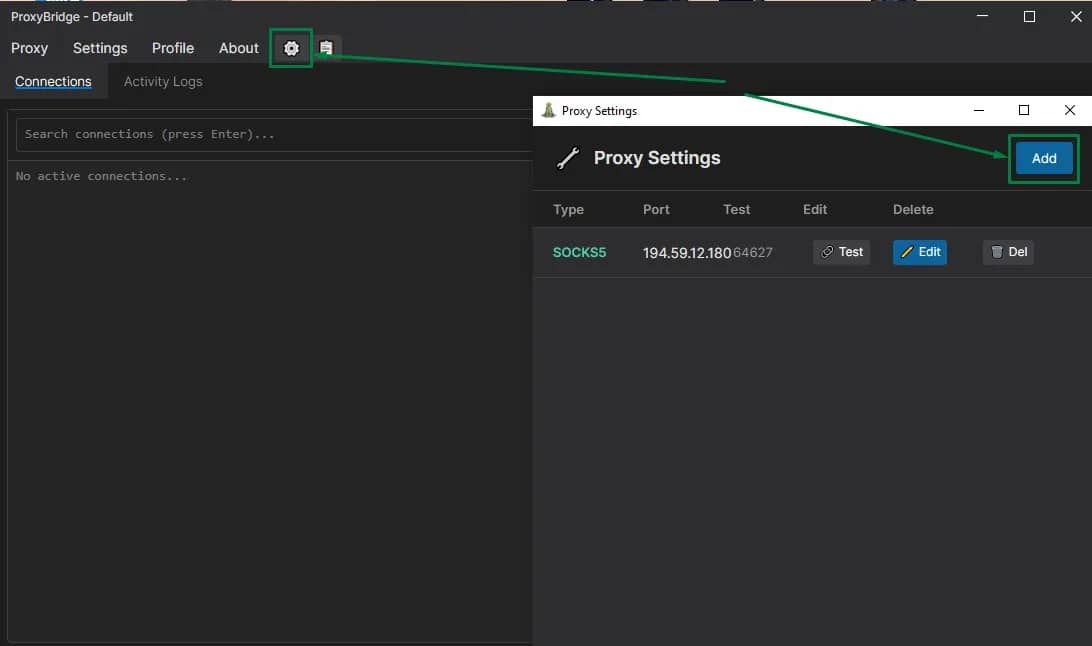
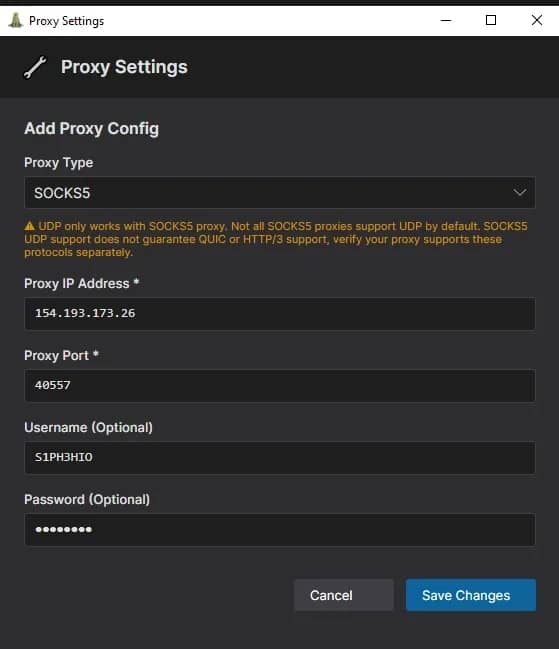
5. Select the application whose traffic needs to be routed through the proxy and create a routing rule.
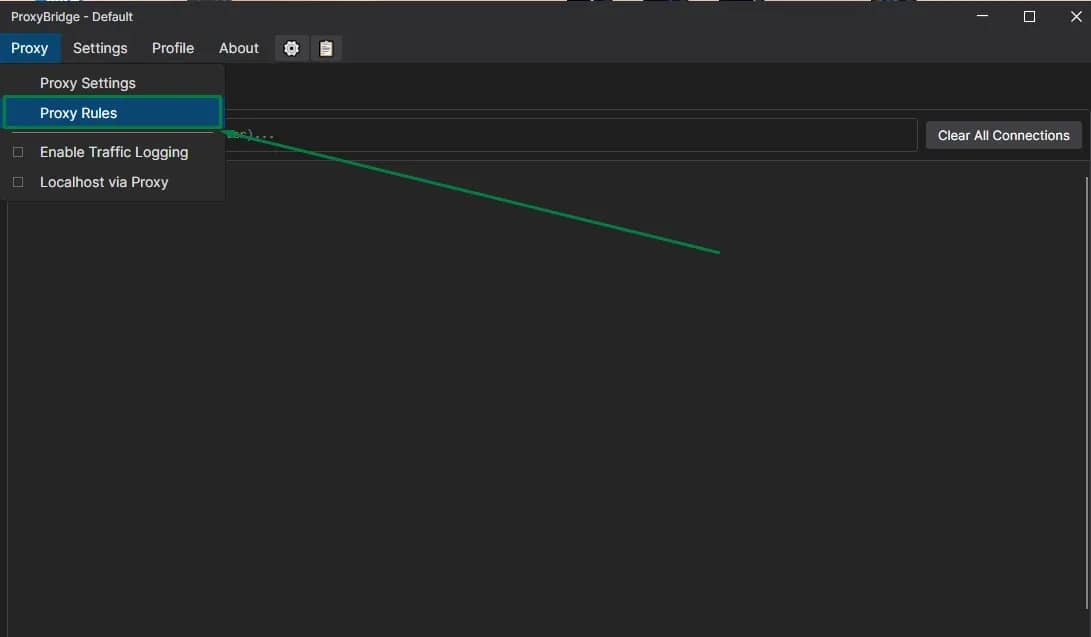
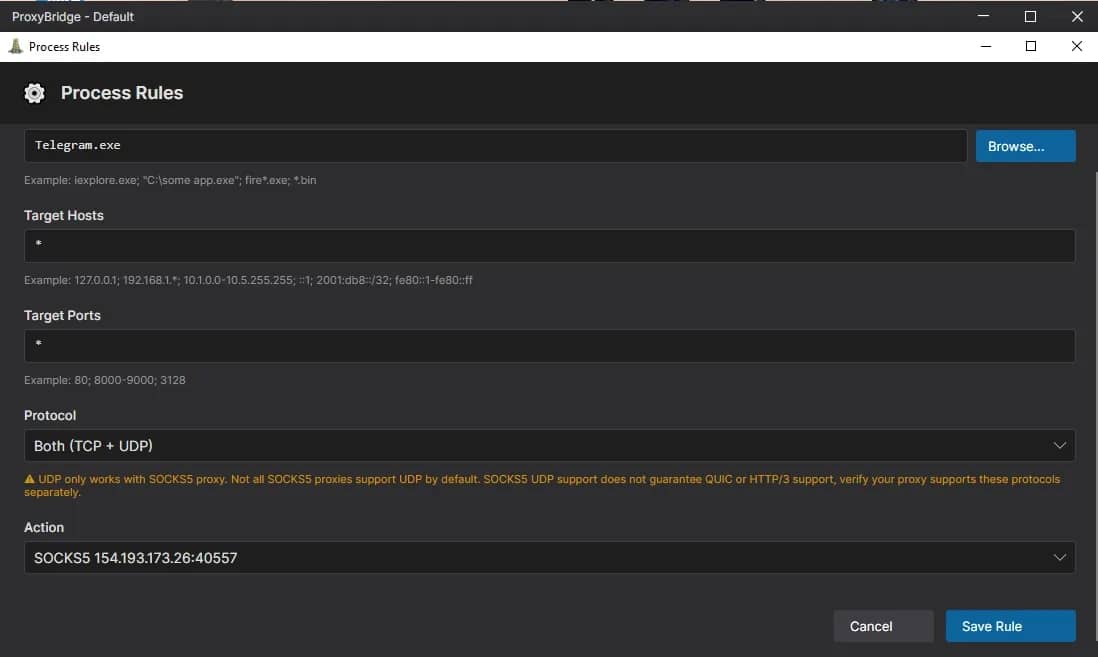
6. Enable the created rule.
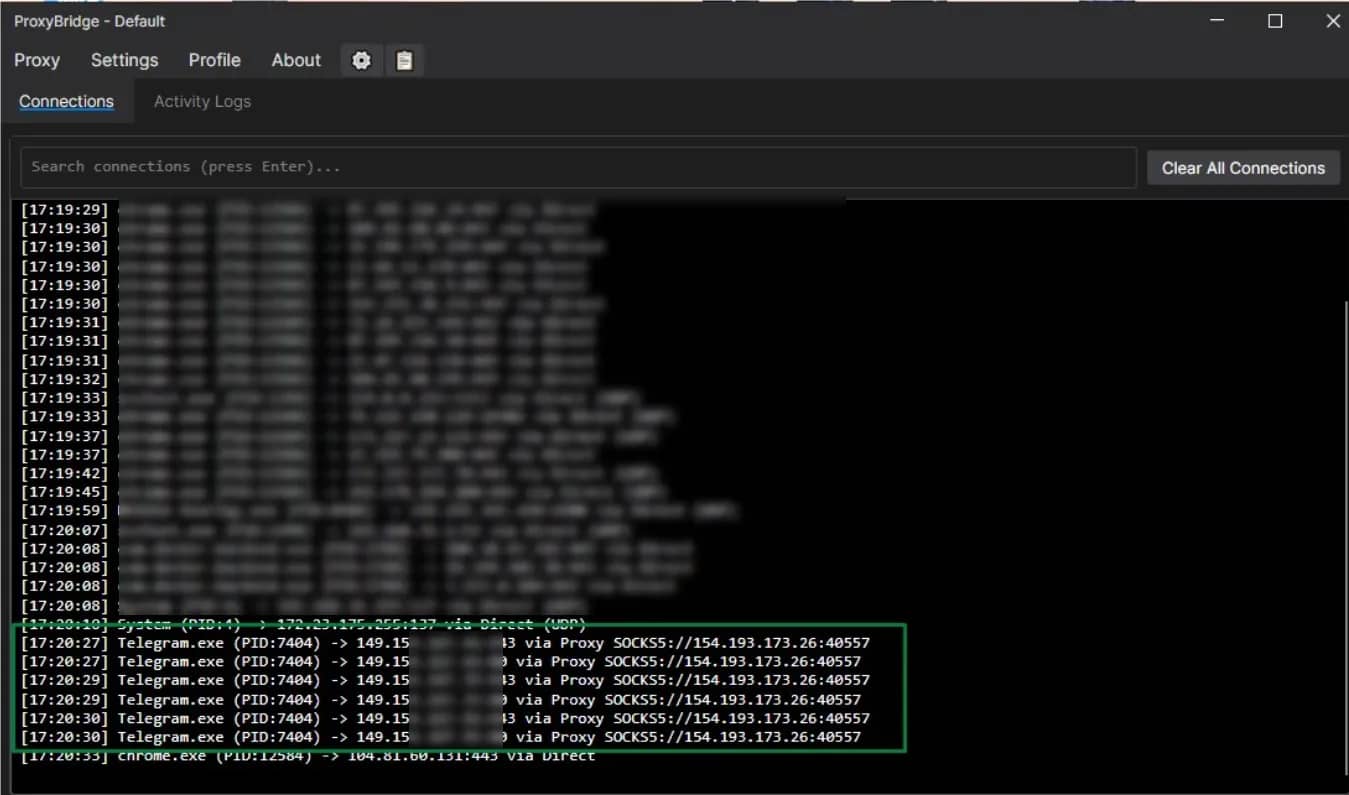
7. Check the external IP and DNS, if important for the task, and test connection stability.
If after configuration the application does not access the network, do not rush to change the tool. First check the proxy type, port, authentication, firewall, DNS, and compatibility of the specific program with the selected client.
Conclusion
Free Proxifier alternatives can effectively cover many basic tasks. Most often you sacrifice convenience: some solutions require technical knowledge and a willingness to study documentation, but there are also open-source programs accessible even to beginners.
It is important to understand limitations and the fact that some projects receive almost no updates — if anything happens, you will have to find a solution on your own. Therefore, you should choose a proxy client not on the principle of availability alone, but fit the capabilities of the service to specific conditions: OS, proxy type, app-based routing, TCP/UDP support, and configuration convenience.
Frequently asked questions
- Yes, for basic tasks you can use free proxy clients. But they may be inferior to Proxifier in convenience, stability, support, and setting flexibility.
- For Windows, you can consider ProxyBridge, ProxiFyre, and SocksCap64. The choice depends on whether you need a GUI, SOCKS5, UDP, and app-based routing.
- Yes. Among open-source options, you can consider ProxyBridge, ProxiFyre, Proxychains-ng, and tun2proxy.
- A VPN usually routes all device traffic through a VPN tunnel. A proxy client can work selectively: for example, routing only a chosen application or process through a proxy.
- No. A proxy client is only a program for routing traffic. The proxy servers themselves must be obtained separately.
- The reasons can vary: incorrect proxy type, wrong port, missing authentication, firewall blocking, DNS issues, or incompatibility of the specific application with the chosen tool.
- For simple tasks, a free analog may be enough. For stable operation, complex rules, proxy chains, and a convenient interface, Proxifier is often more convenient.

Why Google Blocks Accounts and What Your Antidetect Has to Do With It
Google has once again complicated the mechanisms of digital identification by deploying a new, more sophisticated layer of protection based on proprietary HTTP headers. This quiet change caught most of the market off guard, triggering a wave of rushed updates. While others hastily released superficial 'fixes', we realized that we were dealing not with a minor issue but with a fundamental shift that required deep and comprehensive analysis.

SOCKS vs HTTP Proxy: What’s the Real Difference and Which One to Choose?
There are times when you don’t want a website to link the request back to your device. That’s where a proxy comes in, it acts like a middle layer and sends the request for you. The site sees the proxy’s info instead of yours. It’s a go-to trick when you’re trying to see a page that’s not available in your region, pull content that’s restricted by location, or avoid hitting a wall when sending lots of requests.

The Best Alternative to OBS Studio
Working with a webcam on many online platforms can turn into a real challenge. A strict oval or rectangular frame appears on the screen, but your image doesn’t align perfectly with it. As a result, the system blocks further progress, demanding perfect alignment, and your workflow is disrupted before it even begins.