
Search Query Parser: Collecting Keywords
Keyword queries help you understand what people are searching for in a niche and which pages can satisfy that demand. But the larger the keyword database, the harder it is to work with it manually. That is why search query parsers are used to collect and process semantics.
In this material, we will explain how search query collection through a parser works, which sources can be used, and how to prepare keywords for further clustering.
What Is a Search Query Parser
A parser is a tool for automatic data collection that saves an SEO specialist from routine work. The program goes to a search engine, enters the required word, waits for the page to load, and collects the necessary metrics. Then the cycle automatically repeats for hundreds and thousands of queries in a row. When working manually, a specialist has to collect, copy, and sort data on their own. A parser takes over this task and speeds up semantic core collection many times over.
This data is used to assess search demand and build the site structure. Popular queries are turned into separate landing pages, categories, or articles.
What Data a Parser Collects
Programs extract keyword analytics from search engines and various SEO databases. After the work is completed, the user receives a table with a set of metrics:
- Basic frequency. Shows the total number of queries for a word and related word forms.
- Exact frequency. Helps assess demand for a specific phrase without extra tails and additional words.
- Demand seasonality. Shows how audience interest changes by month and season.
- Search suggestions. Collects query tails from Yandex and Google to find low-competition topics.
- Competitor phrases. Shows queries for which other sites already receive organic traffic.
- Competition level. Helps assess the difficulty of ranking for a query.
- Snippets. Exports titles and descriptions of competitor pages for SERP analysis.
Where a Parser Is Especially Useful
Automating semantic collection is especially useful in projects with large amounts of data. At the same time, different niches require different approaches to parsing.
| Niche | What Is Usually Parsed | Specifics |
| Affiliate marketing | Product queries, brands, offers | Semantics are usually divided by verticals: e-commerce offers, nutra, finance, gambling, dating, and other areas require different approaches to keyword collection |
| iGaming and betting | Game slots, bonuses, bookmaker reviews, game rules | A parser helps find branded queries, typos, low-frequency keywords, and long-tail queries that competitors often do not cover |
| E-commerce | Product categories, characteristics, models | Separate query clusters are usually collected for categories, filters, and product cards |
| Content projects | User questions, search suggestions, forum topics | Media sites and blogs use parsing to find new topics, expand site structure, and gain organic traffic |
| Local business | Geo-dependent queries, services, districts, maps | In local SEO, region binding is important because search results depend on the user's location |
| SaaS and B2B | Queries for services, integrations, platform comparisons | Semantics are often collected around business problems, use cases, and comparisons with competitors |
Which Search Queries Can Be Parsed
A parser can collect almost any queries, but the main task of an SEO specialist is to correctly divide them by intent and landing pages.
1. Marker queries.
Marker queries set the direction for all further semantics. Usually, these are short high-frequency keywords or phrases like “laptop,” “insurance,” “food delivery,” from which a tree of nested queries is then built.
Marker queries provide a large amount of traffic, but convert worse than more precise search phrases because the user is only at the stage of studying the topic.
2. Commercial queries.
Commercial queries reflect the user's readiness to choose a product, service, or place an order. They usually contain marker words such as: “buy,” “order,” “price,” “delivery,” “cost.” Product cards, categories, and commercial pages are created for such keywords.
3. Informational queries.
The user is looking for an answer to a question, an instruction, or a review. Such queries usually include words like: “how,” “why,” “review,” “reviews,” “forum.” These keywords lead to a blog, FAQ, or knowledge base.
4. Navigational queries.
In this case, users search for a specific brand or site. Ranking for other people's navigational queries is usually pointless because search engines prioritize official resources.
5. Geo-dependent queries.
Search results for such keywords depend on the user's region.
Examples: “food delivery berlin”; “bike rental phuket”; “order pizza rome”.
To rank for geo-dependent queries, the site usually indicates an address, region, and local phone number.
What Tools Are Used to Collect Keywords
Parsing tools differ in functionality, speed, and level of automation. Some are suitable for quick niche analysis, while others are used to collect large semantic cores for big projects.
Free Tools
Free tools like Yandex Wordstat and Google Keyword Planner are suitable for small tasks and initial niche analysis. With their help, you can check the main keyword phrases, view approximate frequency, and find ideas for expanding semantics.
The main drawback is that they are practically unsuitable for mass processing large lists. Data has to be manually collected, exported, cleaned, combined in tables, and then clustered separately.
Online Services for Semantic Collection and Analysis
This category includes cloud SEO tools:
- Key.so;
- Rush Analytics;
- Serpstat;
- Ahrefs.
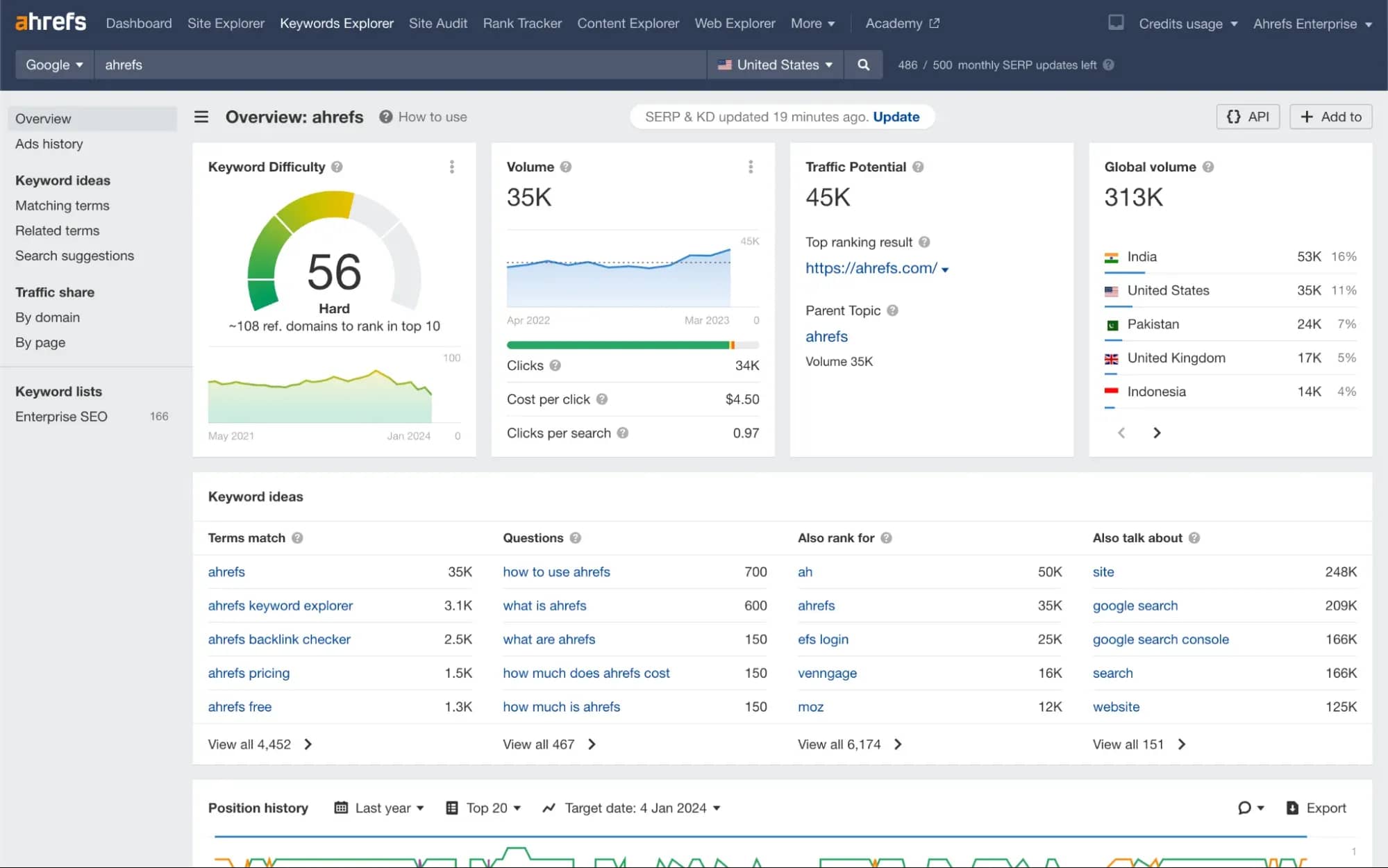
They are used for different tasks: collecting a starter list of keywords, viewing competitor queries, checking frequency, finding additional phrases, and exporting data to a table. The feature set depends on the specific service. For example, some tools are better suited for competitor analysis, while others are better for mass keyword collection, suggestions, and clustering.
The downside of cloud parsers is the high subscription cost and tariff limitations.
Professional Software
For large projects, desktop programs like Key Collector are used. Such software collects data directly from search engines and can work with suggestions, seasonality, frequency, and clustering.
With a large parsing volume, it is necessary to connect proxies, configure pauses between requests, and handle captchas. Without this, search engines quickly introduce restrictions.
How to Collect Keywords Through a Parser: Step-by-Step Scheme
Let's look at the scenario using Key Collector as an example. Starter phrases are uploaded into it, expansions are collected from available sources, frequency is checked, data from search results is added, and the result is exported to a table.
For example, let's take an online phone store. The task is to collect keyword queries for categories, filters, product cards, and blog articles.
Step 1. Collect Marker Phrases
Before working with the parser, you need to prepare marker queries. These are basic words and phrases from which the semantics will then be expanded.
For example, for an online phone store, the keywords may be: “smartphone”; “phone”; “mobile phone”; “iPhone”; “Samsung”; “phone with a good camera”; “buy smartphone”.
Different variants of names are added to the markers: brands, models, abbreviations, conversational wording, and slang. The more accurately the starter list is collected, the more useful queries can be found at the next stages.
Step 2. Expanding the Keyword List
After marker phrases are collected, they are uploaded into Key Collector. Then the parser expands the list through available sources: Yandex Wordstat, search suggestions, internal databases of SEO services, or competitor data. The specific set of sources depends on the chosen tool.
For example, from the marker “smartphone,” the parser can collect: “buy smartphone”; “smartphone with a good camera”; “smartphone under $300”; “best smartphone for gaming”; “buy Samsung smartphone”; “which smartphone to choose”.
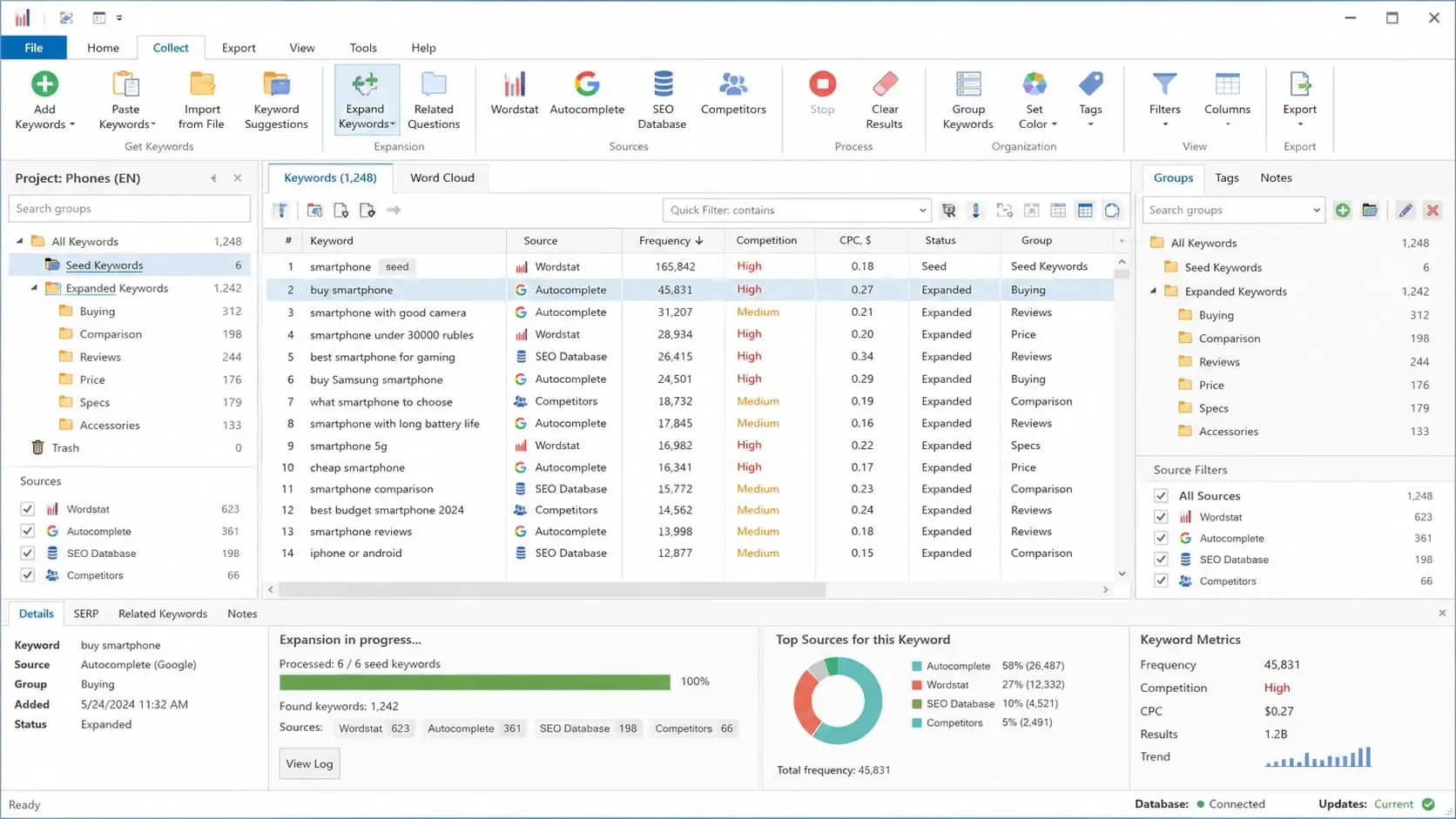
At this stage, the task is to expand the starter list as much as possible. One marker can produce dozens and hundreds of clarifications: by price, brand, characteristics, use case, and other features.
Step 3. Collect Search Suggestions
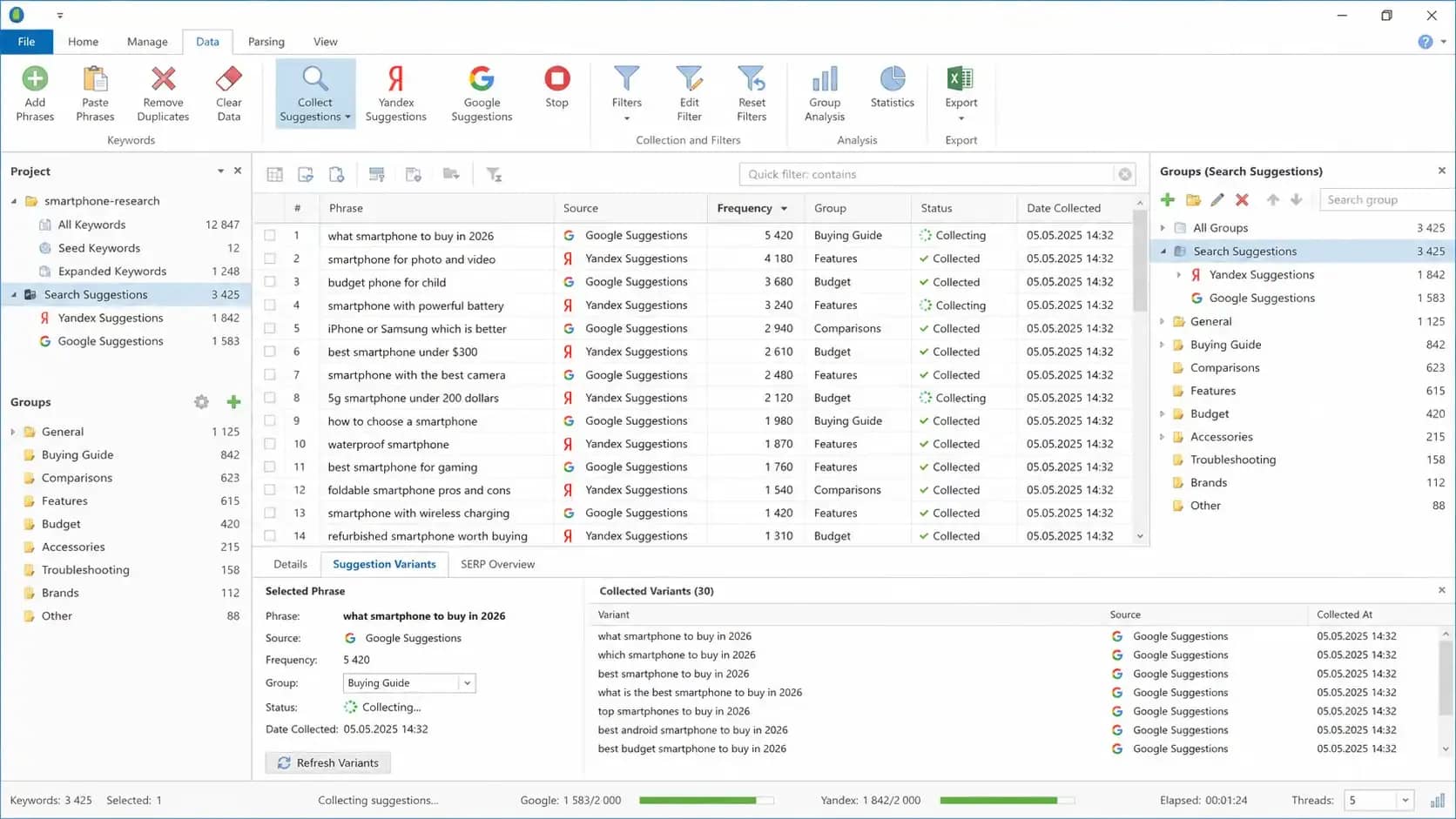
After the basic expansion of the list, search suggestion collection from Yandex and Google is launched in Key Collector. The program takes marker phrases and collected keywords, inserts them into the search bar, and collects options that the search engine offers users as they type a query.
Suggestions are useful because they often include real user wording. For example, for the smartphone topic, you can get: “which smartphone to buy in 2026”; “smartphone for photo and video”; “cheap phone for a child”; “smartphone with a powerful battery”; “iphone or samsung which is better”.
Step 4. Adding Competitor Keywords
After basic semantic collection, the list can be expanded through competitors. For this, SEO services such as Key.so, Serpstat, or Ahrefs are used: a domain is entered into them, and you can see which queries its pages are already visible for in search.
This is necessary in order to find phrases that did not make it into the initial collection: branded queries, low-frequency tails, article topics, categories, and commercial pages. The found keywords are exported and added to the general list for further frequency checking.
Separately, in Key Collector, you can analyze competitors by already collected phrases. The program analyzes search results and shows sites that most often appear in the TOP for these queries. This way, the specialist sees the main competitors for specific keyword groups and understands which pages will have to be outranked in search.
Step 5. Check Query Frequency
When the general keyword list is collected, it is uploaded into Key Collector for mass frequency checking. The program goes through the phrases in bulk and collects statistics from the connected source.
Frequency will show approximate search demand for queries and help understand which phrases should be kept for work and which need to be checked manually or removed from the list.
Frequency collection can take from several minutes to several hours. It all depends on the size of the database, parser settings, proxies, captcha, and data sources.
Step 6. Export Data to a Table
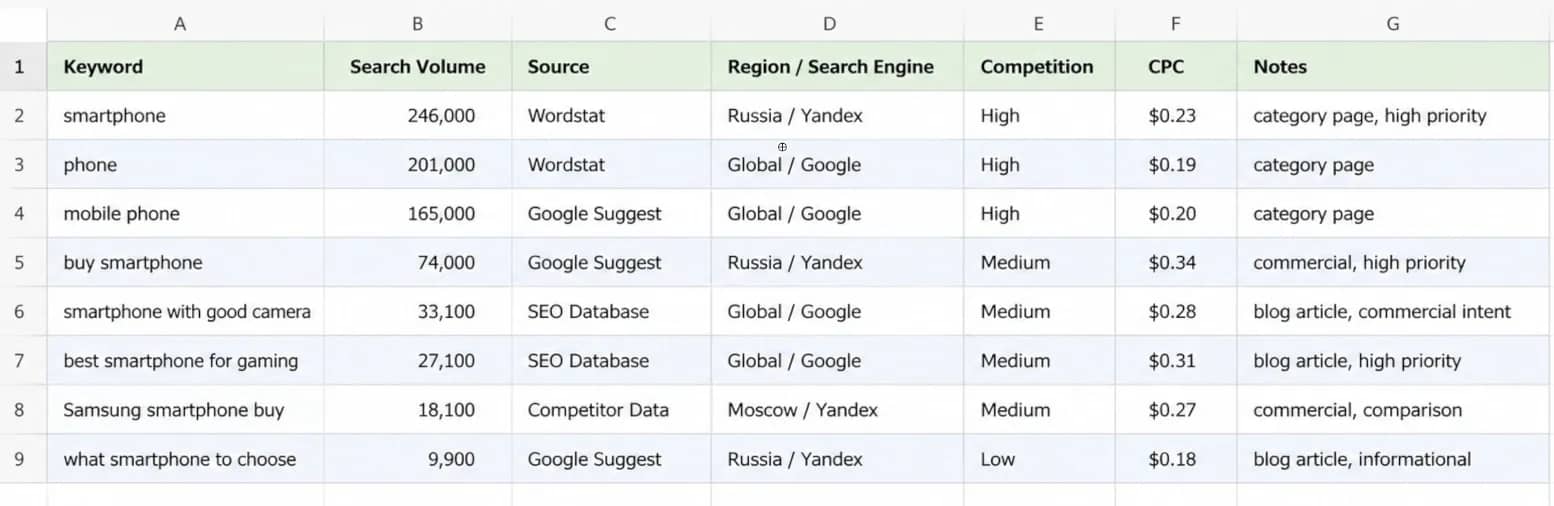
After collecting and checking frequency, the data is exported from Key Collector to a table. The program supports export to CSV and XLSX, so the file can be opened in Excel or imported into Google Sheets.
Usually, the export includes work data:
- keyword phrase;
- frequency;
- query source;
- region or search engine, if important for the project;
- additional metrics from the SEO service;
- comments or notes from the specialist.
How to Clean and Group Collected Keywords
After parsing, you are left with a raw list of queries. It may contain duplicates, junk phrases, irrelevant keywords, and queries with different intent. Part of this work can be automated: for example, removing duplicates, applying negative keywords, filtering phrases by frequency, or launching grouping. Such functions are available in professional parsers and SEO services, including Key Collector.
But the final check is still done by a specialist. The tool helps quickly process a large amount of data, while a person decides which queries are truly suitable for the site, which pages are needed for them, and which groups are better separated.
Removing Duplicates
The same query can enter the database from several sources at once: search suggestions, SEO services, competitor data, or frequency collection systems. Therefore, the first step is to remove full and partial duplicates.
Removing Junk Queries
Next, the table is checked for irrelevant phrases. Semantics often includes random queries, other people's brands, unsuitable cities, free materials, vacancies, instructions, spare parts, or topics that are not related to the site's task.
Queries with zero or minimal frequency are also checked separately. Most of these keywords are usually removed, but before deletion, it is worth evaluating the intent and commercial potential. Sometimes a low-frequency query can be valuable if it precisely describes a product, service, or urgent user need.
Separate Commercial and Informational Queries
After the initial cleaning, queries are divided by user intent. Some queries lead to a commercial action: purchase, application, order, or comparison of offers. Others are related to searching for information: a person wants to understand a topic, read instructions, view a review, or get advice.
For example:
- “buy sneakers” — a query for a catalog, category, or product card;
- “running sneakers price” — a query for a commercial page with products;
- “how to choose running sneakers” — a query for a blog article;
- “which sneakers are better for running on asphalt” — a query for a review, guide, or FAQ.
This way, an SEO specialist understands which pages the site needs. Commercial keywords are assigned to categories, products, services, and landing pages. Informational keywords are used for articles, instructions, reviews, FAQs, and knowledge bases.
Collect a List of Negative Keywords
Negative keywords are needed to quickly remove unnecessary queries from semantics. For example, if a store sells new smartphones, the negative keywords may include: used; repair; spare parts; free; download; instruction; vacancy.
After that, phrases like “buy used smartphone,” “smartphone repair,” “download smartphone manual,” “smartphone seller vacancy” are removed from the table. Such queries are not suitable for a new phone store: they bring people with a different intent and clutter the semantic core.
Grouping Keywords by Intent
After cleaning, queries are combined into semantic groups — clusters. One cluster includes phrases that describe the same user need.
For example: “iPhone 17 price”; “buy iPhone 17”; “iPhone 17 cost”; “order iPhone 17”.
Such queries can usually be promoted within one page because they have a similar commercial intent. To speed up the work, automatic clustering by search results is used. The tool compares the TOP results for different queries and helps understand which keywords should be combined and which are better separated into individual pages.
Assign Query Groups to Pages
When clusters are collected, they are distributed across the site structure. Each group is assigned a suitable landing page.
If there is no suitable page on the site yet, a technical specification is created for the cluster. It records the main query group, intent, structure of the future page, headings, and content requirements.
Conclusion
A parser speeds up keyword query collection but does not replace an SEO specialist. The tool collects data, while the specialist sets markers, chooses sources, checks intent, and decides which queries to take into work. Therefore, before launch, it is important to understand why semantics is being collected: for a new section, blog, product cards, filters, or competitor analysis.
Frequently asked questions
- Parsing depth shows how far the tool goes through the data source. For example, a service can collect not only the first visible phrases, but also deeper pages of search results.
- They are needed for mass data collection, when the tool frequently accesses search engines or statistics services. Without pauses, proxies, and captcha handling, collection may stop due to limits.
- Suggestions help understand how users refine a query directly in the search bar. They often contain long phrases: by price, brand, characteristics, year, comparison, or specific task.
- A parser collects data based on specified words and sources, but it does not always understand the business task. The list may include other people's brands, unsuitable cities, informational queries instead of commercial ones, vacancies, instructions, free materials, and random tails. That is why cleaning is needed after collection.

Why Google Blocks Accounts and What Your Antidetect Has to Do With It
Google has once again complicated the mechanisms of digital identification by deploying a new, more sophisticated layer of protection based on proprietary HTTP headers. This quiet change caught most of the market off guard, triggering a wave of rushed updates. While others hastily released superficial 'fixes', we realized that we were dealing not with a minor issue but with a fundamental shift that required deep and comprehensive analysis.

SOCKS vs HTTP Proxy: What’s the Real Difference and Which One to Choose?
There are times when you don’t want a website to link the request back to your device. That’s where a proxy comes in, it acts like a middle layer and sends the request for you. The site sees the proxy’s info instead of yours. It’s a go-to trick when you’re trying to see a page that’s not available in your region, pull content that’s restricted by location, or avoid hitting a wall when sending lots of requests.

The Best Alternative to OBS Studio
Working with a webcam on many online platforms can turn into a real challenge. A strict oval or rectangular frame appears on the screen, but your image doesn’t align perfectly with it. As a result, the system blocks further progress, demanding perfect alignment, and your workflow is disrupted before it even begins.