
Perfect Order on Your Screen with the Snap Feature
When working with accounts in bulk, efficiency and speed come to the forefront. We have often heard from you about one annoying routine: when launching multiple sessions, the screen instantly turns into a chaotic pile of windows. They overlap each other, and you have to spend precious minutes manually resizing and arranging them across the screen.
Minutes were spent on routine instead of real tasks. We decided to do things differently.
Meet Snap — an intelligent system for automatic browser window layout. Launch sessions, and Linken Sphere will arrange them on the screen automatically.
How Snap works
Everything works intuitively. Launch as many sessions as you want — Snap will calculate the layout itself and arrange the windows without overlapping.
You no longer need to drag anything. Just select the required sessions and click Start in the mass actions menu.
Setup
- For macOS users: On macOS, everything works right out of the box — no setup required. The Snap feature is already activated by default.
- For Windows users: Due to the specifics of window management in the OS, for Snap to work correctly, you will need to disable the Smart Window Control feature. Only one positioning algorithm can be active in Linken Sphere at a time.
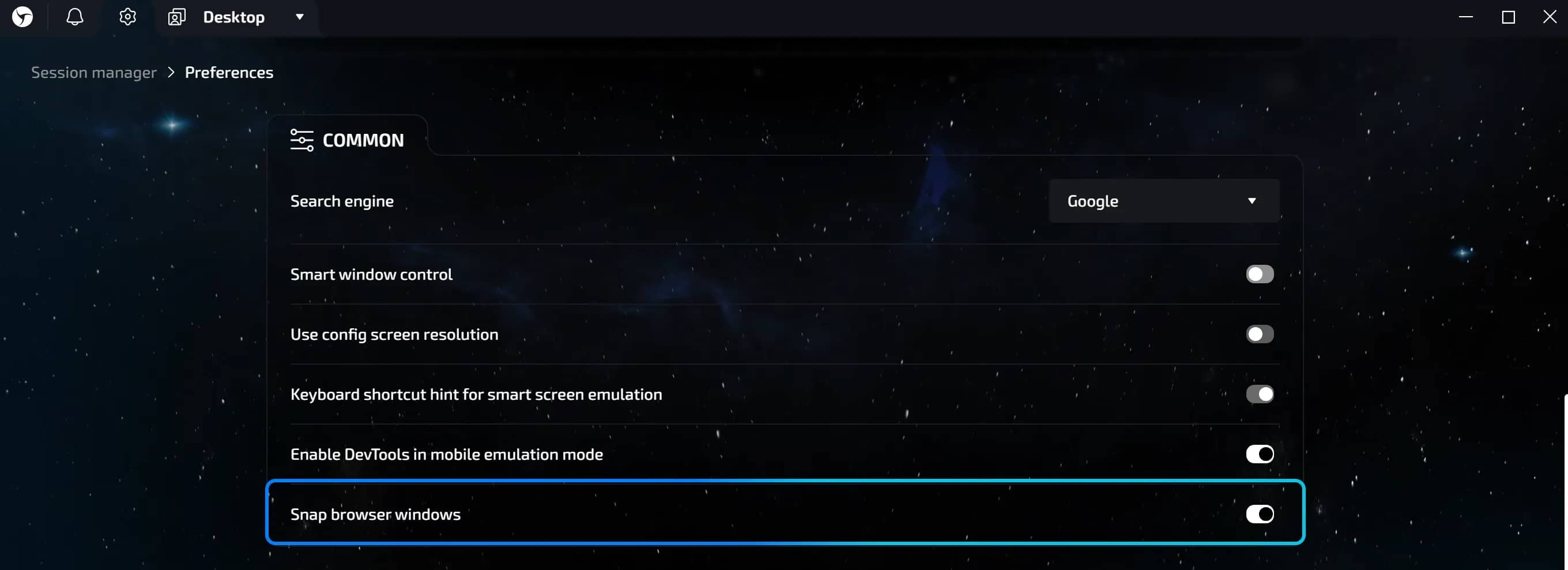
You always retain full control over your workspace. You can manage the Snap feature in the global program settings: click on the gear icon in the upper left corner, go to the Common section, and find the Snap browser windows toggle.
Conclusion
Snap gives you back the time you previously spent arranging windows. Less routine. More focus on tasks. Try it today.
Frequently asked questions
- Yes. After a restart, each session will return to its place — exactly where Snap placed it upon launch.
- There is no manual configuration. Snap automatically selects the optimal layout depending on the number of sessions.
- There are no restrictions from Linken Sphere. The number depends solely on your computer's resources.
- No. Only one positioning algorithm works at a time. You need to disable Smart Window Control to use Snap.

Why Google Blocks Accounts and What Your Antidetect Has to Do With It
Google has once again complicated the mechanisms of digital identification by deploying a new, more sophisticated layer of protection based on proprietary HTTP headers. This quiet change caught most of the market off guard, triggering a wave of rushed updates. While others hastily released superficial 'fixes', we realized that we were dealing not with a minor issue but with a fundamental shift that required deep and comprehensive analysis.

SOCKS vs HTTP Proxy: What’s the Real Difference and Which One to Choose?
There are times when you don’t want a website to link the request back to your device. That’s where a proxy comes in, it acts like a middle layer and sends the request for you. The site sees the proxy’s info instead of yours. It’s a go-to trick when you’re trying to see a page that’s not available in your region, pull content that’s restricted by location, or avoid hitting a wall when sending lots of requests.

The Best Alternative to OBS Studio
Working with a webcam on many online platforms can turn into a real challenge. A strict oval or rectangular frame appears on the screen, but your image doesn’t align perfectly with it. As a result, the system blocks further progress, demanding perfect alignment, and your workflow is disrupted before it even begins.