
How to use AI for web scraping
Updated: November 2026
Neural networks can now see a website through human eyes: they understand where the title is on the screen, where the current discounted price is, and where the crossed-out old price is — even if the site has the most confusing structure.
Which AI scraping method to choose for your task in 30 seconds:
- Need to collect up to 500 product cards without programming skills? Install a ready-made AI browser extension (Thunderbit, Browse AI, Kadoa) — it will automatically find the required columns and export the table to Google Sheets in a couple of minutes.
- Need to regularly scrape one large website without paying for every page? Ask Claude or ChatGPT to write a free script for you based on a sample of a single product card and run it on your computer.
- Need to collect data from dozens of websites with different designs? Connect automatic extraction via API to fast and inexpensive neural networks (GPT-5.4 mini, Gemini 3.5 Flash, or DeepSeek V4) paired with a page crawler (Firecrawl or Crawl4AI).
Below, we will break down how data collection using neural networks works, which services actually save time, and how to set up your workflow so you don't overpay for nothing or get blocked by websites.
Two main ways to use AI in scraping
Beginners often waste their budget simply because they confuse two completely different roles that a neural network can play when collecting information.
Method 1. AI as a free programmer
You don't force the neural network to personally read thousands of pages. Instead, you copy a snippet of a single webpage, send it to a regular chat with ChatGPT or Claude, and say: "Write me a Python program that will extract the title, price, and SKU from here." Within 30 seconds, the neural network outputs a ready-made script. Next, you run this program on your computer — it works at high speed and completely free of charge, without consuming paid AI limits. This option is ideal when you need to collect 100,000 identical items from a single marketplace or catalog.
Method 2. AI as a smart reader
In this scenario, the neural network reads each downloaded page itself and organizes the discovered facts into the columns of your table. This is indispensable when pages do not share a single template: for example, when you are collecting contacts, delivery terms, and directors' names from 500 different factory websites where the information is written as plain text in the "About Us" section. The neural network charges a small fee for reading each page, but in return, it does not break when a website changes its design.
| Comparison Parameter | Traditional Scraper | AI-Written Script | Direct AI Scraping |
| Programming skills required | Yes, confident level | No, just copy the ready-made code | Minimal to none (in ready-made services) |
| Time to launch from scratch | From 2 hours to several days | 5–15 minutes | 2–10 minutes |
| What happens if the site changes design | Scraper breaks, needs rewriting | Script breaks, but AI rewrites it in 2 minutes | Continues working without interruptions |
| Understanding plain text without tables | Cannot do it, searches only by code tags | Cannot do it | Understands meaning and context |
| Cost of processing 10,000 pages | $0, only proxy and server costs | $0, only proxy and server costs | From $1.50 to $12 (charged per volume of text read) |
How a smart AI scraper works
If you simply copy a link to a protected online store, paste it into the ChatGPT dialog box, and write "Collect all products into a table," most likely nothing will work. The chatbot will either reply that it cannot access the website or make up non-existent prices out of thin air.
For AI to consistently collect data on an industrial scale, the process is always divided into four sequential steps:
- Opening the page and loading data. A neural network is a brain that works with text, but it does not have its own full-fledged browser. First, a special crawler program opens the required link, scrolls down the screen, and waits a couple of seconds until prices and reviews that do not load immediately appear on the page.
- Cleaning the page from unnecessary clutter. Inside, a regular webpage consists of a huge amount of technical code: settings for colors, fonts, ad trackers, menus, and long links. If you send all of this to the neural network in its entirety, you will pay 10 times more money for reading useless garbage, and the AI itself may get confused. Therefore, before sending, the program cleans the page and leaves only clean text with the heading structure — this saves up to 80–90% of the budget.
- Filling out the table. The cleaned text is passed to the neural network along with a strict table template. You specify the rules in advance: for example, the "Price" column must contain only a number without a currency symbol, and if there is no phone number on the page, it must leave the cell empty rather than inventing a random number.
- Verification and saving. The finished response is automatically checked for duplicates and saved in a convenient format — Excel, Google Sheets, or a database.
6 best ready-made AI services and extensions
If you are a marketer, analyst, buyer, or marketplace seller and do not want to open a code editor, use ready-made tools. We have selected the six best services as of November 2026 that take care of all the technical work for you.
Thunderbit
One of the most convenient Chrome browser extensions, created specifically for everyday users. You simply open the desired catalog or company card, click on the extension icon, and press the "AI Suggest Columns" button. The neural network analyzes the screen itself, suggests a ready-made table (title, price, rating, link), and collects the data.
What it can do: navigate through catalog pages, go inside each product card to collect minor specifications, extract tables from PDF documents and images, and immediately send the result to Google Sheets, Notion, or Airtable.
Pricing: there is a free trial plan for several dozen pages, and paid subscriptions start at $15–19 per month depending on the volume of rows checked.
Browse AI
A visual service for those who need not just to download a catalog once, but to regularly monitor competitors. You click your mouse once on the desired elements on the website, and the cloud robot remembers your actions and repeats them on a schedule — for example, every morning at 9:00 AM it checks for price changes or new listings and sends a notification to Telegram or email.
Pricing: a free starter plan with 50 credits per month, and working plans range from $19 to $48 per month.
Kadoa
An advanced platform for businesses where you don't need to configure robots manually at all. You paste a link to a website, write in plain text which fields you need, and the AI builds the extraction route itself. The main feature of Kadoa is "self-healing": if the source website completely changes its layout, the service will notice this on its own and rebuild the algorithm without your involvement.
Pricing: there is a free starter package with 500 credits, and paid plans start at $39 per month.
Firecrawl
The main market standard in 2026 for those setting up automated workflows (for example, via Make or n8n) or writing simple scripts. You pass any link to Firecrawl, and it bypasses basic blocks on its own, waits for dynamic blocks on the page to load, and outputs either cleaned text or a ready-made populated table based on your description.
Pricing: 500 pages for free upon registration, the basic Hobby plan costs $16 per month for 3,000 pages, and the Standard plan for 100,000 pages is $83 per month.
Crawl4AI
The best completely free open-source tool. If you have basic skills in running scripts on your computer or your own server, Crawl4AI allows you to download and clean thousands of pages for neural networks without paying subscription fees to third-party services — you pay only for the neural network itself (or connect a free local model on your computer).
Apify
The largest cloud store of ready-made scrapers, which are called "Actors" within the platform. It features both universal AI scrapers that understand plain-language commands and thousands of ready-made templates for specific platforms — Google Maps, Amazon, Instagram, Booking, or LinkedIn.
Pricing: every user receives $5 credited to their balance monthly for free, and paid plans start at $29–39 per month as resources are consumed.
How to ask ChatGPT or Claude to write a free scraper
When you need to collect 20,000 products from a single website with identical cards, running every page through a paid AI is not cost-effective. It is much smarter to spend 5 minutes having the neural network write a custom scraper program for that website. Even if you have never programmed before, it is not hard to figure out:
- Open the catalog page in the Chrome browser, hover your mouse cursor over the title or price of the first product, right-click, and select "Inspect".
- A window with the internal code of the website will open on the right. Move your mouse slightly higher up the lines of code until the entire product card is highlighted in blue on the website itself.
- Right-click on that line in the code and select Copy — Copy outerHTML.
- Open a chat with Claude 4.5 Sonnet or GPT-5.4, paste the copied piece of code, and send the following prompt:
You are an experienced Python scraper developer. Below I have attached an HTML code snippet of a single product card from a website.
Write a complete and reliable Python script (use the requests, BeautifulSoup, and pandas libraries) that:
1. Loads the catalog page from the specified URL (add realistic User-Agent headers of a standard Chrome browser).
2. Finds all product cards on the page.
3. Extracts from each card: Product Title, Current Price (number only), Old Price without discount (if absent, set to an empty value None), and Product Link.
4. Important: search for data strictly inside each individual card using a loop. If any field is missing in a card, the script must not throw an error or stop.
5. Makes a random pause of 2 to 4 seconds between navigating through pagination pages.
6. Saves the final table to a file named result.xlsx.
Write a detailed 3-step guide for a beginner: which commands to enter in the terminal to install the libraries and how to run this file.
Here is the card code:
[PASTE COPIED CODE HERE]
The neural network will give you fully working code and tell you which single line to copy into the command line to run it. As a result, in a couple of minutes, a ready-made Excel file with all the products will appear on your desktop.
Direct scraping with AI
If you are collecting data from hundreds of different websites where each has its own layout, writing a separate script for each site is impossible. This is where direct page reading via a neural network API comes into play.
The main rule for saving money: never use the most expensive flagship models for simple scraping. To pull a price, phone number, and specifications from page text, you don't need a "superintelligence" — lightweight and fast model versions handle this perfectly and cost 15–20 times less.
Let's calculate the real cost of processing 1,000 pages. After cleaning out unnecessary code, an average online store page or article weighs about 2,500–3,000 tokens of text, and the response in table format takes up about 300 tokens:
- Gemini 3.5 Flash / DeepSeek V4 — the most cost-effective workhorses as of November 2026. Processing 1,000 cleaned pages will cost approximately $0.15–0.35.
- GPT-5.4 mini or GPT-4o-mini — the benchmark for stability when filling out complex tables with many columns. 1,000 pages will cost approximately $0.45–0.70.
- Heavy flagships are needed only when you simultaneously ask the AI to perform complex analytics alongside scraping — for example, reading 50 product reviews, identifying the main customer complaints about defects, and assigning a rating to the seller. On such models, 1,000 pages will cost $8–15.
Experienced teams use a clever trick: they combine a regular free script and a paid neural network into a single chain. First, the page is checked by a simple free script in a fraction of a second. If the page is standard and all the data is found — great, we haven't spent a cent. But if the website updated its design and the regular script returned nothing, the program automatically forwards the text of that page to the neural network. As a result, 90% of routine work is processed for free, while your scraper never stops due to changes on the site.
Ready-made system prompt for accurate data extraction
If you are setting up an automated request to a neural network (in Make, n8n, or your own script), use this prompt so the AI does not make up anything extra:
Your task is to accurately extract product data from the provided webpage text and return the response strictly in JSON format according to the specified schema.
CRITICAL RULES:
- Use ONLY facts that are explicitly stated in the text. Guessing, assuming, or calculating missing values is strictly prohibited.
- If any parameter (for example, SKU, discount, or brand) is not in the text, you must set the value to null. Do not write phrases like "not specified" or "no data".
- Ignore the "Similar Products", "Frequently Bought Together", and "Recently Viewed" blocks at the bottom of the page — extract data only for the main product on the page.
- Convert all prices to a clean numeric format without spaces or currency symbols (for example: 14990.50). Specify the currency in a separate field as a three-letter code (USD, RUB, EUR).
Example of a simple script for automated AI scraping
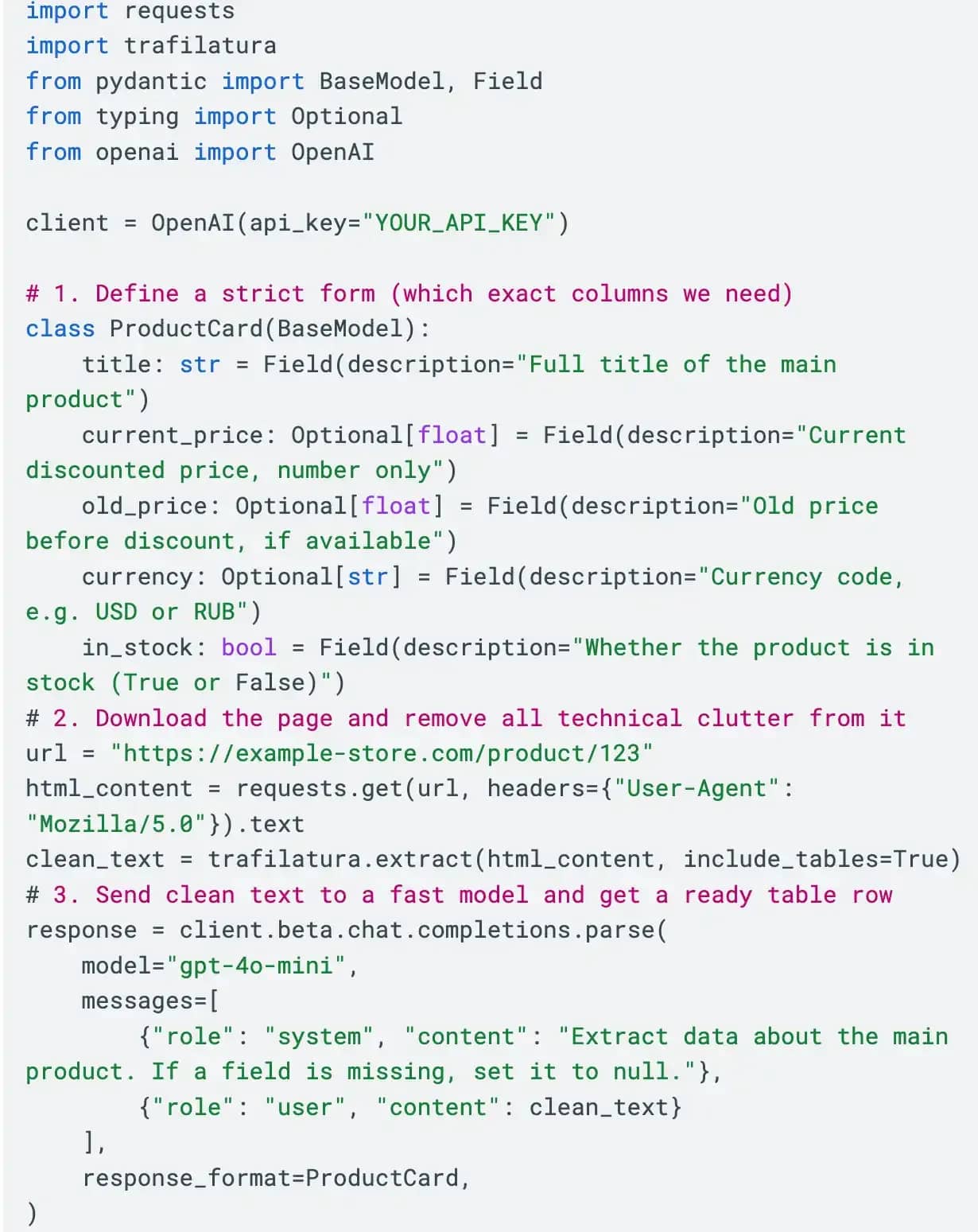
Below is a short Python template where the page is first automatically cleaned of unnecessary code, and then the neural network fills in the strictly defined columns:
How to bypass website protection: why AI is powerless without proxies and the right browser
You set up an AI scraper, tested it on three links — everything works perfectly. You launch a scrape for 5,000 pages and go make some tea, and 10 minutes later you see that instead of prices, the table says "Access Denied", "Error 403", or "Confirm you are not a robot".
It is important to understand: a neural network knows how to parse text, but it does not know how to pass a website's security check. If the security system of an online store or aggregator realizes that a program is knocking at its door, it simply will not serve the page, and the artificial intelligence will have nothing to read.
For websites to hand over data without blocks and endless CAPTCHAs, you need to cover two levels of protection.
First, clean proxies. When 300 pages per minute are opened from a single home or office internet connection, any website immediately blocks that address.
For simple local websites, small online stores, and open catalogs, it is enough to buy inexpensive datacenter or static ISP proxies and distribute requests among them.
For major marketplaces, classifieds boards, real estate websites, and airline ticket aggregators, datacenter addresses will not work — they will be blocked on the very first page. Here you need dynamic residential or mobile proxies that automatically change the IP address to a new home address of a real ISP on every request or every few minutes.
Second, an antidetect browser. Platforms check more than just your IP address. They look at dozens of parameters of your device: what graphics card is installed in the computer, what fonts are installed in the system, how exactly the browser renders hidden images, and whether you have a browsing history. Regular automated programs get caught on this check in a split second.
Moreover, a lot of valuable data is visible only after logging into a personal account. If you log into such an account through a standard bot, the profile will immediately get banned.
To solve this problem, professionals run scraping through profiles in the Linken Sphere antidetect browser. Here is how it works:
- Inside Linken Sphere, you create isolated profiles, bind clean residential proxies to them, and calmly log into the required accounts once.
- To the website, such a profile looks like an ordinary real buyer who raises no suspicion from security systems.
- After that, you connect your AI scraper or browser assistant directly to the running Linken Sphere window via a standard automation port. The browser carefully opens pages without a single CAPTCHA or block, while the neural network grabs the text already loaded on the screen and turns it into a clean table.
What to check before launching
To avoid wasting tokens and getting a broken table, check your scraper before a mass launch:
- Never launch a scrape for 10,000 pages right away. First, run 10–20 test links and visually inspect every column of the resulting table.
- Watch out for truncation on long pages. If a single catalog page contains 100 products at once, the neural network might not fit the entire list into one response and will simply cut off the table midway. Split long lists into parts or collect products page by page.
- Do not force the neural network to do math during scraping. Do not ask the AI to convert dollars to rubles on the fly at the current exchange rate, calculate discount percentages, or sum up warehouse stock — language models often make mistakes in arithmetic. Let the AI simply extract the exact numbers from the site, and let a standard Excel formula handle all the calculations in a second.
- Do not use personal accounts for mass scraping. If authorization is required to view prices on a site, never run automated scraping from your main work account — use separate warmed-up profiles in an antidetect browser so you don't lose access to the service.
- Clean the page of unnecessary code before sending it to the AI. This simple step speeds up the scraper and reduces token costs dozens of times over.
Frequently asked questions
- No, a regular chat is not suitable for full-scale data collection for two reasons. First, the built-in browser of chatbots cannot automatically navigate through hundreds of catalog pages and gets blocked by the security systems of most major websites. Second, due to memory limits in a regular dialogue, the bot will process a maximum of 10–20 items, after which it will start skipping products or shortening the table with the phrase "and so on." For real tasks, use browser extensions like Thunderbit and Browse AI or a setup with a page crawler.
- If you need a one-time collection of a few thousand contacts or products from a couple of websites, ready-made AI services will be cheaper and faster: you will spend up to $15–20 and get the table in half an hour, whereas a programmer's work costs from $50–150 and takes several days. Hiring a developer makes sense only when you need to process millions of pages with complex protection daily in automated mode.
- Automated collection of open, publicly available data — such as public product prices, descriptions, store addresses, and open statistics that are visible to any website visitor — is standard market practice for analytics and price monitoring. The main safety rule is not to collect private personal data of individuals without their consent, not to copy copyrighted texts in full for publication on your own clone site, and not to create excessive load on someone else's server with thousands of simultaneous requests per second.

Why Google Blocks Accounts and What Your Antidetect Has to Do With It
Google has once again complicated the mechanisms of digital identification by deploying a new, more sophisticated layer of protection based on proprietary HTTP headers. This quiet change caught most of the market off guard, triggering a wave of rushed updates. While others hastily released superficial 'fixes', we realized that we were dealing not with a minor issue but with a fundamental shift that required deep and comprehensive analysis.

SOCKS vs HTTP Proxy: What’s the Real Difference and Which One to Choose?
There are times when you don’t want a website to link the request back to your device. That’s where a proxy comes in, it acts like a middle layer and sends the request for you. The site sees the proxy’s info instead of yours. It’s a go-to trick when you’re trying to see a page that’s not available in your region, pull content that’s restricted by location, or avoid hitting a wall when sending lots of requests.

The Best Alternative to OBS Studio
Working with a webcam on many online platforms can turn into a real challenge. A strict oval or rectangular frame appears on the screen, but your image doesn’t align perfectly with it. As a result, the system blocks further progress, demanding perfect alignment, and your workflow is disrupted before it even begins.