Banned for multiple accounts: How to avoid being banned and what to do if your account is already banned
Multi-accounting, or the creation of multiple profiles on a single platform by one user, is a common tool for arbitrageurs, bonus hunters, crypto enthusiasts, and marketers. However, most platforms see multiple registrations as a direct violation of the user agreement, considering it fraud or an attempt to unfairly extract benefits through bonus abuse. In this article, we will break down in detail how security systems detect networks of accounts, what methods can be used to secure your work, and what to do if a block has already occurred.
Why platforms issue a ban for multi-accounting
Modern social networks and crypto exchanges spend huge budgets on marketing and attracting a unique audience, so it is not surprising that they strictly suppress any attempts at manipulation. A ban for multi-accounting most often arrives for creating fake referrals to receive commissions, inflating behavioral factors, and also for bypassing limits set per user.
Platforms where real money revolves fight multi-accounts the most aggressively. These are financial organizations, banks, cryptocurrency exchanges, online casinos, bookmakers, and CPA networks. For them, every duplicate is a direct financial loss. The consequences of discovering a network of profiles are usually severe and are not limited to a simple warning. Platforms issue a permanent ban to the entire chain of linked accounts, freeze funds on the balance without the right to withdraw, and add the user's data to global blacklists.
How platforms recognize multi-accounts
Determining that one person is behind a hundred profiles is a matter of seconds for modern anti-fraud systems. They use a comprehensive approach, analyzing the user on several levels.
First of all, websites read the digital fingerprint of your browser. This includes data about your operating system, browser version, installed fonts, screen resolution, as well as more complex parameters such as Canvas. Naturally, systems track IP addresses, device identifiers, and cookies. If profiles are registered from a single IP or device, they will be linked instantly.
Secondly, behavioral patterns are analyzed. Machine learning algorithms notice if multiple accounts perform absolutely identical actions, log into the network synchronously on a timer, or use identical behavior strategies.
The third, and most banal level of detection is data comparison. If profiles intersect by the same phone numbers, backup email addresses, passwords, or linked bank cards, the ban will arrive automatically.
How to avoid getting a ban for multi-accounting: step-by-step protection
To work safely with a network of profiles, it is necessary to technically separate them so that for the platform, each account looks like a unique person with their own device. For this, anti-detect browsers are used, which spoof the digital footprint. They allow generating unique User-Agent values, screen resolutions, and hardware parameters for each individual profile.
In Linken Sphere, you can create a new unique profile in one click using the fast profile creation mode. The browser will automatically generate a profile with optimal settings, you just need to add a proxy.

The classic profile creation mode is also available, where you can specify the necessary parameters manually:
1. Enter a profile name with a description for convenient profile keeping — this will definitely be useful if you plan to work with dozens of accounts.
2. Add a proxy. The browser supports all popular connection types: HTTP, SOCKS5, TOR, SSH, Localhost, and also has built-in free and premium paid proxies.
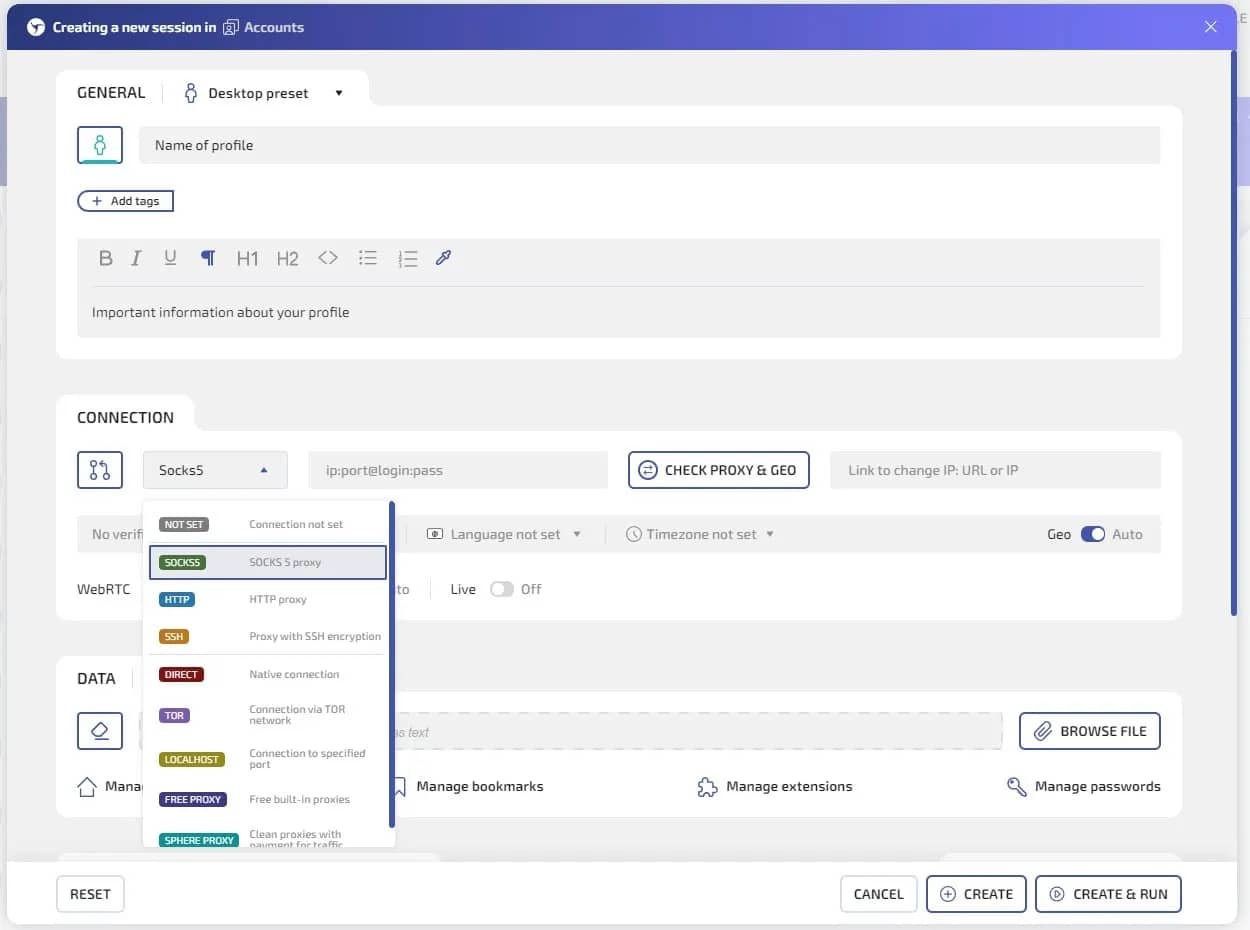
3. Load Cookies if you are working with accounts with a history; if you are creating a new account, this step can be skipped.
4. Specify the type of digital footprint selection and parameters. By default, the browser generates basic optimal device parameters that do not cause contradictions. You can change any device parameter, as well as add noise overlay to certain types of footprints.
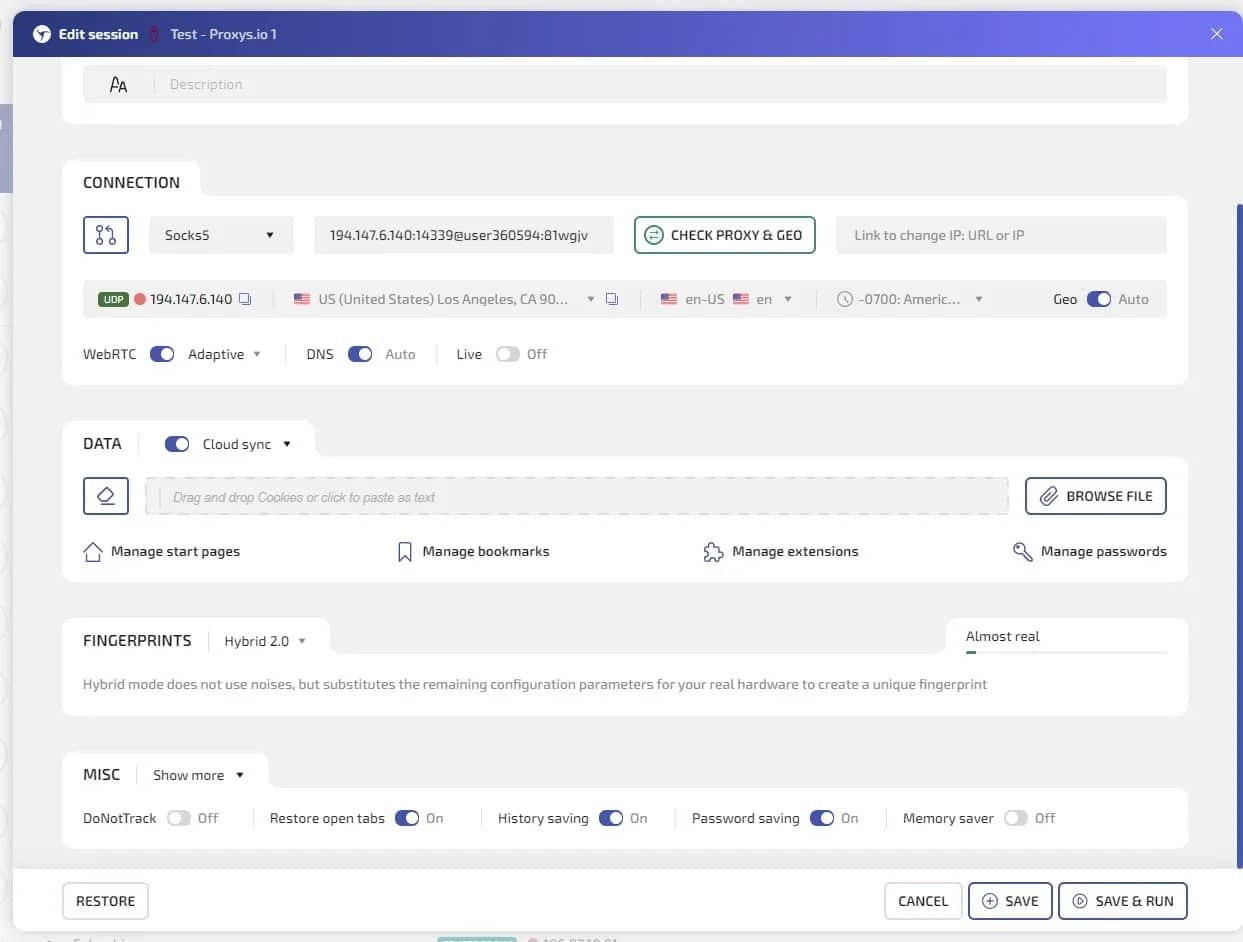
You can also use Hybrid 2.0 mode, where the browser will automatically select the most realistic device parameters based on the parameters of your real device.
5. Save and launch the session. Beforehand, you can check the quality of fingerprint spoofing in thematic services like Pixelscan and others.
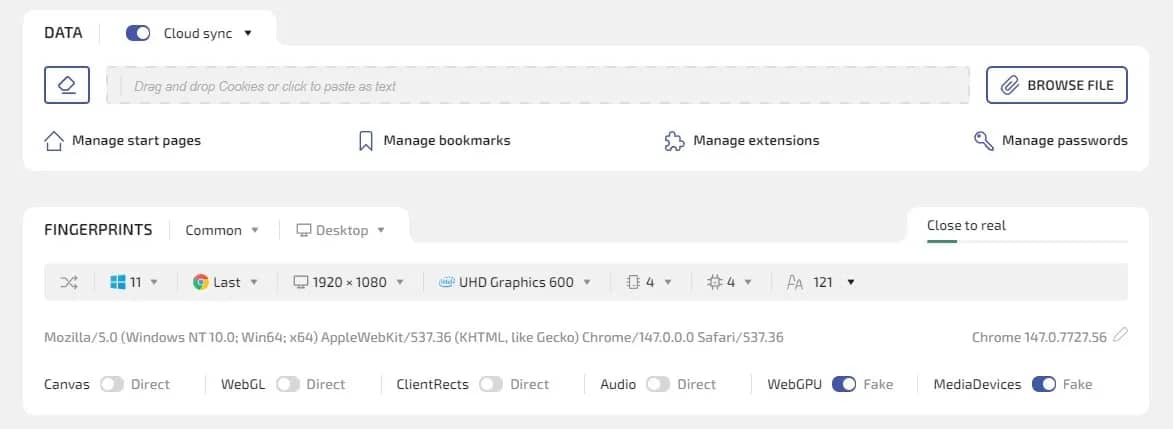
A separate proxy must be linked to each profile in the anti-detect browser. It is strongly recommended to use residential or mobile IP addresses, since they belong to real providers and do not cause suspicion, unlike cheap server IPs from data centers.
Besides software protection, it is important to use unique payment data and phone numbers for registering each account. Virtual cards and SMS activation services will help solve this task. Finally, it is extremely important to mimic "human" behavior: randomize your actions, log into accounts at different hours, make random pauses, and avoid monotonous, robotic clicks.
What to do if you received a ban for multi-accounting
If your accounts have already been blocked, you should not panic, but you need to act methodically. First of all, you can file an appeal to customer support. There are two strategies here: either honestly admit the mistake (if the violation was minor and the service is loyal), or insist that different people (for example, family members) played or worked from the same IP address. The second method sometimes works if you had real differences in documents and payment methods.
Creating a new account after a ban from the same device or IP is absolutely useless, it will instantly go into a shadow ban by hardware or footprint. Bypassing it will require a complete change of network identity: using an anti-detect browser to generate a new fingerprint, buying clean residential proxies, and using completely new payment details and contact data that have never been exposed anywhere before.
For those who want to scale but are not ready to constantly fight with anti-fraud systems, there are "white" alternatives. Many major platforms, for example, Google and Facebook, allow creating corporate accounts or business managers, where employees can legally connect to a single main profile.
Also, some affiliate programs and CPA networks openly allow working in teams via API or providing sub-accounts. The use of such white scaling methods allows focusing on earning rather than on technically bypassing blockings.
Conclusion
A ban for multi-accounting is an unpleasant but predictable consequence of failing to comply with platform rules and neglecting digital anonymity measures. The modern internet is becoming more transparent, and security systems are getting smarter. Multi-accounting requires a professional and methodical approach. If your work is inextricably linked to maintaining multiple profiles, do not skimp on security: use reliable proxies and professional anti-detect browsers. This will help preserve assets and scale projects without fear of sudden blockings.
Frequently asked questions
- Using one smartphone to create multiple profiles is extremely risky. Applications read unique Device IDs (IMEI, MAC addresses) and cache. Without a factory reset and mobile proxies, a ban is practically guaranteed.
- According to the rules of most services, only one account is considered safe. Any number above this is a violation, but by using a high-quality anti-detect browser and proxies, you can safely maintain dozens of profiles.
- Yes, these are some of the most strictly moderated niches. In crypto, multi-accounting is stopped at the launchpad or airdrop stages, and when trying to get multiple welcome bonuses in gambling.
- Chances are slim, especially if algorithms have detected matching IPs, fingerprints, and payment data. Customer support rarely lifts such blocks, so it is easier to create a new isolated identity.

Why Google Blocks Accounts and What Your Antidetect Has to Do With It
Google has once again complicated the mechanisms of digital identification by deploying a new, more sophisticated layer of protection based on proprietary HTTP headers. This quiet change caught most of the market off guard, triggering a wave of rushed updates. While others hastily released superficial 'fixes', we realized that we were dealing not with a minor issue but with a fundamental shift that required deep and comprehensive analysis.

SOCKS vs HTTP Proxy: What’s the Real Difference and Which One to Choose?
There are times when you don’t want a website to link the request back to your device. That’s where a proxy comes in, it acts like a middle layer and sends the request for you. The site sees the proxy’s info instead of yours. It’s a go-to trick when you’re trying to see a page that’s not available in your region, pull content that’s restricted by location, or avoid hitting a wall when sending lots of requests.

The Best Alternative to OBS Studio
Working with a webcam on many online platforms can turn into a real challenge. A strict oval or rectangular frame appears on the screen, but your image doesn’t align perfectly with it. As a result, the system blocks further progress, demanding perfect alignment, and your workflow is disrupted before it even begins.