
How to check proxy functionality: all methods from online checkers to the command line
Updated: September 2026
Anyone who uses proxies for work, traffic arbitrage, parsing, or privacy sooner or later encounters a situation where necessary websites stop opening, the connection drops, or web resources instantly detect the substitution.
Let's figure out how to quickly check proxy performance — from express diagnostics via online services to automated scripts.
What Does a "Working Proxy" Mean?
A full performance check is not limited to a simple server response. A quality proxy is evaluated by five key criteria:
| Criterion | What Exactly We Check | Normal Values |
| Availability | Does the server respond to requests, is the port open | Successful connection without timeouts |
| IP and Geo Substitution | Is the user's real IP address hidden, do the country and region match what the seller claimed | he proxy server's IP is displayed, the region matches the purchase |
| Speed and Ping | Server response time and bandwidth speed | Ping up to 100–150 ms (depends on GEO), speed barely throttles the channel |
| Anonymity Level | Does the proxy transmit headers that reveal the use of a proxy server | «Elite» level (anonymous or elite without Via / X-Forwarded-For leaks) |
| Database Cleanliness | Presence of the IP address in blacklists (blocklists, spam databases of anti-fraud systems) | Absence in blacklists, low risk level |
Method 1. Checking Proxies via Online Checkers
The easiest and fastest way to find out if a proxy is working is to use specialized web services.
Step-by-step algorithm:
- Set up the proxy connection in your browser or specialized software.
- Open one of the popular checkers (for example, 2ip.io, Whoer.net, hidemy.name, BrowserLeaks, or ipinfo.io).
- Compare the displayed data with your real ones: has the IP address, country, or Internet Service Provider (ISP) changed? If the provider has changed to a datacenter or mobile one, and the country matches the purchased one, the basic test is passed.
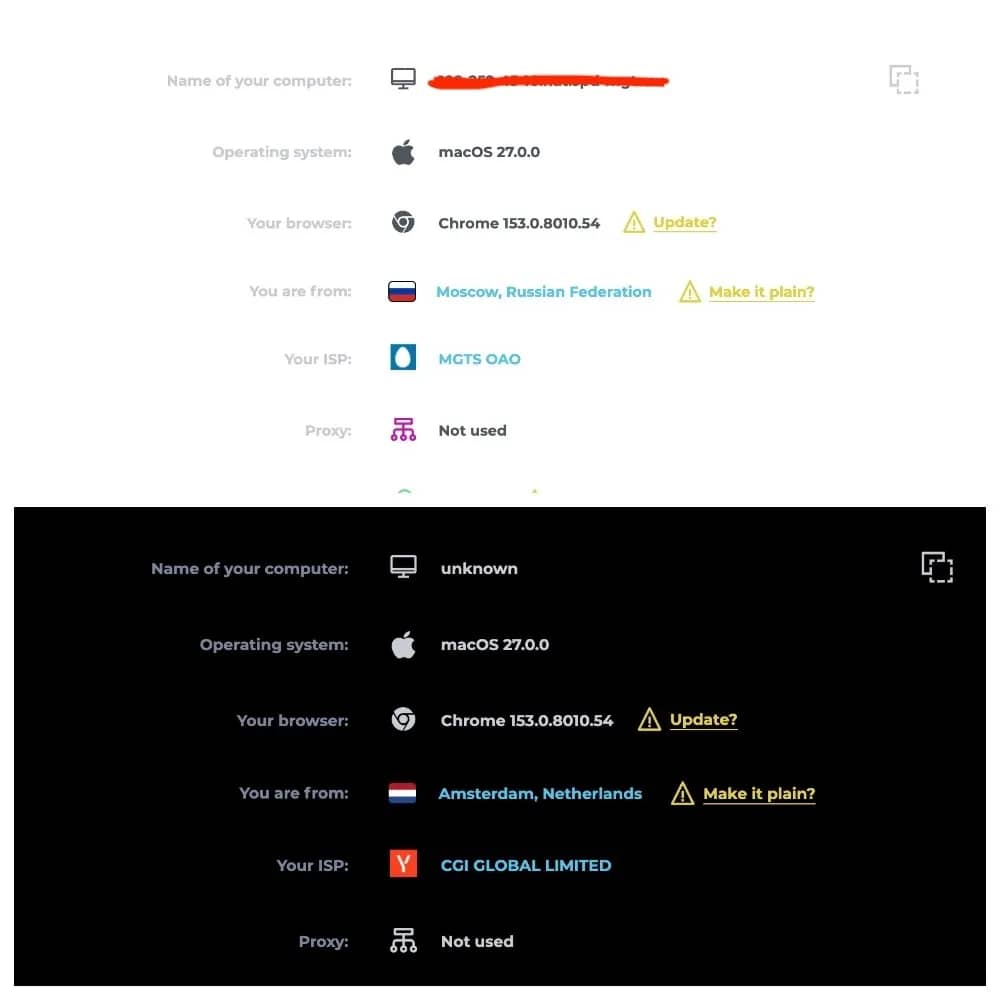
Checking without connection (API checkers): there are special online checkers where you can upload a proxy list in the format IP:Port or IP:Port:Login:Password directly into the text field of the site. The service itself will poll each address and issue a summary report: which server responded and which turned out to be dead.
Method 2. Checking via Browser and OS Settings
To test the proxy in "combat" conditions, use system or browser settings.
In browsers (Chrome, Firefox). For Google Chrome, extensions like Proxy SwitchyOmega are used, where you can quickly create profiles for HTTP, HTTPS, and SOCKS5 proxies, switching between them in one click. In Firefox, proxy settings are built directly into the system "Network Settings" menu.
In the operating system (Windows / macOS). In Windows, the path lies through Settings -> Network & Internet -> Proxy. The IP and port are registered manually.
"Before and After" check:
- Open a browser tab without a proxy and record your real IP.
- Enable the proxy connection, open an incognito tab (or refresh the checker page).
- Make sure the numbers have changed. If the site gives a connection error (ERR_CONNECTION_TIMED_OUT or ERR_PROXY_CONNECTION_FAILED), the proxy is dead, blocked by a firewall, or incorrect authorization data was entered.
Method 3. Checking via the Command Line
For system administrators, developers, and media buyers, checking a proxy via the terminal (console) is the fastest method.
Using the curl utility
The command allows you to send a request through a proxy and see the external IP that the target server sees:
For HTTP/HTTPS proxies:
curl -x http://username:password@ip:port https://ifconfig.me
For SOCKS5 proxies:
curl -x socks5://username:password@ip:port https://ifconfig.me
If you receive the proxy's IP address in response, the server is working properly.
Checking port availability (Windows PowerShell)
To make sure that the remote port is open and accepting connections:
Test-NetConnection -ComputerName Proxy_IP_Address -Port PORT
If the TcpTestSucceeded parameter is set to True, the port is open.
Method 4. Checking via Script (for Scraping and Automation)
If you run automated tasks (parsers, posting software), it is better to build proxy checks into the code using scripts.
A minimal example in Python using the requests library:
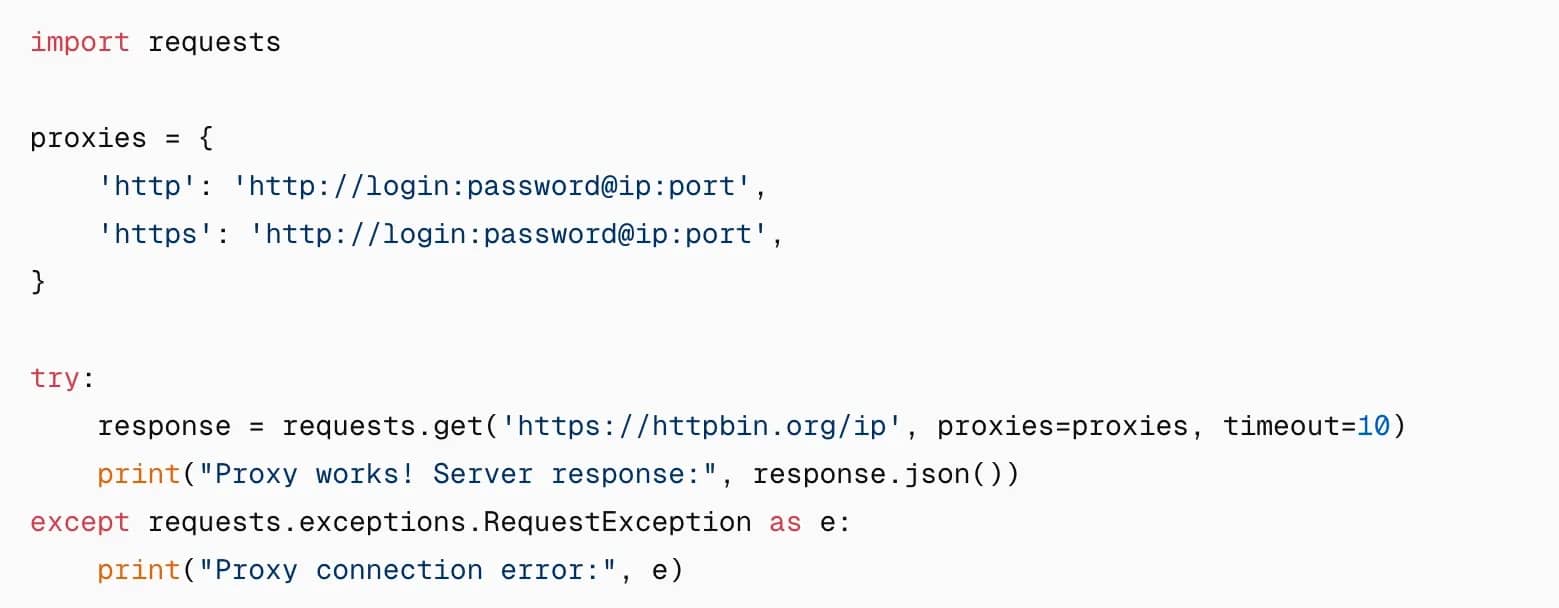
Scripts of this type allow you to mass-validate IP lists, filtering out non-working addresses.
Method 5. Checking for DNS and WebRTC Leaks
Even if the IP checker shows the desired country, privacy may be compromised due to technical features of the browser.
DNS leak. The system can send requests to domain names through your real internet service provider instead of through the proxy tunnel. Check this on sites like dnsleaktest.com — the list of servers should not include your ISP or your real country.
WebRTC leak. Communication technology in the browser can transmit the real IP bypassing the proxy. Check it on browserleaks.com/webrtc and, if necessary, disable WebRTC through special plugins or browser settings.
Speed and Ping Checking
The speed of working through a proxy is always lower than with a direct connection due to additional links in the data transmission chain.
How to measure: run a standard Speedtest through the browser with the proxy enabled or evaluate the response time in checkers.
Normal benchmarks:
- for server proxies — low ping, high speed, limited by the server channel;
- for mobile proxies — higher ping (usually 80–200 ms), average speed, but maximum trust level of security systems.
Why a proxy lags: remote geographical location of the server (for example, a proxy in Australia while you are in Europe), congestion of the public channel, or the use of cheap shared proxies used by too many users.
Geolocation and IP "Cleanliness" Check
For serious tasks, the reputation of the IP address is critically important. Cleanliness is checked against anti-fraud system databases:
- Check the IP for presence in blacklists (spam database blocklists).
- Make sure the address is not marked as belonging to a datacenter if you bought mobile or residential proxies. A "dirty" IP is guaranteed to be met with captchas, blocks, and account bans.
Mass Checking a Proxy List
If you have a base of hundreds or thousands of addresses:
- Use specialized desktop software (such as Proxy Checker) or cloud-based batch checking services.
- Upload the list in text format.
- Filter the results by speed, availability, protocol type (HTTP / SOCKS5), and countries.
Tip: public free proxies die literally within hours, so their mass check must be carried out immediately before starting work.
Proxy Not Working: Diagnostics and Solutions
If the check reveals a failure, you don't necessarily have to abandon the proxy right away. It is entirely possible that the error can be fixed.
| Symptom | Possible Cause | Solution |
| Connection Error / Timeout | Incorrect IP/port or proxy is "dead" | Recheck data, ping host via console |
| Error 407 (Proxy Authentication Required) | Incorrect login or password | Re-enter credentials, check special characters |
| Sites do not open, but checker works | IP address blocked by a specific resource | Change proxy server or use a clean pool (residential/mobile) |
| IP does not change (remains yours) | Proxy not applied in the system or cache triggered | Clear browser cache, check proxy extension settings |
| Low speed, drops | Server congestion or too distant geo | Switch to a server closer to the target audience of the site |
How Often Should You Check Proxies Anyway?
- Once — immediately after purchase from the seller to request a replacement in case of malfunction.
- Before each launch of resource-intensive tasks (parsers, large-scale advertising campaigns).
- When working with account farms, performance and ping checks should be automated every few hours.
Conclusion
Proxy checking is a mandatory stage of digital hygiene that will protect you from bans, budget drains, and wasted time.
A proxy is considered fully operational if:
- The port is open, and the server responds stably without long timeouts.
- An external IP checker shows the new address and the required country.
- There are no DNS and WebRTC leaks.
- Speed and ping are within acceptable limits for your task.
- The IP address is absent from blacklists and spam databases.
- Authorization by login and password passes without errors.
Use this algorithm before each launch of important online projects.
Frequently asked questions
- Yes, it is enough to use any online IP address checking service in your browser or enter the proxy in the settings of browser extensions (for example, SwitchyOmega).
- If you use regular unencrypted HTTP proxies, the server owner can technically see the unencrypted data transmitted. When using HTTPS or SOCKS5 with encryption, the traffic is protected, and the proxy provider sees only the encrypted stream and the domains you access.
- HTTP proxies work at the application level and are checked primarily for working with web traffic. SOCKS5 supports working with any protocols, including UDP, so when checking it via the command line or checkers, it is important to make sure that this particular tunneling type is supported.
- This can happen for two reasons: the seller provided a proxy with a geolocation that does not match the claimed one, or the geolocation databases (MaxMind, IP2Location) on the checker itself have not yet managed to update information about the new owner of the IP range.

Why Google Blocks Accounts and What Your Antidetect Has to Do With It
Google has once again complicated the mechanisms of digital identification by deploying a new, more sophisticated layer of protection based on proprietary HTTP headers. This quiet change caught most of the market off guard, triggering a wave of rushed updates. While others hastily released superficial 'fixes', we realized that we were dealing not with a minor issue but with a fundamental shift that required deep and comprehensive analysis.

SOCKS vs HTTP Proxy: What’s the Real Difference and Which One to Choose?
There are times when you don’t want a website to link the request back to your device. That’s where a proxy comes in, it acts like a middle layer and sends the request for you. The site sees the proxy’s info instead of yours. It’s a go-to trick when you’re trying to see a page that’s not available in your region, pull content that’s restricted by location, or avoid hitting a wall when sending lots of requests.

The Best Alternative to OBS Studio
Working with a webcam on many online platforms can turn into a real challenge. A strict oval or rectangular frame appears on the screen, but your image doesn’t align perfectly with it. As a result, the system blocks further progress, demanding perfect alignment, and your workflow is disrupted before it even begins.