
The Main Mistakes When Using Anti-Detect Browsers: A Complete Analysis for Affiliates
The main mistakes when using anti-detect browsers are most often hidden not in the software code itself, but in the actions of the users. Today, anti-detect browsers have become the absolute industry standard: stable multi-accounting, traffic arbitrage, secure data parsing, work with crypto projects, and e-commerce are impossible without them.
However, buying a subscription to Linken Sphere or AdsPower is only 20% of success. The internal statistics of top arbitrage teams and detection systems show a paradoxical picture: over 80% of account bans occur precisely because of the human factor, and not because of the anti-fraud systems "breaching" the browser itself. Platforms block users for anomalies that they create with their own hands.
In this article, we will break down 10 critical flaws when working with anti-detects. For convenience, we will divide the mistakes into three key categories: technical, behavioral, and organizational.
Technical mistakes: when the software works, but leaks the fingerprint
No browser will save you if the profile configuration screams to the security system that you are trying to fool it.
Inconsistency between IP address and browser geolocation
The most banal, but destructive blunder. The IP address of your proxy shows that you are in Berlin, but the system time of the profile is set to Bangkok. Language conflicts are added to this: the browser is in English, the IP is from Germany, and the keyboard layout is in Russian. Such anomalies instantly trigger the scoring system, and the account's trust level goes into the negative.
Recommendation: before every login, check the consistency of the profile through professional checkers: whoer.net, browserleaks.com, pixelscan.net.
We talked about how checkers work and whether they can be trusted in a separate article.
Ignoring WebRTC and HTML5 geolocation leaks
Some try to simply completely disable the WebRTC function in the settings, considering it protection. For advertising networks, especially Facebook Ads and TikTok, disabled WebRTC is a red flag, a signal of using software for anonymization, since 99.9% of real users have this function working. Similarly with HTML5 Geo. You must not disable it, but ensure correct WebRTC spoofing strictly through your proxy. The leak of the real local and public IP through WebRTC is a reason for an instant block.
Inconsistency of the user-agent
The User-Agent is a string that tells the site the browser and operating system version. If you generated a profile a year ago and are still working with the same UA, you are in the risk zone. A common mistake is a mismatch of components: for example, you set the current User-Agent (Chrome 148), but the core of the anti-detect browser runs on an old rendering engine (Chrome 142). Client Hints easily reveal this discrepancy. Automatic updates of the UA without updating the browser core are a direct path to detection.
Incorrect choice of proxy type for the task
Using datacenter proxies to register Facebook accounts will lead to a ban even at the data entry stage. The difference is critical: residential or high-quality mobile proxies are needed for social networks. Using cheap, "dirty" IP addresses with a rich spam history will kill even the most perfect browser fingerprint. Always check the cleanliness of the IP before starting via specialized services — blacklists, IPQualityScore.
Behavioral mistakes: an anti-detect does not replace a human
Anti-fraud algorithms analyze not only the technical parameters of the "hardware", but also exactly how the user interacts with the page.
Instant activity after profile creation
If a profile was created a minute ago, and the user immediately follows a direct link to the Facebook Ads Manager or starts parsing a page with thousands of requests — this is a bot. The lack of an initial warm-up is fatal. The correct scenario includes natural surfing, scrolling through the news feed, reading articles, clicking on regular links, and only then moving on to target actions.
Violation of human behavioral patterns
Perfectly straight mouse movements, copy/paste instead of typing, lack of pauses before clicks — all this is read by scripts like MouseFlow, Hotjar, and native platform algorithms. A living person scrolls not only vertically, but also horizontally, moves the cursor chaotically, and makes micro-pauses for reading. Robotic flawlessness of actions is your main enemy.
Working with multiple accounts without breaks
Too frequent re-logins from a single working device is a marker of an account farm. If you log into 20 accounts in a row every 5 minutes, a session template is created. In addition, "night pauses" are often ignored. If the profile's IP belongs to Los Angeles, and the account shows hyperactivity at 3 am local time for a week, this raises suspicions.
Ignoring cookies and browser history
An absolutely empty cookie file when logging into Facebook is a powerful signal of a new device without a history. Regular users roam the net with megabytes of accumulated cookies. Mistakes at the stage of importing sessions are also common: loading broken files, domain mismatch, unrealistic or expired timestamps in JSON files.
Buying accounts with ready-made cookies or a natural build-up of history over at least 3-7 days is the choice of professionals.
Organizational mistakes: processes are costlier than tools
Even if the technical and behavioral base is perfect, chaos in management will destroy the account network.
Lack of a tracking and tagging system for profiles
Haphazard storage of dozens of profiles, proxies, and accesses in one nameless folder leads to human errors.
Recommendation: implement strict naming. In Linken Sphere (and the majority of popular anti-detects) there is a division into desktops, where a separate proxy is connected to each profile. You can apply tags, a profile description, profile statuses (conditionally, "new", "warmed up", "ads launched", "ban"), the creation date and modification date are visible, and whether the proxy is connected to any other profile. The main thing is not to be lazy about keeping records.
Untimely updating of software and browser core
The anti-detect is based on the Chromium or Firefox core. Ignoring core updates creates a unique, standout fingerprint. If 95% of the internet has already moved to Chrome 147, and your profile stubbornly runs on core version 141 or earlier, this becomes a trigger.
The second part of the problem is related to the developers of anti-detects themselves: in custom builds, updates roll out with a delay after the release of the official Chrome. Always check the relevance of your version via whatismybrowser.com. Or use Linken Sphere — the team is famous for the most prompt updates.
Checklist before launching a profile
Checking these 10 points takes no more than two minutes, but saves hours of work and budgets.
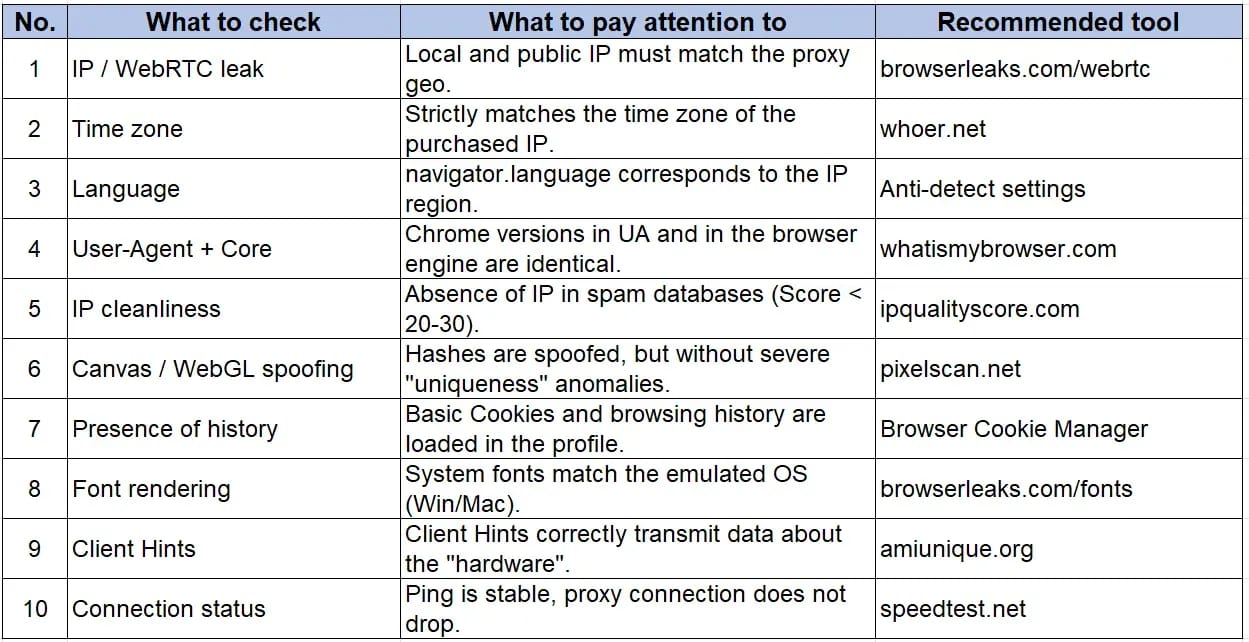
Conclusion
Using anti-detect browsers requires a deep understanding of the mechanics of how the internet works. It is important to realize the main point: an anti-detect is not a magic "make profit without bans" button. It is a professional tool that helps scale and strengthen your workflows. And in precisely the same way, it amplifies your mistakes.
Conduct an audit of current processes: check how your team prepares profiles, what proxies you work with, and whether time zone settings match the geolocation. Save the checklist from this article and consult it before launching high-risk advertising campaigns — this will save your nerves, time, and money.
Frequently asked questions
- No. An anti-detect browser is a digital fingerprint spoofing tool, not a magic shield. If you behave like a bot or use low-quality proxies, the anti-detect will not protect you from algorithmic platform bans.
- The leak of a real IP address, especially through WebRTC, is more critical, as it is direct proof of using proxy tunnels and hiding geo. The leak of the original fingerprint or the use of a too unique generated one leads to an accumulative drop in trust and a shadowban.
- It depends on the proxy type and the task. Mobile proxies can rotate IP every 5-10 minutes via a link or timer — this is safe for farms. Residential proxies are tied to the session and hold as long as the account is alive. Shifting a single account from proxy to proxy without urgent need is not recommended.
- Most likely, the behavioral factor comes into play. If your super-trusted profile makes robotic, unnatural clicks, registers, and 10 seconds later binds a payment card, the platform's anti-fraud system will block you for unnatural activity, ignoring the quality of the fingerprint and proxy.

Why Google Blocks Accounts and What Your Antidetect Has to Do With It
Google has once again complicated the mechanisms of digital identification by deploying a new, more sophisticated layer of protection based on proprietary HTTP headers. This quiet change caught most of the market off guard, triggering a wave of rushed updates. While others hastily released superficial 'fixes', we realized that we were dealing not with a minor issue but with a fundamental shift that required deep and comprehensive analysis.
SOCKS vs HTTP Proxy: What’s the Real Difference and Which One to Choose?
There are times when you don’t want a website to link the request back to your device. That’s where a proxy comes in, it acts like a middle layer and sends the request for you. The site sees the proxy’s info instead of yours. It’s a go-to trick when you’re trying to see a page that’s not available in your region, pull content that’s restricted by location, or avoid hitting a wall when sending lots of requests.

The Best Alternative to OBS Studio
Working with a webcam on many online platforms can turn into a real challenge. A strict oval or rectangular frame appears on the screen, but your image doesn’t align perfectly with it. As a result, the system blocks further progress, demanding perfect alignment, and your workflow is disrupted before it even begins.