Multi-account browser: how to choose an anti-detect solution for your needs
Updated: September 2026
Anti-fraud security systems of platforms like Meta, Google, Amazon, and CoinList are continuously refining their behavioral and technical analysis methods. Attempts to run parallel operations through regular tabs, incognito mode, or simply rotating proxies inevitably result in a ban across your entire account farm. That is why managing multi-accounting setups is impossible without a dedicated browser.
Below, we break down the difference between standard browsers and anti-detect solutions, key evaluation criteria, current pricing plans of market leaders accounting for recent changes, and a step-by-step fingerprint testing guide prior to purchasing a license.
What is a multi-accounting browser and why a regular browser fails
A multi-accounting browser (anti-detect browser) is specialized software that creates isolated virtual environments with unique digital hardware and OS fingerprints. Each individual profile inside such a browser mimics an independent physical machine, preventing cross-identification and cascading account bans.
Mainstream web browsers like Chrome, Safari, and Edge are engineered with the exact opposite goal: making users as identifiable as possible for ad networks and web analytics. Even if you clear your cache, delete cookies, and turn on a VPN, a website will instantly determine that sessions originate from the very same physical device.
Data collection relies on digital fingerprinting. Scripts running on the target resource issue micro-requests via internal browser APIs and assemble a unique hash of your system in milliseconds. This array contains dozens of parameters ranging from Canvas and WebGL rendering to installed fonts and system libraries. We covered the technical breakdown of digital fingerprints in a separate article.
Incognito mode only shields you from saving session history to your local hard drive — for third-party trackers, your digital fingerprint remains completely identical to a regular window. A VPN only replaces your external IP address, keeping network headers, your local DNS resolver, and underlying hardware signatures completely intact.
A multi-accounting browser resolves this issue: every created profile operates as an autonomous sandbox with its own dedicated cookie directory, local storage, and spoofed APIs. The browser intercepts script calls addressed to the operating system and returns generated or real-device-harvested parameter values, maintaining their internal mathematical consistency.
How to choose a multi-accounting browser
Before purchasing a subscription, evaluate the tool against core fundamental criteria:
| Criterion | Why it matters | What to check |
| Fingerprint spoofing quality | Determines profile survival under strict anti-fraud filters | Verification results on check sites: Pixelscan, BrowserLeaks, CreepJS, Iphey |
| Browser core & update frequency | An outdated core exposes spoofing when User-Agent versions mismatch | Current core version, delay in shipping updates following Google's official Chrome releases |
| Proxy integration | Anti-detect software is useless without clean IP masking | Support for HTTP, SOCKS5, and SSH protocols; built-in proxy manager; quick IP validation and rotation |
| Free plan / trial | Allows testing session stability without financial commitments | Number of bundled profiles, expiration limits, access to essential features |
| Team collaboration | Critical for media buying teams, agencies, and account-farming departments | Role-based access control, one-click profile transfers, employee activity logs |
| Automation | Vital for scaling repetitive actions and warm-up farming | Availability of Local API / REST API, compatibility with Puppeteer, Playwright, Selenium; built-in no-code RPA |
| Supported platforms | Dictates device flexibility and hardware requirements | Builds for Windows, macOS (including native Apple Silicon support), Linux, mobile clients |
| Total cost of ownership | Hidden fees can multiply your monthly overhead | Per-profile price calculations, paid configurations/fingerprint packs, proxy slot limits, API fees |
Comparison of the best browsers for multi-accounting
We have consolidated up-to-date data on the key market players in the table below:
| Browser | Core | Free Tier | Paid tiers, monthly starting price, from | Proxies | API | Teamwork | OS |
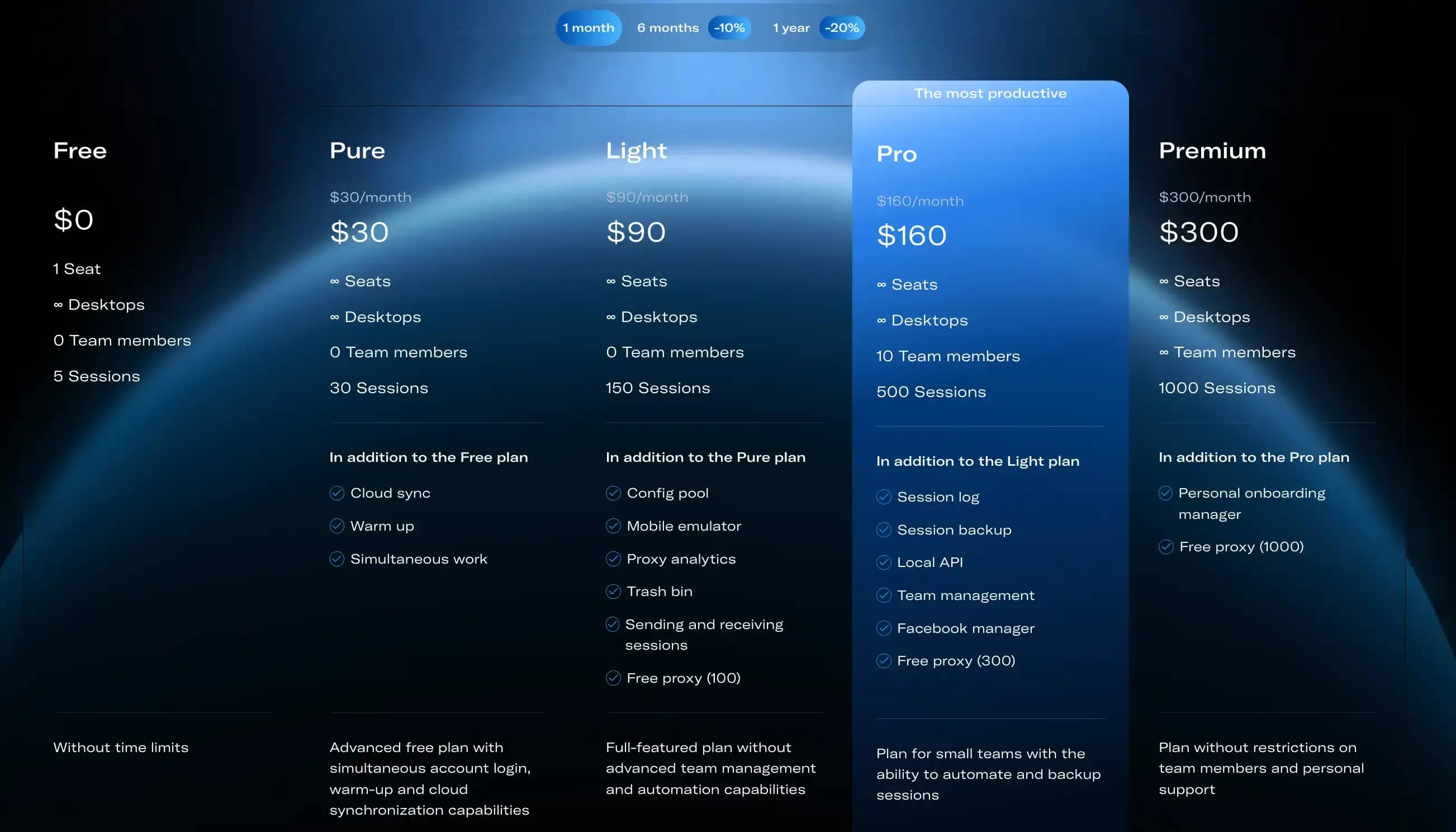
| Linken Sphere | Chromium | 5 sessions, no time limit | $30/mo (Pure, 30 sessions) | HTTP/SOCKS5/SSH + free proxies on Light and above | Local API from Pro tier | Up to 10 members on Pro, unlimited on Premium | Win / macOS |
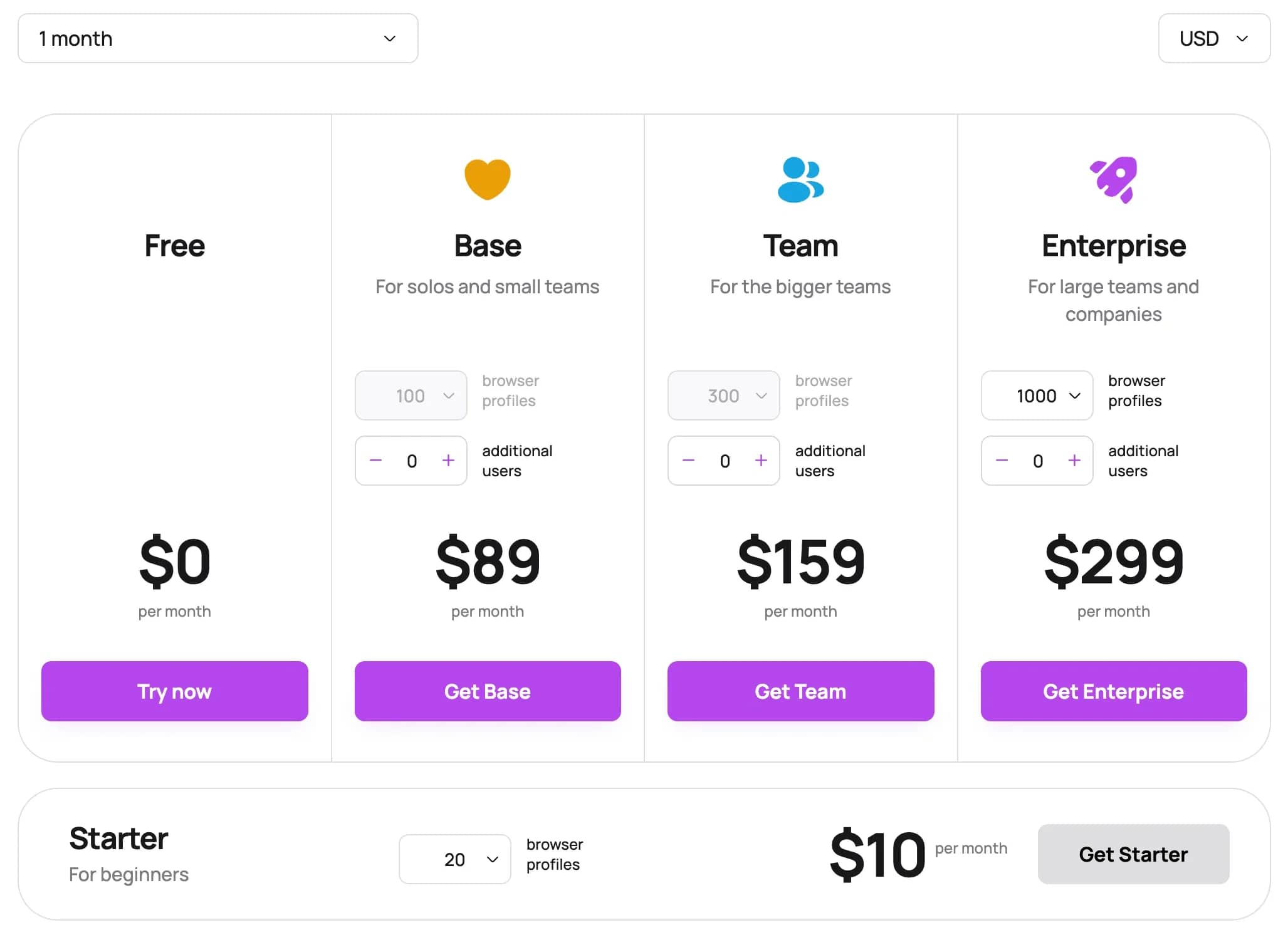
| Dolphin Anty | Chromium | 5 profiles | $10/mo (20 profiles) | HTTP/SOCKS5, none built-in | Yes (on paid tiers) | From Base tier, +$10/mo per extra seat | Win / macOS / Linux |
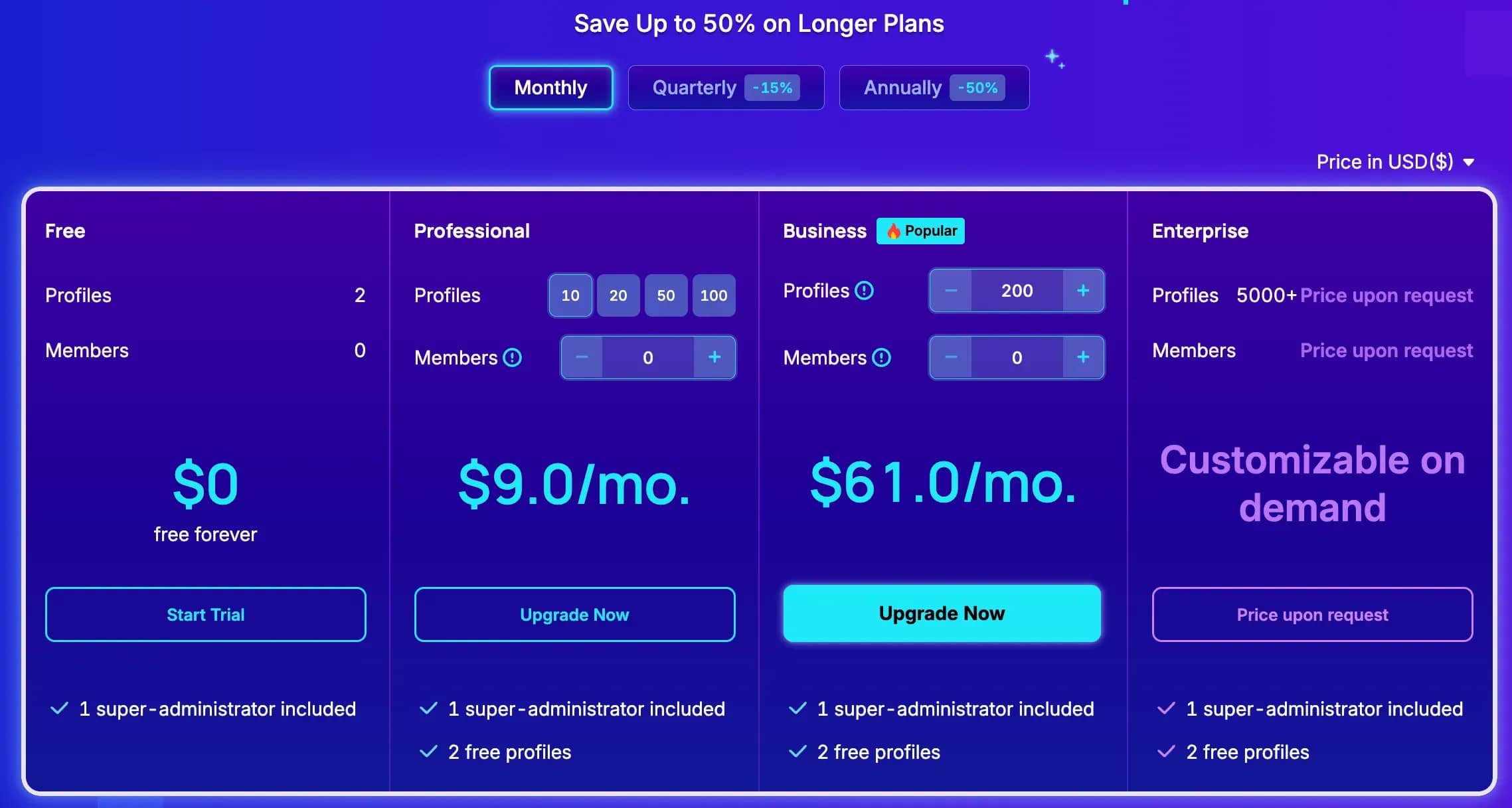
| AdsPower | Chromium / Firefox | 2 profiles, no time limit | $9/mo (10 profiles) | HTTP/HTTPS/SOCKS5, none built-in | Yes (on paid tiers) | From Professional tier (+$5/mo per extra seat) | Win / macOS / Linux |
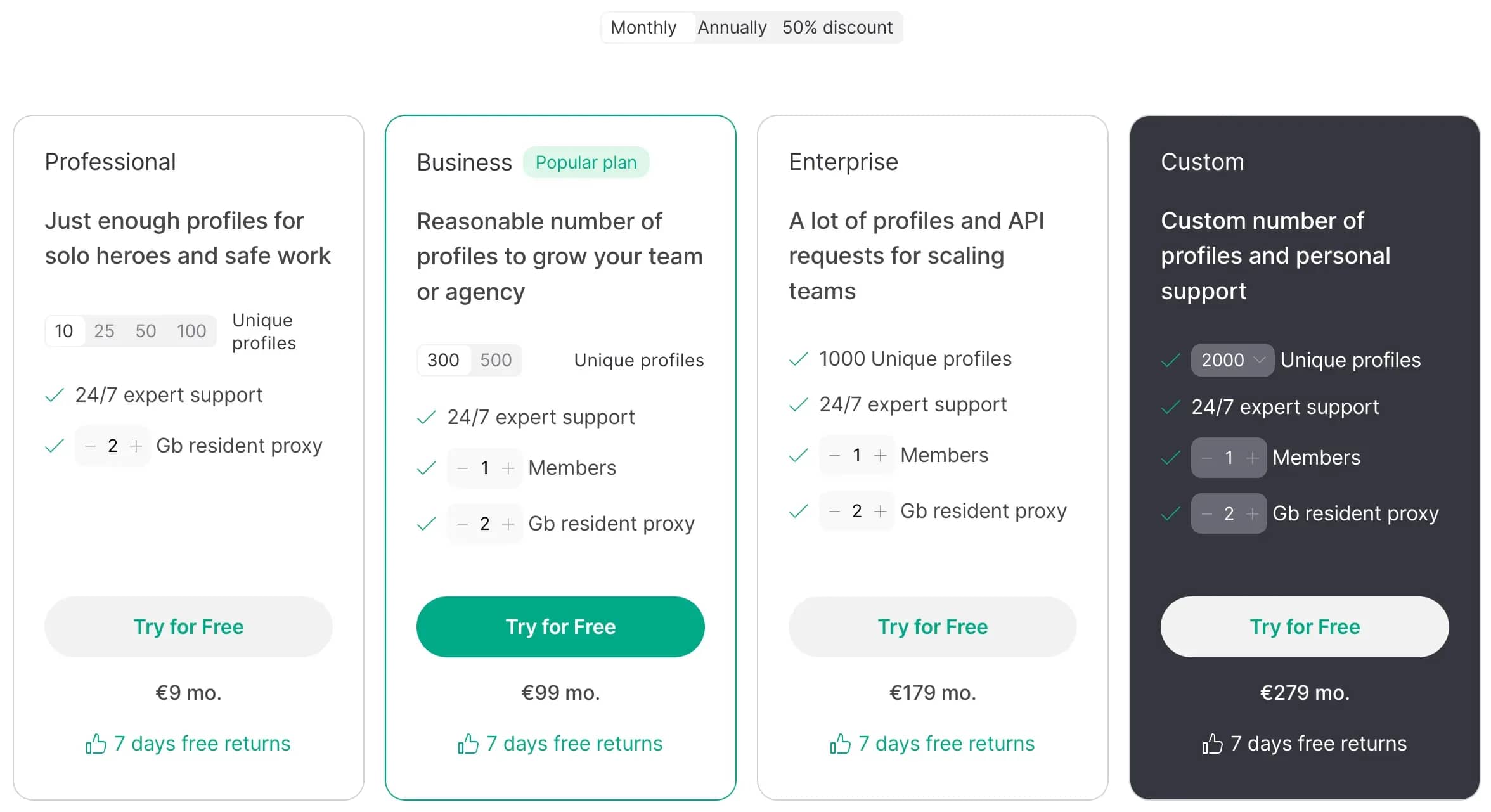
| GoLogin | Chromium (Orbita) | 3 profiles, no time limit | €9/mo (10 profiles) | Built-in datacenter proxies + 2 GB residential traffic on paid tiers | Yes (except Free tier) | From Business tier | Win / macOS / Linux + Android app |
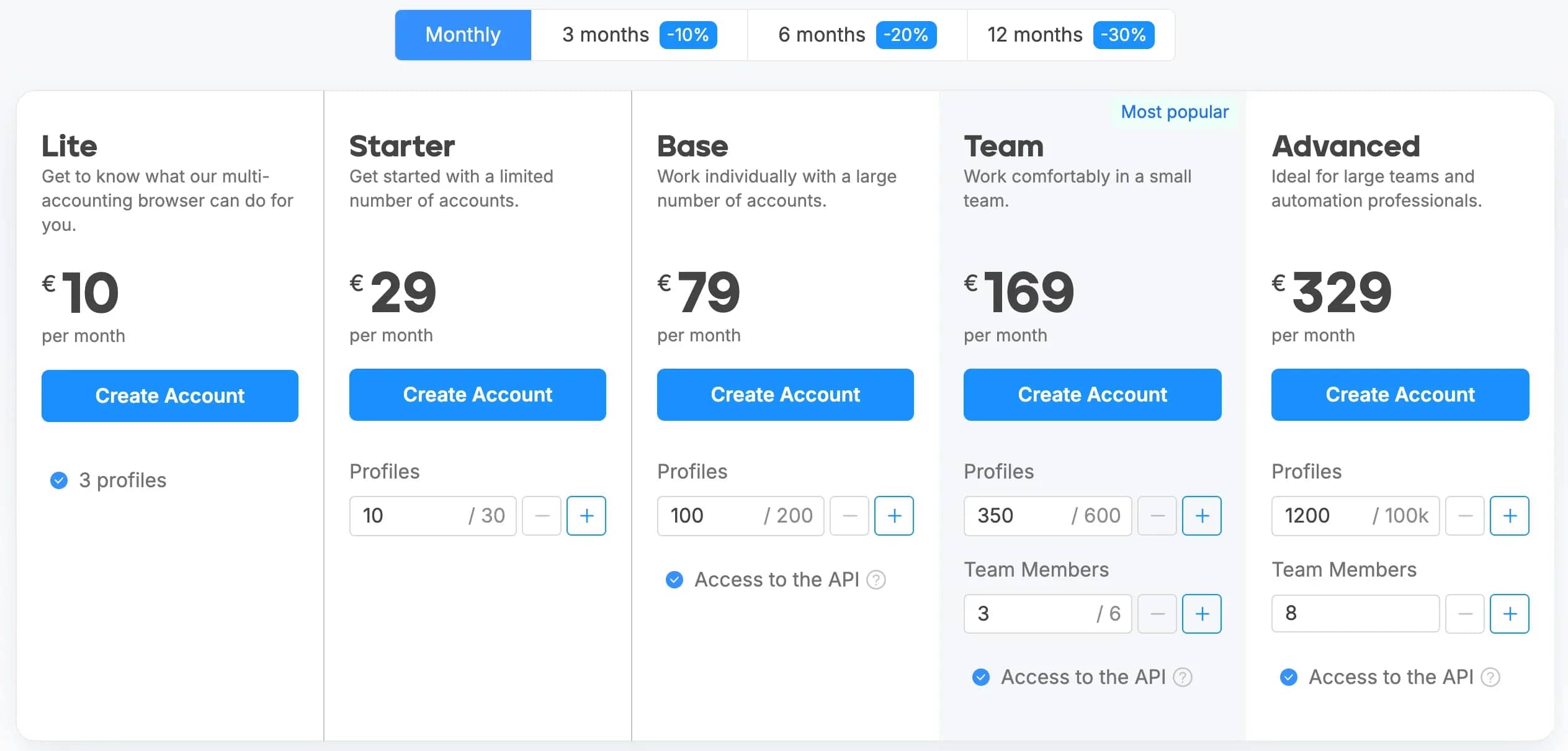
| Octo Browser | Chromium | None | €10/mo (3 profiles) | HTTP/SOCKS5, none built-in | From Base tier (€79/mo) | From Team tier (€169/mo) | Win / macOS / Linux (beta) + iOS app |
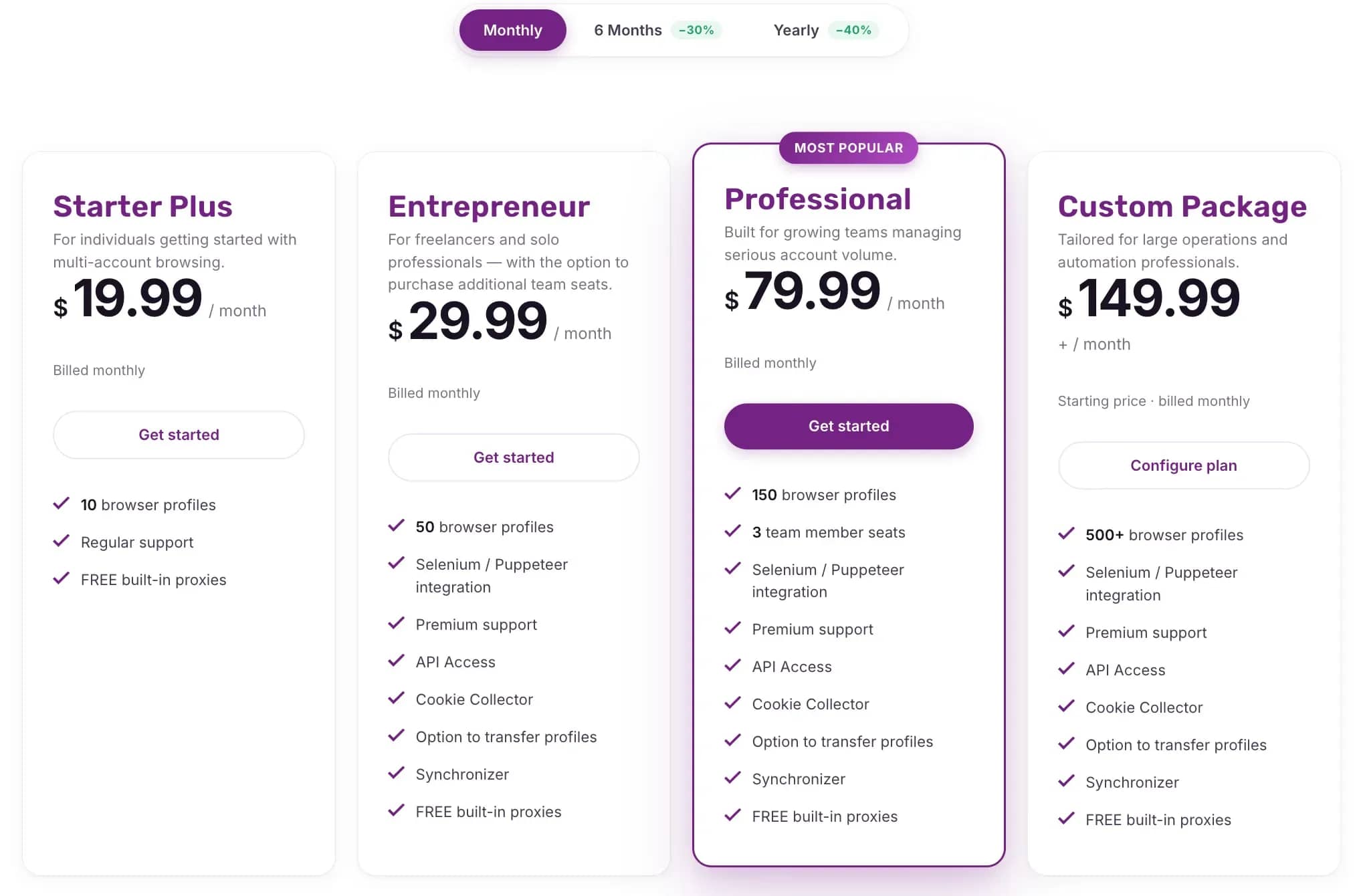
| Incogniton | Chromium | 10 profiles (first 2 months), then 3 permanently | $19.99/mo (10 profiles) | HTTP/SOCKS5/SSH + built-in proxies (9 countries) | Yes (REST API) | From Professional tier (from 3 seats) | Win / macOS |
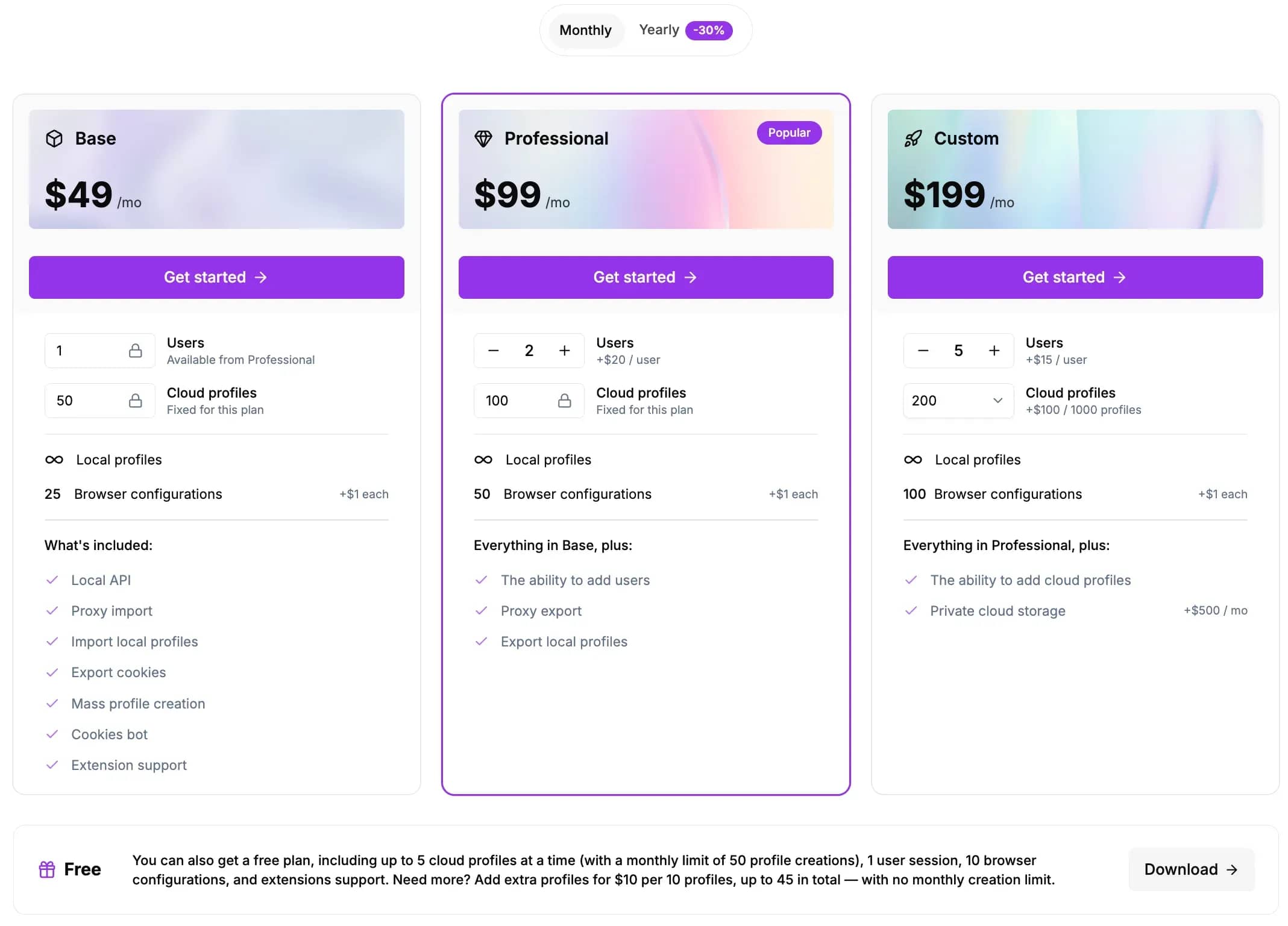
| Undetectable | Chromium | 5 concurrent cloud profiles (up to 50 profile generations/mo) | $49/mo (Base, 50 cloud + unlimited local) | HTTP/SOCKS5, none built-in | Yes (from Base tier) | Extra team seats +$20/mo each | Win / macOS |
Linken Sphere
Linken Sphere is an iconic tool that underwent a massive architectural overhaul, offering exceptional technical isolation. The browser implements a hybrid fingerprint generation mode based on real device configurations, precise mobile browser emulation (available on the Light tier and up), and a smart session management concept. A major advantage is the permanent free tier with 5 sessions, allowing you to test spoofing capabilities without time constraints.
The core is updated at record speed: adaptation for the Chrome 144 release took just 3 days from Google's official release. Starting with the Light plan, users gain access to built-in free proxies, while the Pro tier provides a Local API and collaboration tools for up to 10 team members.
Downsides: lack of builds for Linux and mobile operating systems, as well as the absence of cloud synchronization on the free tier.
Dolphin Anty
Dolphin Anty is one of the market leaders in the CIS for CPA marketing and media buying across Meta Ads, Google Ads, and TikTok. The product's key advantage is its laser focus on routine media buyer workflows: a built-in action synchronizer, bulk account import with automatic cookie parsing, and an advanced API for developing custom auto-launch pipelines.
As of September 2026, the developers adjusted their policy: the free starter plan was reduced from the previous 10 profiles down to 5, though it remains permanent with no time limit.
Drawbacks include the lack of native built-in proxies and a relatively steep price tag at team scale: a plan with 100 profiles runs $89 per month, while each additional team seat on the Base tier costs an extra $10 monthly.
AdsPower
AdsPower caters to e-commerce, SMM, and large-scale multi-accounting on a budget. A standout feature of the browser is dual-engine support: SunBrowser based on Chromium and FlowerBrowser based on Firefox, enabling the creation of fundamentally distinct digital footprints. The integrated RPA (Robotic Process Automation) module allows you to build behavioral task automations without writing any code.
Paid tiers start at an accessible $9 per month for 10 profiles.
On the downside: independent tests reveal that certain checkers (such as Iphey) occasionally flag the SunBrowser core via heuristic signatures. Additionally, the community remembers a security incident in early 2025 involving compromised third-party crypto wallet extensions, after which the developers significantly hardened their security infrastructure and earned SOC 2 Type II certification.
GoLogin
GoLogin runs on the proprietary Orbita engine and focuses on mobility and cloud computing. It is one of the few anti-detects offering a full-featured native Android application alongside a reliable web version: you can launch profiles and manage sessions straight from a smartphone or tablet without needing a desktop setup. A permanent free plan with 3 profiles is available to all users.
A notable advantage of the paid packages is the bundled 2 GB of premium residential proxy bandwidth, reducing initial setup overhead for beginners.
Weak points: the complimentary datacenter proxies are heavily saturated and trigger flags on sensitive services, and API access is completely locked out on the free version.
Octo Browser
Octo Browser positions itself as an enterprise-grade solution focusing on spotless fingerprint authenticity. Instead of simply injecting random noise values, the developers utilize a deeply optimized Chromium core with meticulous hardware parameter calibration. The software is optimized for Apple Silicon architecture, showing minimal RAM usage, and launched an iOS companion app in May 2026.
The company's commercial policy is rigid: there is no free tier or trial period whatsoever, with the minimum entry point being the Starter tier at €10 per month for just 3 profiles. Furthermore, the starter plan only allows storing a single proxy in the proxy manager, API access begins with the Base tier (€79/mo), and team collaboration is locked behind the Team plan.
Incogniton
Incogniton earned widespread adoption thanks to an intuitive user interface and a low barrier to entry. Key features include bulk clipboard input, human-like typing emulation to bypass behavioral anti-fraud checks, and SSH tunnel integration. The free plan grants 10 profiles for the first two months of use, after which the free allowance drops to 3 profiles permanently.
Key strengths include a pool of built-in free proxies covering 9 countries, available out-of-the-box on every plan. Paid tiers start at $19.99 per month.
Specific caveats: strict cooldown periods when re-entering closed profiles — the software may enforce up to a 30-minute waiting window before relaunching the same session to avoid profile database corruption.
Undetectable
Undetectable offers a distinctive hybrid storage architecture. Its Base paid tier at $34 per month includes 50 cloud profiles and an unlimited number of local profiles stored directly on your computer's local drive. This makes it a cost-effective solution for large-scale operations that do not require continuous cloud synchronization.
The free tier includes 5 concurrent cloud profile slots with a monthly limit of 50 new profile creations, expandable via 10-profile add-on packs for $10 each. API access is unlocked starting from the Base tier.
Primary drawbacks: OS support is restricted to Windows and macOS, and pre-configured hardware fingerprints beyond those bundled with the license are sold separately at roughly $1 each.
Common mistakes when choosing a multi-accounting browser
Perhaps the most widespread mistake beginners make when picking an anti-detect browser is choosing purely on price. Low-grade software with poor Canvas and WebGL masking will inevitably lead to cascading account bans, where financial losses from burned accounts and budgets far outweigh the savings on a premium subscription. It is best to first take advantage of free tiers to test basic workflows. Scaling without testing is equally risky: validating 2–3 test profiles on your specific target platform protects your budget against unforeseen behavioral triggers.
Never cut corners on proxies: buying datacenter IPs from public subnets instantly invalidates the protection of even the most sophisticated anti-detect browser. Most anti-fraud engines flag hosting provider subnets as suspicious before analyzing browser fingerprints. Likewise, running multiple profiles through a single proxy will trigger linkage bans.
A less obvious, yet often fatal mistake is ignoring the browser core update frequency: if an anti-detect runs a six-month-old Chromium build while sending a modern User-Agent header, discrepancies in syntax and internal APIs will trigger an instant block. The core update latency should not exceed several days (exemplified by Linken Sphere releasing their Chrome 144 update in just 3 days).
Do not overlook profile contamination: attempting to log into two accounts within a single profile via different tabs completely destroys session isolation.
How to verify fingerprint quality before purchasing
Before committing to a long-term subscription, thoroughly test the browser's spoofing reliability on free profiles.
- Create a clean profile: launch a free test profile in your chosen anti-detect. Keep the fingerprint settings on recommended auto values.
- Connect a proxy: ensure you attach a private residential or mobile proxy matching your target geolocation. Testing on a home IP will distort network checks.
- Check the profile on Pixelscan: navigate to pixelscan.net. Examine the consistency metric. A green status confirms that hardware indicators correlate logically and match the reported User-Agent.
- Analyze parameters on BrowserLeaks: open browserleaks.com. Review the tests for Canvas, WebGL, AudioContext, and Fonts. Make sure the hashes are unique, system fonts align with the selected OS (for instance, a macOS profile must not expose Windows-specific fonts like Calibri), and WebRTC does not leak your real IP address.
- Gauge trust score on CreepJS: visit abrahamjuliot.github.io/creepjs. This checker uncovers low-level JavaScript engine inconsistencies, API execution timings, and primitive object spoofing attempts. A high Trust Score (80% or greater) indicates robust core protection against detection.
- Benchmark the results: run the identical tests inside your computer's standard browser without spoofing tools to contrast the fingerprints and verify that no real hardware parameters leak through.
Conclusion
Choosing a multi-accounting browser in 2026 is a pragmatic process of matching software capabilities to your niche requirements and operational volume. Before deciding, always take advantage of free test access, configure high-quality residential proxies, and run your generated profile through third-party fingerprint checkers.
Frequently asked questions
- It is specialized software that generates isolated profiles with unique hardware and operating system digital fingerprints. Web resources perceive each profile as an independent, distinct physical computer.
- A regular browser broadcasts an unaltered digital signature of your actual physical device (Canvas, WebGL, audio hash, font lists, CPU specs). An anti-detect isolates cache and cookies while spoofing underlying system parameters to prevent accounts from being linked together.
- No, this strategy inevitably results in account bans. A VPN only changes the external IP address of your connection, whereas the browser's digital fingerprint and hardware configuration remain identical across every session.
- The number of profiles is limited only by your chosen subscription tier and your PC's hardware capacity (primarily available RAM). Equipped with an adequate proxy pool and sufficient machine power, professionals manage anywhere from 50 to several thousand isolated profiles.
- For most workflows facing aggressive anti-fraud systems, private residential or mobile rotating proxies are recommended. Datacenter proxies should only be considered for platforms with minimal security enforcement. Some browsers (such as GoLogin on paid plans or Linken Sphere from the Light plan up) offer built-in proxy allocations directly within the client.
- Using anti-detect technology is completely legal in itself: it is a software utility widely applied for testing web applications, verifying ad campaigns, and safeguarding personal privacy. The legal status of your activities depends entirely on what operations you perform and compliance with the relevant laws in your jurisdiction.

Why Google Blocks Accounts and What Your Antidetect Has to Do With It
Google has once again complicated the mechanisms of digital identification by deploying a new, more sophisticated layer of protection based on proprietary HTTP headers. This quiet change caught most of the market off guard, triggering a wave of rushed updates. While others hastily released superficial 'fixes', we realized that we were dealing not with a minor issue but with a fundamental shift that required deep and comprehensive analysis.

SOCKS vs HTTP Proxy: What’s the Real Difference and Which One to Choose?
There are times when you don’t want a website to link the request back to your device. That’s where a proxy comes in, it acts like a middle layer and sends the request for you. The site sees the proxy’s info instead of yours. It’s a go-to trick when you’re trying to see a page that’s not available in your region, pull content that’s restricted by location, or avoid hitting a wall when sending lots of requests.

The Best Alternative to OBS Studio
Working with a webcam on many online platforms can turn into a real challenge. A strict oval or rectangular frame appears on the screen, but your image doesn’t align perfectly with it. As a result, the system blocks further progress, demanding perfect alignment, and your workflow is disrupted before it even begins.