
YouTube Proxies: How to Choose
Using YouTube is becoming increasingly difficult — restrictions get in the way: from traffic throttling and local blocking to strict Google spam filters when trying to automate routine processes. To solve these problems, proxy servers are used. Unlike a VPN, which encrypts all device traffic and reduces overall connection speed, a proxy works pointwise. It can be configured for a specific browser, application, or automated script.
From our guide, you will learn how to choose the type of proxy for your tasks, where to rent reliable servers, and how to properly configure them on your device.
Which proxies to choose for your task
The correct choice of proxy type will save your budget and protect your resources from blocking.
For simple bypassing of regional restrictions
If the goal is simply to watch videos in 1080p and higher resolution, choose personal IPv4 proxies from server data centers or high-quality residential proxies. The key requirements here are connection speed (at least 15-20 Mbps) and unlimited traffic.
For boosting views and likes
To simulate the activity of live viewers, residential or mobile proxies with rotation are suitable. An attempt to boost views through cheap server IPs will lead to YouTube simply deducting all boosted metrics or blocking the video for fraud.
For scraping data from YouTube
For harvesting search results, comments, or subtitles, the key factor is the size of the available pool of addresses. Residential proxies with payment for each gigabyte of traffic will be the optimal choice. This will allow you to use millions of different IP addresses in parallel.
For working with YouTube Studio и AdSense
For managing valuable channels and withdrawing earnings from monetization, static residential proxies or private mobile proxies in one hand with a static IP are required. An IP change at each login can arouse suspicion and lead to a temporary freeze of payments.
For multi-accounting and channel farms
If you administer a network of 10–50 channels, use a combination of an antidetect browser and mobile proxies with rotation via API. You can configure an IP address change for each profile separately, excluding the possibility of linking accounts.
Top proxy providers for YouTube
Prices and tariff plans are current as of June 2026. When choosing a provider, we focused on video streaming stability and price accessibility.
Proxy-Seller
A popular proxy service with a huge geography (over 220 countries) and flexible tariffs.
Residential proxies: payment for traffic from $0.70 to $3.50 per 1 GB (the price drops when purchasing large packages). Selection of a specific city and internet service provider is available.
Mobile proxies: dedicated private 4G/5G channels with unlimited traffic and rotation. Prices start from $10 to $80 per month, depending on the chosen geo and carrier.
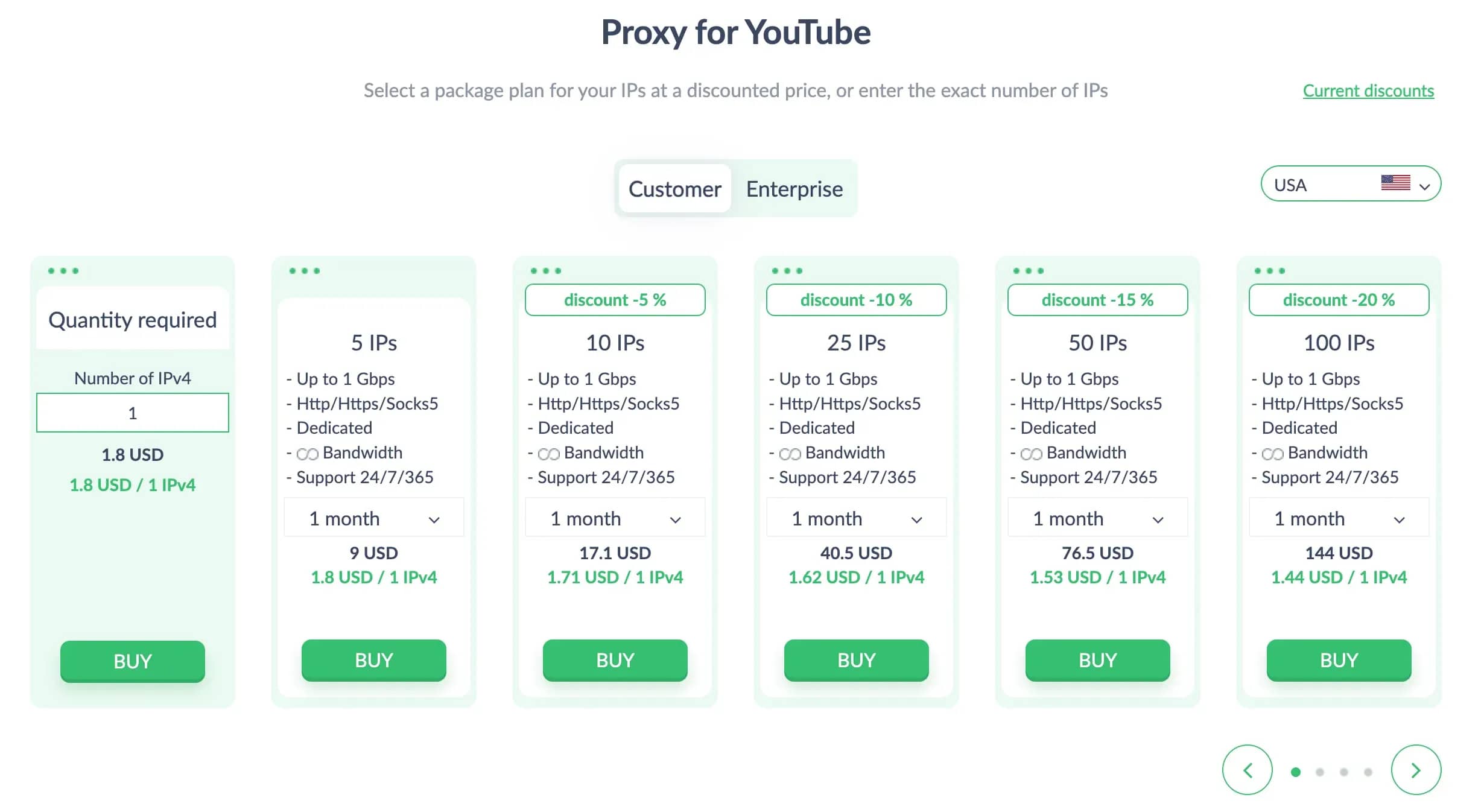
Key features: excellent 24/7 support, support for HTTP(S) and SOCKS5 protocols, instant delivery of addresses after payment.
IPRoyal
One of the market leaders in terms of residential pool quality — more than 32 million clean IP addresses.
Residential proxies: from $1.75 to $7.00 per 1 GB. The most important advantage of IPRoyal is that purchased traffic does not expire at the end of the month; it can be used as needed.
Mobile proxies: private mobile proxies cost from $117 to $130 per month (daily trial rental is available for ~$10). Fully unlimited traffic is provided.
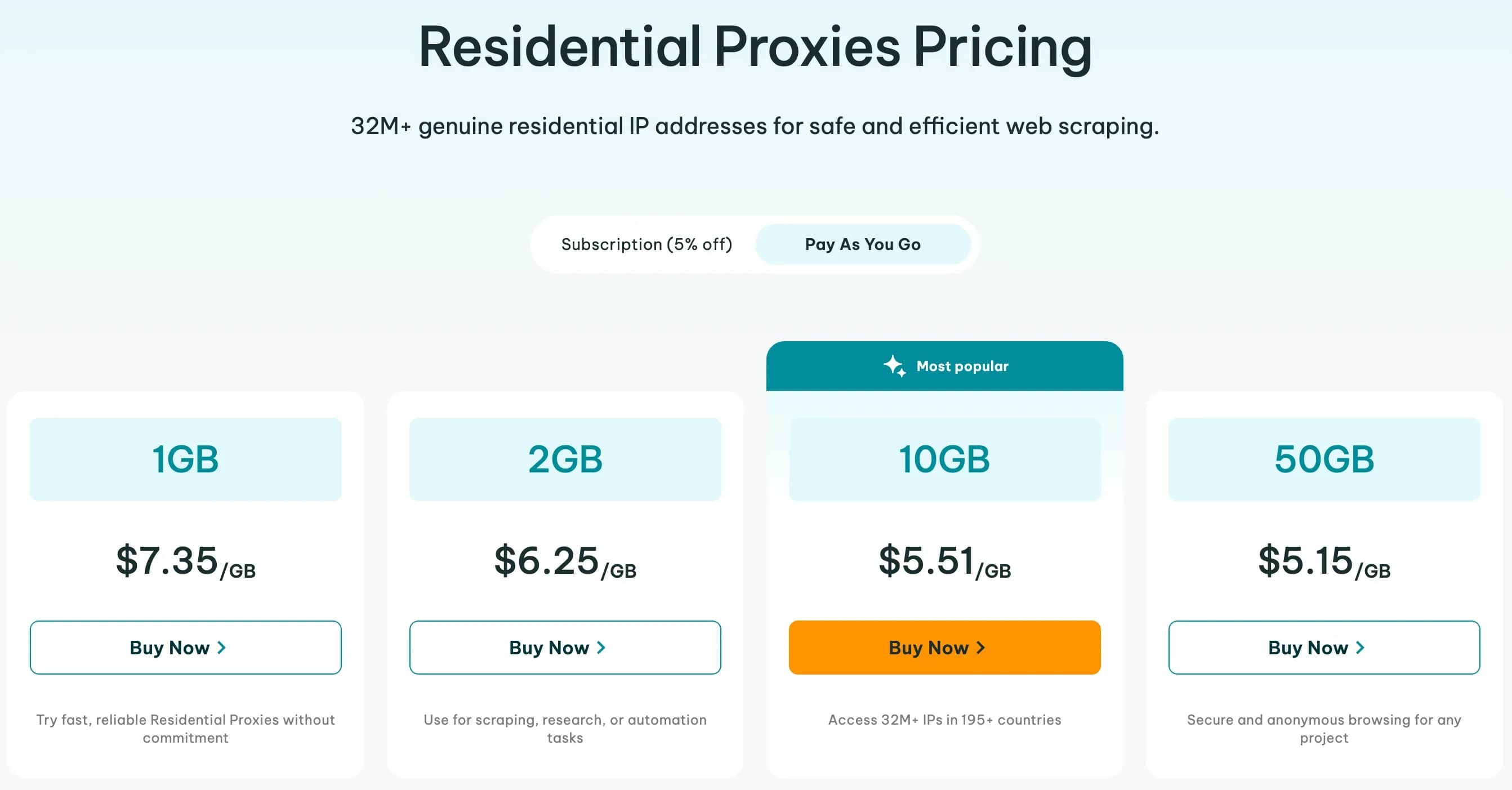
Key features: high speed, clean IP pools that are ideal for strict Google and YouTube Studio filters.
ASocks
A provider with the most transparent and simple unified tariff grid.
Residential and mobile proxies: fixed payment for consumed traffic — $3.00 per 1 GB. No hidden subscriptions or fees. Unlimited packages are also available: residential proxies from $5 per port/month, mobile — from $15 per port/month.
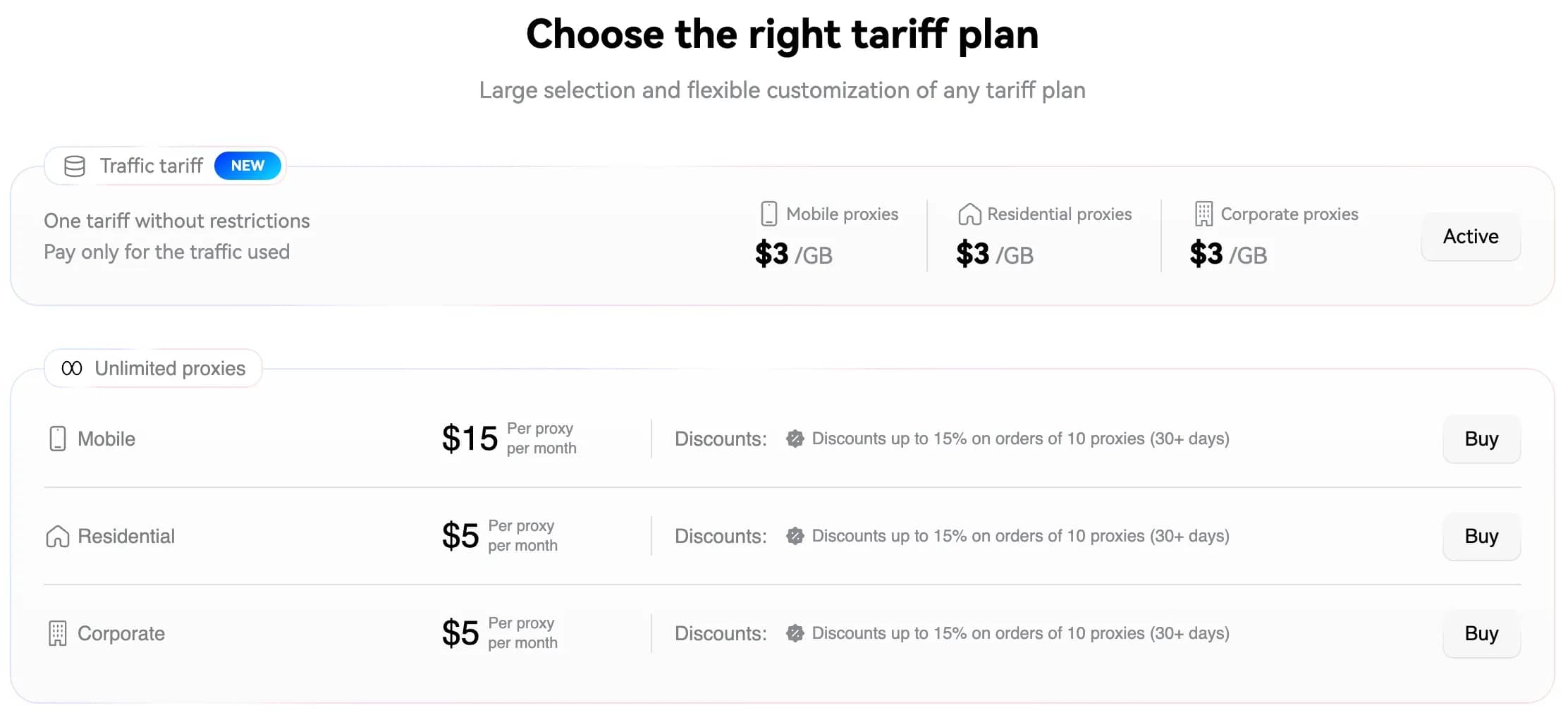
Key features: perfectly suited for beginners and small projects thank to convenient billing and the absence of a minimum balance deposit threshold.
Proxyline
A budget provider focused on personal datacenter proxies.
Individual IPv4 proxies: from $1.50 per month per address.
Shared IPv4 (shared, up to 3 people): from $0.67 per month per address.
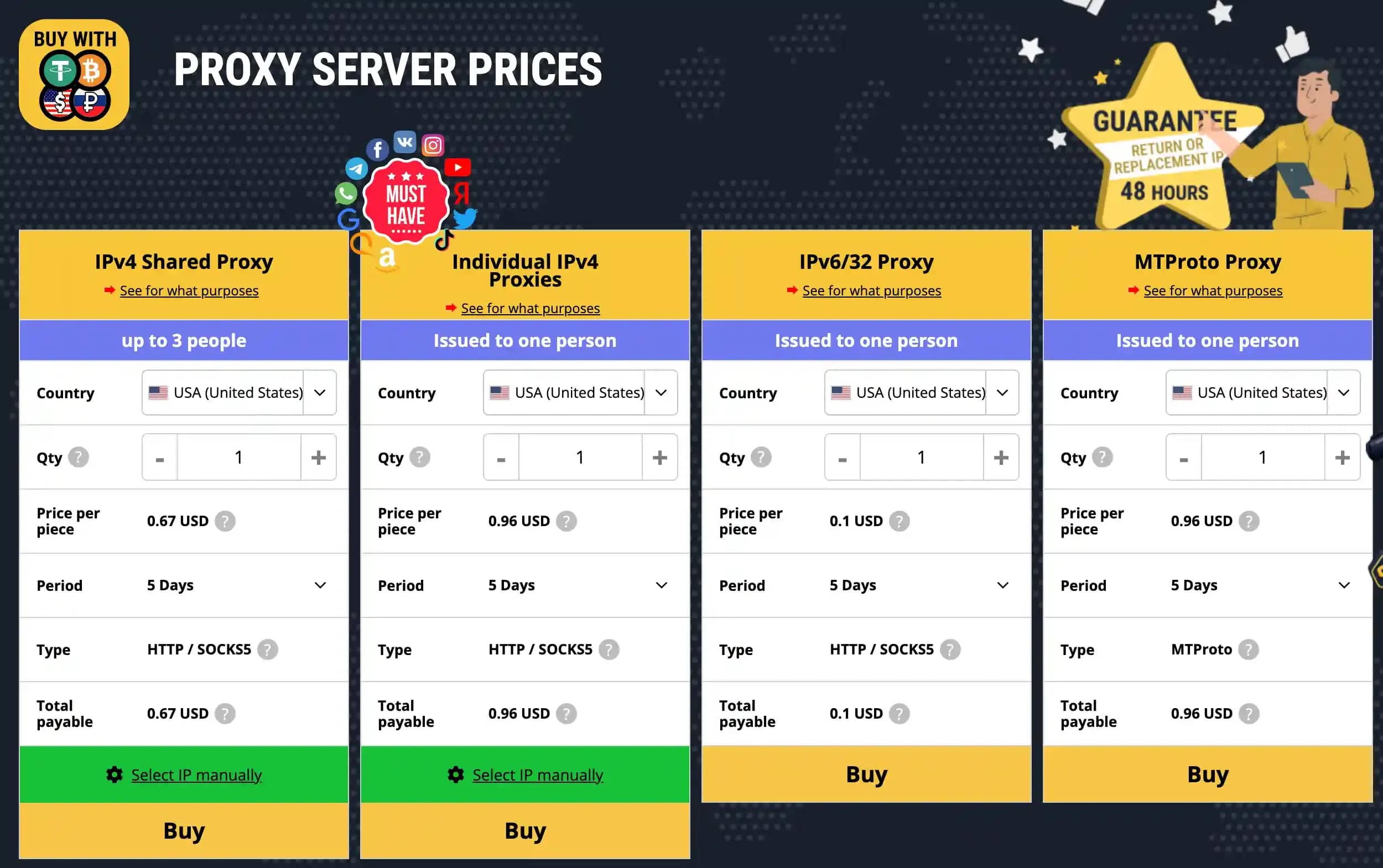
Key features: low cost makes this service an optimal solution if you need many cheap IPs for ordinary background viewing of YouTube content without strict requirements for trust.
In terms of price/performance ratio for mobile proxies, Proxy-Seller is the leader due to its flexible choice of geos and cellular carriers. If you need a fully dedicated physical channel with support for rotation via a link, take a look at IPRoyal.
For residential proxies, the best choice due to non-expiring traffic is IPRoyal, and ASocks if you want to pay a single flat price per gigabyte without overpaying.
How to configure a proxy for YouTube on a PC
Configuring a proxy on a computer allows you to redirect traffic of the entire operating system or a specific browser.
Configuration in Windows 10/11
For global system configuration:
- Open Settings (keyboard shortcut Win + I) -> go to the Network & Internet section -> select the Proxy tab.
- In the Manual proxy setup block, click the Set up button next to the Use a proxy server item.
- Toggle the switch to the On position, enter the IP address and port of your proxy server. Click Save. When you first open the browser, the system will ask you to enter the username and password for the proxy (if authentication is configured).
Configuration in macOS
- Open System Settings -> go to the Network section.
- Select your active connection (Wi-Fi or Ethernet) and click the Details... (or Advanced) button.
- Go to the Proxies tab and check the required protocol (for example, Web Proxy (HTTP) or SOCKS Proxy).
- Enter the IP and port, enable authentication if necessary, and fill in the username/password fields. Click OK and apply the settings.
Configuration in Google Chrome
By default, Google Chrome uses the global proxy server settings of your operating system (Windows or macOS). To configure a proxy exclusively inside Chrome without affecting other programs, it is recommended to use a free extension, such as Proxy SwitchyOmega:
- Install the Proxy SwitchyOmega extension from the Chrome Web Store.
- Open the extension settings, click New Profile, specify a profile name.
- In the settings table, select the protocol (HTTP or SOCKS5) and enter the parameters of your proxy (IP and port).
- If necessary, click on the "lock" icon on the right to enter username and password for authentication.
- Click the Apply Changes button. By clicking on the extension icon on the Chrome panel, you can switch between your real IP and the proxy connection in one click.
Configuration in Mozilla Firefox
Unlike Chrome, the Firefox browser has independent built-in network settings:
- Open Firefox settings (three lines in the right corner -> Settings).
- On the General tab, scroll down to the very bottom to the Network Settings section and click the Settings... button.
- Select the Manual proxy configuration item.
- Enter the IP address and port in the corresponding fields (for HTTP or SOCKS). If you are using SOCKS5, make sure to check SOCKS v5.
- Click OK to save the parameters.
Before logging into your YouTube account, make sure to ensure that your connection is disguised. Open any specialized site (for example, whoer.net or 2ip.io). The system should show the country and IP address of your rented proxy server, as well as confirm the absence of leaks of your real IP.
How to configure a proxy for YouTube on a phone
Configuring a proxy for YouTube on Android
- Go to Settings -> Connections -> Wi-Fi (or Network & internet).
- Tap on the gear icon (settings) next to the wireless network you are connected to.
- Tap the View more (or Advanced) button and find the Proxy item.
- Change the value from None to Manual.
- Fill in the fields Proxy host name (IP address) and Port. Tap Save.
Configuring a proxy in iOS
- Open Settings -> go to the Wi-Fi section.
- Tap on the blue (i) icon to the right of the name of the network you are connected to.
- Scroll down to the bottom and select Configure Proxy.
- Switch the selector to Manual mode.
- Fill in the Server and Port fields. If the proxy is protected by a password, enable the Authentication toggle and specify your username and password. Tap Save in the upper right corner.
If you do not want to configure the Wi-Fi network manually or you need to use a proxy when working via mobile internet, use special software:
- for Android — the Every Proxy or ProxyDroid application (for devices with root-rights). They allow you to wrap traffic into a proxy tunnel in one tap;
- for iOS — use the free proxy client Potatso Lite or the popular multi-functional tool Shadowrocket, a paid app in the App Store that allows you to manage rotation scripts and connections.
Conclusion
The choice of proxy for YouTube depends on your needs and budget.
If you need a simple and fast solution for regular viewing or a one-time bypass of restrictions with good speed — choose individual IPv4 from datacenters from Proxyline or proven residential packages with payment per gigabyte from Proxy-Seller.
For professional automation, managing account networks, data scraping, or boosting metrics, the optimal solution will be high-trust mobile proxies from IPRoyal or Proxy-Seller, or dynamic residential pools from ASocks. They guarantee the maximum level of anonymity and will reliably protect your projects from bans and sanctions by YouTube.
Frequently asked questions
- Theoretically yes, but you will face slow content loading, constant resetting of video quality to the minimum, regular captchas, and a high risk of leakage of your personal data.
- If there is no connection, check: 1) If the paid traffic has run out with your proxy service provider. 2) Technical correctness of entering the IP address, SOCKS/HTTP ports, and authorization data (username/password). 3) Whether your local internet service provider has blocked access to the IP of the proxy server itself. You can test the functionality of the address by connecting it on another device or changing the network type.
- To boost activity, it is necessary to use rotating residential proxies with an IP address change on each new view/session or a pool of mobile proxies with a rapid address change at intervals. This guarantees that each view will be counted by the platform as a unique action from a new user.
- You can use one proxy server for several accounts only if these channels are "white", you run them manually, and you do not engage in spam or boosting on them. For professional affiliate marketing and automation, combining accounts on a single IP is categorically prohibited.
- A mobile proxy has high trust from Google's algorithms. Due to the dynamic distribution of IPs by mobile operators, one mobile address is shared by hundreds of ordinary people. Google cannot ban this IP because this will disrupt the performance of services for a huge number of honest users. In addition, a mobile proxy provides unlimited traffic within your tariff, whereas you have to pay for residential traffic for each gigabyte used.

Why Google Blocks Accounts and What Your Antidetect Has to Do With It
Google has once again complicated the mechanisms of digital identification by deploying a new, more sophisticated layer of protection based on proprietary HTTP headers. This quiet change caught most of the market off guard, triggering a wave of rushed updates. While others hastily released superficial 'fixes', we realized that we were dealing not with a minor issue but with a fundamental shift that required deep and comprehensive analysis.

SOCKS vs HTTP Proxy: What’s the Real Difference and Which One to Choose?
There are times when you don’t want a website to link the request back to your device. That’s where a proxy comes in, it acts like a middle layer and sends the request for you. The site sees the proxy’s info instead of yours. It’s a go-to trick when you’re trying to see a page that’s not available in your region, pull content that’s restricted by location, or avoid hitting a wall when sending lots of requests.

The Best Alternative to OBS Studio
Working with a webcam on many online platforms can turn into a real challenge. A strict oval or rectangular frame appears on the screen, but your image doesn’t align perfectly with it. As a result, the system blocks further progress, demanding perfect alignment, and your workflow is disrupted before it even begins.