
Where to Buy YouTube Accounts and How to Use Them Safely
Updated: October 2026
A typical situation: you buy a batch of 20 warmed-up YouTube accounts to upload Shorts or purchase a ready-made monetized channel for $250, log in from your regular browser, change the password and recovery email, and 10 minutes later you see the "Verify it's you" screen requesting an SMS code sent to a phone number you don't have access to. Or the account survives, but the uploaded videos get exactly 0 impressions in the recommendation feed.
When searching for "buy YouTube account," users are usually looking for two fundamentally different products: consumable Google profiles or ready-made channels with subscribers and active monetization. Below, we will break down both scenarios — from current prices and choosing a platform in 2026 to a pre-payment verification checklist and a step-by-step algorithm for logging in for the first time without triggering Google's anti-fraud system.
Types of YouTube Accounts
YouTube does not have a separate independent authorization system: every login goes through a Google account, inside which either a personal channel or a Brand Account is created. Both the product format and the security of the deal depend directly on this.
When you buy a consumable account in an account shop, you receive a text string with credentials to the Google profile itself and a cookies file. When you buy an established channel on a marketplace, a secure transfer works differently—the seller assigns your own Google account as the primary owner of the channel via Brand Account management permissions without having to hand over their personal email with all its linked data.
In October 2026, the YouTube account market is divided into five main categories:
- Autoregs (freshly registered accounts). Google profiles with an automatically created empty channel, registered via scripts or software. The cheapest consumable material: without proper aging and clean proxies, such accounts last from a few hours to a couple of days and hit an SMS verification checkpoint at the slightest suspicion. They are bought for scraping, leaving comments, liking, or mass software testing.
- Self-registered accounts (manual registration with warm-up). Accounts registered manually from mobile or residential IP addresses of a specific country (USA, Germany, Ukraine, Kazakhstan, etc.), verified via SMS (with the phone number itself later removed from security settings so it doesn't interfere with logging in), and having a basic video watch history and accumulated cookies.
- Aged accounts (from 2006–2024). The most popular segment among affiliate marketers and free-traffic teams driving traffic via YouTube Shorts. These are profiles and channels created 2 to 15+ years ago, sometimes containing old amateur videos. Google's anti-fraud system treats them with significantly greater trust: videos from such channels enter the Shorts recommendation pool faster, and the accounts themselves are less likely to catch an instant freeze when publishing content.
- Accounts with unlocked "Advanced Features." In 2026, YouTube strictly divides channels by access levels in YouTube Studio (standard, intermediate, and advanced features). Without the activated third level, you won't be able to place clickable external links in the description, pin comments under videos, or upload a large number of Shorts per day. Such accounts undergo preliminary verification via video selfie, ID documents, or channel history on the seller's side.
- Ready-made channels with subscribers and monetization. Full-fledged channels that have passed the YouTube Partner Program threshold (1,000 subscribers and 4,000 watch hours of long-form videos over a year, or 10 million Shorts views over 90 days) and have an active link to Google AdSense. They are purchased for a fast launch of commercial projects, gray-hat content networks, or traffic redirection without losing months warming up a channel from scratch.
Current pricing as of October 2026 based on data from marketplaces DarkStore, Accs-Shop, Madbid, and specialized exchanges (the exact price depends on the registration GEO, package completeness, and exchange rates):
| Account type | Transfer method | Estimated price | Google trust level | Recommended use cases |
| Autoregs | Login, password, recovery email, sometimes cookies | $0.5–2 | Low | Mass-looking, behavioral metric boosting, comments, scraping, testing |
| Self-registered with warm-up and cookies | Login, password, permanent recovery email with password, JSON cookies, User-Agent | $1.5–5 | Medium | Initial YouTube Shorts uploads, warming up for Google Ads, channel networks |
| Aged accounts | Full access package + recovery email + cookies | $4–15 depending on year and GEO (US/EU are more expensive) | High | Free-traffic affiliate marketing via Shorts, fast entry into recommendations, doorway pages |
| Channels with Advanced Features | Google profile credentials + cookies | $6–20 | High | Affiliate marketing with external links, pinned comments, and bulk uploading |
| Channels with history and subscribers (non-monetized) | Ownership transfer or with original email | $15–250+ | High | Fast start for a niche project, streaming, bypassing the initial sandbox |
| Monetized channels | Via escrow: ownership rights or full account + AdSense re-linking | $160–500+ for basic ones, thousands of dollars for revenue-generating ones | Maximum (with a clean history) | Earning on AdSense, commercial media networks, international YouTube |
Where to Buy YouTube Accounts: 3 Platform Formats
The choice of platform depends on whether you are buying a batch of technical consumables for the evening or investing budget into a ready-made asset.
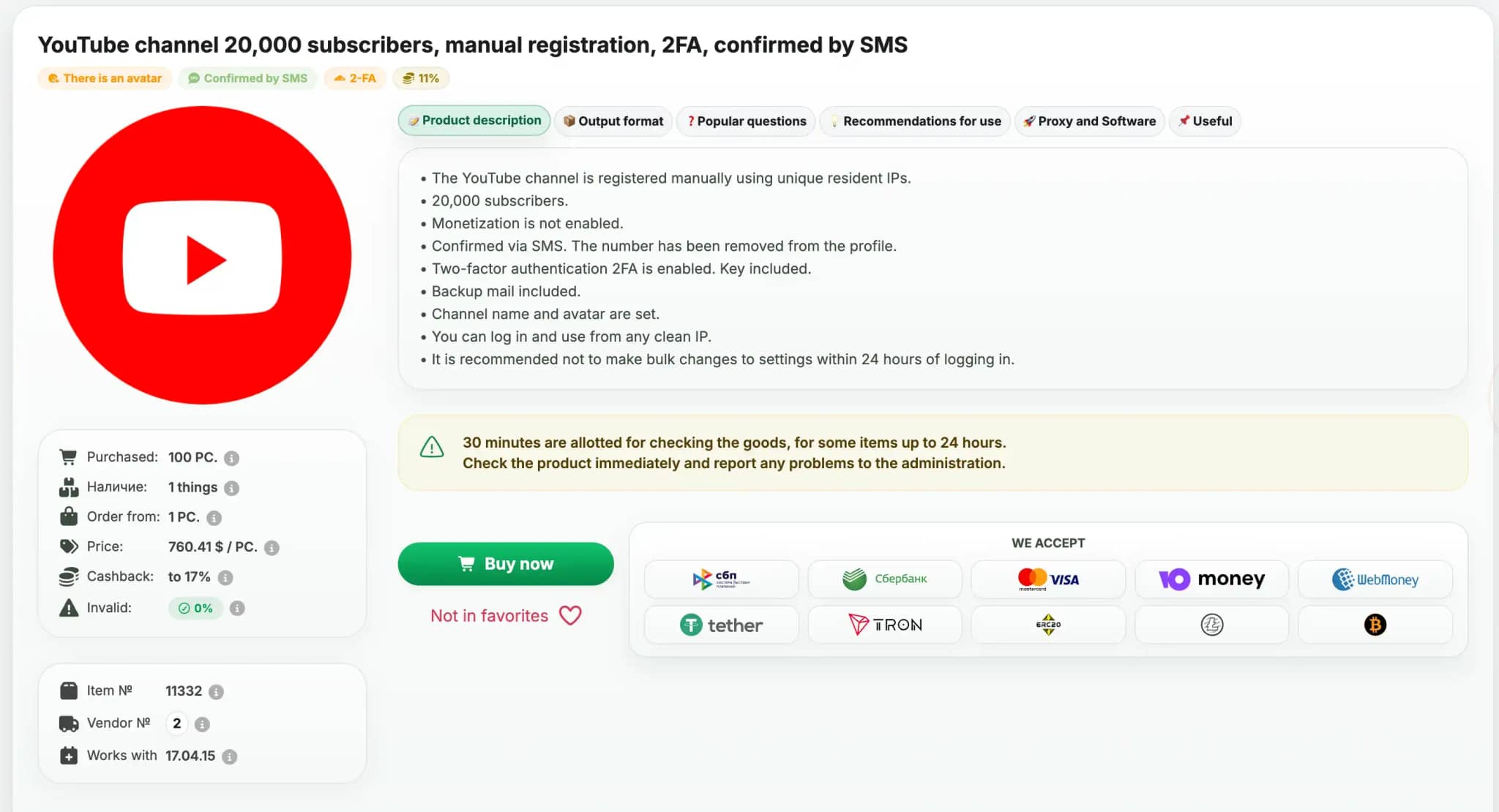
Digital Goods Marketplaces and Shops
If you need empty aged accounts, US or European self-registered accounts with cookies, or profiles with unlocked advanced features, you buy them in stores with instant automated delivery. Popular platforms in 2026 include Dark Shopping, Buy-accs.net, Accs-Shop, Retriv.Market, and Hstock.
The mechanics are simple: you select an item by its description (for example, "Gmail USA 2020 + YouTube channel + recovery email + Cookies JSON"), pay for the order, and immediately download a text archive. The main feature of such shops is a strict verification timeframe. The replacement warranty for invalid goods ranges from 15 to 60 minutes (rarely up to 5 hours) from the moment of purchase, and many sellers require a continuous screen recording from the moment of payment to the first account check.
Channel Marketplaces with Escrow
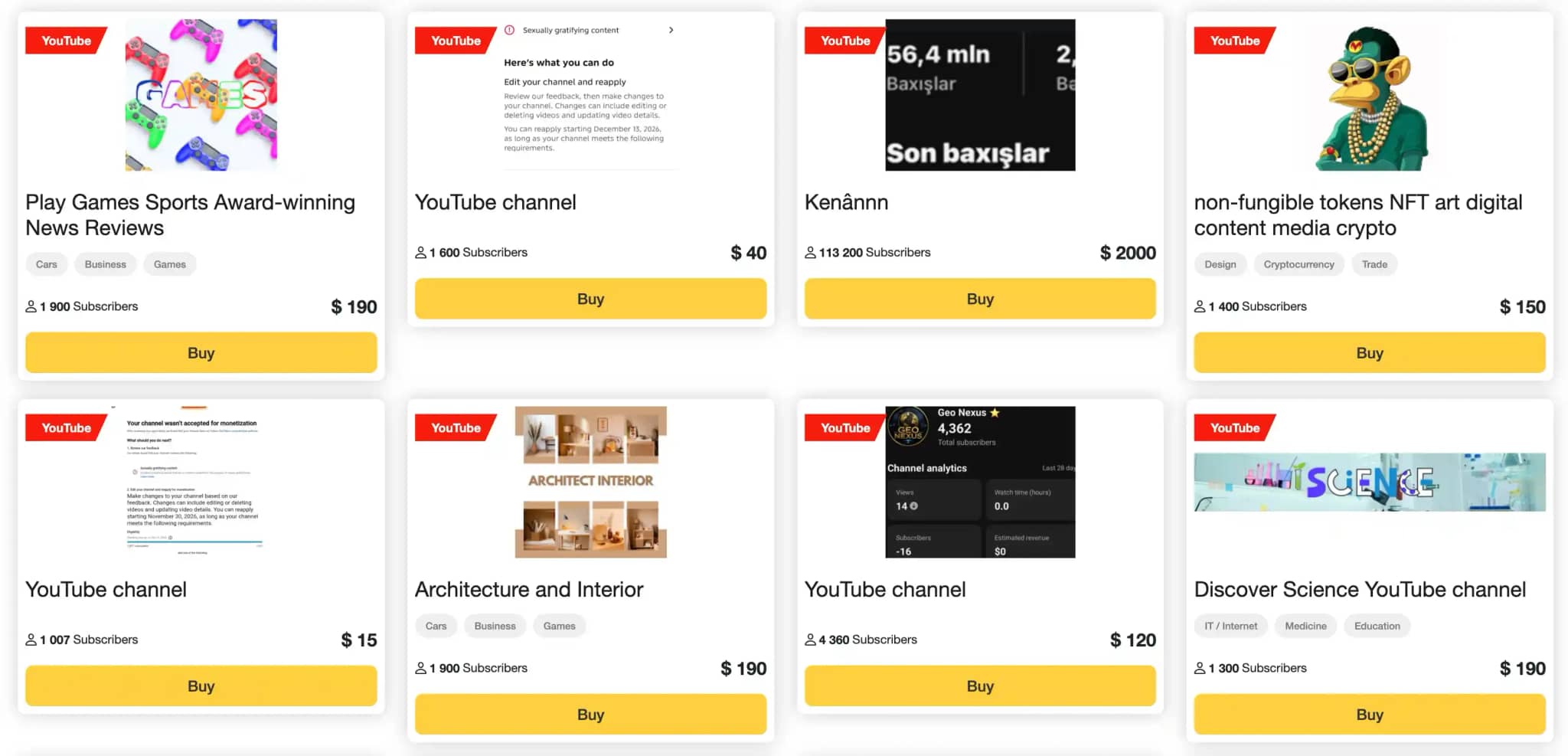
Buying channels with subscribers and active monetization in automated shops via a text file is extremely risky — there is a high chance of running into a hacked account that the rightful owner will recover within 24 hours. Specialized marketplaces are used for such deals: Garantmarket, Madbid, Telderi, Bloggers Tools, or the YouTube section on FunPay and Playerok.
Here, the transaction goes through a secure hold system or a live escrow agent provided by the platform. The buyer reserves the funds on the marketplace balance, the seller transfers the credentials or assigns the buyer as the channel owner, the escrow agent verifies that the re-linking is clean and that there are no third-party sessions, and only after final confirmation does the seller receive the money. The escrow fee usually ranges from 3.5% to 10% of the transaction amount.
Specialized Telegram Exchanges and Chats
A large share of deals in 2026 takes place inside Telegram channels and chats (for example, YouTube Market and private affiliate community chats). Here you can directly reach teams that professionally farm 2006–2019 accounts, verify the third checkmark (Advanced Features) on them for free-traffic campaigns, or sell networks of monetized channels tailored for the US market at $160 to $300 apiece.
The main rule of working in Telegram: never transfer money directly via prepayment, no matter how many screenshots with reviews the seller shows you. Conduct transactions exclusively through a verified escrow agent of a well-known exchange, or buy 1–2 consumable accounts for a test run before placing a bulk order.
| Platform category | What is sold | Transaction protection mechanism | Primary buyer risk | Target audience |
| Automated delivery shops and marketplaces | Autoregs, self-registered accounts, aged accounts, accounts with the 3rd checkmark and cookies | Replacement of invalid accounts via ticket within 15–60 minutes after purchase | Triggering an SMS checkpoint upon improper login | Affiliate marketers, free-traffic specialists, SMM specialists, testers |
| Channel marketplaces with escrow | Channels with subscribers, watch history, and monetization | Funds held on the exchange side / manual check by an escrow agent | Hidden bot boosting; account clawback via support when transferred with the original email | Creators, webmasters, content network owners, and brands |
| Telegram chats and direct sellers | Custom farming on demand, bulk batches for Shorts, monetized channels | Only when involving an independent escrow agent | Scams and fake escrow accounts with a single-letter typo in the username | Experienced media buyers and teams purchasing specific consumables in bulk |
How to Check a YouTube Account Before Buying: Anti-Scam Checklist
Your verification approach depends on whether you are buying a $5 pack of consumables or a $500 channel for long-term growth. Let's split the checklist into two scenarios.
If You Are Buying Consumable Accounts in a Shop (for Shorts, Free Traffic, Multi-Accounting)
Read the listing card carefully before paying — in the description, sellers explicitly state technical nuances that could render an account unusable:
- Presence of cookies and User-Agent in the package. In 2026, buying Google accounts in a login:password-only format without cookies is practically pointless. Attempting to log in from a clean browser will very likely immediately trigger an identity verification prompt asking for the old phone number or device. Choose listings marked with Cookie JSON and a specified fingerprint.
- Access to the recovery email. The delivery string must include not just the address of the recovery email (where Google sends codes and which is needed to pass the basic "Confirm your recovery email" checkpoint), but also a working password for it. If the description says "recovery email without password," you will lose the account at the very first recovery code request.
- Phone number status. The ideal wording in the description of a quality self-registered or aged account is: "SMS verified, phone number removed from the security profile." If someone else's virtual number remains linked to 2FA or security settings, Google will request an SMS specifically to that number.
- Channel status and feature eligibility level. Cheap listings of old Gmail accounts often include fine print: "YouTube channel may be suspended." Make sure that the channel is created and active, and — for driving traffic — that all 3 feature levels are enabled under "Channel settings — Feature eligibility."
If You Are Buying a Ready-Made Channel with Subscribers or Monetization on an Exchange
When buying a channel on an exchange, never trust cropped screenshots of statistics—they can be faked in two minutes using the browser's Inspect Element tool. Ask the seller to record a fresh video refreshing the YouTube Studio page (or share their screen on a call) and check five parameters:
- Absence of strikes and hidden restrictions. The YouTube Studio dashboard must have no active Community Guidelines Strikes or Copyright Strikes. Even a single pending warning means that at the next mistake the channel will get a publishing freeze, and with three strikes — permanent termination.
- Traffic sources and geography over 90 and 365 days. Open the "Analytics — Content" tab. On a live channel, the main traffic comes from "Suggested videos," "Browse features", the "Shorts feed," or "YouTube search." If 80% of views came from external sources or "Playlists," and the graph looks like a sharp vertical spike followed by a flat line at zero — the channel was boosted with cheap bots from click farms right before being listed for sale.
- Monetization status and Google AdSense link. In the "Earn" section, verify not only that the channel is accepted into the Partner Program, but also that you have the option to change the linked AdSense account to your own. Buying a channel where someone else's or a banned AdSense account is permanently linked without the right to change it means handing over all future revenue to the previous owner.
- Alignment of the channel's niche with your plans. YouTube's recommendation algorithms build an audience profile for a channel based on its past videos. If you buy a channel with 50,000 subscribers from Asia and India that grew on clips of popular games, delete the old videos, and start uploading English-language reviews of financial services, your CTR will plummet below 1%, and the algorithms will stop pushing your new videos.
- Secure transfer method. The most common scam scheme when buying expensive channels is a clawback through Google Support. The seller hands over the channel along with the "original email," you change the passwords and phone numbers, and two weeks later the seller files a hacking report with Google Support, states the model of their first smartphone, the home registration IP address, and the date the inbox was created, and recovers the account.
How to protect yourself: insist on converting the channel into a Brand Account and transferring "Primary Owner" rights to your own personally created Google email. According to YouTube rules, a new primary owner can only be assigned 7 days after the invitation is accepted. For all 7 of those days, the money must remain in escrow on the exchange. Once the rights are transferred to your personal account and the seller is removed from the list of owners and managers, clawing back the channel by recovering the old email is technically impossible.
Why Purchased YouTube Accounts Get Banned Right After Logging In
Even if the seller delivered a pristine 2018 account with a clean history, you can kill it in 60 seconds with your own actions during the first login. Google's anti-fraud system is one of the most sophisticated in the world: it analyzes not just whether the password was entered correctly, but hundreds of network and hardware environment parameters in real time.
Main reasons why purchased accounts hit a checkpoint or get shadowbanned:
- Digital fingerprint and geolocation conflict. Imagine that an account was registered and warmed up on a Windows 11 PC with an NVIDIA graphics card and a US residential IP address in the New York time zone. The buyer takes this account and logs into it from an Apple M-series MacBook through a free Dutch VPN. For Google's security algorithms, this is a 100% marker of session hijacking.
- WebRTC network leaks and time zone mismatches. Even with a proxy or VPN connected, a regular browser often leaks your ISP's real IP address via the WebRTC protocol, while your computer's system time (for example, UTC+3) does not match the geography of the proxy IP address (UTC-5). Google instantaneously detects the connection spoofing.
- Using cheap datacenter proxies. $1 IPv4 proxies from datacenters carry a corresponding ISP/ASN type. Google knows all server subnet pools. Logging in from such an IP almost guaranteed slashes the channel's trust score: the account might not be banned immediately, but all uploaded Shorts will get 0 impressions in the feed.
- "Account Takeover" behavioral trigger. A classic beginner mistake: logging in from a new device and, within the first two minutes, consecutively changing the password, recovery email, channel name, and avatar, linking a new phone number, and immediately queuing up five videos with links in the description. That is exactly how automated hijacking scripts behave. Google's security algorithm immediately locks the session and throws the account into mandatory security verification.
- Linking a network of accounts. If you manage 5–10 YouTube channels in a single standard browser (switching between profiles or opening Incognito tabs), Google sees an identical hardware fingerprint: Canvas, WebGL, audio card, installed fonts list, and screen resolution. As soon as one channel in your network gets banned for spam or policy violations, shadow restrictions will hit all linked profiles.
How to Safely Log In and Warm Up a Purchased YouTube Account
For purchased accounts to survive, avoid asking for SMS upon login, and consistently deliver reach, each profile must be opened in a completely isolated environment that emulates a separate physical computer. Below is a working six-step login protocol.
Step 1. Prepare an Isolated Profile in an Antidetect Browser
Never log into purchased accounts from your personal browser. Create a separate profile in an antidetect browser. If the seller included the User-Agent string and screen parameters used when farming the account, select the same operating system (for example, Windows or macOS) when generating the fingerprint to avoid an abrupt hardware change within an active session.
Step 2. Select and Verify a Proxy Matching the Account GEO
Connect a dedicated residential or mobile proxy to the profile. The main principle: the country (and ideally the state or region) of the proxy must strictly match the registration GEO of the purchased account. If you bought a German self-registered account, log in from a German residential IP; if it's a US account, use a US IP. In your antidetect browser settings, make sure that the time zone, geolocation, interface language, and WebRTC automatically adjust to match the external IP address parameters of the proxy.
Step 3. Import Cookies and Perform a Seamless Login
Do not open accounts.google.com to manually enter the login and password if you have cookies. Upload the cookies file (usually in JSON or Netscape format) from the seller's archive directly into the created antidetect browser profile before launching it. After starting the profile, go straight to youtube.com. If the cookies are alive and the proxy and fingerprint are configured cleanly, you will find yourself inside an already authenticated account without a single security verification prompt.
If the system still asks you to verify your identity upon the first login, do not select "Get a verification code via SMS" — click on "Confirm your recovery email" and enter the recovery email address from the seller's text file without logging into the email inbox itself.
Step 4. Let the Account Rest and Warm Up to the New Device (First 24–72 Hours)
After a successful login, let the account "get used" to your new browser profile and IP address. During the first 24 hours, changing passwords, modifying security settings, and uploading videos is strictly prohibited.
Simulate normal human behavior:
- On the first day, open the YouTube home page, type 2–3 keywords into the search bar related to the niche you plan to run the channel in, and watch 3–4 long-form videos and a dozen Shorts all the way through. Leave a couple of likes and subscribe to 1–2 major channels in your niche.
- Visit 4–5 major third-party websites that have Google Analytics tags or a "Sign in with Google" button to accumulate fresh third-party cookies on your IP.
- Leave the profile alone until the next day. On the second day, repeat light viewer activity and set up the channel banner, avatar, and description (without external links).
Step 5. Safe Re-Linking of Credentials
Experienced affiliate marketers often don't change the password at all on cheap autoregs or self-registered accounts intended for short-cycle free-traffic campaigns, so as not to needlessly trigger Google's security system — provided the account was bought from a trusted shop as an exclusive single-hand sale.
If the account is acquired for long-term work and changing credentials is necessary, do it gradually no earlier than Day 3–4 after the first login from the exact same IP address:
- First, go to Google security settings and add two-factor authentication via the Google Authenticator app using a QR code or secret key, or generate backup codes, and then change the recovery email address to your own.
- Wait another 24 hours of normal activity, and only after that change the main account password and terminate old unfamiliar sessions under the "Your devices" tab.
Step 6. Smooth Start to Publishing
On Day 3–4 after the warm-up, upload your first test video or Short without aggressive calls to action or links, and monitor the analytics for 12–24 hours. If the video receives its first dozens or hundreds of impressions from the Shorts feed or recommendations, it means the account has successfully passed the anti-fraud filter, and you can move to your regular publishing schedule — 1–3 videos per day, gradually scaling up the pace.
Conclusion
Buying a ready-made YouTube account or channel in 2026 saves weeks of routine warming up, allows you to bypass the initial algorithmic sandbox, and lets you immediately jump into competing for traffic or monetization. However, it is important to understand: the purchased file with a login and cookies is merely a semi-finished product on its own. Its survival rate and future reach depend 90% on the technical environment you place it into.
When you work with a network of dozens of YouTube Shorts channels, test affiliate campaigns, or manage commercial projects, overlapping browser fingerprints or a single real IP leak will wipe out your entire invested budget. To ensure Google perceives every purchased account as a unique user on a real home computer, use Linken Sphere. The antidetect browser provides deep kernel-level hardware fingerprint spoofing, seamless one-click JSON cookie import, and secure session sharing within your team without re-authentication or triggering security checkpoints.
Frequently asked questions
- Zero impressions in the Shorts feed on a purchased account almost always indicate that a shadow anti-fraud filter has been triggered. This happens for three reasons: you logged into the account using a dirty datacenter proxy or an IP address that doesn't match the profile's registration country; you logged in without importing cookies and immediately started changing passwords; or you uploaded a video within the first few minutes of logging in from a new device without 24–48 hours of viewer warm-up.
- For safe work with Google and YouTube, only dedicated residential or mobile proxies following the "1 proxy = 1 account" rule are suitable. The proxy country must match the GEO where the account was registered. Cheap datacenter IPv4 and especially IPv6 proxies should not be used for uploading videos — Google's anti-fraud system easily identifies hosting subnets and throttles the channel's reach.

Why Google Blocks Accounts and What Your Antidetect Has to Do With It
Google has once again complicated the mechanisms of digital identification by deploying a new, more sophisticated layer of protection based on proprietary HTTP headers. This quiet change caught most of the market off guard, triggering a wave of rushed updates. While others hastily released superficial 'fixes', we realized that we were dealing not with a minor issue but with a fundamental shift that required deep and comprehensive analysis.

SOCKS vs HTTP Proxy: What’s the Real Difference and Which One to Choose?
There are times when you don’t want a website to link the request back to your device. That’s where a proxy comes in, it acts like a middle layer and sends the request for you. The site sees the proxy’s info instead of yours. It’s a go-to trick when you’re trying to see a page that’s not available in your region, pull content that’s restricted by location, or avoid hitting a wall when sending lots of requests.

The Best Alternative to OBS Studio
Working with a webcam on many online platforms can turn into a real challenge. A strict oval or rectangular frame appears on the screen, but your image doesn’t align perfectly with it. As a result, the system blocks further progress, demanding perfect alignment, and your workflow is disrupted before it even begins.